
Use U for transactions to access tokenized U.S. stocks and other global assets on-chain.
Written by: Web3 Farmer Frank
What is the greatest common divisor between RWA and on-chain?
In the context of the U.S. stock market reaching new highs and the tightening liquidity of Alt, more and more people are beginning to realize that assets with true certainty, verifiable cash flow, and real returns are becoming the new consensus in the on-chain market.
However, objectively speaking, while assets like U.S. stocks in the real world have certainty, they are new to most traditional financial users and even Web3 players, making it difficult to overcome the cognitive gap from 0 to 1 and achieve rapid expansion from 1 to 100.
This direction has also seen many practical explorations, including supporting the purchase of tokenized assets like Apple, Tesla, Nvidia, Nasdaq ETF, etc. on-chain, breaking the geographical and identity restrictions of traditional finance. For example, MSX has launched over 200 types of U.S. stock token targets, allowing users to participate in U.S. stock token trading with USDT/USDC at the click of a button.
This article will focus on the usage process of the MSX platform, providing a detailed and practical operation guide for all users interested in on-chain U.S. stock token trading.
MSX One-stop Beginner's Guide
1. Registration and login
First, open the official website (be sure to confirm the domain name is correct, and be wary of imitation and phishing links).
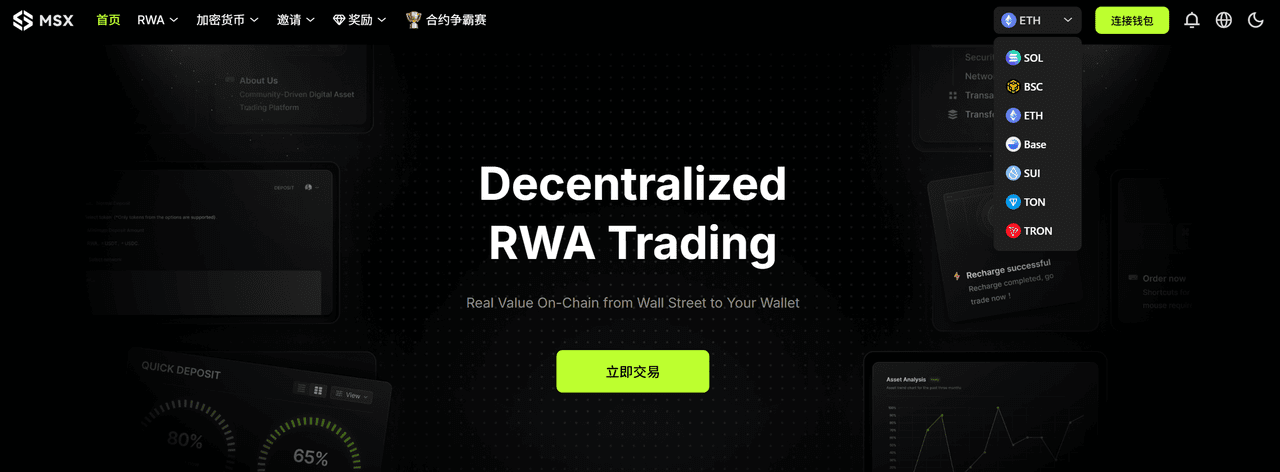
After entering the homepage, click 'Connect Wallet' in the upper right corner. Currently, MSX supports wallet addresses from four mainstream networks: Solana, BNB Chain, Ethereum, Base for registration and login.
You can choose any commonly used network, click 'Connect', and after confirming in the wallet pop-up, the account registration will be completed automatically without any additional information or email binding.
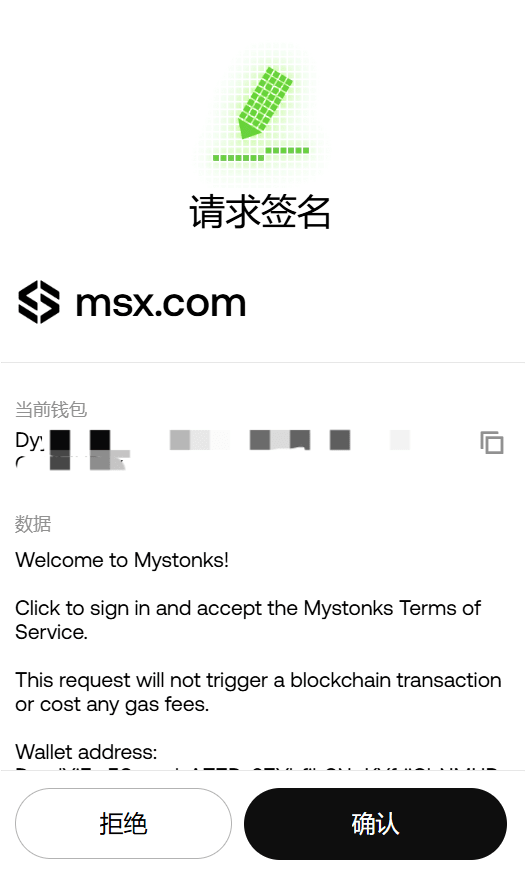
Tip: When new accounts log in for the first time, browser plugin wallets (such as MetaMask, Phantom, OKX Wallet, etc.) will pop up a signature confirmation window. Please ensure the authorization source is the official domain name.
However, it should be noted that any wallet address on any chain is regarded as an independent account in MSX, which means that even if you use the same mnemonic to generate the same set of wallets, as long as you switch to a different network, the system will recognize it as a completely new account.
For example:
When you register and log in using the Ethereum network address 0x....888, it will automatically be recognized as Account A;
When you switch to the BNB Chain network and log in again with the same 0x…888 address, MSX will create an independent Account B for this login, and the balances, positions, and transaction records of these two accounts will not be interlinked;
In other words, accounts on each chain are mutually independent. The account you logged into on BNB Chain is completely different from the account you logged into on Solana or Ethereum networks.
Therefore, it is recommended to select the primary network (such as BNB Chain or Solana) when first registering and maintain consistency in subsequent operations to facilitate unified management of assets and transaction records, avoiding confusion or missing checks.
In addition, to enhance security, MSX recommends users immediately bind their email after the first login to enable email protection functions to prevent malicious account operations.
Users can click on the wallet address in the upper right corner of the page → select 'Security Center' to enter the settings page, then fill in the commonly used email (preferably using international emails like Gmail, Outlook, etc., to avoid interception), click 'Send Verification Code', and the system will send a verification code email to the email you filled in.
Fill in the 6-digit verification code received in the verification code input box and click 'Confirm Binding' to enable the email protection function, which will be associated with the current MSX account.
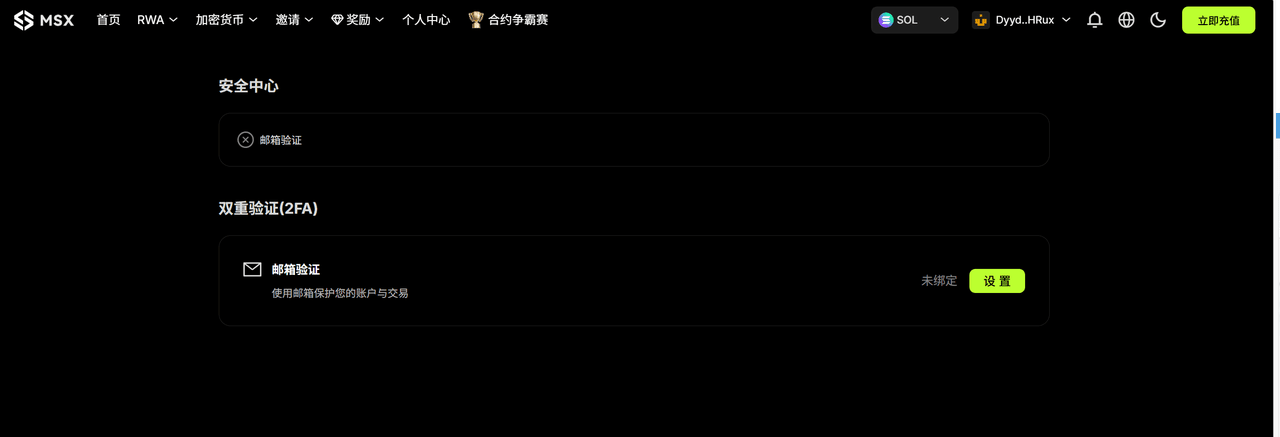
After binding the email, you will automatically enable the following functions:
Recharge and withdrawal notifications: Each time you recharge, withdraw, or perform other key operations, an instant email reminder will be sent;
Security and risk control reminders: When the account detects abnormal logins or operational risks, the system will issue an instant alert via email;
Platform announcements and upgrade notifications: Receive updates on product updates, system maintenance, airdrop events, etc., issued by MSX official;
Account recovery and verification functions: If you need to recover your account or perform advanced operations (such as email binding change) in the future, the bound email will serve as verification credentials;
If you wish to change your bound email, you can click 'Modify' in the 'Security Center'. The system will require you to complete the following steps: Verify your identity using the old email; Enter the new email address and verify the verification code; Confirm the change is complete.
2. Recharge
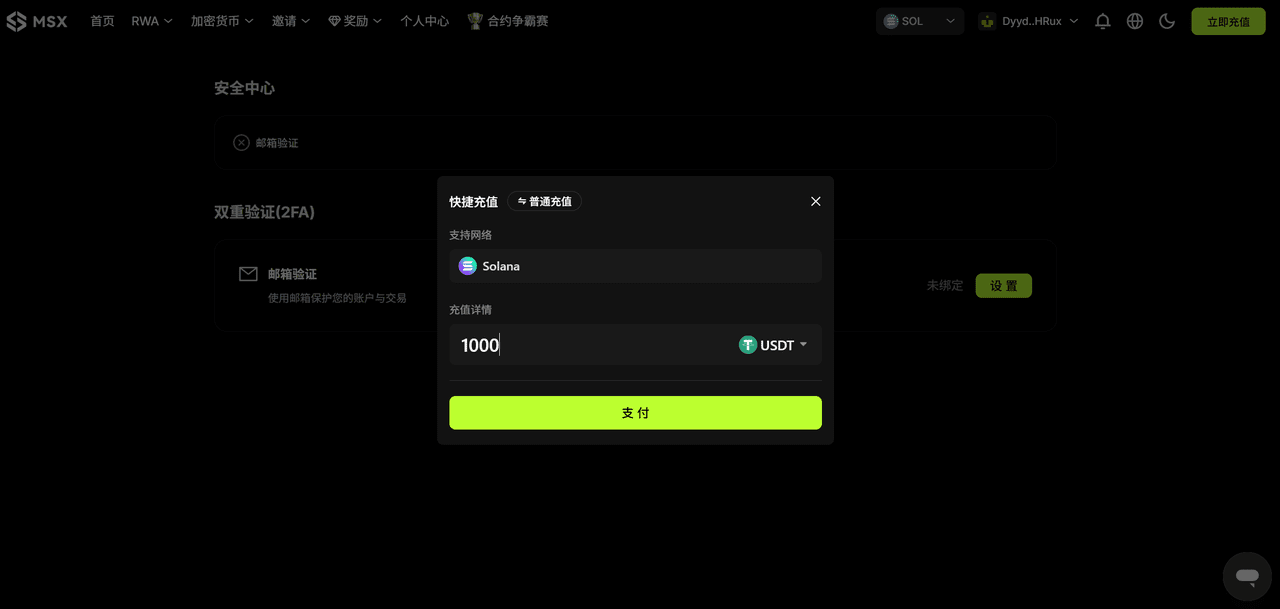
After successfully logging into your account, click 'Recharge Now' in the upper right corner of the homepage. The system will automatically pop up the recharge window and provide two recharge methods: 'Quick Recharge' and 'Regular Recharge'.
(1) Quick recharge
Recharge networks support Solana, BNB Chain, Ethereum, Base (and the network selected for logging in must be consistent), supported currencies are USDT, USDC
Operation process: Enter the specific recharge amount, click 'Pay', and the system will automatically call the browser plugin wallet linked to MSX. As long as there is enough balance in the wallet, you can confirm and perform a quick recharge;
The entire process usually takes a few seconds to complete, with funds arriving instantly, making it very suitable for frequent traders or users who want to quickly deposit funds;
(2) Regular recharge
Recharge networks support Solana, Ethereum, BNB Chain, Base, and Tron, supported currencies are USDT, USDC, and U.S. stock tokens (the system will be unable to recognize and credit unsupported stock tokens or non-mainstream assets)
Operation process: After selecting the recharge network and currency, the system will generate the corresponding recharge address and QR code. Copy this address or scan it, and withdraw directly from your wallet or CEX to this address;
After waiting for block confirmation on the corresponding network, the recharge amount will automatically be credited to your current logged-in account balance (total net recharge + total realized profit + total net capital cost - total fees - opening margin);
To ensure asset security, please carefully check the three pieces of information: network, currency, and address before the transfer, making sure they are consistent. It is recommended to first conduct a small test transfer to confirm there are no errors before making a large recharge. Delayed arrivals can be processed through tickets or 24-hour customer service for manual assistance.
Tip: If unsupported currencies are sent to the recharge address, please keep the transaction hash (TxID), screenshot the recharge details page and wallet transaction records, and submit an appeal through the MSX official ticket center. If the transfer network selected during recharge is inconsistent with the recharge network displayed by MSX, the assets will be permanently lost. Please be cautious.
It is important to distinguish that on MSX, 'logged-in account' and 'recharge account' are both related to asset ownership, but they are two independent concepts:
The logged-in account is determined by the connected wallet address, determining 'who the funds belong to': As mentioned above, when you connect with a wallet address from a certain chain (such as BNB Chain or Solana), the system will create and recognize it as an independent account based on that address;
The recharge account refers to the chain and currency from which funds are transferred to MSX, determining 'where the funds come from': MSX supports multiple chains for recharge, allowing you to choose any supported chain to transfer USDT/USDC. The recharge account determines the source channel of funds but does not change the identity of the currently logged-in account;
For example, it may be more intuitive to understand. For instance, if you log in with a certain wallet address on the BNB Chain network (logged-in account), you can choose to recharge that account through the BNB Chain network or choose to recharge through other supported networks (such as Base or Solana), the system will automatically recognize and map the funds to the current balance of the BNB Chain login account.
So the chain used for login ≠ the only chain for recharge — the login account determines 'which account the funds ultimately belong to', while the recharge account determines 'which chain the funds are transferred from', and the two have a one-to-many relationship.
In short, regardless of which chain you recharge, the funds will ultimately converge into your currently logged-in wallet account.
3. U.S. stock token trading
After completing the recharge, you can directly enter the trading section for real-world assets. Currently, both 'Spot' and 'Contracts' types are available, covering various tokenized assets including U.S. stocks and mainstream indices.
(1) Spot trading
In the spot area, you can directly buy tokenized real U.S. stock assets, just like in traditional brokerages, including:
U.S. stock individual stocks: Tesla (TSLA.M), Nvidia (NVDA.M), Apple (AAPL.M), Amazon (AMZN.M), and hundreds of other U.S. stock individual stocks;
Index assets: S&P 500 ETF (SPY.M), Nasdaq 100 ETF (QQQ.M), Russell 2000 ETF (IWM.M), and other index assets;
Leveraged products: Nasdaq triple long/short ETF (TQQQ.M / SQQQ.M) and other leveraged products;
All U.S. stock token targets on MSX come from the corresponding stocks or index ETFs in the real brokerage market and achieve real-time synchronization through on-chain contracts mapping and oracle price feeds. Users holding tokenized stocks such as AAPL, TSLA, etc. will enjoy dividend rights consistent with native stocks during the corresponding periods.
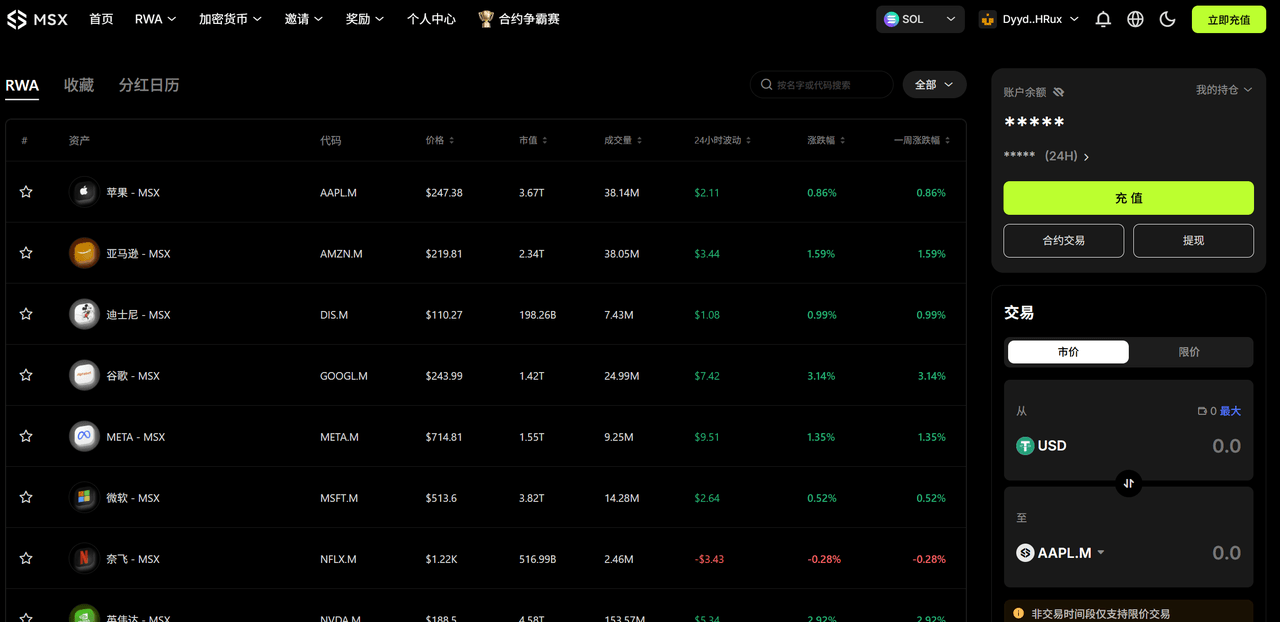
In trading hours, MSX has fully opened pre-market, intraday, and post-market trading hours (currently in daylight saving time):
Pre-market: Eastern Time 04:00–09:30 (UTC+8 16:00–21:30)
In-market: Eastern Time 09:30–16:00 (UTC+8 21:30–04:00 next day)
Post-market: Eastern Time 16:00–20:00 (UTC+8 04:00–08:00 next day)
It is worth mentioning that the trading model currently used by MSX is 'order flow' model, different from the traditional 'custody + market maker (MM)' structure — when users buy on the chain, MSX synchronously initiates corresponding buy orders to cooperative brokerages; when users sell, the platform synchronously sells the corresponding underlying through brokerage accounts.
In other words, the user's operation is equivalent to directly participating in the real market through MSX's 'trading interface', and the meaning of custody has also been upgraded to on-chain proof of trading authenticity and brokerage execution transparency.
(2) Contract trading
The contract section (Futures) of MSX provides multiple leverage and long/short functions, allowing users to participate in the price fluctuations of tokenized U.S. stock assets in a more flexible way.
Currently supported assets include mainstream U.S. stock individual stocks, ETF index assets, etc. Trading directions can freely choose to go long (Long) or go short (Short); leverage multiples can support up to 20×, and risk control also supports take profit/stop loss/automatic liquidation functions to help users manage risks.
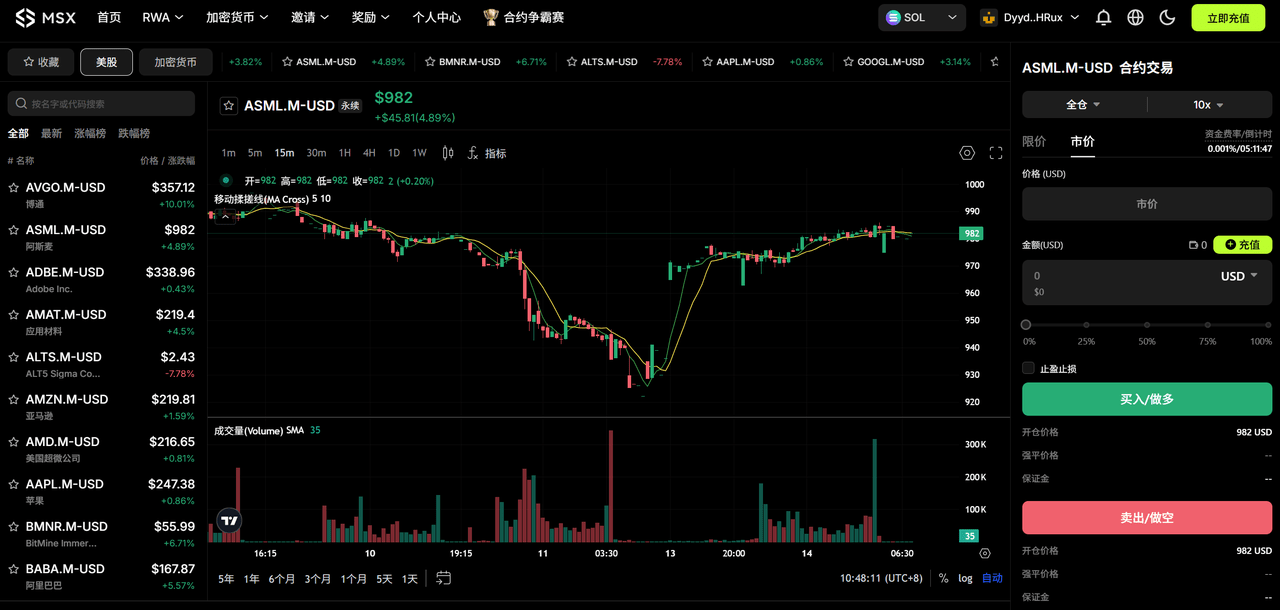
Additionally, the MSX contract adopts a dynamic margin system and an automatic liquidation mechanism to ensure the safety of user assets and system stability, where initial margin = notional value of the opening position × margin ratio (depending on leverage multiple), maintenance margin = notional value of the opening position × maintenance margin ratio.
When the account margin rate is lower than the system maintenance margin requirement (approximately equivalent to the position floating loss exceeding the bearable range), the system will automatically trigger liquidation to prevent further losses. It should be emphasized that currently, MSX charges USDT and USDC are uniformly counted into the total USD margin.
4. Crypto trading
In addition to tokenized U.S. stocks, MSX also supports on-chain spot and contract trading of mainstream crypto assets. Users do not need to register or recharge to a custody account; as long as they connect their wallet, they can start trading directly.
When you log in to MSX, the system will automatically detect the network of your currently connected wallet (such as Solana, Ethereum, BNB Chain, Base, etc.) and dynamically display the corresponding tradable token list and market interface based on that network, for example:
If you are currently logged into the Solana network, MSX will automatically load mainstream tokens and meme assets on Solana (such as BONK, WIF, etc.), and display the spot and contract interface based on Solana;
If you log into the Ethereum network, the interface will automatically switch to Ethereum ecosystem assets (such as PEPE, UNI, AAVE, etc.);
Logging into BNB Chain, Base, etc. is the same, the system will load the corresponding tradable assets and market conditions on that chain;
Tip: No need to manually switch trading pairs, MSX will automatically recognize and sync based on the current wallet's network.
(1) Spot
Crypto spot trading supports direct buying and selling of mainstream tokens and popular assets, with the entire process completed entirely on-chain:
Open 'Crypto' → 'Spot', select the token you want to trade (such as BONK/USDC, ETH/USDT, etc.), enter the purchase quantity, click 'Buy' or 'Sell', and the wallet will pop up for signature confirmation. After completion, the transaction will be executed immediately.
The entire trading process does not require a recharge, trading directly with wallet balance, and is fully transparent, with records viewable on the block explorer, supporting Gas currencies like ETH/SOL and payment in USDT/USDC, with price feeds automatically connected to mainstream aggregators and oracle quotations.
(2) Contracts
The Crypto contract section provides users with leveraged trading and long/short functions, suitable for users with a certain risk-bearing capacity and strategic experience.
It uses a 'perpetual contract' mechanism, allowing users to participate in price fluctuations through margin operations without holding spot — regardless of whether the market is rising or falling, flexible strategies can be implemented through 'going long' or 'going short':
Supported trading pairs: BTC/USDT, ETH/USDT, SOL/USDT and other assets;
Maximum leverage multiple: 100× (different currencies may vary);
Margin mode: Supports multi-currency margin (USDT / USDC considered as unified USD margin);
Funding rate: The system calculates and displays it in real time, automatically settling at intervals;
Users click 'Crypto' → 'Contracts', select trading pairs (such as BTC/USDT, ETH/USDT, SOL/USDT, etc.), set the leverage multiple (up to 20 times), enter the opening direction and quantity, click 'Long' or 'Short', and confirm to open a position.
Furthermore, its recharge process is the same as the U.S. stock token trading section, divided into quick recharge and regular recharge methods:
Quick recharge: Recharge networks support Solana, BNB Chain, Ethereum, Base (and the network selected for logging in must be consistent), supported currencies are USDT, USDC
Operation process: Enter the specific recharge amount, click 'Pay', and the system will automatically call the browser plugin wallet linked to MSX. As long as there is enough balance in the wallet, you can confirm and perform a quick recharge;
The entire process usually takes a few seconds to complete, with funds arriving instantly, making it very suitable for frequent traders or users who want to quickly deposit funds;
Regular recharge: Recharge networks support Solana, Ethereum, BNB Chain, Base, and Tron, supported currencies are USDT, USDC, and U.S. stock tokens (the system will be unable to recognize and credit unsupported stock tokens or non-mainstream assets)
Operation process: After selecting the recharge network and currency, the system will generate the corresponding recharge address and QR code. Copy this address or scan it, and withdraw directly from your wallet or CEX to this address;
After waiting for block confirmation on the corresponding network, the recharge amount will automatically be credited to your current logged-in account balance;
Risk warning: Contract trading carries high leverage risks. Please reasonably control your positions and ensure there is sufficient margin in the wallet to prevent liquidation.
(3) Follow
'Follow' function allows you to track meme tokens you are interested in.
On the 'Cryptocurrency' 'Spot' page, click 'Add to Follow' to add this meme asset to your personal watchlist, view real-time price monitoring and fluctuations display, as well as fully diluted valuation (FDV), circulating market value, number of trades, number of unique trading addresses, transaction volume, creation time, token detection, and other information, and quickly jump to the trading page with one click.

(4) Cross-chain bridge
MSX has a built-in cross-chain bridge function, which can help users freely transfer assets between different public chains, achieving one-stop capital management and cross-chain liquidity scheduling.
Whether you are on Solana, BNB Chain, or Ethereum, Base, etc., you can achieve fast, low-cost asset migration through the Bridge.
Currently, supported networks include Solana, Ethereum, BNB Chain, Base, Tron, Optimism, Polygon, Arbitrum, zkSync, Linea, X Layer and other mainstream networks, supporting currencies cover USDT, USDC and most mainstream crypto assets (ETH, SOL, BNB, MATIC, AVAX, etc.)
Usage process:
Open 'Crypto' → 'Cross-chain Bridge';
Select the source chain and target chain (e.g., from BNB Chain → Solana);
Select asset type and quantity;
Click 'Confirm', and after the wallet signature, the cross-chain transaction will be automatically initiated.
Tip: After the cross-chain is completed, the assets on the target network will automatically map to your currently logged-in wallet address, without the need for manual exchange.
5. Withdrawal
After completing the transaction, you can withdraw assets from MSX back to your personal wallet or CEX at any time to realize the withdrawal operation.
In the upper right corner of the trading page, you can view: current account balance, position status, 24-hour profit and loss, and quick operation entrances (recharge / spot or contract trading / withdrawal).
Click 'Withdraw', the system will pop up the withdrawal window, where the withdrawal network supports Solana, BNB Chain, Base, and the withdrawal currencies support USDT or USDC.
After selecting the network and currency to withdraw, enter the withdrawal amount and target wallet address, click 'Withdraw', and the system will execute the transfer, with a single withdrawal network fee of 0.5 USDT/USDC. The withdrawal processing time usually depends on the selected network — if you encounter delays or timeouts with the withdrawal, you can submit a problem through the 'Ticket Center' and attach the withdrawal amount, currency, transaction hash (TxID), and other information. The official team will assist with verification as soon as possible.
To ensure the safety of funds, please make sure to confirm the following items before withdrawal:
Correct target address: Once the address is wrong, the assets cannot be recovered;
Network matching:Ensure the withdrawal network is consistent with the network of the target address;
In conclusion
Visibly, RWA is becoming an inevitable trend for both on-chain and TradFi.
On one hand, Crypto assets accelerate the 'Wall Street-ization' and 'institutionalization', the era of pure narrative and liquidity dividends has passed. On-chain needs higher quality, verifiable, and priceable underlying assets, thus bringing U.S. stocks and others on-chain is more like a supply-side reform of assets, providing a real anchor for the risk pricing and yield distribution of DeFi.
On the other hand, TradFi and regulators are also seeking broader reach, higher efficiency, and lower settlement costs — from Robinhood to BlackRock, to exchanges and clearing institutions like Nasdaq, RWA is becoming their pathway into the chain.
In this context, the RWA narrative is facing a real intersection, the boundaries between on-chain finance and TradFi are becoming increasingly blurred.