In this blog, you will learn the details of the integration of Binance Pay and Trustee Plus, get acquainted with the step-by-step instructions for using Trustee Plus and its benefits. Transferring cryptocurrencies from the Binance account to the Trustee Plus crypto wallet, and further spending using the built-in payment card has become even more convenient and affordable. But about everything in order.

We are happy to inform you that from today the Binance community of Central and Eastern Europe, as well as Ukraine and Moldova can join the Trustee Plus family - a crypto wallet with an integrated payment card that allows you to pay using your crypto balance anywhere there are payment bank terminals : shops, cafes, gyms, taxis, restaurants and so on.
No more extra effort to exchange or withdraw cryptocurrency to settle in everyday life. Just link one of the three accounts: BTC, ETH or USDT in the Trustee Plus wallet to the card and spend from it up to EUR 5,000 per day, or up to EUR 50,000 per month without a second thought.
An additional convenience is replenishment of the wallet
Thanks to the collaboration between Trustee Plus and Binance Pay, users can easily fund their Trustee Plus accounts using their Binance USDT balance with ZERO FEES.
You can download the application and issue a card HERE:
This allows you to make the most of your crypto-assets in your daily life and maximize the profits you can get by using Binance and Trustee Plus - products that are undisputed leaders in their niches.
Key benefits of Trustee Plus for Binance users
Since the end of Binance Card service in Central and Eastern Europe, the problem of convenient daily cryptocurrency payments has been urgent for the large community of crypto-enthusiasts and Binance users. Today we finally solve it and here's why:
1. The card is issued almost instantly after installing the application. All you need is to go through KYC and order the issuance of the card. For Ukrainian users, thanks to the integration with the Diya service, this process takes less than a minute.
2. The standard cost of issuing a card is 10 EUR, but only for the Binance family during January 23 - February 25, a card can be issued with a 50% discount.
3. The only exchange fee is 0.5% of the amount. Trustee Plus no longer charges any fees, hidden or explicit.
4. The payment card in the wallet is virtual, it is added to Apple Pay and Google Pay in just a few clicks and is accepted at any bank network terminals.
5. ATMs with NFC readers can withdraw up to EUR 20,000 in cash per month.
6. Free transfers of any of 21 different cryptocurrencies inside the wallet - no fees for payments to loved ones, relatives, acquaintances. No wallet usage limits.
7. In Trustee Plus, you can also use fiat assets: hryvnia, euro and Kazakh tenge.
8. Just install Trustee Plus to all relatives, open payment cards and, supporting each other, pay with cryptocurrency around the world without any problems.
9. Referral program. Refer friends and get up to 45% commission rewards for their exchanges.
Thanks to the collaboration between Trustee Plus and Binance, everyone now has the opportunity to use their crypto assets as a tool for everyday settlements.

How to get a Trustee Plus payment card. Step-by-step guide
In this part, we will tell you how to become the owner of a Trustee Plus payment card in just 7 steps, which opens up the limitless world of cryptocurrency payments. Faultless and with the best financial conditions.
1. Installing the application.
Download Trustee Plus from AppStore or GooglePlay to your smartphone using the link: https://trusteeplus.app.link/diBroKgKdGb

2. Registration and KYC.
 In the application, press "Registration" and enter the phone number;
Enter the code received in an SMS message or via Telegram;
Get verified - through the Diya application or in another way;
 Everything is ready! Your Trustee Plus is ready to go!
3. Replenishment of the wallet.
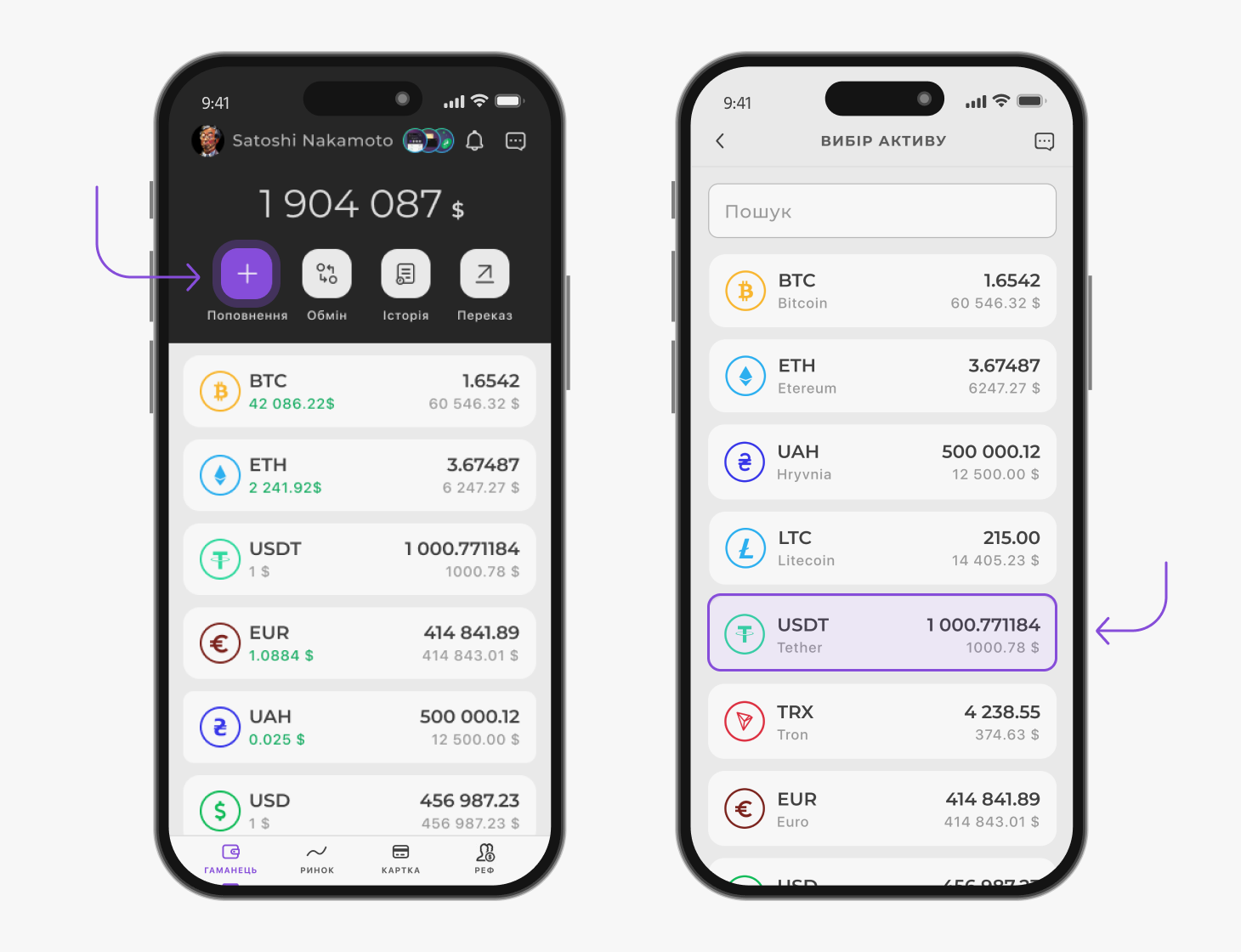
Choose a cryptocurrency;
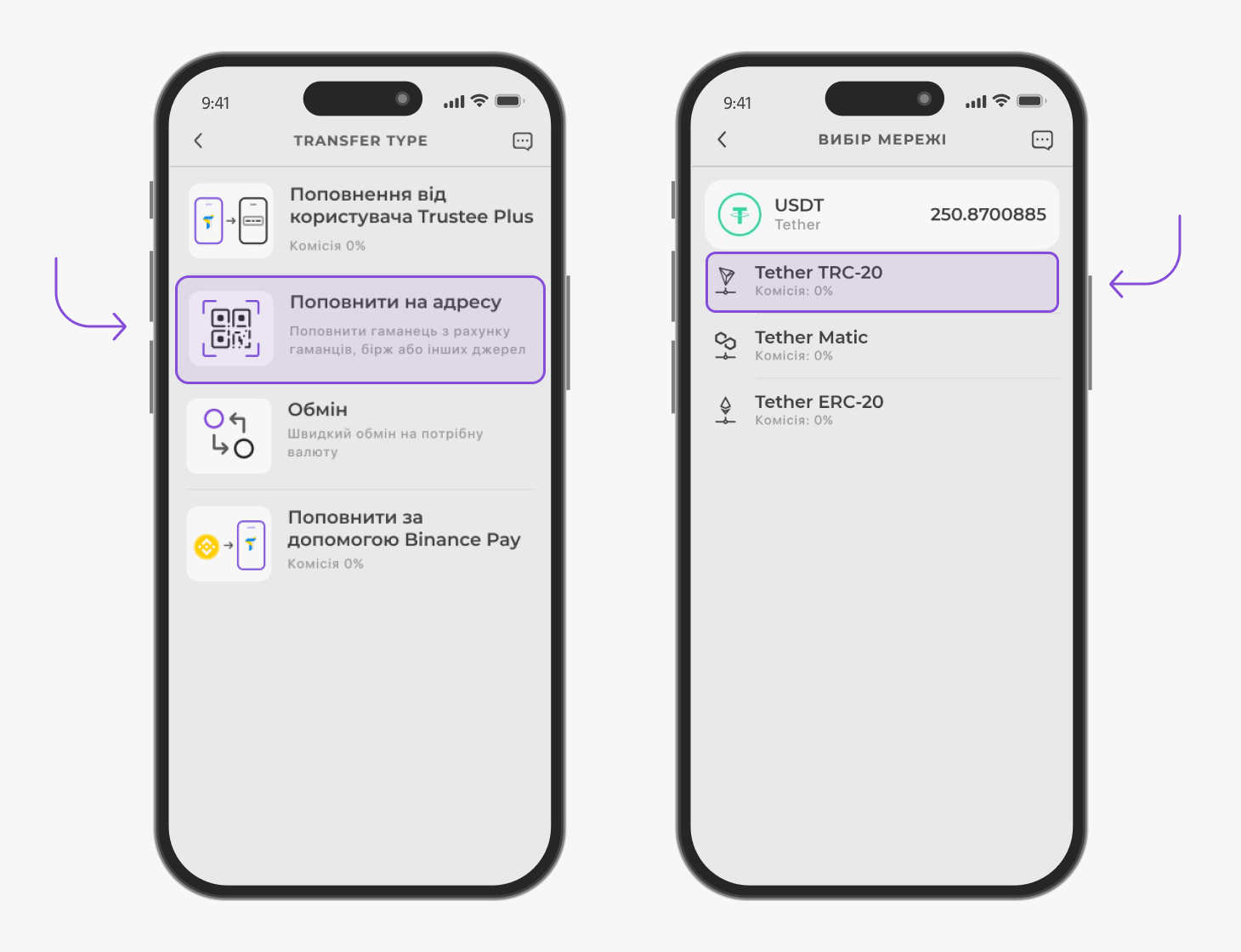
If necessary, select a network. For example, this is required when transferring USDT and ETH;
A cryptocurrency address will appear in the menu that opens: it can be copied or sent via messenger in the form of a QR code using the "Share" button.
You can also top up your account instantly via Binance Pay:

4. Issuance of a Trustee Plus payment card.
Trustee Plus makes it possible to issue a personal bank card in the application. It is tied to one of three accounts of your wallet: in BTC, ETH or USDT. And after that, you can use it like a regular payment card, paying on the Internet or in stores, thanks to Apple or Google Pay services, by attaching a smartphone to the terminal. Or withdraw cash from ATMs with an NFC reader.
 Select the “Card” section at the bottom of the Trustee Plus screen;
Familiarize yourself with the information on card issuance, confirm your agreement with the documents governing card issuance;
Click on the "Get" button;
Read the balance data and click "Next";

Link the asset that will be used for payment. To do this, click "Connect a coin" and select a cryptocurrency. It can be changed at any time;
Pay for the card issue by clicking on the "Pay" button.
After that, wait for the release of the Trustee card and add it to the contactless payment service.
5. Adding to Apple Pay and Google Pay.
How to add a card to Apple Pay? To add a crypto card to Apple Pay, follow these steps.
The whole process takes less than a minute!
Launch the Apple Wallet application on your smartphone or install it;
Click on the "+" button, and then on the item "Debit or credit card";

Click on the button "Enter card data manually" and fill in the fields. In the "Name" field, be sure to enter your first and last name in Latin letters;
Choose activation via SMS - the code will come to Trustee Plus.
That's all! The crypto card is added to Apple Pay and is ready for payment through the terminal. Do not forget to set it in Apple Wallet as the main card for payment.
How to add a card to Google Pay?
You can add a card to Google Pay in one minute. For this:
Install and open Google Wallet on your Android smartphone;
Click "Add to wallet" and select "Payment card";

Enter your card details by filling in all required fields. Enter your first and last name in Latin. Check the correctness of the entered data;
Click "Receive SMS" - you will receive a message from the Trustee.
After that, the card is added to Google Pay. In the settings, set Trustee card payment as default and make your first purchase with digital assets!
6. Use in everyday life.

The Trustee Plus crypto card can be used to pay at 60 million points of sale worldwide and online stores - from morning coffee to online subscriptions.
7. Earnings on the wallet

The wallet allows you to earn not only on the growth of the price of cryptocurrencies, but also on the referral program. The user receives 25% of the exchange commissions of all the friends they invited and another 20% of the exchange commissions of all the people they invited. If desired, this ratio can be changed to the opposite: 20% and 25%, respectively.
Answers to common questions - FAQ
1. How to take advantage of Binance Pay and Trustee Plus integration
In order to take advantage of this integration, you need to download and register in the Trustee Plus application.
On the main screen of the application, click on the "Top up" button, choose the currency USDT, BTC or ETH and the top up method via Binance Pay.
2. How do I know if I can issue a Trustee Plus card for myself?
The card can be issued by adults who have documents of international standard, such as an ID card and a foreign passport.
3. Where can I learn more about Trustee Plus?
More information can be found on our official website. Or you can always contact our support service in the application, they will be happy to provide you with all the necessary information.
4. What are the limits for using the Trustee Plus payment card?
Daily limits: settlements - 5,000 EUR;
Cash withdrawal - 2,000 EUR.
Monthly limits: calculations - 50,000 EUR;
Cash withdrawal from ATMs with NFC readers - 20,000 EUR.
5. What is the cost of card issuance and settlement fees?
Issuance of the card will cost 10 EUR;
Service fee - 0 EUR;
Online/offline calculation - 0%;
Cash withdrawal - 1.5% + 1 EUR;
Replenishment of cryptocurrency balance - 0%;
Conversion into EUR - 0.5%.
6. How to get help if there are problems with the Trustee Plus wallet or payment card payments?
You can always contact our professional support service. They will quickly provide you with all the necessary information and help you solve any issue of complexity.
7. Is Trustee Plus legal?
The owner of Trustee Plus is the legal entity UAB "Trustee Global" (registration code 306099031). It is a company registered in the Republic of Lithuania, registered in the Register of Legal Entities of the Republic of Lithuania as a virtual currency exchange operator and a virtual currency depository wallet operator and acts as a virtual asset service provider.