


Main topics of the post:
Once a transaction on the blockchain is confirmed, it is irreversible, so your last line of defense in Web3 is to carefully review the signature page.
Carefully check the full address of the recipient, not just a few characters, to ensure that your funds are sent to the correct destination.
Know the difference between signing a transaction and signing a message – both can pose serious risks. A single mistake can give scammers access to your assets.
When interacting with digital assets and decentralized applications (DApps) on your Web3 journey, it is essential to understand how to keep your funds safe. Consider your Binance Wallet as your digital vault, and the "signature page" as the moment you authorize actions from that vault.
When interacting with decentralized exchanges and DApps, it is common for requests to appear asking you to review and approve a transaction or a "signature request." This is an important moment for you to stop everything, check, and protect your assets before they leave your control! Keep reading to learn how to avoid problems while navigating the exciting world of Web3.
Understand the fundamentals
The power of blockchain lies in its immutability: once a transaction is recorded, it remains there forever. This is why careful verification before taking any on-chain action is your most important defense.
The Rule of 'Irreversible'
Final: cryptocurrency transfers on the blockchain are final. Once you confirm a transaction through the signature page and it is processed on the blockchain, it cannot be reversed.
The recipient is essential: your funds will go to the specified address. If that address is wrong or belongs to a scammer, your cryptocurrencies will likely be lost forever. This highlights the importance of always carefully verifying the recipient's address.
Review your actions. The confirmation page is the final step that will show the action you are about to take. Is it a swap, transfer, approval, signature, or something else? Ensure that the information aligns exactly with what you intended to do in the DApp.
On-chain transaction signature
When making a transfer (for example, sending cryptocurrency to another wallet) or executing a smart contract (for example, swapping tokens on a DEX, providing liquidity, etc.), you will "confirm" the action through the signature page. This means you are authorizing a change in the state of the blockchain and that your cryptocurrency will be transferred.
What to review
Recipient's address: is it correct? Was there any change to the address you entered earlier?
Details: are the details about the currency (USDC/USDT, etc.) and the network (BSC/ETH, etc.) to which you are sending the funds correct?
Warnings: are there any security warnings associated with the transfer? If something seems wrong, cancel the transaction and check everything again.

Message signature (off-chain/signature requests)
Sometimes, a DApp may ask you to "sign a message" or approve a "signature request." This type of signature usually does not directly move your funds.
Although signing messages itself is not a direct transfer, malicious DApps can trick you into signing messages, such as Permit, Permit2, or eth_sign, which grant broader permissions or even unlimited access to your tokens later. Binance Wallet has blocked the riskier message signing functions (like eth_sign), but exercising caution is still essential.
What to review
When receiving a message to sign, understand why the DApp is requesting the signature. If it seems unrelated to the action you are trying to perform or if the message text is unreadable or looks like a random string of characters, do not sign.
If in doubt, close the DApp and research what this specific signature request means for that particular platform.

Recognize common traps
The malicious address trap
How: scammers send virtually insignificant amounts of cryptocurrency to your wallet from an address that mimics the first and last characters of an address you frequently use. They may also use more sophisticated techniques to spoof your address, making it look like you sent funds to the address when you actually did not.
Why: they expect you to mistakenly copy that address from your transaction history next time.
Prevention: do not rely on automatic habits or copying from the recent transactions list. Instead:
Hide small/spam transactions. In Binance Wallet, you can click the filter button in the upper right corner and hide those transactions from the list.
Use the address book. Save the verified recipient addresses you frequently use in the address book and always use them for transactions with those counterparts.
Copy from the source. Always copy the address directly from the original source (the person or platform you are sending to).
Test transactions (especially for high values). For high-value transfers, first send a smaller amount as a test transaction. Only after confirming receipt should you proceed with the larger value transfer.
Paste and verify. Paste the destination address in your wallet and visually compare the entire string of characters to ensure they match.

Phishing sites
These are fake sites created to steal your wallet credentials or trick you into signing malicious transactions.
How: scammers may send links via email, social media, or even manipulate online search results. As soon as you connect your wallet and provide approval or sign something suspicious, your funds can be drained from your wallet without any further action on your part.
Prevention:
Meticulously check the URL. Look for subtle typos (for example, uniswap.com versus unìswap.com) or alternative domain extensions (.xyz instead of .com).
Never click on suspicious links. Always access the official site by typing the URL directly or using a trusted bookmark bar.
Verify information independently. If you receive an urgent message about your account, verify it through official channels (for example, directly accessing your account, contacting customer service through official contact information) instead of clicking on links in the message.

Phishing site posing as a Anti-Money Laundering (AML) verification page.
Fake airdrops/NFTs in your wallet
You may see a strange token or NFT in your wallet that you did not purchase. Scammers send them as bait.
How: they may include a malicious link in the metadata or description of the token, luring you to visit a site where you will be tricked into signing a transaction that will empty your wallet – or the airdrop/NFT token itself may be malicious by nature.
Prevention: do not interact, sell, or click on any links associated with unsolicited or unknown tokens or NFTs. As long as you do not interact with them, they cannot harm your funds. By clicking on the red warning symbol, which indicates a known malicious token, you will see more details about the risks detected so far.

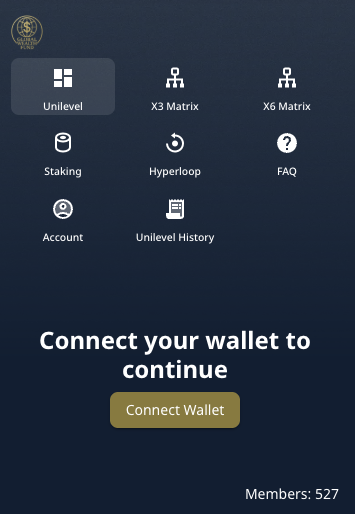
Ponzi scheme
Ponzi schemes are scams designed to fund the scammer by making you continue to invest and refer others to invest.
How: these schemes promise high returns using the funds of later investors. The scheme collapses when there are not enough new investors to pay the old ones.
Prevention: if something seems too good to be true, it probably is a scam. Legitimate cryptocurrency investments involve risks, and consistently high and guaranteed returns are a major red flag.
Golden rules for your on-chain security
Research thoroughly: before connecting your wallet to any DApp, conduct due diligence. Research the project, its team, and reputation. Look for audits of smart contracts performed by reputable third-party firms.
Avoid copying and pasting: while convenient, copying and pasting addresses can be risky due to clipboard hijackers ("clipboard hijackers" are malware that alter copied addresses).
Use the address book: add your frequently used verified addresses to the address book and always use those saved addresses.

Check more than once: before confirming any transfer on the signature page, compare the recipient's address with the address you intended to send, character by character. Scammers often rely on you only checking the first and last characters.
Be cautious of social engineering: scammers often exploit human psychology more than technical vulnerabilities, so be wary of unsolicited offers and pressure tactics.
Understand permissions: know exactly what you are doing when connecting your wallet or signing a message/transaction.
Pay attention to warnings: always pay attention to the warnings displayed in the wallet when connecting or attempting to perform transactions or signatures, otherwise, you may suffer total loss of funds.

Final considerations
Navigating safely through the Web3 landscape requires attention and a detailed understanding of the critical role that the signature page plays as your final checkpoint before performing irreversible transactions on the blockchain. By carefully verifying recipient addresses, distinguishing between signing transactions and messages, and staying alert to common scams such as phishing sites and malicious addresses, you can significantly reduce the risk of losing your assets.
Remember, your Binance Wallet is your digital vault. Treat every signature request with caution, verify all details, and never rush the process. Being informed and cautious is your best defense to protect your funds and confidently explore the exciting world of decentralized finance.
Further reading
Web3 Security – Stay safe from multisig wallet scams on TRON and other blockchains
Web3 Wallet Security – Avoid fake wallet apps and smishing scams
Legal Disclaimer: Binance Wallet is an optional product. It is your responsibility to determine whether this product is suitable for you. Binance is not responsible for your access to or use of third-party applications (including features integrated into Binance Wallet) and will have no liability concerning your use of those third-party applications, including but not limited to any transactions you may dispute. Please read Binance Wallet's Terms of Use carefully and always conduct your own research.