
TokenPocket provides users with a convenient and secure way to buy and manage cryptocurrencies. With TokenPocket, you can safely and easily purchase Binance Chain Meme coins and set up MEV protection. Learn about the Transit Swap exchange tutorial!
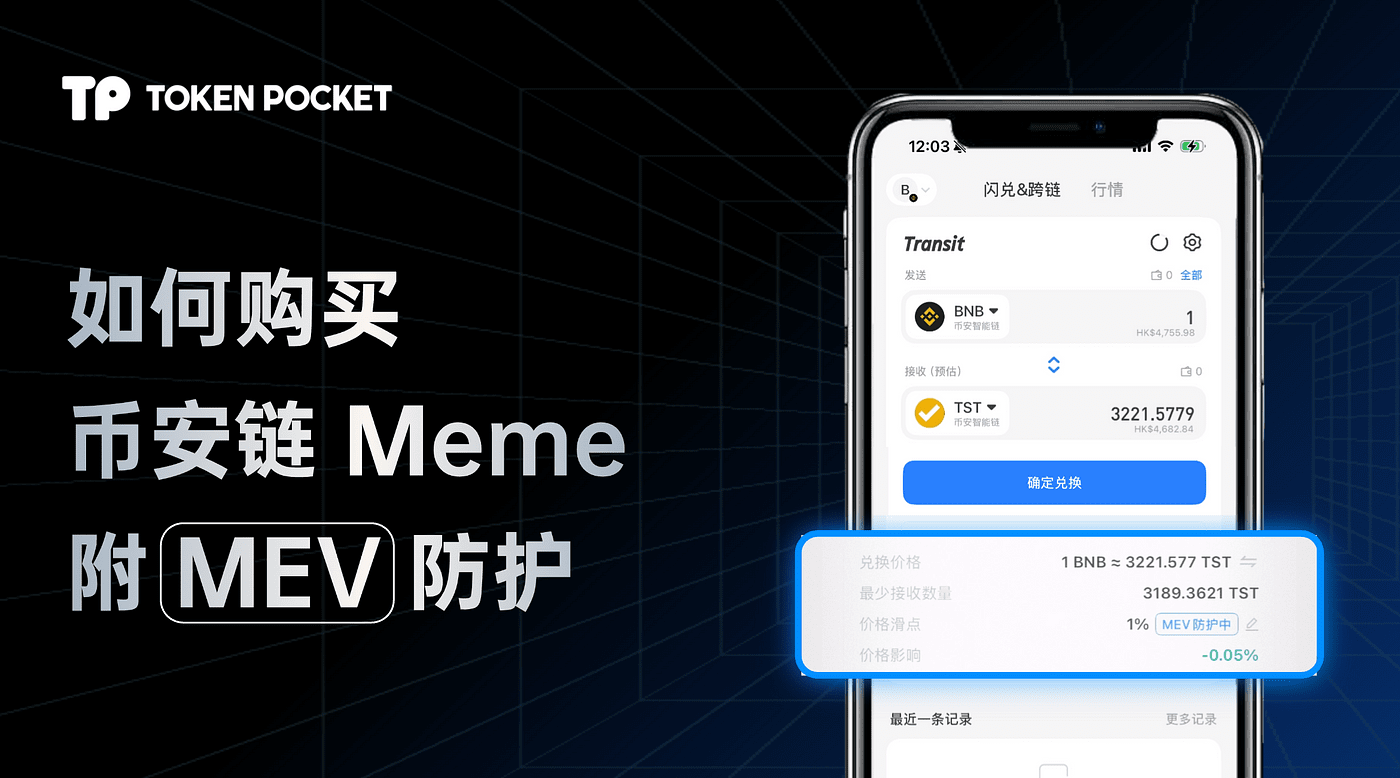
Securely purchase Binance Chain Meme coins with TokenPocket.
Step 1: Buy BNB (Binance Smart Chain) with fiat currency.
Step 2: Enable MEV protection.
Step 3: Purchase Binance Chain Meme coins like $TST through Transit Buy.
Step 1: Buy BNB (Binance Smart Chain) with fiat currency.
Download and install the TokenPocket wallet.
Download and install the TokenPocket wallet.
Download wallet.
Beware of fake apps! Make sure to recognize the official TokenPocket website:TokenPocket official website, download and install the app.Create an account.
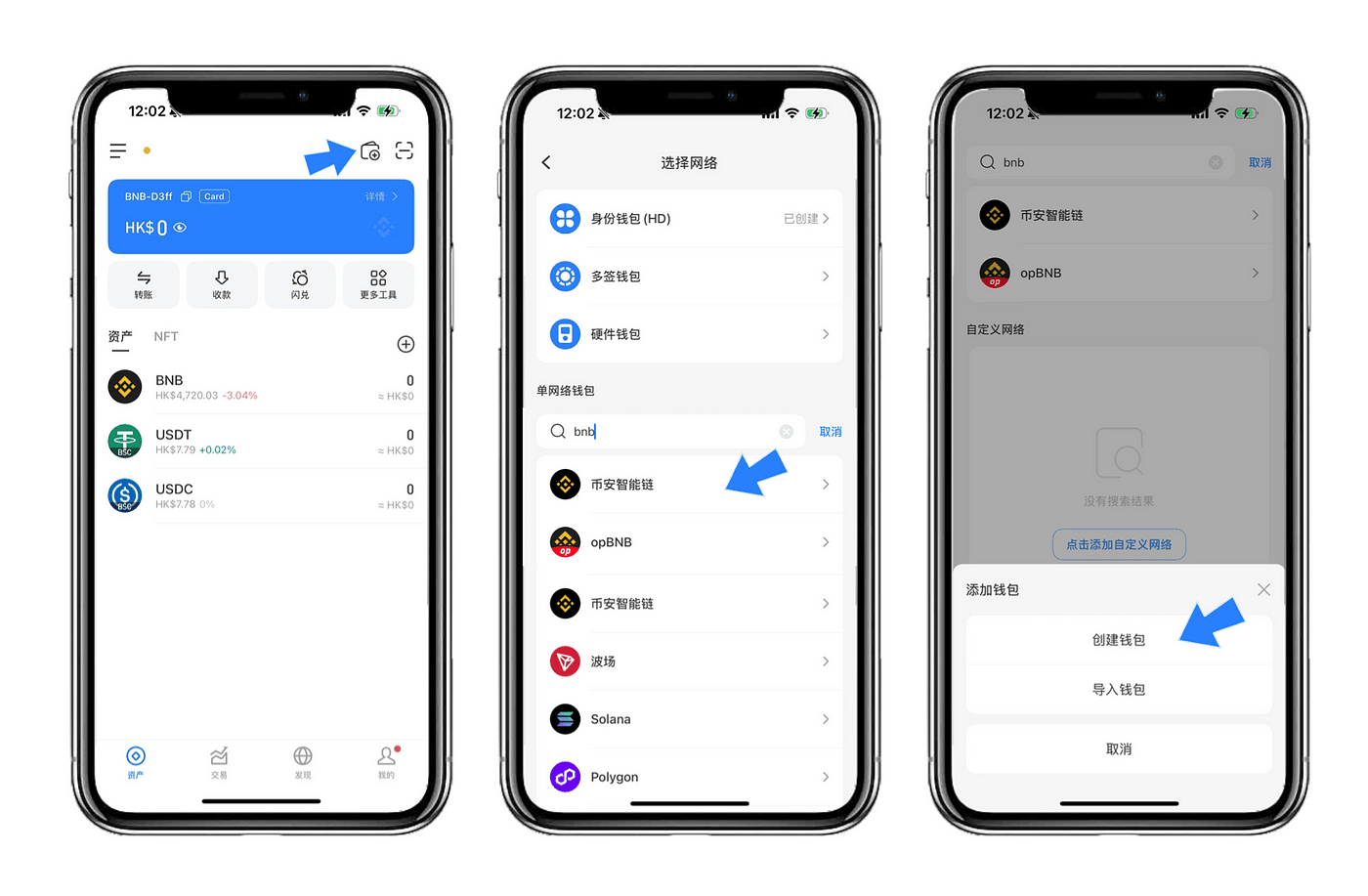
Open TokenPocket and click the button in the upper right corner.Add wallet.Select the target blockchain network from the list, such as BNB (Binance Smart Chain).
Choose 【Create Wallet】 and follow the prompts to complete account creation.
Important Reminder:
Do not disclose your mnemonic phrase to anyone!
Back up the mnemonic phrase offline, ensure it is kept securely to avoid leaks and loss.
Purchase cryptocurrency through Transit Buy.
TokenPocket has built-in Transit Buy functionality, providing users with a convenient fiat to cryptocurrency purchasing service. This tutorial uses purchasing BNB (Binance Smart Chain) as an example:
Open Transit Buy.
Purchase cryptocurrency through Transit Buy.
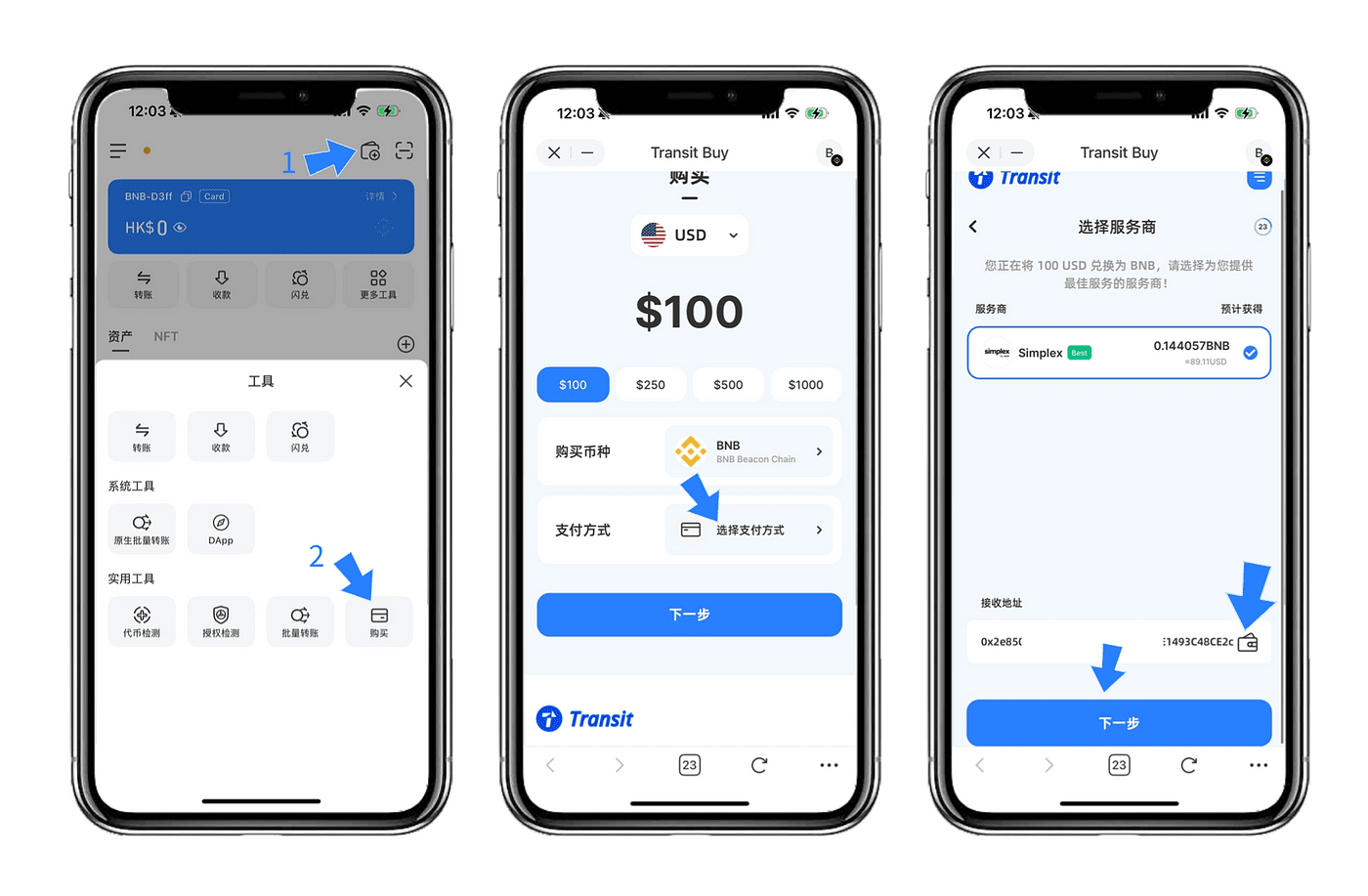
Open TokenPocket and click the 【Buy】 button in the more tools section to enter the Transit Buy interface.
The interface defaults to the buy page. Please select the desired fiat currency (e.g., USD) and BNB (Binance Smart Chain).
Click 【Next】.
Select payment method.
Choose a suitable payment method in the payment option (e.g., Google Pay or credit card).
Fill in the receiving address: You can enter the target address or click the wallet icon to directly select a wallet address that has been added in TokenPocket.
Confirm order and payment.
The interface will redirect to the payment service provider's page.
After entering the payment details page, confirm the payment amount, click 【Confirm】, and then complete the payment.
Wait for the transaction to complete.
After successful payment, wait a moment to receive the purchased tokens, which will be automatically deposited into your specified wallet address.
Step 2: Enable MEV protection.
MEV attack principles: stealing user assets through front-running and sandwich attacks. After enabling protection, the transaction path will be encrypted. Important reminder: Recent MEV attack incidents have surged!
Data shows that over 50% of blockchain users have encountered MEV attacks without realizing it, with unprotected users averaging a loss of $127. Enabling MEV protection in the TokenPocket wallet is very simple and can provide comprehensive protection for your transactions, keeping you away from malicious MEV attacks.
Enabling Steps:
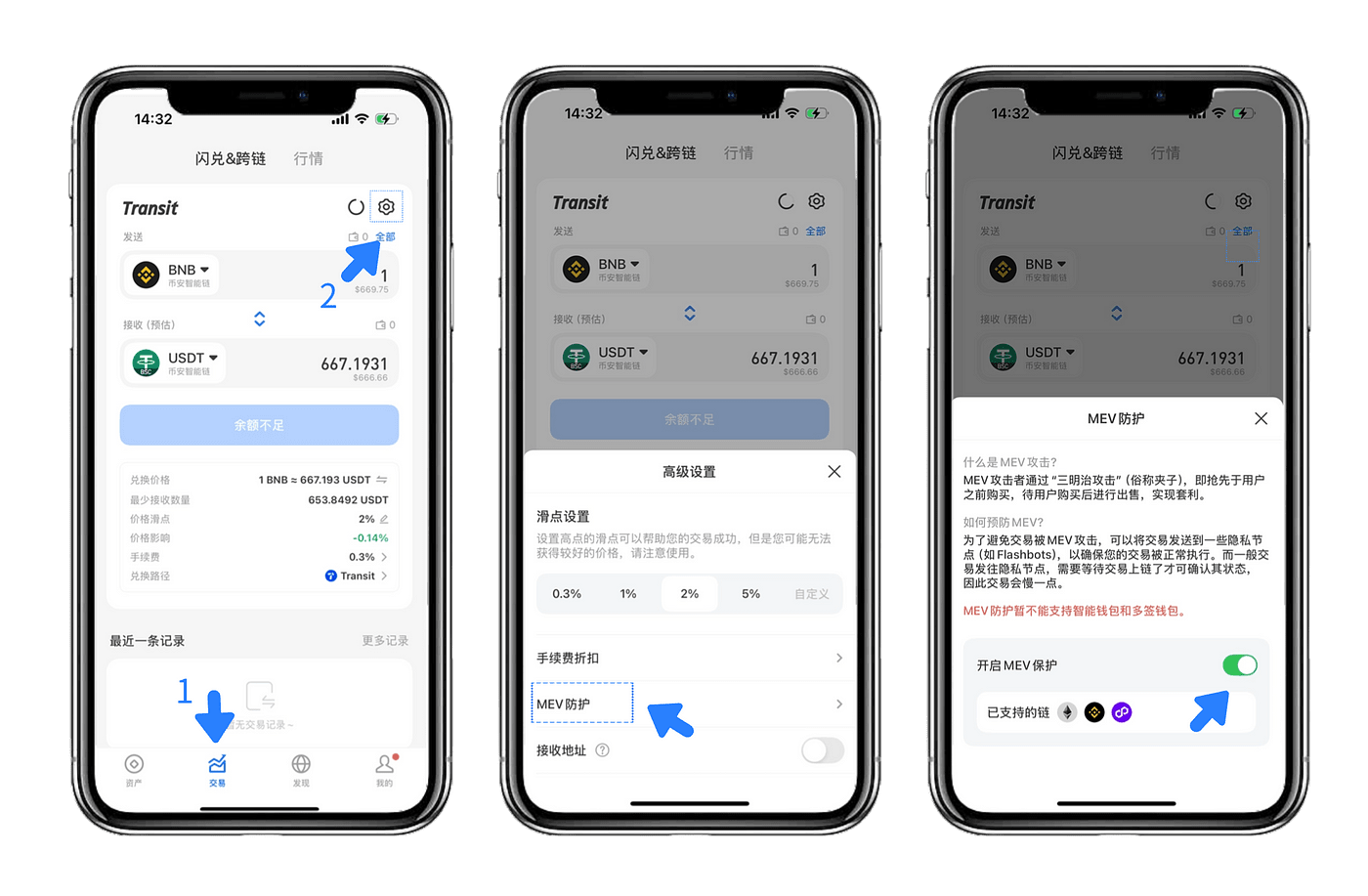
Enable MEV protection.
Update TokenPocket wallet: First, ensure you are using the latest version of the TokenPocket wallet.
Go to the settings page: Open TokenPocket, navigate to transactions, and click the 'Settings' button in the upper right corner.
Enable MEV protection: In 'Advanced Settings', find the 'MEV protection' option and click to enable it.
Complete protection: Once enabled, your transactions will be automatically protected from MEV attackers.
Step 3: Purchase $TST through Transit Buy.
Exchange BNB for $TST through Transit Swap.
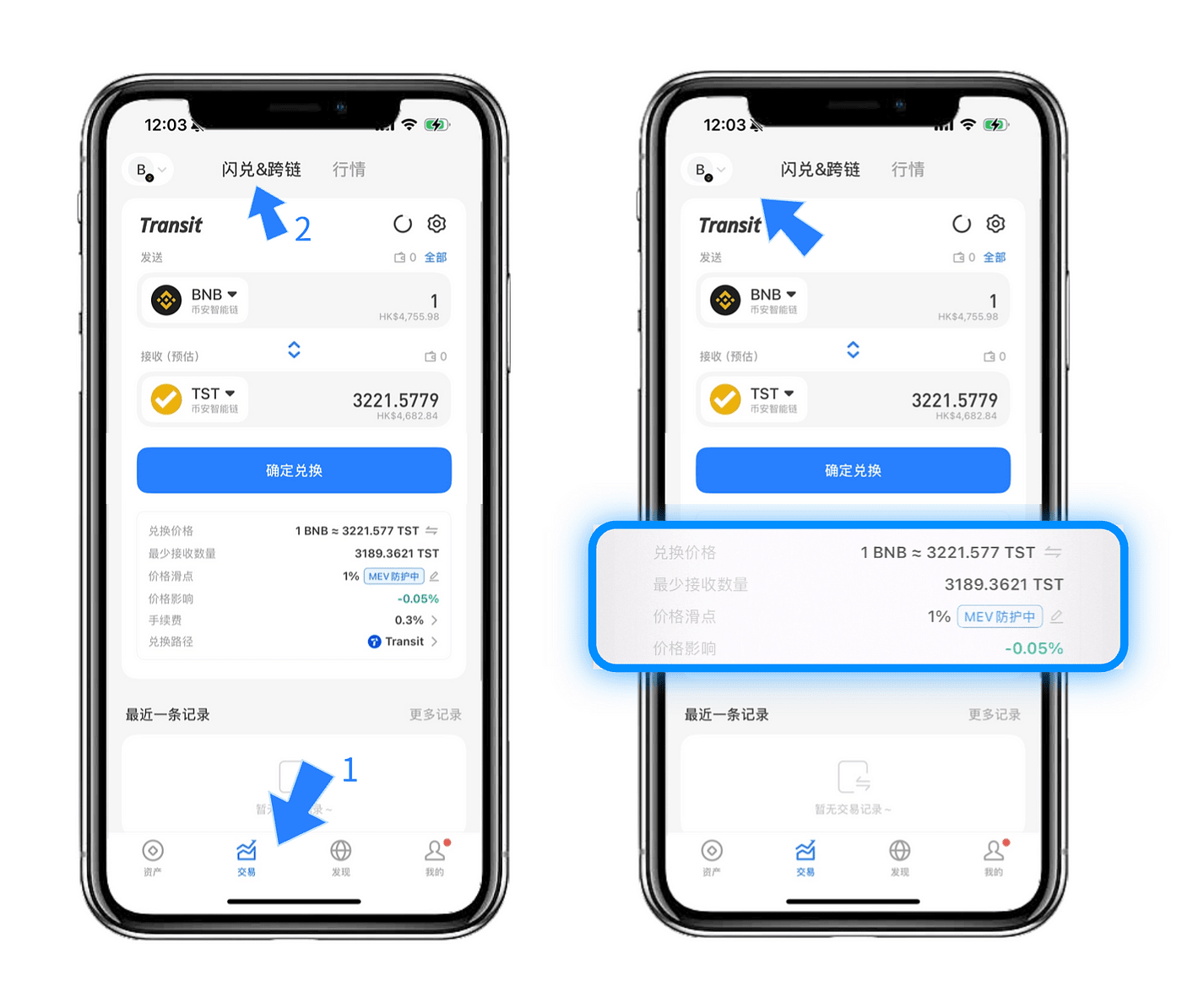
Purchase $TST through Transit Buy.
Open TokenPocket, click 【Transactions】 in the bottom navigation bar, and select the Swap/Cross-chain feature to enter the exchange interface.
Enter exchange information.
On the exchange page, set the token you want to exchange:
Send: Enter BNB, and input the exchange amount.
Receive: Enter $TST token or contract address.
⚠️ Important! Verify the contract address before exchanging: 0x86bb94…66429.
Confirm transaction.
Click 【Confirm Exchange】 to enter the transaction confirmation interface. After confirming everything is correct, click 【Confirm】 and wait for the transaction to complete.
View exchange results.
After the transaction is complete, return to the TokenPocket wallet asset page to view your $TST token balance.
Convenient features provided by TokenPocket.
Token price tracking.
View the price and market dynamics of the target token in real-time and set custom price alerts for the token.Cross-chain trading support.
Through TokenPocket, you can complete multi-chain asset exchanges and cross-chain transfers without complicated operations.Global service support.
Supports multiple payment methods, including Google Pay, Apple Pay, and credit cards, allowing users worldwide to easily purchase cryptocurrency.
Buying cryptocurrency through TokenPocket has never been so easy! Download TokenPocket now and explore the infinite possibilities of cryptocurrency.
👉 Download TokenPocket.