
Elrond Wallet is a user-friendly web wallet with a simple interface for interacting with the Elrond ecosystem. With this guide, you will get acquainted with the functionality of the wallet and learn how to delegate EGLD tokens.
Note. Always check the address of web wallets, as they are vulnerable to phishing attacks (the site should always have a security certificate - this is indicated by the https extension).

Save the address https://wallet.elrond.com/ in your bookmarks so as not to end up on a scam site.
Let's move on to creating a wallet.
Step 1: Create a new wallet
Go to the Elrond Wallet website and click Create Wallet. If you forget your wallet password and lose your Keystore File, you can restore access to your funds using the seed phrase by clicking the Access Existing button.
Step 2: Save your seed phrase
At this stage, the wallet warns that if it is lost, it will not be possible to recover the password (since blockchain wallets do not store this information), and Elrond Wallet also reminds that it is important to store the seed phrase in a safe place.
Write down 24 words on paper and hide them in a safe place. It is important to keep the words in the order they appear on the screen.
Enter the words corresponding to the sequence number to confirm the correct spelling of the seed phrase.
Step 3: Create a password
To log into your account, you will need a password of at least 8 characters, with capital letters, numbers and special characters (for example: *, @). Create a strong password and enter it twice in the empty fields.
The wallet has been created. Now the key storage file in the .json extension will be automatically downloaded to our device - it will be needed to log into the wallet along with the password.
The developers took good care of security, right?
Fill your wallet
Topping up Elrond Wallet is very easy. Login to your wallet by entering your password and downloading your keystore file.
The screenshot shows what the key file should look like. Its name contains the wallet address, and the file itself has the extension .json. Click Access Wallet.
The wallet interface opens. The main panel will display wallet statistics.
To get the Elrond wallet address, simply click on the Copy button located to the right of the address or the QR code icon, or select the address and copy it using the Ctrl + C key combination.

Buy EGLD tokens on any crypto exchange and send them to the copied wallet address. After replenishment, you can stake EGLD.
How to stake EGLD
This can be done directly in the Elrond Wallet.
Step 1: Select a validator
Go to the Stake section. The page that opens displays staking statistics: the number of staked tokens, active staking and available rewords. To open the list of validators, click Stake Now.
There are many validators on the list - choose any one that suits your profitability.
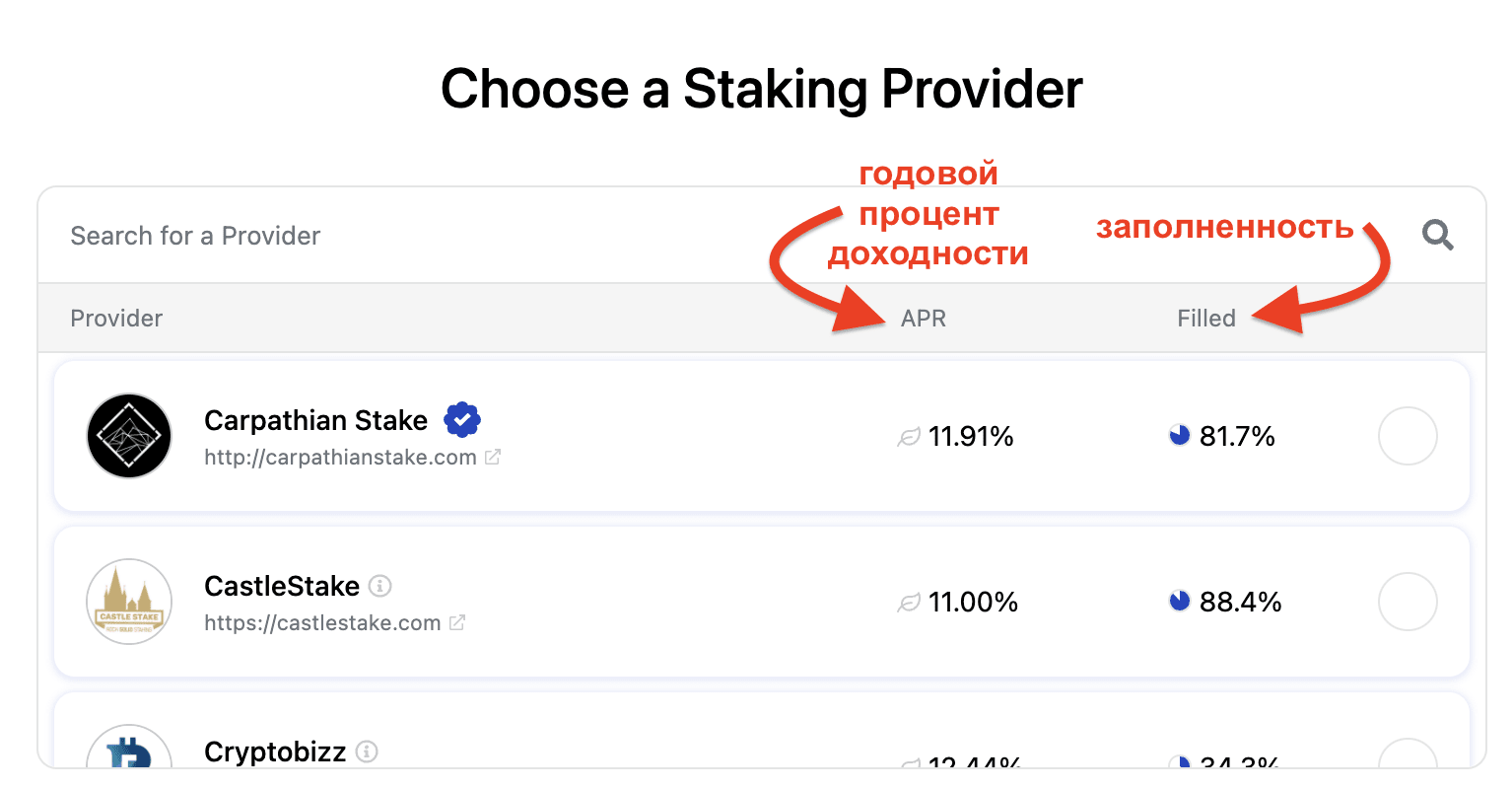
Also keep in mind that validators charge a certain commission for their services.

Check the box next to the selected validator, as shown in the screenshot, and click Continue. Please note the Filled field. It shows how busy the validator is with delegators. The Elrond network allows a limited number of delegators to be accepted.
Step 2: Delegate EGLD Tokens
Enter the number of tokens to stake, click Continue and wait for confirmation by validators.
Review the transaction parameters and click Confirm.
Ready! Tokens have been successfully staked.