
#binancereferralcode
binancereferralcode
43,011 views
317 Discussing
Hot
Latest

Article
Binance Referral Code CODE2026: What to Check Before You Sign UpIf you’re opening your first Binance account and looking for a referral code, the most useful check is what Binance displays on your own registration screen. This guide explains where CODE2026 goes, how to review any offer tied to your account, and where to look for trading fees or rewards later.
Referral disclosure. CODE2026 is my referral code. I may earn a commission if you use it and meet Binance’s program requirements.
How to use Binance referral code CODE2026
Open the Binance registration page using this referral link. [https://www.binance.com/join?ref=CODE2026](https://www.binance.com/join?ref=CODE2026). Check the address bar before entering any information.Look for Referral ID during sign-up. If it’s already filled in, confirm it says CODE2026. If the field is available and empty, you can enter the code manually.Read the terms displayed for your region. Check which product the offer covers, whether it has an expiry date, and whether it is a fee rebate or a separate reward task.Once you’ve reviewed those details, follow the verification steps shown in your account. If the code is unavailable or the expected offer doesn’t appear, check Binance’s regional rules or ask Binance Support about eligibility.
Referral availability can differ across countries and accounts. Binance’s official referral notes list regional exclusions and changes, so check the requirements that apply to you before relying on an offer. [Referral Pro FAQ](https://www.binance.com/en/support/faq/detail/6233094e540b4ea4ac50387d1518911b) · [Regional referral rules](https://www.binance.com/en/support/faq/detail/d06a66559cdd4185aea360752405633e)
Referral rebates, BNB fee payments, and welcome vouchers
These benefits show up in different places. A referral rebate, where offered, is tied to eligible fees and the terms of your referral. Paying fees with BNB is a separate account setting that changes the fee charged on qualifying trades. A welcome voucher is a campaign reward with its own eligibility, deadline, and redemption conditions.
To compare offers, check the eligible market first. A benefit displayed for Spot does not establish the same terms for Futures, withdrawals, or blockchain network fees. If you see a campaign advertised elsewhere, compare it with the terms actually displayed on your account.
A $1,000 Spot fee example
Suppose your trade size is $1,000 and the fee rate shown for that pair is 0.10%. The trading fee would be $1.00. At the 0.075% rate shown in Binance’s standard fee example for eligible BNB payments, that same trade would cost $0.75. The $0.25 difference comes from the BNB fee setting in this example. Account tier, trading pair, promotions, and fee eligibility can change what you pay.
To verify a completed trade, open Trade History and check the fee and the asset used to pay it. Review any referral rebate separately under the terms of the offer. [Current Spot fee table](https://www.binance.com/en/fee/trading) · [Binance’s BNB fee guide and screenshot](https://www.binance.com/en/support/faq/detail/115000583311)
Where to check welcome rewards after registration
Open Rewards Hub and look for tasks assigned to your account. For each task, read the requirements, deadline, reward type, and how to claim it. If a task requires a deposit or trading volume, check what counts before deciding whether it is worth doing. Voucher terms can restrict what the reward offsets and how long you have to redeem it. [Binance welcome bonus terms](https://www.binance.com/en-NG/support/announcement/detail/854ba3fda59648799882ff19b5296645)
Secure your account before adding funds
Use a unique password or a passkey where supported. Set up two-factor authentication and consider enabling Binance’s anti-phishing code in Security settings. If a message asks you to send documents or verification codes through a chat, go back to the official Binance app or site and use the support or verification options there. [Binance Academy’s beginner and security guide](https://www.binance.com/en/academy/articles/binance-beginner-s-guide)
Frequently asked questions
Can I add CODE2026 if I already have an account? Keep your existing account. Binance has separate referral-binding options for some eligible accounts without a referrer. Requirements depend on your account and the applicable process. Check the official FAQ for your case. [Binance Rebind FAQ](https://www.binance.com/en/support/faq/detail/185520b0cb3d43d2a1ab0d12ba223d35)
[Screenshot source: Binance Support’s Affiliate dashboard guide](https://www.binance.com/en/support/faq/detail/63572e23acda4bc891fd605e93335669)
What if the Referral ID field is missing? Return to the official registration page and check the account and regional requirements. If you still can’t see the field or confirm the offer, use Binance Support before completing sign-up.
Where can I confirm the exact offer? Use the registration screen for the referral details, Rewards Hub for assigned tasks, and Trade History for the fees you actually paid.
#Binance #BinanceReferralCode #BinanceSquare
Binance Referral Code CODE2026: What to Check Before You Sign Up
If you’re opening your first Binance account and looking for a referral code, the most useful check is what Binance displays on your own registration screen. This guide explains where CODE2026 goes, how to review any offer tied to your account, and where to look for trading fees or rewards later.
Referral disclosure. CODE2026 is my referral code. I may earn a commission if you use it and meet Binance’s program requirements.
How to use Binance referral code CODE2026
Open the Binance registration page using this referral link. https://www.binance.com/join?ref=CODE2026. Check the address bar before entering any information.Look for Referral ID during sign-up. If it’s already filled in, confirm it says CODE2026. If the field is available and empty, you can enter the code manually.Read the terms displayed for your region. Check which product the offer covers, whether it has an expiry date, and whether it is a fee rebate or a separate reward task.Once you’ve reviewed those details, follow the verification steps shown in your account. If the code is unavailable or the expected offer doesn’t appear, check Binance’s regional rules or ask Binance Support about eligibility.
Referral availability can differ across countries and accounts. Binance’s official referral notes list regional exclusions and changes, so check the requirements that apply to you before relying on an offer. Referral Pro FAQ · Regional referral rules
Referral rebates, BNB fee payments, and welcome vouchers
These benefits show up in different places. A referral rebate, where offered, is tied to eligible fees and the terms of your referral. Paying fees with BNB is a separate account setting that changes the fee charged on qualifying trades. A welcome voucher is a campaign reward with its own eligibility, deadline, and redemption conditions.
To compare offers, check the eligible market first. A benefit displayed for Spot does not establish the same terms for Futures, withdrawals, or blockchain network fees. If you see a campaign advertised elsewhere, compare it with the terms actually displayed on your account.
A $1,000 Spot fee example
Suppose your trade size is $1,000 and the fee rate shown for that pair is 0.10%. The trading fee would be $1.00. At the 0.075% rate shown in Binance’s standard fee example for eligible BNB payments, that same trade would cost $0.75. The $0.25 difference comes from the BNB fee setting in this example. Account tier, trading pair, promotions, and fee eligibility can change what you pay.
To verify a completed trade, open Trade History and check the fee and the asset used to pay it. Review any referral rebate separately under the terms of the offer. Current Spot fee table · Binance’s BNB fee guide and screenshot
Where to check welcome rewards after registration
Open Rewards Hub and look for tasks assigned to your account. For each task, read the requirements, deadline, reward type, and how to claim it. If a task requires a deposit or trading volume, check what counts before deciding whether it is worth doing. Voucher terms can restrict what the reward offsets and how long you have to redeem it. Binance welcome bonus terms
Secure your account before adding funds
Use a unique password or a passkey where supported. Set up two-factor authentication and consider enabling Binance’s anti-phishing code in Security settings. If a message asks you to send documents or verification codes through a chat, go back to the official Binance app or site and use the support or verification options there. Binance Academy’s beginner and security guide
Frequently asked questions
Can I add CODE2026 if I already have an account? Keep your existing account. Binance has separate referral-binding options for some eligible accounts without a referrer. Requirements depend on your account and the applicable process. Check the official FAQ for your case. Binance Rebind FAQ
Screenshot source: Binance Support’s Affiliate dashboard guide
What if the Referral ID field is missing? Return to the official registration page and check the account and regional requirements. If you still can’t see the field or confirm the offer, use Binance Support before completing sign-up.
Where can I confirm the exact offer? Use the registration screen for the referral details, Rewards Hub for assigned tasks, and Trade History for the fees you actually paid.
#Binance #BinanceReferralCode #BinanceSquare
168

Article
Binance Referral Code BTC2026: How the $19,800 Welcome Rewards WorkThe Binance sign-up page opened with referral code BTC2026 says you can unlock up to $19,800 in welcome rewards. This short guide shows where that number comes from, using the page as it looked on November 23, 2026.
Where the welcome rewards are shown
[Open the BTC2026 sign-up page](https://www.binance.com/join?ref=BTC2026). The left panel shows Code: BTC2026, a 'New user bonus' badge with a See How link, and the line 'Complete tasks. Unlock up to $19,800 in welcome rewards.'
The task tiers
See How opens the Affiliate-Boosted Welcome Bonus table. Each tier asks for a net deposit and a trade volume within a task period:
Tier 1: 100 USD net deposit, 3K trade volume, 100 USD reward, 7 daysTier 3: 500 USD deposit, 30K volume, 400 USD reward, 7 daysTier 7: 20K USD deposit, 50M volume, 10K USD reward, 30 days
What to know before you start
Rewards depend on completing the tasks in time, your region and eligibilityThe page notes a limited number of rewards per 30-day cycleDon't trade more than you planned just to reach a tierThe code has to be on the account from sign-up
How to claim, step by step
Register through the BTC2026 link and verify your identityOpen the rewards or tasks area in the appComplete the deposit and trading tasks of the tier you choose before the deadlineCheck the reward status in the Rewards Hub
Ready to start? [Binance referral code BTC2026 sign-up link](https://www.binance.com/join?ref=BTC2026).
Disclosure: BTC2026 is my referral code, and I may earn commission from qualifying activity. This is an independent guide, not an official Binance post. Benefits depend on Binance's terms, your region and your eligibility. Crypto trading carries risk, and leveraged Futures trading can lose more than you expect. Not financial advice. DYOR.
#BinanceReferralCode #BTC2026 #Binance #CryptoTips
Binance Referral Code BTC2026: How the $19,800 Welcome Rewards Work
The Binance sign-up page opened with referral code BTC2026 says you can unlock up to $19,800 in welcome rewards. This short guide shows where that number comes from, using the page as it looked on November 23, 2026.
Where the welcome rewards are shown
Open the BTC2026 sign-up page. The left panel shows Code: BTC2026, a 'New user bonus' badge with a See How link, and the line 'Complete tasks. Unlock up to $19,800 in welcome rewards.'
The task tiers
See How opens the Affiliate-Boosted Welcome Bonus table. Each tier asks for a net deposit and a trade volume within a task period:
Tier 1: 100 USD net deposit, 3K trade volume, 100 USD reward, 7 daysTier 3: 500 USD deposit, 30K volume, 400 USD reward, 7 daysTier 7: 20K USD deposit, 50M volume, 10K USD reward, 30 days
What to know before you start
Rewards depend on completing the tasks in time, your region and eligibilityThe page notes a limited number of rewards per 30-day cycleDon't trade more than you planned just to reach a tierThe code has to be on the account from sign-up
How to claim, step by step
Register through the BTC2026 link and verify your identityOpen the rewards or tasks area in the appComplete the deposit and trading tasks of the tier you choose before the deadlineCheck the reward status in the Rewards Hub
Ready to start? Binance referral code BTC2026 sign-up link.
Disclosure: BTC2026 is my referral code, and I may earn commission from qualifying activity. This is an independent guide, not an official Binance post. Benefits depend on Binance's terms, your region and your eligibility. Crypto trading carries risk, and leveraged Futures trading can lose more than you expect. Not financial advice. DYOR.
#BinanceReferralCode #BTC2026 #Binance #CryptoTips
103
Article
Binance Referral Code BTC2026: 2026 Tutorial from Sign-Up to FuturesThe Binance referral code in this guide is BTC2026. This tutorial walks a new user through the whole path on Binance in 2026: creating the account with the code, depositing, placing Spot limit, market and stop-loss orders, withdrawing, then moving USDT to Futures, setting leverage and opening a position with TP/SL. Every screenshot below was taken on Binance on November 23, 2026.
Quick answer: Binance referral code 2026
Referral code: BTC2026Sign-up link: [Binance referral code BTC2026 sign-up link](https://www.binance.com/join?ref=BTC2026)What the sign-up page shows (checked November 23, 2026): up to $19,800 in welcome rewards for completing tasks, and trading fee rebatesThe code is entered once, at registration. A referral can't be changed later
Step 1: Create your Binance account with code BTC2026
[Open the BTC2026 sign-up page](https://www.binance.com/join?ref=BTC2026). The left side of the page shows Code: BTC2026, so you don't have to type it. Enter your email or phone number, tick the Privacy Notice box and click Register. Binance sends a verification code; enter it and set a strong password.
Step 2: Verify your identity and secure the account
Identity verification (KYC): name, date of birth, address, an ID document and a short face checkTurn on 2FA with an authenticator app or a passkeySet an anti-phishing code so real Binance emails show itAdd a withdrawal whitelist once you know which addresses you use
Step 3: How to deposit crypto on Binance
Go to Wallet → Deposit → Deposit Crypto. Pick the coin (USDT in this example), then the network. The network you choose on Binance must match the network you send from. For USDT the list shows BSC (BEP20), TRX (TRC20), ETH (ERC20) and others, with the expected time and confirmations.
Example: if your other wallet sends USDT on BEP20, select BSC here, copy the address Binance shows, and send a small test amount first. A wrong network can mean lost funds.
Step 4: Spot limit order on Binance
Open Trade → Spot and search BTC/USDT. In the order form choose Limit. A limit order fills only at your price or better.
Example: BTC was about 61,300 USDT when we checked. To buy only if it dips, set Price 60,000 and Amount 0.001 BTC. The order sits in Open Orders until the market reaches 60,000. Total = 60,000 × 0.001 = 60 USDT (plus the trading fee).
Step 5: Spot market order on Binance
Choose Market to buy right now at the best available price. Here you can type a Total in USDT; the minimum shown was 5 USDT.
Example: Total 50 USDT buys about 0.00081 BTC at 61,300. In a fast market the fill price can differ slightly; the optional Slippage Tolerance box caps that.
Step 6: How to set a stop-loss on Binance Spot
Open the third tab and pick Stop Limit. The Stop is the trigger price; the Price is the limit order placed once the stop is hit.
Example: you bought 0.001 BTC at 61,300. On the Sell side set Stop 58,000 and Price 57,900, Amount 0.001. If BTC trades at 58,000, a sell limit at 57,900 is placed. Setting the price a little under the stop helps it fill in a fast drop.
The same menu also lists Stop Market, Trailing Stop, OCO (take profit and stop-loss together), TWAP, POV and Scaled Order.
Step 7: How to withdraw from Binance
Go to Wallet → Withdraw. Pick the coin, paste the destination address (or use the Binance user tab for an internal transfer), choose the same network the receiving wallet uses, enter the amount and confirm with your 2FA.
Check the network fee shown before you confirmSend a small test first to a new addressInternal transfers to another Binance user use the Binance user tab
Step 8: Transfer USDT from Spot to Futures
Futures uses its own wallet. In the Futures order panel, click the ⇆ icon next to Avbl. Set From: Spot, To: USDⓈ-M Futures, coin USDT, type an amount and click Confirm.
Example: transfer 100 USDT. Move only what you are ready to risk; the rest stays in Spot.
Step 9: How to set leverage on Binance Futures
Click the leverage button (it showed 125x by default for BTCUSDT) and drag the slider or type a number. The panel shows the maximum position at the current leverage and warns that higher leverage raises liquidation risk.
Example: with 100 USDT margin at 5x you control a 500 USDT position. A 1% move in BTC changes your PnL by about 5 USDT (5% of margin). At 20x the same move is about 20 USDT. Beginners usually start between 2x and 5x.
Step 10: Open a Futures position with TP/SL
Choose Cross or Isolated, then Limit or Market. Enter the size, tick TP/SL and fill in Take Profit and Stop Loss before you click Buy/Long or Sell/Short.
Example (long): BTC at 61,300, 5x, size 500 USDT. Take Profit 63,000, Stop Loss 60,000. If the stop hits, the loss is roughly (61,300 − 60,000) / 61,300 × 500 ≈ 10.6 USDT plus fees. Check the Liq Price line before confirming; your stop should trigger well before it.
FAQ
Can I add BTC2026 after I register?
Only in limited cases: Binance allows adding a code within a short window after registration, if the account has no referral yet and meets its conditions. The simplest way is to use the link at sign-up.
Does the referral code change how Binance works?
No. The account, the order types and the wallets are the same. The code only links your account to the referral.
Is Futures trading required?
No. Many users only use Spot. Futures uses leverage and can liquidate your margin, so learn Spot first.
Start with Binance referral code BTC2026
Ready? [Binance referral code BTC2026 sign-up link](https://www.binance.com/join?ref=BTC2026). Keep the order: secure the account, deposit a small amount, practise Spot orders, and only then try Futures with low leverage.
Disclosure: BTC2026 is my referral code, and I may earn commission from qualifying activity. This is an independent guide, not an official Binance post. Benefits depend on Binance's terms, your region and your eligibility. Crypto trading carries risk, and leveraged Futures trading can lose more than you expect. Not financial advice. DYOR.
#BinanceReferralCode #BTC2026 #Binance #CryptoTips
Binance Referral Code BTC2026: 2026 Tutorial from Sign-Up to Futures
The Binance referral code in this guide is BTC2026. This tutorial walks a new user through the whole path on Binance in 2026: creating the account with the code, depositing, placing Spot limit, market and stop-loss orders, withdrawing, then moving USDT to Futures, setting leverage and opening a position with TP/SL. Every screenshot below was taken on Binance on November 23, 2026.
Quick answer: Binance referral code 2026
Referral code: BTC2026Sign-up link: Binance referral code BTC2026 sign-up linkWhat the sign-up page shows (checked November 23, 2026): up to $19,800 in welcome rewards for completing tasks, and trading fee rebatesThe code is entered once, at registration. A referral can't be changed later
Step 1: Create your Binance account with code BTC2026
Open the BTC2026 sign-up page. The left side of the page shows Code: BTC2026, so you don't have to type it. Enter your email or phone number, tick the Privacy Notice box and click Register. Binance sends a verification code; enter it and set a strong password.
Step 2: Verify your identity and secure the account
Identity verification (KYC): name, date of birth, address, an ID document and a short face checkTurn on 2FA with an authenticator app or a passkeySet an anti-phishing code so real Binance emails show itAdd a withdrawal whitelist once you know which addresses you use
Step 3: How to deposit crypto on Binance
Go to Wallet → Deposit → Deposit Crypto. Pick the coin (USDT in this example), then the network. The network you choose on Binance must match the network you send from. For USDT the list shows BSC (BEP20), TRX (TRC20), ETH (ERC20) and others, with the expected time and confirmations.
Example: if your other wallet sends USDT on BEP20, select BSC here, copy the address Binance shows, and send a small test amount first. A wrong network can mean lost funds.
Step 4: Spot limit order on Binance
Open Trade → Spot and search BTC/USDT. In the order form choose Limit. A limit order fills only at your price or better.
Example: BTC was about 61,300 USDT when we checked. To buy only if it dips, set Price 60,000 and Amount 0.001 BTC. The order sits in Open Orders until the market reaches 60,000. Total = 60,000 × 0.001 = 60 USDT (plus the trading fee).
Step 5: Spot market order on Binance
Choose Market to buy right now at the best available price. Here you can type a Total in USDT; the minimum shown was 5 USDT.
Example: Total 50 USDT buys about 0.00081 BTC at 61,300. In a fast market the fill price can differ slightly; the optional Slippage Tolerance box caps that.
Step 6: How to set a stop-loss on Binance Spot
Open the third tab and pick Stop Limit. The Stop is the trigger price; the Price is the limit order placed once the stop is hit.
Example: you bought 0.001 BTC at 61,300. On the Sell side set Stop 58,000 and Price 57,900, Amount 0.001. If BTC trades at 58,000, a sell limit at 57,900 is placed. Setting the price a little under the stop helps it fill in a fast drop.
The same menu also lists Stop Market, Trailing Stop, OCO (take profit and stop-loss together), TWAP, POV and Scaled Order.
Step 7: How to withdraw from Binance
Go to Wallet → Withdraw. Pick the coin, paste the destination address (or use the Binance user tab for an internal transfer), choose the same network the receiving wallet uses, enter the amount and confirm with your 2FA.
Check the network fee shown before you confirmSend a small test first to a new addressInternal transfers to another Binance user use the Binance user tab
Step 8: Transfer USDT from Spot to Futures
Futures uses its own wallet. In the Futures order panel, click the ⇆ icon next to Avbl. Set From: Spot, To: USDⓈ-M Futures, coin USDT, type an amount and click Confirm.
Example: transfer 100 USDT. Move only what you are ready to risk; the rest stays in Spot.
Step 9: How to set leverage on Binance Futures
Click the leverage button (it showed 125x by default for BTCUSDT) and drag the slider or type a number. The panel shows the maximum position at the current leverage and warns that higher leverage raises liquidation risk.
Example: with 100 USDT margin at 5x you control a 500 USDT position. A 1% move in BTC changes your PnL by about 5 USDT (5% of margin). At 20x the same move is about 20 USDT. Beginners usually start between 2x and 5x.
Step 10: Open a Futures position with TP/SL
Choose Cross or Isolated, then Limit or Market. Enter the size, tick TP/SL and fill in Take Profit and Stop Loss before you click Buy/Long or Sell/Short.
Example (long): BTC at 61,300, 5x, size 500 USDT. Take Profit 63,000, Stop Loss 60,000. If the stop hits, the loss is roughly (61,300 − 60,000) / 61,300 × 500 ≈ 10.6 USDT plus fees. Check the Liq Price line before confirming; your stop should trigger well before it.
FAQ
Can I add BTC2026 after I register?
Only in limited cases: Binance allows adding a code within a short window after registration, if the account has no referral yet and meets its conditions. The simplest way is to use the link at sign-up.
Does the referral code change how Binance works?
No. The account, the order types and the wallets are the same. The code only links your account to the referral.
Is Futures trading required?
No. Many users only use Spot. Futures uses leverage and can liquidate your margin, so learn Spot first.
Start with Binance referral code BTC2026
Ready? Binance referral code BTC2026 sign-up link. Keep the order: secure the account, deposit a small amount, practise Spot orders, and only then try Futures with low leverage.
Disclosure: BTC2026 is my referral code, and I may earn commission from qualifying activity. This is an independent guide, not an official Binance post. Benefits depend on Binance's terms, your region and your eligibility. Crypto trading carries risk, and leveraged Futures trading can lose more than you expect. Not financial advice. DYOR.
#BinanceReferralCode #BTC2026 #Binance #CryptoTips
68
Article
Binance Referral Code CODE2026: Full Step-by-Step Guide for 2026This guide walks a new user through Binance in the order you actually need it: create the account, add funds, place your first Spot orders, protect them with a stop-loss, move to Futures with low leverage, and withdraw. Every screenshot was taken on Binance on November 22, 2026, around 11:00 (UTC+3), with BNB/USDT near 540 and XRPUSDT near 0.915.
Start by opening the account with the Binance referral code CODE2026. [Binance referral code CODE2026 sign-up link](https://www.binance.com/join?ref=CODE2026)
Binance Referral Code CODE2026: Quick Facts
Referral code: CODE2026Sign-up link: [https://www.binance.com/join?ref=CODE2026](https://www.binance.com/join?ref=CODE2026)What the sign-up page shows: up to 20% trade rebates on Spot and Futures fees, kept for the life of the accountNew user rewards: up to $19,800, unlocked step by step through tasksChecked: November 22, 2026
Step 1: Create Your Binance Account
Open the [CODE2026 registration page](https://www.binance.com/join?ref=CODE2026). Before you type anything, look at the top left: it must read Code: CODE2026. That line tells you the code is attached, so you don't need to type it anywhere.
Enter your email or phone number.Tick the box to accept the Privacy Notice and click Register.Type the 6-digit code Binance sends you.Set a strong password you use nowhere else.
Step 2: Verify Your Identity and Secure the Account
Binance asks for identity verification before you can deposit, trade and withdraw freely. Have your ID card or passport ready and finish the face check in good light.
Then turn on an authenticator app or passkey and set an Anti-Phishing Code. If you skip it, Binance warns you on the withdraw page: the code is added to every real Binance email, so fake emails stand out.
Step 3: How to Deposit USDT on Binance
Go to Wallet, then Deposit, then Deposit Crypto. Select USDT, then open Select Network. Binance shows a warning that only the listed networks are supported and that a deposit on another network may be lost.
BSC (BEP20): about 1 minute, 1 confirmationTRX (TRC20): about 1 minute, 1 confirmationETH (ERC20): about 2 minutes, 6 confirmationsPlasma: about 1 minute
Example: you hold 100 USDT on BEP20 in another wallet. Pick BSC here, copy the address Binance shows, paste it into the sending wallet, choose BEP20 there as well, and send. It lands in your Spot wallet in about a minute.
Step 4: Place a Limit Order on Binance Spot
A limit order buys or sells only at the price you set. Open Trade, then Spot, and search BNB/USDT. Under the chart pick Limit.
Example from the screenshot: BNB traded at 540.72. We set the buy price to 525 USDT and the amount to 0.1 BNB. Total fills in by itself: 525 x 0.1 = 52.50 USDT. The order waits in the book until BNB drops to 525, and the estimated fee shown was 0.000075 BNB.
Step 5: Place a Market Order on Binance
A market order fills at once at the best price in the book. Click Market. The price box shows Market Price, so you only enter how much USDT to spend. In our example we typed 20 USDT. The minimum order is 5 USDT.
Use a market order when speed matters more than the exact price. Use a limit order when the price matters more than speed.
Step 6: How to Set a Stop-Loss on Binance Spot
A stop-loss sells if the price falls to a level you choose, so one bad move doesn't become a big loss. On Spot you build it with a Stop Limit order on the Sell side.
Stop: 515. When BNB trades at 515, the order wakes up.Price: 512. It then places a sell limit at 512.Amount: 0.1 BNB. Total: 51.20 USDT, estimated fee 0.0384 USDT.
Keep the limit price a little under the stop. In a very fast drop the price can jump past both and the order may not fill; that is the cost of controlling the price.
Step 7: Transfer USDT from Spot to Futures
Futures uses its own wallet. On the Futures page, click the two-arrow icon next to Avbl. Set From to your Spot account and To to USDⓈ-M Futures, pick USDT, type the amount (50 USDT in our example) and confirm. Transfers between your own wallets are instant.
Step 8: How to Change Leverage on Binance Futures
Open XRPUSDT Perpetual. At the top of the order panel you see Cross, the leverage button and S. The default here was 20x. Click it to open Adjust Leverage, which has a slider from 1x to 100x.
For a first trade we typed 3x. The window itself warns that higher leverage increases your liquidation risk, and that a leverage change also applies to open positions and orders.
Step 9: Open a Futures Trade with Take Profit and Stop Loss
Choose Limit, set the price and size, tick TP/SL, then fill both boxes before you click Buy/Long or Sell/Short.
Price: 0.9100 USDT, size: 60 USDTTake Profit: 0.9600, about +5.5% from entry, roughly +3.30 USDTStop Loss: 0.8900, about -2.2% from entry, roughly -1.32 USDTAt 3x leverage the margin for 60 USDT is about 20 USDT; at 20x it would be about 3 USDT
Buy/Long profits if XRP rises; Sell/Short profits if it falls. The TP/SL boxes close the position for you at either level, so decide both before you enter.
Step 10: How to Withdraw from Binance
Go to Wallet, then Withdraw. Pick USDT, paste the receiving address, then choose the network the receiving wallet supports. Binance lists the fee next to each network:
BSC (BEP20): fee 0.01 USDT, about 1 minuteopBNB: fee 0.015 USDT, about 2 minutesTRX (TRC20): fee 2 USDT, about 1 minute
Sending to someone who also uses Binance? Open the Binance user tab and send by email, phone or Binance ID; no network is needed. For a new address, send a small test amount first.
FAQ: Binance Referral Code CODE2026
What is the Binance referral code for 2026?
Use CODE2026. Open [https://www.binance.com/join?ref=CODE2026](https://www.binance.com/join?ref=CODE2026) and the code is filled in for you.
Can I add the referral code after I register?
Only in limited cases, so the safe way is to use the link when you first sign up and check that Code: CODE2026 is shown.
Which leverage should a beginner use on Binance Futures?
No leverage is safe, but low leverage such as 2x to 3x with a stop loss keeps the liquidation price far away and the loss small.
Is a stop limit the same as a stop-loss?
A stop limit is the Spot order type you use to build a stop-loss. On Futures you set the stop loss directly in the TP/SL box.
Start with Binance Referral Code CODE2026
Follow the steps in order, keep your first trades small and put a stop-loss on every position. [Open the CODE2026 sign-up page](https://www.binance.com/join?ref=CODE2026), check that Code: CODE2026 is visible, and create your account.
Disclosure: CODE2026 is my referral code, and I may earn commission from qualifying activity. This is an independent guide, not an official Binance post. Rewards depend on Binance's terms, your region and your eligibility. Crypto and Futures trading carry high risk, and leverage can wipe out your margin. Not financial advice. DYOR.
#BinanceReferralCode #CODE2026 #Binance #CryptoTips
Binance Referral Code CODE2026: Full Step-by-Step Guide for 2026
This guide walks a new user through Binance in the order you actually need it: create the account, add funds, place your first Spot orders, protect them with a stop-loss, move to Futures with low leverage, and withdraw. Every screenshot was taken on Binance on November 22, 2026, around 11:00 (UTC+3), with BNB/USDT near 540 and XRPUSDT near 0.915.
Start by opening the account with the Binance referral code CODE2026. Binance referral code CODE2026 sign-up link
Binance Referral Code CODE2026: Quick Facts
Referral code: CODE2026Sign-up link: https://www.binance.com/join?ref=CODE2026What the sign-up page shows: up to 20% trade rebates on Spot and Futures fees, kept for the life of the accountNew user rewards: up to $19,800, unlocked step by step through tasksChecked: November 22, 2026
Step 1: Create Your Binance Account
Open the CODE2026 registration page. Before you type anything, look at the top left: it must read Code: CODE2026. That line tells you the code is attached, so you don't need to type it anywhere.
Enter your email or phone number.Tick the box to accept the Privacy Notice and click Register.Type the 6-digit code Binance sends you.Set a strong password you use nowhere else.
Step 2: Verify Your Identity and Secure the Account
Binance asks for identity verification before you can deposit, trade and withdraw freely. Have your ID card or passport ready and finish the face check in good light.
Then turn on an authenticator app or passkey and set an Anti-Phishing Code. If you skip it, Binance warns you on the withdraw page: the code is added to every real Binance email, so fake emails stand out.
Step 3: How to Deposit USDT on Binance
Go to Wallet, then Deposit, then Deposit Crypto. Select USDT, then open Select Network. Binance shows a warning that only the listed networks are supported and that a deposit on another network may be lost.
BSC (BEP20): about 1 minute, 1 confirmationTRX (TRC20): about 1 minute, 1 confirmationETH (ERC20): about 2 minutes, 6 confirmationsPlasma: about 1 minute
Example: you hold 100 USDT on BEP20 in another wallet. Pick BSC here, copy the address Binance shows, paste it into the sending wallet, choose BEP20 there as well, and send. It lands in your Spot wallet in about a minute.
Step 4: Place a Limit Order on Binance Spot
A limit order buys or sells only at the price you set. Open Trade, then Spot, and search BNB/USDT. Under the chart pick Limit.
Example from the screenshot: BNB traded at 540.72. We set the buy price to 525 USDT and the amount to 0.1 BNB. Total fills in by itself: 525 x 0.1 = 52.50 USDT. The order waits in the book until BNB drops to 525, and the estimated fee shown was 0.000075 BNB.
Step 5: Place a Market Order on Binance
A market order fills at once at the best price in the book. Click Market. The price box shows Market Price, so you only enter how much USDT to spend. In our example we typed 20 USDT. The minimum order is 5 USDT.
Use a market order when speed matters more than the exact price. Use a limit order when the price matters more than speed.
Step 6: How to Set a Stop-Loss on Binance Spot
A stop-loss sells if the price falls to a level you choose, so one bad move doesn't become a big loss. On Spot you build it with a Stop Limit order on the Sell side.
Stop: 515. When BNB trades at 515, the order wakes up.Price: 512. It then places a sell limit at 512.Amount: 0.1 BNB. Total: 51.20 USDT, estimated fee 0.0384 USDT.
Keep the limit price a little under the stop. In a very fast drop the price can jump past both and the order may not fill; that is the cost of controlling the price.
Step 7: Transfer USDT from Spot to Futures
Futures uses its own wallet. On the Futures page, click the two-arrow icon next to Avbl. Set From to your Spot account and To to USDⓈ-M Futures, pick USDT, type the amount (50 USDT in our example) and confirm. Transfers between your own wallets are instant.
Step 8: How to Change Leverage on Binance Futures
Open XRPUSDT Perpetual. At the top of the order panel you see Cross, the leverage button and S. The default here was 20x. Click it to open Adjust Leverage, which has a slider from 1x to 100x.
For a first trade we typed 3x. The window itself warns that higher leverage increases your liquidation risk, and that a leverage change also applies to open positions and orders.
Step 9: Open a Futures Trade with Take Profit and Stop Loss
Choose Limit, set the price and size, tick TP/SL, then fill both boxes before you click Buy/Long or Sell/Short.
Price: 0.9100 USDT, size: 60 USDTTake Profit: 0.9600, about +5.5% from entry, roughly +3.30 USDTStop Loss: 0.8900, about -2.2% from entry, roughly -1.32 USDTAt 3x leverage the margin for 60 USDT is about 20 USDT; at 20x it would be about 3 USDT
Buy/Long profits if XRP rises; Sell/Short profits if it falls. The TP/SL boxes close the position for you at either level, so decide both before you enter.
Step 10: How to Withdraw from Binance
Go to Wallet, then Withdraw. Pick USDT, paste the receiving address, then choose the network the receiving wallet supports. Binance lists the fee next to each network:
BSC (BEP20): fee 0.01 USDT, about 1 minuteopBNB: fee 0.015 USDT, about 2 minutesTRX (TRC20): fee 2 USDT, about 1 minute
Sending to someone who also uses Binance? Open the Binance user tab and send by email, phone or Binance ID; no network is needed. For a new address, send a small test amount first.
FAQ: Binance Referral Code CODE2026
What is the Binance referral code for 2026?
Use CODE2026. Open https://www.binance.com/join?ref=CODE2026 and the code is filled in for you.
Can I add the referral code after I register?
Only in limited cases, so the safe way is to use the link when you first sign up and check that Code: CODE2026 is shown.
Which leverage should a beginner use on Binance Futures?
No leverage is safe, but low leverage such as 2x to 3x with a stop loss keeps the liquidation price far away and the loss small.
Is a stop limit the same as a stop-loss?
A stop limit is the Spot order type you use to build a stop-loss. On Futures you set the stop loss directly in the TP/SL box.
Start with Binance Referral Code CODE2026
Follow the steps in order, keep your first trades small and put a stop-loss on every position. Open the CODE2026 sign-up page, check that Code: CODE2026 is visible, and create your account.
Disclosure: CODE2026 is my referral code, and I may earn commission from qualifying activity. This is an independent guide, not an official Binance post. Rewards depend on Binance's terms, your region and your eligibility. Crypto and Futures trading carry high risk, and leverage can wipe out your margin. Not financial advice. DYOR.
#BinanceReferralCode #CODE2026 #Binance #CryptoTips
Farzanahameed01:
👍
3
281
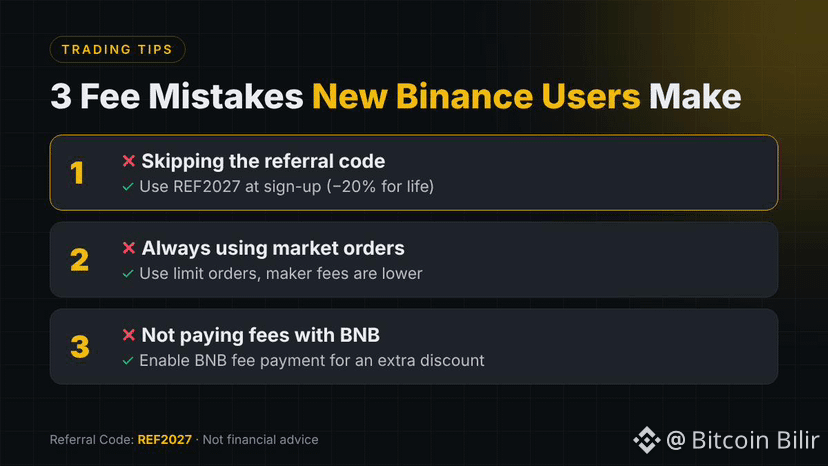
Fee Mistakes New Binance Users Make
Most new traders lose money on fees without even noticing. Avoid these:
❌ Mistake 1: Skipping the referral code
The referral code can only be added at sign-up. Miss it and you pay full fees forever.
✅ Fix: Use REF2027 for a lifetime 20% discount on Spot & Futures.
❌ Mistake 2: Always using market orders
Market (taker) orders cost more. On Futures, taker fees are 2.5x maker fees.
✅ Fix: Use limit orders whenever you can.
❌ Mistake 3: Not paying fees with BNB
Binance gives an extra discount when you pay fees with BNB.
✅ Fix: Turn on BNB fee payment in your settings.
Small fees add up fast. Fix all three and keep more of your profits. 💰
🔑 Binance Referral Code: REF2027
⚠️ Not financial advice. DYOR.
#Binance #REF2027 #BinanceReferralCode
THE_PUNCHER:
Compré un poquito de BNB para pagar comisiones y configuré la app para pagar con BNB.
4
41
6.8k
Article
Binance Referral Code BTC2026: Sign-Up Guide and FAQ (2026)The Binance referral code in this guide is BTC2026. Below: how to enter it at sign-up, what to check if you want to add it later, and short answers to common questions. Last checked against Binance's pages on November 21, 2026.
What is a Binance referral code?
A referral code links your new Binance account to the person who invited you. You enter it once, when you create the account. Using a code costs nothing, and it does not change how Binance works for you.
How to sign up on Binance with code BTC2026
Open the [BTC2026 sign-up link](https://www.binance.com/join?ref=BTC2026). The code BTC2026 is filled in for you.Register with your email or phone number and set a strong password.Before you finish, check that the referral field shows BTC2026.Complete identity verification (KYC) so you can deposit and trade.
Identity verification (KYC): what to prepare
Basic details: Full name, date of birth and addressA valid ID document: Passport, national ID card or driving licenceFace check: A short selfie or video checkClear photos, real data: Blurry photos or wrong details slow it down
Secure your new account first
Turn on 2FA: Use an authenticator app, not only SMSAdd a passkey: Sign in with your device instead of typing a passwordSet an anti-phishing code: It appears in genuine Binance emailsUse a withdrawal whitelist: Withdraw only to addresses you saved
How to make your first deposit
You can fund the account with crypto from another wallet, or with local currency where Binance supports it in your country.
Click Deposit: Choose crypto or your local currencyPick the coin: For example USDTMatch the network: Use the same network as the sending walletWait for confirmations: Then the balance shows in your account
Your first Spot trade, step by step
Open Trade, then Spot: From the top menuSearch for a pair: For example BTC/USDTChoose Limit or Market: Limit sets your price, Market fills nowEnter the amount: In BTC or in USDTCheck your order: Open Orders and Trade History
What the code means for Spot trading
Binance's referral sign-up page lists up to 20% trade rebates on qualifying Spot trading fees for users who register with a code (checked November 21, 2026). Welcome rewards are separate and depend on tasks, your region and eligibility. Since April 29, 2026, Spot referral amounts are calculated on net fees, so they can be lower. Choose an exchange for its security, its coins and its tools, not for a rebate.
Can I add BTC2026 after I sign up?
Sometimes. Binance lets you add a code later only if all of these are true:
Your account is less than 30 days old.It has no referral code yet.You have not deposited or traded yet.You meet any other conditions on Binance's referral page.
A referral code cannot be changed or removed once it is linked. Closing an account to register again can end referral benefits.
Binance referral code BTC2026: FAQ
Is BTC2026 free to use?
Yes. Entering a referral code costs nothing.
Can I change my referral code later?
No. Once a code is linked to your account, it stays.
Does the code work in every country?
Only where Binance offers its services. Check that Binance is available in your country before you register.
Do I need to verify my identity?
Yes. Binance requires identity verification before you can deposit and trade.
I already have a Binance account. Can I use BTC2026?
Only if your account meets the conditions above. Otherwise the code cannot be added.
Is this an official Binance article?
No. It is an independent guide written by a Binance user.
Does a referral code reduce trading risk?
No. Crypto prices can move fast. Only use money you can afford to lose.
What is a Spot trade?
You buy or sell a coin at the current price and own it straight away. No borrowing is involved.
Market or Limit order: which should I use first?
A Market order fills right away at the best available price. A Limit order waits until the price you set is reached.
Which network should I choose for a deposit?
The same network the sending wallet uses. Sending on the wrong network can lose the funds.
What is 2FA?
A second check at sign-in and withdrawal, usually a code from an authenticator app.
What is an anti-phishing code?
A word you choose that Binance adds to its real emails, so you can spot fake ones.
Is the welcome reward guaranteed?
No. It depends on tasks, your region and eligibility, as shown on Binance's page.
Where can I read the official rules?
On binance.com: the referral FAQ and the fee pages.
Summary
Binance referral code: BTC2026. To use it, [open the BTC2026 sign-up page](https://www.binance.com/join?ref=BTC2026) and check that the code shows before you finish registering.
Disclosure: BTC2026 is my referral code, and I may earn commission from qualifying activity. This is an independent guide, not an official Binance post. Benefits depend on Binance's terms, your region and your eligibility. Crypto trading carries risk. Not financial advice. DYOR.
#BinanceReferralCode #BTC2026 #Binance #CryptoTips
Binance Referral Code BTC2026: Sign-Up Guide and FAQ (2026)
The Binance referral code in this guide is BTC2026. Below: how to enter it at sign-up, what to check if you want to add it later, and short answers to common questions. Last checked against Binance's pages on November 21, 2026.
What is a Binance referral code?
A referral code links your new Binance account to the person who invited you. You enter it once, when you create the account. Using a code costs nothing, and it does not change how Binance works for you.
How to sign up on Binance with code BTC2026
Open the BTC2026 sign-up link. The code BTC2026 is filled in for you.Register with your email or phone number and set a strong password.Before you finish, check that the referral field shows BTC2026.Complete identity verification (KYC) so you can deposit and trade.
Identity verification (KYC): what to prepare
Basic details: Full name, date of birth and addressA valid ID document: Passport, national ID card or driving licenceFace check: A short selfie or video checkClear photos, real data: Blurry photos or wrong details slow it down
Secure your new account first
Turn on 2FA: Use an authenticator app, not only SMSAdd a passkey: Sign in with your device instead of typing a passwordSet an anti-phishing code: It appears in genuine Binance emailsUse a withdrawal whitelist: Withdraw only to addresses you saved
How to make your first deposit
You can fund the account with crypto from another wallet, or with local currency where Binance supports it in your country.
Click Deposit: Choose crypto or your local currencyPick the coin: For example USDTMatch the network: Use the same network as the sending walletWait for confirmations: Then the balance shows in your account
Your first Spot trade, step by step
Open Trade, then Spot: From the top menuSearch for a pair: For example BTC/USDTChoose Limit or Market: Limit sets your price, Market fills nowEnter the amount: In BTC or in USDTCheck your order: Open Orders and Trade History
What the code means for Spot trading
Binance's referral sign-up page lists up to 20% trade rebates on qualifying Spot trading fees for users who register with a code (checked November 21, 2026). Welcome rewards are separate and depend on tasks, your region and eligibility. Since April 29, 2026, Spot referral amounts are calculated on net fees, so they can be lower. Choose an exchange for its security, its coins and its tools, not for a rebate.
Can I add BTC2026 after I sign up?
Sometimes. Binance lets you add a code later only if all of these are true:
Your account is less than 30 days old.It has no referral code yet.You have not deposited or traded yet.You meet any other conditions on Binance's referral page.
A referral code cannot be changed or removed once it is linked. Closing an account to register again can end referral benefits.
Binance referral code BTC2026: FAQ
Is BTC2026 free to use?
Yes. Entering a referral code costs nothing.
Can I change my referral code later?
No. Once a code is linked to your account, it stays.
Does the code work in every country?
Only where Binance offers its services. Check that Binance is available in your country before you register.
Do I need to verify my identity?
Yes. Binance requires identity verification before you can deposit and trade.
I already have a Binance account. Can I use BTC2026?
Only if your account meets the conditions above. Otherwise the code cannot be added.
Is this an official Binance article?
No. It is an independent guide written by a Binance user.
Does a referral code reduce trading risk?
No. Crypto prices can move fast. Only use money you can afford to lose.
What is a Spot trade?
You buy or sell a coin at the current price and own it straight away. No borrowing is involved.
Market or Limit order: which should I use first?
A Market order fills right away at the best available price. A Limit order waits until the price you set is reached.
Which network should I choose for a deposit?
The same network the sending wallet uses. Sending on the wrong network can lose the funds.
What is 2FA?
A second check at sign-in and withdrawal, usually a code from an authenticator app.
What is an anti-phishing code?
A word you choose that Binance adds to its real emails, so you can spot fake ones.
Is the welcome reward guaranteed?
No. It depends on tasks, your region and eligibility, as shown on Binance's page.
Where can I read the official rules?
On binance.com: the referral FAQ and the fee pages.
Summary
Binance referral code: BTC2026. To use it, open the BTC2026 sign-up page and check that the code shows before you finish registering.
Disclosure: BTC2026 is my referral code, and I may earn commission from qualifying activity. This is an independent guide, not an official Binance post. Benefits depend on Binance's terms, your region and your eligibility. Crypto trading carries risk. Not financial advice. DYOR.
#BinanceReferralCode #BTC2026 #Binance #CryptoTips
135

Article
Signing up for Binance with the BINANCEBRO referral code: checklist, scenarios, and glossary (2026)Updated: November 22, 2026 · Son of Nakamoto, Binance user since 2019
✔️ Last checked against Binance’s official pages: November 22, 2026, 19:28 UTC
Transparency notice: BINANCEBRO is my personal code for Binance’s Referral Pro program. Binance pays me a commission for each person who registers with it, and I pass part of that on to them. It costs you nothing: trading fees are the same. This is not financial advice.
Quick summary: To use a referral code on Binance, just enter it in the “Referral ID (optional)” field before completing registration. The code in this guide is BINANCEBRO. If you’ve already created your account, you can still add it within 30 days, provided you meet Binance’s conditions, which I explain below.
Signing up for Binance with the BINANCEBRO referral code: checklist, scenarios, and glossary (2026)
Updated: November 22, 2026 · Son of Nakamoto, Binance user since 2019
✔️ Last checked against Binance’s official pages: November 22, 2026, 19:28 UTC
Transparency notice: BINANCEBRO is my personal code for Binance’s Referral Pro program. Binance pays me a commission for each person who registers with it, and I pass part of that on to them. It costs you nothing: trading fees are the same. This is not financial advice.
Quick summary: To use a referral code on Binance, just enter it in the “Referral ID (optional)” field before completing registration. The code in this guide is BINANCEBRO. If you’ve already created your account, you can still add it within 30 days, provided you meet Binance’s conditions, which I explain below.
90
Article
Binance Futures Fees Explained: Maker, Taker, Funding and SIGNUP2027Futures traders pay two kinds of costs on Binance: trading fees and funding. This guide explains both with real numbers from November 20, 2026, and shows what the Binance referral code SIGNUP2027 changes. [Binance referral code SIGNUP2027 sign-up link](https://www.binance.com/join?ref=SIGNUP2027)
Binance Futures Trading Fees for Regular Users
USDT-margined contracts: 0.0200% maker / 0.0500% takerPaying with BNB (10% off): 0.0180% / 0.0450%USDC and USD1 contracts during the current promotion: 0.0000% maker / 0.0400% taker
These rates are from the [USDⓈ-M Futures fee page](https://www.binance.com/en/fee/futureFee), checked November 20, 2026.
Maker vs Taker in One Sentence
A maker order waits in the order book (a limit order that does not fill at once); a taker order fills immediately (a market order). Makers pay less.
Example: One 1,000 USDT SOLUSDT Trade
Open with a market order (taker): 1,000 x 0.05% = 0.50 USDTClose with a limit order (maker): 1,000 x 0.02% = 0.20 USDTTotal: 0.70 USDTWith SIGNUP2027 (20% off): 0.56 USDT, so you save 0.14 USDT on this trade
Do that 100 times a month and the saving is 14 USDT, every month, for life.
What Is the Funding Rate?
Perpetual contracts have no expiry, so Binance uses funding to keep the price close to the spot index. It is paid between long and short traders every 8 hours. The SOLUSDT header showed Funding (8h) 0.00415% with a countdown to the next payment.
When funding is positive, longs pay shorts. On a 1,000 USDT long, 0.00415% means about 0.04 USDT per 8 hours. Funding is paid between traders, while the referral discount applies to your trading fees.
4 Ways to Cut Your Futures Costs
Sign up with SIGNUP2027 for 20% off every trading fee.Use limit orders to pay maker instead of taker fees.Hold BNB to pay fees for an extra 10% off.Check funding before holding a position for days.
Start Trading Futures with SIGNUP2027
[Open the SIGNUP2027 sign-up page](https://www.binance.com/join?ref=SIGNUP2027) and keep 20% of every Futures fee in your account.
Disclosure: SIGNUP2027 is my referral code, and I may earn commission from qualifying activity. This is an independent guide, not an official Binance post. Rewards depend on Binance's terms, your region and your eligibility. Crypto and Futures trading carry high risk, and leverage can wipe out your margin. Not financial advice. DYOR.
#BinanceReferralCode #SIGNUP2027 #BİNANCEFUTURES #Binance
Binance Futures Fees Explained: Maker, Taker, Funding and SIGNUP2027
Futures traders pay two kinds of costs on Binance: trading fees and funding. This guide explains both with real numbers from November 20, 2026, and shows what the Binance referral code SIGNUP2027 changes. Binance referral code SIGNUP2027 sign-up link
Binance Futures Trading Fees for Regular Users
USDT-margined contracts: 0.0200% maker / 0.0500% takerPaying with BNB (10% off): 0.0180% / 0.0450%USDC and USD1 contracts during the current promotion: 0.0000% maker / 0.0400% taker
These rates are from the USDⓈ-M Futures fee page, checked November 20, 2026.
Maker vs Taker in One Sentence
A maker order waits in the order book (a limit order that does not fill at once); a taker order fills immediately (a market order). Makers pay less.
Example: One 1,000 USDT SOLUSDT Trade
Open with a market order (taker): 1,000 x 0.05% = 0.50 USDTClose with a limit order (maker): 1,000 x 0.02% = 0.20 USDTTotal: 0.70 USDTWith SIGNUP2027 (20% off): 0.56 USDT, so you save 0.14 USDT on this trade
Do that 100 times a month and the saving is 14 USDT, every month, for life.
What Is the Funding Rate?
Perpetual contracts have no expiry, so Binance uses funding to keep the price close to the spot index. It is paid between long and short traders every 8 hours. The SOLUSDT header showed Funding (8h) 0.00415% with a countdown to the next payment.
When funding is positive, longs pay shorts. On a 1,000 USDT long, 0.00415% means about 0.04 USDT per 8 hours. Funding is paid between traders, while the referral discount applies to your trading fees.
4 Ways to Cut Your Futures Costs
Sign up with SIGNUP2027 for 20% off every trading fee.Use limit orders to pay maker instead of taker fees.Hold BNB to pay fees for an extra 10% off.Check funding before holding a position for days.
Start Trading Futures with SIGNUP2027
Open the SIGNUP2027 sign-up page and keep 20% of every Futures fee in your account.
Disclosure: SIGNUP2027 is my referral code, and I may earn commission from qualifying activity. This is an independent guide, not an official Binance post. Rewards depend on Binance's terms, your region and your eligibility. Crypto and Futures trading carry high risk, and leverage can wipe out your margin. Not financial advice. DYOR.
#BinanceReferralCode #SIGNUP2027 #BİNANCEFUTURES #Binance
162
Article
Binance Referral Code SIGNUP2027 FAQ: 12 Questions New Users AskNew users ask the same questions about the Binance referral code SIGNUP2027 again and again. Here are short, clear answers to the twelve most common ones, checked on November 20, 2026. [Binance referral code SIGNUP2027 sign-up link](https://www.binance.com/join?ref=SIGNUP2027)
1. What is the Binance referral code for 2027?
The code is SIGNUP2027. It gives a lifetime 20% commission discount on Spot and Futures trading fees, and new users can unlock up to $19,800 in welcome bonus rewards.
2. Where do I enter SIGNUP2027?
You don't have to type it. Open [https://www.binance.com/join?ref=SIGNUP2027](https://www.binance.com/join?ref=SIGNUP2027) and the code is filled in for you. The sign-up page shows Code: SIGNUP2027 at the top left.
3. Is the 20% discount for Spot only?
No. With SIGNUP2027 the discount covers both Spot and Futures trading fees.
4. How long does the discount last?
For the lifetime of the account. You don't need to renew it.
5. What are the normal Binance fees?
On the [Spot fee page](https://www.binance.com/en/fee/trading) a Regular user pays 0.100% maker and 0.100% taker, or 0.075% when paying with BNB. On [USDⓈ-M Futures](https://www.binance.com/en/fee/futureFee) it is 0.0200% maker and 0.0500% taker.
6. How much will I actually save?
Spot: 5,000 USDT traded = 5 USDT fee, you save 1 USDT.Futures: 20,000 USDT taker volume = 10 USDT fee, you save 2 USDT.Active traders save more, because the discount repeats on every trade.
7. How does the $19,800 bonus work?
It is the maximum of a welcome task ladder. You unlock rewards step by step by completing deposit and trading tasks within the time shown in the Rewards Hub.
8. Do I need to verify my identity?
Yes. Identity verification is needed to deposit, trade and claim rewards. Prepare an ID card or passport before you start.
9. Can I add the code after I sign up?
Only in limited cases, so it is much safer to use the link when you first register.
10. Can I use the code on the mobile app?
Yes. Open the link on your phone, finish the sign-up, then log in to the app with the same account. The discount stays on the account.
11. Does the code change my trading limits or prices?
No. You trade the same markets at the same prices. Only the fee you pay is lower.
12. What is the most common mistake?
Signing up first and looking for a code later. Always check that Code: SIGNUP2027 is visible before you click Register.
Get Binance Referral Code SIGNUP2027
[Open the SIGNUP2027 sign-up page](https://www.binance.com/join?ref=SIGNUP2027) and keep the 20% discount on every Spot and Futures trade you make.
Disclosure: SIGNUP2027 is my referral code, and I may earn commission from qualifying activity. This is an independent guide, not an official Binance post. Rewards depend on Binance's terms, your region and your eligibility. Crypto and Futures trading carry high risk, and leverage can wipe out your margin. Not financial advice. DYOR.
#BinanceReferralCode #SIGNUP2027 #Binance #CryptoTips
Binance Referral Code SIGNUP2027 FAQ: 12 Questions New Users Ask
New users ask the same questions about the Binance referral code SIGNUP2027 again and again. Here are short, clear answers to the twelve most common ones, checked on November 20, 2026. Binance referral code SIGNUP2027 sign-up link
1. What is the Binance referral code for 2027?
The code is SIGNUP2027. It gives a lifetime 20% commission discount on Spot and Futures trading fees, and new users can unlock up to $19,800 in welcome bonus rewards.
2. Where do I enter SIGNUP2027?
You don't have to type it. Open https://www.binance.com/join?ref=SIGNUP2027 and the code is filled in for you. The sign-up page shows Code: SIGNUP2027 at the top left.
3. Is the 20% discount for Spot only?
No. With SIGNUP2027 the discount covers both Spot and Futures trading fees.
4. How long does the discount last?
For the lifetime of the account. You don't need to renew it.
5. What are the normal Binance fees?
On the Spot fee page a Regular user pays 0.100% maker and 0.100% taker, or 0.075% when paying with BNB. On USDⓈ-M Futures it is 0.0200% maker and 0.0500% taker.
6. How much will I actually save?
Spot: 5,000 USDT traded = 5 USDT fee, you save 1 USDT.Futures: 20,000 USDT taker volume = 10 USDT fee, you save 2 USDT.Active traders save more, because the discount repeats on every trade.
7. How does the $19,800 bonus work?
It is the maximum of a welcome task ladder. You unlock rewards step by step by completing deposit and trading tasks within the time shown in the Rewards Hub.
8. Do I need to verify my identity?
Yes. Identity verification is needed to deposit, trade and claim rewards. Prepare an ID card or passport before you start.
9. Can I add the code after I sign up?
Only in limited cases, so it is much safer to use the link when you first register.
10. Can I use the code on the mobile app?
Yes. Open the link on your phone, finish the sign-up, then log in to the app with the same account. The discount stays on the account.
11. Does the code change my trading limits or prices?
No. You trade the same markets at the same prices. Only the fee you pay is lower.
12. What is the most common mistake?
Signing up first and looking for a code later. Always check that Code: SIGNUP2027 is visible before you click Register.
Get Binance Referral Code SIGNUP2027
Open the SIGNUP2027 sign-up page and keep the 20% discount on every Spot and Futures trade you make.
Disclosure: SIGNUP2027 is my referral code, and I may earn commission from qualifying activity. This is an independent guide, not an official Binance post. Rewards depend on Binance's terms, your region and your eligibility. Crypto and Futures trading carry high risk, and leverage can wipe out your margin. Not financial advice. DYOR.
#BinanceReferralCode #SIGNUP2027 #Binance #CryptoTips
5
982
Article
Binance Referral Code BTC2026: Signup Guide and FAQs (2026)The Binance referral code in this guide is BTC2026. It explains how to enter the code when signing up, what to check if you want to add it later, and gives short answers to frequently asked questions. Last checked against Binance's pages: November 21, 2026.
What is a Binance referral code?
A referral code links a new Binance account to the person who invited you. Enter it once when creating your account. Using a code is free and does not change how you use Binance.
Binance Referral Code BTC2026: Signup Guide and FAQs (2026)
The Binance referral code in this guide is BTC2026. It explains how to enter the code when signing up, what to check if you want to add it later, and gives short answers to frequently asked questions. Last checked against Binance's pages: November 21, 2026.
What is a Binance referral code?
A referral code links a new Binance account to the person who invited you. Enter it once when creating your account. Using a code is free and does not change how you use Binance.
What is a Binance referral code?
A referral code links a new Binance account to the person who invited you. Enter it once when creating your account. Using a code is free and does not change how you use Binance.
68
Article
Binance referral code BTC2026: Signup guide and FAQsThe Binance referral code in this article is BTC2026. Below is how to enter the code when signing up, what to check if you want to add a code later, and brief answers to frequently asked questions. Last checked on Binance's pages: 21/11/2026.
What is a Binance referral code?
A referral code links your new Binance account to the person who invited you. You can enter the code only once, when creating your account. Using a code is free and does not change how Binance works for you.
Binance referral code BTC2026: Signup guide and FAQs
The Binance referral code in this article is BTC2026. Below is how to enter the code when signing up, what to check if you want to add a code later, and brief answers to frequently asked questions. Last checked on Binance's pages: 21/11/2026.
What is a Binance referral code?
A referral code links your new Binance account to the person who invited you. You can enter the code only once, when creating your account. Using a code is free and does not change how Binance works for you.
What is a Binance referral code?
A referral code links your new Binance account to the person who invited you. You can enter the code only once, when creating your account. Using a code is free and does not change how Binance works for you.
69
Article
Binance Referral Code BTC2026: Sign-Up Guide and FAQ (2026)The Binance referral code in this guide is BTC2026. Below: how to enter it when signing up, what to check if you want to add it later, and quick answers to common questions. Last checked on Binance’s page: November 21, 2026.
What is a Binance referral code?
A referral code links your new Binance account to the person who invited you. You enter it just once, when creating your account. Using a code is free and doesn’t change how Binance works for you.
Binance Referral Code BTC2026: Sign-Up Guide and FAQ (2026)
The Binance referral code in this guide is BTC2026. Below: how to enter it when signing up, what to check if you want to add it later, and quick answers to common questions. Last checked on Binance’s page: November 21, 2026.
What is a Binance referral code?
A referral code links your new Binance account to the person who invited you. You enter it just once, when creating your account. Using a code is free and doesn’t change how Binance works for you.
What is a Binance referral code?
A referral code links your new Binance account to the person who invited you. You enter it just once, when creating your account. Using a code is free and doesn’t change how Binance works for you.
74
Article
Binance referral code BTC2026: sign-up guide and questions and answersThis guide uses Binance referral code BTC2026. Below, you’ll find how to enter it during sign-up, what to check if you want to add it later, and short answers to common questions. Last checked on Binance pages: 21 November 2026.
What is a Binance referral code?
Binance referral code BTC2026: sign-up guide and questions and answers
This guide uses Binance referral code BTC2026. Below, you’ll find how to enter it during sign-up, what to check if you want to add it later, and short answers to common questions. Last checked on Binance pages: 21 November 2026.
What is a Binance referral code?
What is a Binance referral code?
39
Article
Binance referral code BTC2026: sign-up guide and FAQsThe Binance referral code in this guide is BTC2026. Here you’ll find how to enter it when signing up, what to check if you want to add it later, and brief answers to frequently asked questions. Binance pages last reviewed: November 21, 2026.
What is a Binance referral code?
A referral code links your new Binance account to the person who invited you. It can only be entered once, when you create your account. Using the code is free and does not change how Binance works for you.
Binance referral code BTC2026: sign-up guide and FAQs
The Binance referral code in this guide is BTC2026. Here you’ll find how to enter it when signing up, what to check if you want to add it later, and brief answers to frequently asked questions. Binance pages last reviewed: November 21, 2026.
What is a Binance referral code?
A referral code links your new Binance account to the person who invited you. It can only be entered once, when you create your account. Using the code is free and does not change how Binance works for you.
What is a Binance referral code?
A referral code links your new Binance account to the person who invited you. It can only be entered once, when you create your account. Using the code is free and does not change how Binance works for you.
1
53

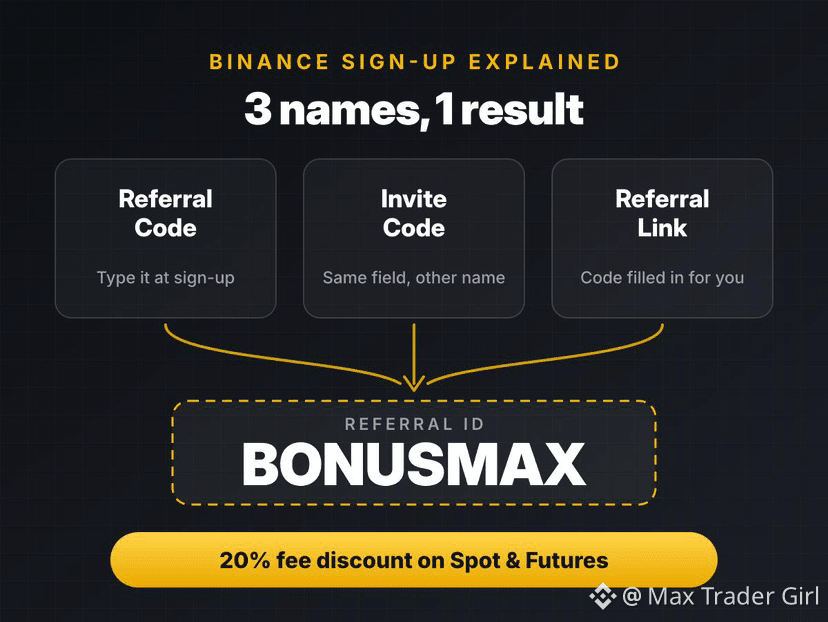
Binance Invite Code vs Referral Code vs Referral Link: What’s the Difference? 🔑
New users often get confused by these terms. Here’s the simple answer: they all do the same job.
🔹 Referral Code / Referral ID
A short code you type during sign-up. Example: BONUSMAX
🔹 Invite Code / Inviter Code
Just another name for the referral code. Same field, same result.
🔹 Referral Link
A sign-up link with the code already inside. Open it and the Referral ID field is filled in for you.
Whichever you use, the result is the same: your account is linked to the code and you get 20% of your trading fees back on Spot & Futures with BONUSMAX.
✅ Option 1: Type BONUSMAX in the Referral ID field
✅ Option 2: Use the link below (code added automatically)
👉[https://www.binance.com/join?ref=BONUSMAX](https://www.binance.com/join?ref=BONUSMAX)
💡 Tip: Before you tap “Create Account”, check that the field shows BONUSMAX.
#BinanceInviteCode #BinanceReferralCode #BONUSMAX
Binance Invite Code vs Referral Code vs Referral Link: What’s the Difference? 🔑
New users often get confused by these terms. Here’s the simple answer: they all do the same job.
🔹 Referral Code / Referral ID
A short code you type during sign-up. Example: BONUSMAX
🔹 Invite Code / Inviter Code
Just another name for the referral code. Same field, same result.
🔹 Referral Link
A sign-up link with the code already inside. Open it and the Referral ID field is filled in for you.
Whichever you use, the result is the same: your account is linked to the code and you get 20% of your trading fees back on Spot & Futures with BONUSMAX.
✅ Option 1: Type BONUSMAX in the Referral ID field
✅ Option 2: Use the link below (code added automatically)
👉https://www.binance.com/join?ref=BONUSMAX
💡 Tip: Before you tap “Create Account”, check that the field shows BONUSMAX.
#BinanceInviteCode #BinanceReferralCode #BONUSMAX
1
92
Article
Binance referral code BTC2026: sign-up and FAQsThe Binance referral code in this guide is BTC2026. Below: how to enter it when signing up, what to check if you want to add it later, and brief answers to common questions. Last checked against Binance pages: November 21, 2026.
What is a Binance referral code?
A referral code links your new Binance account to the person who invited you. You enter the code once, when creating your account. It’s free and doesn’t change how Binance works for you.
Binance referral code BTC2026: sign-up and FAQs
The Binance referral code in this guide is BTC2026. Below: how to enter it when signing up, what to check if you want to add it later, and brief answers to common questions. Last checked against Binance pages: November 21, 2026.
What is a Binance referral code?
A referral code links your new Binance account to the person who invited you. You enter the code once, when creating your account. It’s free and doesn’t change how Binance works for you.
What is a Binance referral code?
A referral code links your new Binance account to the person who invited you. You enter the code once, when creating your account. It’s free and doesn’t change how Binance works for you.
52
Article
Binance Beginner Handbook 2027: Referral Code SIGNUP2027 WalkthroughThis handbook shows a new user how to use Binance from the first click to the first Futures trade. Every screenshot was taken on Binance on November 20, 2026, and every example uses real prices from that morning: ETH/USDT near 1,754 on Spot and SOLUSDT near 72.50 on Futures.
Before anything else, register with the Binance referral code SIGNUP2027. It gives you a lifetime 20% commission discount on both Spot and Futures trading fees, and new users can unlock up to $19,800 in welcome bonus rewards. [Binance referral code SIGNUP2027 sign-up link](https://www.binance.com/join?ref=SIGNUP2027)
Binance Referral Code SIGNUP2027 at a Glance
Referral code: SIGNUP2027Fee discount: 20% on Spot and Futures trading fees, for lifeNew user bonus: up to $19,800 through welcome tasksSign-up link: [https://www.binance.com/join?ref=SIGNUP2027](https://www.binance.com/join?ref=SIGNUP2027)Checked: November 20, 2026
Step 1: Register on Binance with SIGNUP2027
Open the [SIGNUP2027 registration page](https://www.binance.com/join?ref=SIGNUP2027). The top left must say Code: SIGNUP2027. Under it you will see two boxes: "Up to 20% trade rebates" and "Up to $19,800 new user bonus". If you see them, the code is already attached, so you don't need to type it anywhere.
Enter your email or phone number.Tick the box to accept the Privacy Notice and click Register.Type the 6-digit code Binance sends you.Create a strong password that you use nowhere else.
Step 2: Verify Your Identity
Binance asks for identity verification before you can deposit, trade and withdraw freely. Have your ID card or passport ready, take the photos in good light, and finish the face check in one go. Most accounts are approved within minutes.
Turn on two-factor authentication and set an anti-phishing code right after. Both take two minutes and protect your account from fake emails.
Step 3: How to Deposit USDT on Binance
Go to Wallet, then Deposit, then Deposit Crypto. Pick USDT as the asset, then choose the network. The network must be the same one your sending wallet uses, or the funds can be lost.
BSC (BEP20): about 1 minute, 1 confirmationTRX (TRC20): about 1 minute, 1 confirmationETH (ERC20): about 2 minutes, 6 confirmations
Example: you have 200 USDT on another wallet on BEP20. Choose BSC here, copy the address Binance shows, paste it in the sending wallet, select BEP20 there too, and send. The USDT arrives in your Spot wallet in about a minute.
Step 4: Place a Limit Order on Binance Spot
A limit order buys or sells only at the price you choose. Open Trade, then Spot, and search ETH/USDT. In the order panel pick Limit.
Example from the screenshot: ETH was trading at 1,753.64. We set the buy price to 1,740 USDT and the amount to 0.05 ETH. The Total field fills in by itself: 1,740 x 0.05 = 87 USDT. The order waits in the book until ETH drops to 1,740.
Fee math: the Regular user Spot fee is 0.100% ([Binance fee page](https://www.binance.com/en/fee/trading), checked November 20, 2026). On 87 USDT that is 0.087 USDT. With the 20% discount from SIGNUP2027, you pay about 0.0696 USDT. Small on one order, but it adds up over hundreds of trades.
Step 5: Place a Market Order on Binance
A market order fills at once at the best available price. Click Market. The price field shows "Market Price", so you only enter how much you want to spend in USDT (Total) or how much ETH you want to sell (Amount). The minimum is 5 USDT.
Use market orders when speed matters more than the exact price. Use limit orders when you want control over the price.
Step 6: Other Binance Order Types
Open the arrow next to Stop Limit to see the full list: Stop Limit, Stop Market, Trailing Stop, OCO, TWAP and POV. For a beginner, Stop Limit and OCO are the two worth learning first.
Step 7: How to Set a Stop-Loss on Binance (Stop Limit)
A stop-loss sells your coins if the price falls to a level you pick, so one bad move doesn't turn into a big loss. On Spot you build it with a Stop Limit order on the Sell side.
Stop: 1,700. When ETH trades at 1,700, the order wakes up.Price: 1,695. It then places a sell limit at 1,695.Amount: 0.05 ETH. Total: 84.75 USDT.
Keep the limit price a little under the stop price. If the market falls fast through both, a stop limit may not fill; that is the trade-off for price control.
Step 8: Transfer USDT from Spot to Futures
Futures uses its own wallet. On the Futures page click the two-arrow icon next to "Avbl". Set From to your Spot account and To to USDⓈ-M Futures, pick USDT, type the amount (100 in our example) and confirm. The transfer is instant and free.
Step 9: How to Change Leverage on Binance Futures
Open SOLUSDT Perpetual. At the top of the order panel you will see Cross and a leverage button. The default here was 20x. Click it and the Adjust Leverage window opens with a slider from 1x to 100x.
For a first trade, type 5 and confirm. Lower leverage means a liquidation price further away from your entry. The window itself warns that higher leverage increases liquidation risk.
Step 10: Open a Futures Trade with Take Profit and Stop Loss
Pick Limit, set the price, enter the size, and tick TP/SL before you click Buy/Long. Example from the screenshot:
Price: 72.52 USDT, size: 100 USDT (about 1.38 SOL)Take Profit: 76, about +4.8%, a gain of about 4.80 USDTStop Loss: 70, about -3.5%, a loss of about 3.47 USDTAt 5x leverage, the margin used is only 20 USDT
Futures fees for Regular users are 0.0200% maker and 0.0500% taker on USDT pairs ([Futures fee page](https://www.binance.com/en/fee/futureFee), checked November 20, 2026). Opening this 100 USDT trade as a taker costs 0.05 USDT; with SIGNUP2027 you save 20% of it on every trade.
Step 11: How to Withdraw from Binance
Go to Wallet, then Withdraw. Pick USDT, paste the receiving address, then choose the network. The list shows the fee for each one, and this is where the right choice saves money:
BSC (BEP20): fee 0.01 USDTopBNB: fee 0.015 USDTTRX (TRC20): fee 2 USDT
The receiving wallet must support the same network. Send a small test amount first if you are using a new address.
How Much SIGNUP2027 Saves You: Two Examples
Spot: 10,000 USDT traded in a month x 0.100% = 10 USDT in fees. 20% off saves 2 USDT a month.Futures: 50,000 USDT taker volume x 0.050% = 25 USDT. 20% off saves 5 USDT a month.Because the discount is lifetime, the saving repeats every month you trade.
FAQ: Binance Referral Code SIGNUP2027
What is the Binance referral code for 2027?
Use SIGNUP2027. It gives a lifetime 20% discount on Spot and Futures fees and access to up to $19,800 in new user bonus rewards.
Can I add the code after I register?
Binance allows it only in limited cases. The safe way is to sign up through the link so the code is attached from day one.
What is the safest leverage for beginners?
There is no safe leverage, but low leverage like 2x to 5x with a stop loss keeps the liquidation price far away and the loss small.
Is a stop limit the same as a stop loss?
A stop limit is the order type you use to build a stop loss on Spot. On Futures you can set the stop loss directly with the TP/SL box.
Start with Binance Referral Code SIGNUP2027
[Open the SIGNUP2027 sign-up page](https://www.binance.com/join?ref=SIGNUP2027), check that Code: SIGNUP2027 is shown, and follow the steps above in order. Start small, use a stop loss on every trade, and keep leverage low until you know how Futures moves.
Disclosure: SIGNUP2027 is my referral code, and I may earn commission from qualifying activity. This is an independent guide, not an official Binance post. Rewards depend on Binance's terms, your region and your eligibility. Crypto and Futures trading carry high risk, and leverage can wipe out your margin. Not financial advice. DYOR.
#BinanceReferralCode #SIGNUP2027 #Binance #BİNANCEFUTURES
Binance Beginner Handbook 2027: Referral Code SIGNUP2027 Walkthrough
This handbook shows a new user how to use Binance from the first click to the first Futures trade. Every screenshot was taken on Binance on November 20, 2026, and every example uses real prices from that morning: ETH/USDT near 1,754 on Spot and SOLUSDT near 72.50 on Futures.
Before anything else, register with the Binance referral code SIGNUP2027. It gives you a lifetime 20% commission discount on both Spot and Futures trading fees, and new users can unlock up to $19,800 in welcome bonus rewards. Binance referral code SIGNUP2027 sign-up link
Binance Referral Code SIGNUP2027 at a Glance
Referral code: SIGNUP2027Fee discount: 20% on Spot and Futures trading fees, for lifeNew user bonus: up to $19,800 through welcome tasksSign-up link: https://www.binance.com/join?ref=SIGNUP2027Checked: November 20, 2026
Step 1: Register on Binance with SIGNUP2027
Open the SIGNUP2027 registration page. The top left must say Code: SIGNUP2027. Under it you will see two boxes: "Up to 20% trade rebates" and "Up to $19,800 new user bonus". If you see them, the code is already attached, so you don't need to type it anywhere.
Enter your email or phone number.Tick the box to accept the Privacy Notice and click Register.Type the 6-digit code Binance sends you.Create a strong password that you use nowhere else.
Step 2: Verify Your Identity
Binance asks for identity verification before you can deposit, trade and withdraw freely. Have your ID card or passport ready, take the photos in good light, and finish the face check in one go. Most accounts are approved within minutes.
Turn on two-factor authentication and set an anti-phishing code right after. Both take two minutes and protect your account from fake emails.
Step 3: How to Deposit USDT on Binance
Go to Wallet, then Deposit, then Deposit Crypto. Pick USDT as the asset, then choose the network. The network must be the same one your sending wallet uses, or the funds can be lost.
BSC (BEP20): about 1 minute, 1 confirmationTRX (TRC20): about 1 minute, 1 confirmationETH (ERC20): about 2 minutes, 6 confirmations
Example: you have 200 USDT on another wallet on BEP20. Choose BSC here, copy the address Binance shows, paste it in the sending wallet, select BEP20 there too, and send. The USDT arrives in your Spot wallet in about a minute.
Step 4: Place a Limit Order on Binance Spot
A limit order buys or sells only at the price you choose. Open Trade, then Spot, and search ETH/USDT. In the order panel pick Limit.
Example from the screenshot: ETH was trading at 1,753.64. We set the buy price to 1,740 USDT and the amount to 0.05 ETH. The Total field fills in by itself: 1,740 x 0.05 = 87 USDT. The order waits in the book until ETH drops to 1,740.
Fee math: the Regular user Spot fee is 0.100% (Binance fee page, checked November 20, 2026). On 87 USDT that is 0.087 USDT. With the 20% discount from SIGNUP2027, you pay about 0.0696 USDT. Small on one order, but it adds up over hundreds of trades.
Step 5: Place a Market Order on Binance
A market order fills at once at the best available price. Click Market. The price field shows "Market Price", so you only enter how much you want to spend in USDT (Total) or how much ETH you want to sell (Amount). The minimum is 5 USDT.
Use market orders when speed matters more than the exact price. Use limit orders when you want control over the price.
Step 6: Other Binance Order Types
Open the arrow next to Stop Limit to see the full list: Stop Limit, Stop Market, Trailing Stop, OCO, TWAP and POV. For a beginner, Stop Limit and OCO are the two worth learning first.
Step 7: How to Set a Stop-Loss on Binance (Stop Limit)
A stop-loss sells your coins if the price falls to a level you pick, so one bad move doesn't turn into a big loss. On Spot you build it with a Stop Limit order on the Sell side.
Stop: 1,700. When ETH trades at 1,700, the order wakes up.Price: 1,695. It then places a sell limit at 1,695.Amount: 0.05 ETH. Total: 84.75 USDT.
Keep the limit price a little under the stop price. If the market falls fast through both, a stop limit may not fill; that is the trade-off for price control.
Step 8: Transfer USDT from Spot to Futures
Futures uses its own wallet. On the Futures page click the two-arrow icon next to "Avbl". Set From to your Spot account and To to USDⓈ-M Futures, pick USDT, type the amount (100 in our example) and confirm. The transfer is instant and free.
Step 9: How to Change Leverage on Binance Futures
Open SOLUSDT Perpetual. At the top of the order panel you will see Cross and a leverage button. The default here was 20x. Click it and the Adjust Leverage window opens with a slider from 1x to 100x.
For a first trade, type 5 and confirm. Lower leverage means a liquidation price further away from your entry. The window itself warns that higher leverage increases liquidation risk.
Step 10: Open a Futures Trade with Take Profit and Stop Loss
Pick Limit, set the price, enter the size, and tick TP/SL before you click Buy/Long. Example from the screenshot:
Price: 72.52 USDT, size: 100 USDT (about 1.38 SOL)Take Profit: 76, about +4.8%, a gain of about 4.80 USDTStop Loss: 70, about -3.5%, a loss of about 3.47 USDTAt 5x leverage, the margin used is only 20 USDT
Futures fees for Regular users are 0.0200% maker and 0.0500% taker on USDT pairs (Futures fee page, checked November 20, 2026). Opening this 100 USDT trade as a taker costs 0.05 USDT; with SIGNUP2027 you save 20% of it on every trade.
Step 11: How to Withdraw from Binance
Go to Wallet, then Withdraw. Pick USDT, paste the receiving address, then choose the network. The list shows the fee for each one, and this is where the right choice saves money:
BSC (BEP20): fee 0.01 USDTopBNB: fee 0.015 USDTTRX (TRC20): fee 2 USDT
The receiving wallet must support the same network. Send a small test amount first if you are using a new address.
How Much SIGNUP2027 Saves You: Two Examples
Spot: 10,000 USDT traded in a month x 0.100% = 10 USDT in fees. 20% off saves 2 USDT a month.Futures: 50,000 USDT taker volume x 0.050% = 25 USDT. 20% off saves 5 USDT a month.Because the discount is lifetime, the saving repeats every month you trade.
FAQ: Binance Referral Code SIGNUP2027
What is the Binance referral code for 2027?
Use SIGNUP2027. It gives a lifetime 20% discount on Spot and Futures fees and access to up to $19,800 in new user bonus rewards.
Can I add the code after I register?
Binance allows it only in limited cases. The safe way is to sign up through the link so the code is attached from day one.
What is the safest leverage for beginners?
There is no safe leverage, but low leverage like 2x to 5x with a stop loss keeps the liquidation price far away and the loss small.
Is a stop limit the same as a stop loss?
A stop limit is the order type you use to build a stop loss on Spot. On Futures you can set the stop loss directly with the TP/SL box.
Start with Binance Referral Code SIGNUP2027
Open the SIGNUP2027 sign-up page, check that Code: SIGNUP2027 is shown, and follow the steps above in order. Start small, use a stop loss on every trade, and keep leverage low until you know how Futures moves.
Disclosure: SIGNUP2027 is my referral code, and I may earn commission from qualifying activity. This is an independent guide, not an official Binance post. Rewards depend on Binance's terms, your region and your eligibility. Crypto and Futures trading carry high risk, and leverage can wipe out your margin. Not financial advice. DYOR.
#BinanceReferralCode #SIGNUP2027 #Binance #BİNANCEFUTURES
134
Article
Binance Referral Code BTC2026: Sign-Up Guide and FAQThe Binance referral code featured in this guide is BTC2026. Here, you’ll see how to enter it when signing up, what to check if you want to add it later, and brief answers to the most common questions. Last checked against Binance pages: November 21, 2026.
What is a Binance referral code?
A referral code links your new Binance account to the person who invited you. You enter it just once, when creating your account. It costs nothing to use and doesn’t change how Binance works for you.
Binance Referral Code BTC2026: Sign-Up Guide and FAQ
The Binance referral code featured in this guide is BTC2026. Here, you’ll see how to enter it when signing up, what to check if you want to add it later, and brief answers to the most common questions. Last checked against Binance pages: November 21, 2026.
What is a Binance referral code?
A referral code links your new Binance account to the person who invited you. You enter it just once, when creating your account. It costs nothing to use and doesn’t change how Binance works for you.
What is a Binance referral code?
A referral code links your new Binance account to the person who invited you. You enter it just once, when creating your account. It costs nothing to use and doesn’t change how Binance works for you.
81
How Much Can a Binance Referral Code Save You? 📊
A 20% fee rebate sounds small, until you see it over a year. Here's what Binance referral code BTC2026 returns at the standard 0.10% Spot fee:
💰 Monthly Spot volume → Yearly savings
• 10,000 USDT → 24 USDT
• 50,000 USDT → 120 USDT
• 100,000 USDT → 240 USDT
• 500,000 USDT → 1,200 USDT
📈 Futures (taker, 0.05% fee):
• 100,000 USDT/month → 120 USDT a year
• 1,000,000 USDT/month → 1,200 USDT a year
The math is simple: fee paid × 20% = what comes back to you, on every trade, automatically.
The only catch? You need to enter the code when you sign up.
👉 [https://www.binance.com/join?ref=BTC2026](https://www.binance.com/join?ref=BTC2026)
Already have an account with no referrer? You may still be eligible to rebind. Check Binance's rebind rules.
#BinanceReferralCode #BinanceFees
How Much Can a Binance Referral Code Save You? 📊
A 20% fee rebate sounds small, until you see it over a year. Here's what Binance referral code BTC2026 returns at the standard 0.10% Spot fee:
💰 Monthly Spot volume → Yearly savings
• 10,000 USDT → 24 USDT
• 50,000 USDT → 120 USDT
• 100,000 USDT → 240 USDT
• 500,000 USDT → 1,200 USDT
📈 Futures (taker, 0.05% fee):
• 100,000 USDT/month → 120 USDT a year
• 1,000,000 USDT/month → 1,200 USDT a year
The math is simple: fee paid × 20% = what comes back to you, on every trade, automatically.
The only catch? You need to enter the code when you sign up.
👉 https://www.binance.com/join?ref=BTC2026
Already have an account with no referrer? You may still be eligible to rebind. Check Binance's rebind rules.
#BinanceReferralCode #BinanceFees
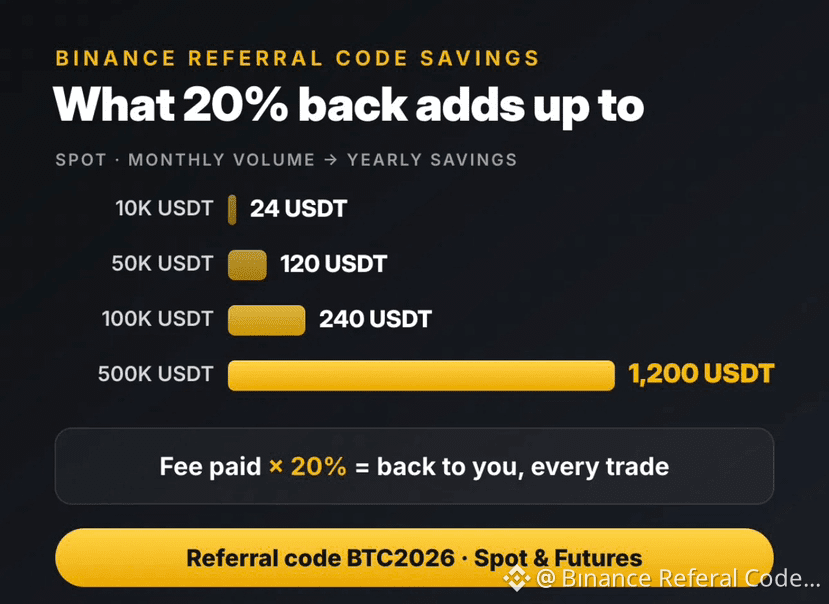
159
Article
Binance Referral Code Bonus 2027: How the $19,800 Rewards WorkNew users who sign up with the Binance referral code SIGNUP2027 get two things: a lifetime 20% discount on Spot and Futures fees, and access to a welcome bonus of up to $19,800. This guide shows how that bonus is actually paid, using the real task table on the sign-up page, checked on November 18, 2026.
[Binance referral code SIGNUP2027 sign-up link](https://www.binance.com/join?ref=SIGNUP2027)
Where to See the Bonus on the Binance Sign-Up Page
Open the [SIGNUP2027 link](https://www.binance.com/join?ref=SIGNUP2027). The left side shows Code: SIGNUP2027, "Up to 20% trade rebates" and "Up to $19,800 new user bonus", plus a "See How" link under the bonus.
The Binance Welcome Bonus Task Table
"See How" opens the Affiliate-Boosted Welcome Bonus. It has seven tiers. Each tier asks for a net deposit and a trading volume inside a set number of days.
Tier 1: $100 net deposit, $3K volume, 7 days, $100 reward.Tier 2: $200 net deposit, $10K volume, 7 days, $200 reward.Tier 3: $500 net deposit, $30K volume, 7 days, $400 reward.Tier 4: $2K net deposit, $500K volume, 14 days, $1K reward.Tier 5: $5K net deposit, $5M volume, 14 days, $3K reward.Tier 6: $10K net deposit, $20M volume, 30 days, $5K reward.Tier 7: $20K net deposit, $50M volume, 30 days, $10K reward.
What "Net Deposit" and "Trade Vol" Mean
Net deposit is what you deposit minus what you withdraw in the period. Trade volume is the total value of your trades. A tier only counts if both targets are hit within its task period.
The top of the table also says 1,000 rewards are available each cycle for new invitees, and the cycle resets every 30 days. Rewards are limited, so finish your sign-up and KYC early.
The Part That Never Runs Out: 20% Off Fees
The bonus is task-based. The fee discount is not. Every Spot and Futures trade you make on the account gets the 20% discount, for life.
Spot 0.075% with BNB: 10,000 USDT a month costs 7.50 USDT, 1.50 USDT comes back.Futures taker 0.045% with BNB: 100,000 USDT a month costs 45 USDT, 9 USDT comes back.
How to Get the Bonus and the Discount
Open [https://www.binance.com/join?ref=SIGNUP2027](https://www.binance.com/join?ref=SIGNUP2027).Check the code line: Code: SIGNUP2027.Register and complete KYC.Open the Rewards Hub and pick the tier that fits your plans.
FAQ
Is the $19,800 paid at once?
No. It is the top of a task ladder. Each tier pays when you meet its deposit and volume targets in time.
Do I keep the 20% discount if I skip the tasks?
Yes. The fee discount is linked to the account through the referral code, not to the tasks.
Claim Your Binance Bonus with SIGNUP2027
[Open the SIGNUP2027 sign-up page](https://www.binance.com/join?ref=SIGNUP2027) and start with the discount on your very first trade.
Disclosure: SIGNUP2027 is my referral code, and I may earn commission from qualifying activity. This is an independent guide, not an official Binance post. Rewards depend on Binance's terms, your region and your eligibility. Crypto and Futures trading carry high risk, and leverage can wipe out your margin. Not financial advice. DYOR.
#BinanceReferralCode #SIGNUP2027 #Binance #BinanceFees
Binance Referral Code Bonus 2027: How the $19,800 Rewards Work
New users who sign up with the Binance referral code SIGNUP2027 get two things: a lifetime 20% discount on Spot and Futures fees, and access to a welcome bonus of up to $19,800. This guide shows how that bonus is actually paid, using the real task table on the sign-up page, checked on November 18, 2026.
Binance referral code SIGNUP2027 sign-up link
Where to See the Bonus on the Binance Sign-Up Page
Open the SIGNUP2027 link. The left side shows Code: SIGNUP2027, "Up to 20% trade rebates" and "Up to $19,800 new user bonus", plus a "See How" link under the bonus.
The Binance Welcome Bonus Task Table
"See How" opens the Affiliate-Boosted Welcome Bonus. It has seven tiers. Each tier asks for a net deposit and a trading volume inside a set number of days.
Tier 1: $100 net deposit, $3K volume, 7 days, $100 reward.Tier 2: $200 net deposit, $10K volume, 7 days, $200 reward.Tier 3: $500 net deposit, $30K volume, 7 days, $400 reward.Tier 4: $2K net deposit, $500K volume, 14 days, $1K reward.Tier 5: $5K net deposit, $5M volume, 14 days, $3K reward.Tier 6: $10K net deposit, $20M volume, 30 days, $5K reward.Tier 7: $20K net deposit, $50M volume, 30 days, $10K reward.
What "Net Deposit" and "Trade Vol" Mean
Net deposit is what you deposit minus what you withdraw in the period. Trade volume is the total value of your trades. A tier only counts if both targets are hit within its task period.
The top of the table also says 1,000 rewards are available each cycle for new invitees, and the cycle resets every 30 days. Rewards are limited, so finish your sign-up and KYC early.
The Part That Never Runs Out: 20% Off Fees
The bonus is task-based. The fee discount is not. Every Spot and Futures trade you make on the account gets the 20% discount, for life.
Spot 0.075% with BNB: 10,000 USDT a month costs 7.50 USDT, 1.50 USDT comes back.Futures taker 0.045% with BNB: 100,000 USDT a month costs 45 USDT, 9 USDT comes back.
How to Get the Bonus and the Discount
Open https://www.binance.com/join?ref=SIGNUP2027.Check the code line: Code: SIGNUP2027.Register and complete KYC.Open the Rewards Hub and pick the tier that fits your plans.
FAQ
Is the $19,800 paid at once?
No. It is the top of a task ladder. Each tier pays when you meet its deposit and volume targets in time.
Do I keep the 20% discount if I skip the tasks?
Yes. The fee discount is linked to the account through the referral code, not to the tasks.
Claim Your Binance Bonus with SIGNUP2027
Open the SIGNUP2027 sign-up page and start with the discount on your very first trade.
Disclosure: SIGNUP2027 is my referral code, and I may earn commission from qualifying activity. This is an independent guide, not an official Binance post. Rewards depend on Binance's terms, your region and your eligibility. Crypto and Futures trading carry high risk, and leverage can wipe out your margin. Not financial advice. DYOR.
#BinanceReferralCode #SIGNUP2027 #Binance #BinanceFees
Trong_Hatachi:
The “up to $19,800” figure really depends on the task table—good call checking what’s actually shown at signup. Follow me back if you share more breakdowns like this!
2
2
17
3.1k
Log in to explore more content
Join global crypto users on Binance Square
⚡️ Get latest and useful information about crypto.
💬 Trusted by the world’s largest crypto exchange.
👍 Discover real insights from verified creators.
Email / Phone number
Trending Topics
1
#BitcoinAndStocksSlipAgainAmidTrump’sTariffPlans
35,349 views
496 Discussing
2
#WillOctCorePCEShiftFedHikeExpectations?
326,313 views
2,146 Discussing
3
#JensenHuangSaysNvidiaDoesn’tNeedASuccessionPlan
22,572 views
331 Discussing
4
#AnthropicBreaksBelowIPOPriceAmidAISlump
121,649 views
1,100 Discussing
5
#HKMALaunchesCMUDigitalAssetPlatformForBondTokenization
0 views
0 Discussing
6
#HongKongPlansToRequireBanksToRegisterWithSFC
369 views
17 Discussing
7
#FidelityCryptoAddsAAVELINKAndUNITrading
7,768 views
145 Discussing
8
#UKToBanExchangesMakingMarketsOnOwnPlatforms
5,091 views
101 Discussing
9
#CFTCApprovesTradeReportingRuleForPredictionMarkets
13,262 views
162 Discussing
10
#Bitcoin'sReboundFadesBelow$60K
188,004 views
467 Discussing