



Content
Creating an account on Binance Futures
Top up your Binance Futures balance
Trading interface
Setting up leverage
What is the difference between the mark price and the latest price?
Available types of orders and how to use them
How to Use the Binance Futures Calculator
How to use hedging mode
What is the financing rate and how can I check it?
What is Post Only, TIF and Position Reduction
Conditions for liquidating your positions
Auto deleveraging (ADL) and its consequences
Summary
Creating an account on Binance Futures
To open a Binance Futures account, you will need a Binance account. You can create one on Binance by clicking “Sign Up” in the top right corner of the screen. Then follow these steps:
Enter your email address and choose a strong password. If you have a referral ID, paste it into the appropriate field. If not, use ourreferral linkto receive a 10% discount on spot/margin trading fees.

When you're ready, click Create Account.
You will then receive a confirmation email. To complete your registration, follow the instructions in the email.
Next, log into your Binance account, hover over the bar at the top of the page and click on “USD(S)-M Futures.”

Click on the "Open Now" button to activate your Binance Futures account. Ready. You can start trading!
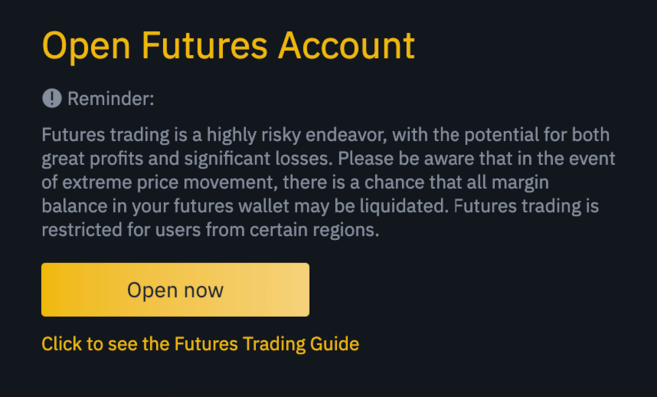
If you are not familiar with trading futures contracts, we recommend reading the articles What are forward and futures contracts? and What are perpetual futures contracts? before using the service.
You can also refer to the Binance Futures FAQ to learn about the specifics of the contracts.
If you are not ready to risk real money, you can start with the Binance Futures test network.
Top up your Binance Futures balance
You can transfer funds between the exchange wallet (on Binance) and the futures wallet (on Binance Futures).
If you do not have funds on your balance, we recommend that you read the How to Enter Cryptocurrency on Binance guide.
To transfer funds to your futures wallet, click Transfer on the right side of the Binance Futures page.

Enter the amount you want to transfer and click "Confirm Transfer". You will soon be able to see your futures wallet balance. You can change the translation direction using the double arrow icon as shown below.

This is not the only way to deposit funds into a futures wallet. You can also use funds in your exchange wallet as collateral and borrow USDT to trade futures on the futures wallet balance page. This way, you do not need to transfer funds directly to the futures wallet. But of course, you will have to return the USDT you took.

Binance Futures interface

1. This menu contains links to other sections of Binance, including COIN-M Futures (Quarterly Futures), API Access, Spot, and Promotions. The Information tab contains links to frequently asked questions about futures, financing rate, index price and other market data.
Additionally, you can access your Binance account and dashboard, and easily track your wallet and order balances within the entire Binance ecosystem.
2. On the control panel you can:
Select the current contract from the list (BTCUSDT by default).
Marking price (a necessary element to track, since it is based on the liquidation of positions).
Check the expected funding rate and countdown to the next funding round.
Study the chart. You can switch between the original and embedded TradingView charts, and get a visual representation of the current order book depth in real time by clicking on the Depth button.

Monitor order book data in real time. You can adjust the order book accuracy in the drop-down menu in the top right corner of the module (default 0.01).
Monitor the history of transactions on the platform.

The arrow in the lower right corner of the module means that the element can be moved and resized. This makes it easy to create your own interface style.

3. In this part of the page you can track your trading activity. Here you can switch between tabs to check the current status of positions, see open and executed orders, and view the full history of trades and transactions over a certain period of time.
Here you can also track positions in the auto deleveraging (ADL) queue (the indicator plays an important role during times of high volatility).
4. You can see available assets, deposit funds and buy cryptocurrency. This section also provides information about the current contract and positions. Be sure to keep an eye on the margin ratio to avoid liquidation.
Click "Transfer" to transfer funds between the futures wallet and other components of the Binance ecosystem.
5. This is the order entry field. Read about the available order types later in this article. Here you can also select cross and isolated margin and adjust your leverage by clicking on the current leverage level (default 20x).
Setting up leverage
Binance Futures allows you to manually adjust your leverage. To select a contract, go to the top left corner of the page and hover over the current contract (BTCUSDT by default).
To set leverage, go to the order entry field and click on the current leverage amount (default 20x). Specify the desired size using the slider or enter the required number, then click “Confirm”.
It is worth noting that the larger the position, the lower the amount of leverage available. And vice versa: the smaller the position size, the greater the available leverage.
Always note that using higher leverage increases the likelihood of your position being liquidated. Beginner traders are advised to use due caution when determining the amount of leverage they will use.
What is the difference between the mark price and the latest price?
To avoid unnecessary liquidations due to price spikes during periods of high volatility, Binance Futures uses the latest and mark prices.
Last price is the value of the last transaction in the contract. In other words, the last trade in trading history determines the last price. It is used to calculate realized PnL (profit and loss).
Price marking is intended to prevent price manipulation. It is calculated based on funding data and a basket of prices from several spot exchanges. The liquidation price and unrealized PnL are calculated based on the mark price.
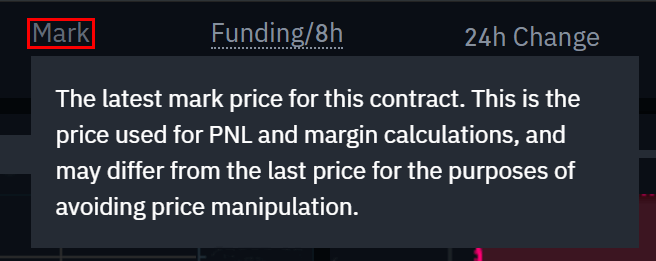
Please note that the marked price and the latest price may differ from each other.
Once you select your order type, you will be able to set a stop price. You can select the last price or the marking price as a trigger. To do this, specify the desired price in the drop-down menu in the order entry field.
Available types of orders and how to use them
Binance Future supports several order types:
Limit order
A limit order is placed on the order book with a specific limit price. In this case, the order will be executed only if the market price reaches or exceeds the limit price. Thus, limit orders are used to buy at a lower price or sell at a higher price relative to the market.
Market order
A market order is an order to buy or sell at the best market price. It is executed based on limit orders that were previously placed in the order book. When you place a market order, you will pay a taker fee.
Stop limit order
The best way to understand how a limit stop order works is to divide it into two parts: the stop price and the limit price. The stop price is responsible for issuing a limit order if the asset reaches a certain value, and the limit price is the predetermined value of the limit order. When the stop price is reached, the limit order immediately appears in the order book.
The limit price and stop price can be the same, but this is not necessary. It is safer to set the stop price (activation price) slightly above the limit price for a sell order or slightly lower for a buy order. This increases the likelihood of a limit order being executed once the stop price is reached.
Stop market order
Like a limit stop order, a market stop order is triggered by the stop price. The difference is that when the stop price is reached, the order becomes a market order.
Limit take profit
If you know what a limit stop order is, then you can easily understand what a limit take profit is. Like a limit stop order, it includes an activation price that triggers the order and a limit price that is added to the order book. The key difference between a limit stop order and a limit take profit order is that the latter can only be used to reduce open positions.
Take profit limit can be useful for managing risk and locking in profits at certain price levels. It can also be used in combination with other order types, such as limit stop orders, to better control positions.
Please note that these do not include OCO orders. For example, if a limit stop order is triggered while you have an active limit take profit, it remains active until you manually cancel it.
You can set a take profit limit in the “Limit Stop” tab in the order entry field.
Market take profit
Like the limit take profit, the market take profit is activated by the stop price. The difference is that when the stop price is reached, the order becomes a market order.
You can set a market take profit in the “Market Stop” tab in the order entry field.
Trailing stop order
A trailing stop order helps lock in profits by limiting potential losses on open positions. In the case of a long position, the trailing stop moves up along with the price. When the price falls, the trailing stop stops again. If the price moves a certain percentage (called variance percentage) in the other direction, a sell order is issued. The same thing happens with a short position, but in reverse. A trailing stop moves down with the market, but stops if the market starts to rise. If the price moves a certain percentage in the other direction, a buy order is issued.
The activation price is the desired price level, upon reaching which the trailing stop is triggered. If you do not specify an activation price, the default will be the current latest price or mark price. The price can be specified at the bottom of the order entry field.
Deviation percentage is a percentage that determines how closely the trailing stop will follow price movements. Thus, with a deviation percentage of 1%, the trailing stop will continue to follow the price at a distance of 1% if the trade moves in the desired direction. If the price moves in the opposite direction by more than 1%, a buy or sell order is placed (depending on the direction of the trade).
How to Use the Binance Futures Calculator
Here you can watch video instructions.
At the top of the order entry field there is a calculator to calculate the value before entering a long or short position. You can adjust the leverage slider on each tab to use as a basis for your calculations.
The calculator has three tabs:
PNL - to calculate initial margin, profit and loss (PnL), and return on equity (ROE) based on estimated entry and exit prices and position size.
Target price - to calculate the price at which you need to close a position in order to achieve the desired percentage income.
Liquidation Price - to calculate the liquidation price based on the wallet balance, estimated entry price and position size.
How to use hedging mode
In hedging mode, you can simultaneously open long and short positions on the same contract. What is it for? Let's say you are confident in the prospects of Bitcoin and open a long position. At the same time, you can open short positions on lower timeframes. Hedging mode is used to prevent short positions from affecting long ones.
By default, the position is in one-way mode, which does not allow you to open long and short positions on the same contract at the same time. If you try to do this, the positions will simply cancel each other. To use hedging mode, you must enable it manually. Here's how to do it:
1. Go to the top right corner of the screen and select Settings.
2. Go to the Position Mode tab and select Hedge Mode.
Before changing the position mode, make sure that you do not have any open orders or positions.
What is the financing rate and how can I check it?
The funding rate ensures that the price of a perpetual futures contract remains as close as possible to the price of the underlying asset (spot). Essentially, traders pay each other based on their open positions. Receipt of payment is determined by the difference between the perpetual futures price and the spot price.
With positive financing, long positions pay short positions, and with negative financing, short positions pay long positions.
If you want to learn more, check out our article What are perpetual futures contracts?.
What does it mean? Depending on open positions and funding rates, traders either pay or receive a profit. Binance Futures pays out every eight hours. At the top of the page, next to the mark price, you can check the timing and estimated financing rate for the next period.
To check historical funding rates for each contract, hover over the Info tab and select Funding Rate History.
What is Post Only, TIF and Position Reduction

If you open limit orders, you can use the Post Only and TIF options. Additional characteristics of limit orders depend on them. They can be found at the bottom of the order entry field.
The Post Only option means that the order will be added to the order book and will never be matched to an existing order. This is suitable for those who want to pay commission as a maker.
TIF allows you to specify a period of time that your orders will remain active before they are executed or expire. You can choose one of three options for this option:
The GTC order will remain in effect until executed or cancelled.
The IOC order will be executed immediately (in whole or in part). If partially executed, the remaining part of the order is cancelled.
The FOK order must be completely filled immediately after it is placed. Otherwise it will not be executed.
When you use one-way mode, the Reduce Positions checkbox ensures that the order can only reduce the size of the current position and never increase it.
Conditions for liquidating your positions
Liquidation occurs when the margin balance falls below the required maintenance margin. Margin Balance is the Binance Futures account balance including unrealized PnL (Profit and Loss). Thus, profits and losses directly affect the change in the margin balance. If you use cross margin mode, this balance will be provided for all positions. If you use isolated margin mode, the balance is distributed among all positions.
Maintenance margin is the minimum amount required to maintain the activity of open positions. The amount of funds required depends on the size of the position: larger positions require a higher maintenance margin to keep them active.
In the lower right corner you can check the current margin ratio. Once the margin ratio reaches 100%, all positions will be liquidated.
When a liquidation occurs, all your active orders are forcibly cancelled. Ideally, you should monitor the status of your positions to avoid automatic liquidations that incur additional fees. If your position is close to being liquidated, it is recommended that you consider closing it manually instead of waiting for automatic liquidation.
Auto-deleveraging and its consequences
When a trader's account balance becomes negative, an insurance fund is used to cover the losses. However, during times of high market volatility, conditions may arise where the insurance fund may not be able to absorb losses and will have to reduce the number of open positions to cover them. This means that open positions may be subject to reduction.
The order of position reduction is determined by the queue, the beginning of which is formed from orders with the maximum leverage and possible profit. To find your queue position number, select "ADL" in the "Positions" tab at the top of the page.

Summary
A futures contract is a derivative that obligates traders to buy or sell an asset at a specific price in the future. Unlike traditional futures contracts, perpetual futures contracts do not have a settlement date. However, derivatives can be confusing for inexperienced traders, so it is important to understand how contracts work before taking financial risks. You can test the platform without risking real funds using the Binance Futures test network.