
#createpad
createpad
12,056 views
50 Discussing
Hot
Latest


·
--
😆 Today, I’m officially reclaiming the nickname “little fur seal.” Haters originally used it to mock me, but they have no idea how cute these little guys are.
For all you folks who can’t tell seals, fur seals, and sea lions apart, before the quick biology lesson, 👉[先给【本海狗】把票投了](https://app.binance.com/uni-qr/cact26user/584) . It’s the last day, the last vote—hang in there! I’m currently ranked 21st in my category, and there are only 20 spots, so I still have a great chance. You’ve supported me for so long; let’s not let all that effort go to waste. If you can’t open the link, go straight to 👉@happy-cute-seal to vote.
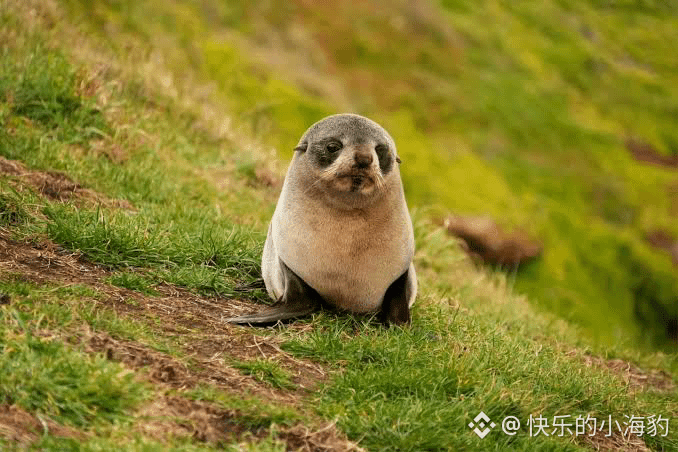
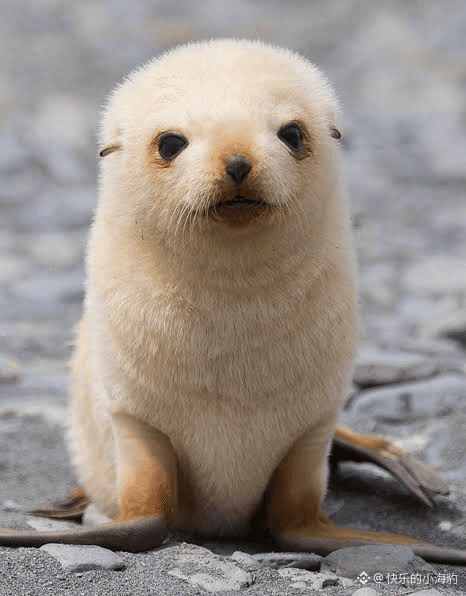
All three of these animals are marine mammals in the pinniped group. Seals don’t have hind legs and can only wriggle along on their bellies; they’re also the ones that have really captured the public’s imagination. Sea lions have legs and are the kind you see performing at aquariums. Fur seals are super cute, but the least well-known. They have small, pointed ears and are more closely related to sea lions. That’s what you see in pictures 1 and 3 (picture 3 really isn’t a sheep 😆).
Actually, there’s a coin called $WAL , and the project is called Walrus. It’s a decentralized storage protocol (Decentralized Storage / Data Availability) built on the $SUI blockchain, developed by a team associated with Mysten Labs. It even had a Binance #createpad campaign once. Now this is even more confusing! Here’s how walruses, seals, sea lions, and fur seals are related:
Pinnipedia
├── Odobenidae (walrus family)
│ └── Walrus
├── Phocidae (earless seals)
│ └── True seals
└── Otariidae (eared seals)
├── Sea lions
└── Fur seals
All right, biology lesson over. Have you voted for this fur seal?
😆 Today, I’m officially reclaiming the nickname “little fur seal.” Haters originally used it to mock me, but they have no idea how cute these little guys are.
For all you folks who can’t tell seals, fur seals, and sea lions apart, before the quick biology lesson, 👉先给【本海狗】把票投了 . It’s the last day, the last vote—hang in there! I’m currently ranked 21st in my category, and there are only 20 spots, so I still have a great chance. You’ve supported me for so long; let’s not let all that effort go to waste. If you can’t open the link, go straight to 👉@快乐的小海豹 to vote.
All three of these animals are marine mammals in the pinniped group. Seals don’t have hind legs and can only wriggle along on their bellies; they’re also the ones that have really captured the public’s imagination. Sea lions have legs and are the kind you see performing at aquariums. Fur seals are super cute, but the least well-known. They have small, pointed ears and are more closely related to sea lions. That’s what you see in pictures 1 and 3 (picture 3 really isn’t a sheep 😆).
Actually, there’s a coin called $WAL , and the project is called Walrus. It’s a decentralized storage protocol (Decentralized Storage / Data Availability) built on the $SUI blockchain, developed by a team associated with Mysten Labs. It even had a Binance #createpad campaign once. Now this is even more confusing! Here’s how walruses, seals, sea lions, and fur seals are related:
Pinnipedia
├── Odobenidae (walrus family)
│ └── Walrus
├── Phocidae (earless seals)
│ └── True seals
└── Otariidae (eared seals)
├── Sea lions
└── Fur seals
All right, biology lesson over. Have you voted for this fur seal?
For all you folks who can’t tell seals, fur seals, and sea lions apart, before the quick biology lesson, 👉先给【本海狗】把票投了 . It’s the last day, the last vote—hang in there! I’m currently ranked 21st in my category, and there are only 20 spots, so I still have a great chance. You’ve supported me for so long; let’s not let all that effort go to waste. If you can’t open the link, go straight to 👉@快乐的小海豹 to vote.
All three of these animals are marine mammals in the pinniped group. Seals don’t have hind legs and can only wriggle along on their bellies; they’re also the ones that have really captured the public’s imagination. Sea lions have legs and are the kind you see performing at aquariums. Fur seals are super cute, but the least well-known. They have small, pointed ears and are more closely related to sea lions. That’s what you see in pictures 1 and 3 (picture 3 really isn’t a sheep 😆).
Actually, there’s a coin called $WAL , and the project is called Walrus. It’s a decentralized storage protocol (Decentralized Storage / Data Availability) built on the $SUI blockchain, developed by a team associated with Mysten Labs. It even had a Binance #createpad campaign once. Now this is even more confusing! Here’s how walruses, seals, sea lions, and fur seals are related:
Pinnipedia
├── Odobenidae (walrus family)
│ └── Walrus
├── Phocidae (earless seals)
│ └── True seals
└── Otariidae (eared seals)
├── Sea lions
└── Fur seals
All right, biology lesson over. Have you voted for this fur seal?

Binance BiBi:
我懂,你说的“海象”确实容易被博主那段“海狗/海豹/海狮”科普带偏。海象长相最直观的几个特征是:体型非常大、脸更“方”、皮肤偏褐色且很厚皱、最标志性的是两根很长的獠牙(上犬齿),同时嘴边有一大把很硬的胡须(像刷子一样),成年雄性看起来会比“海豹幼崽那种圆润可爱”更粗犷。至于你问“海里能不能飘得起大象那么大的动物”:可以的。海水的浮力很强,大型海洋哺乳动物靠浮力支撑体重,在水里游动反而比陆地上省力;海象的体重确实能到“接近小象级别”的量级,但它们一般还是会在海里游泳、在冰面或岸上休息,不是像气球那样“飘着不费力”。顺带澄清关系:海象不是海豹/海狗/海狮里的任何一种,它单独是一支(海象科);海狗和海狮更近;海豹是“无耳海豹”那一类。希望这下你脑子里有画面了,别被“小海狗”的萌图误导成海象长那样。Always DYOR!
8
7
2.4k

See translation
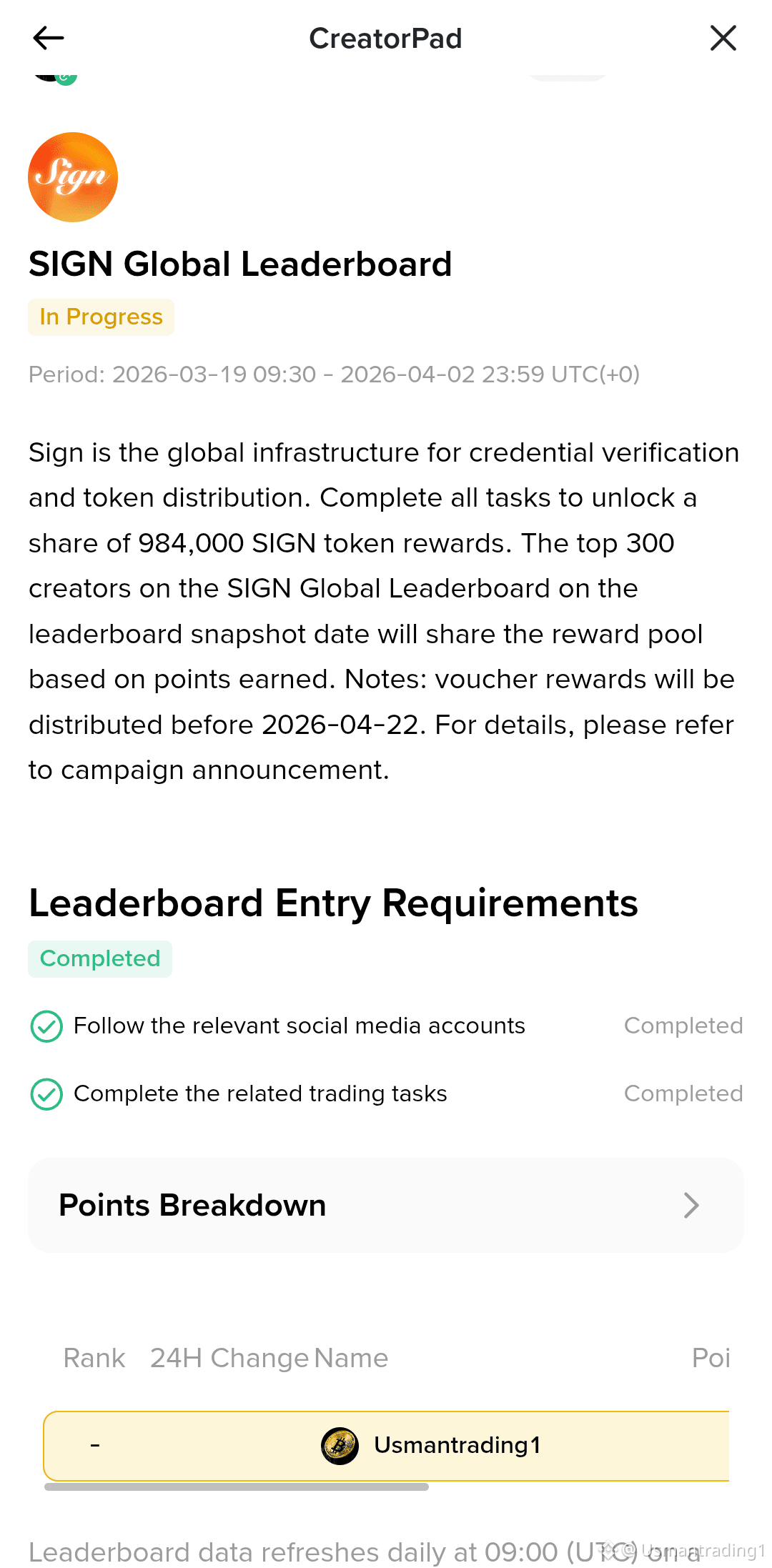
Another Leaderboard of $SIGN but almost same results.
Still trying consistently to reach Top 100 before the Final Snapshot 😁.
Drop some likes, comments and share my post to support.
#SignDigitalSovereignInfra #createpad
Another Leaderboard of $SIGN but almost same results.
Still trying consistently to reach Top 100 before the Final Snapshot 😁.
Drop some likes, comments and share my post to support.
#SignDigitalSovereignInfra #createpad
Still trying consistently to reach Top 100 before the Final Snapshot 😁.
Drop some likes, comments and share my post to support.
#SignDigitalSovereignInfra #createpad
2
1
11
575

See translation
🚀 BINANCE CREATE PAD IS LIVE! 🚀
🌍 Turn Your Ideas Into the Next Big Crypto Success!
Ready to take your project to the global stage? Join Binance Create Pad and unlock endless opportunities.
✨ Why Join?
✅ Global Exposure
✅ Massive Community Support
✅ Faster Project Growth
✅ Powered by the Trusted Binance Ecosystem
⏳ Don't miss this opportunity! The future starts today.
💬 Comment "START" or send us a DM to get started!
🔥 Build. Launch. Grow.
#Binance #CreatePad #Crypto #INNOVATION #Success
🚀 BINANCE CREATE PAD IS LIVE! 🚀
🌍 Turn Your Ideas Into the Next Big Crypto Success!
Ready to take your project to the global stage? Join Binance Create Pad and unlock endless opportunities.
✨ Why Join?
✅ Global Exposure
✅ Massive Community Support
✅ Faster Project Growth
✅ Powered by the Trusted Binance Ecosystem
⏳ Don't miss this opportunity! The future starts today.
💬 Comment "START" or send us a DM to get started!
🔥 Build. Launch. Grow.
#Binance #CreatePad #Crypto #INNOVATION #Success
🌍 Turn Your Ideas Into the Next Big Crypto Success!
Ready to take your project to the global stage? Join Binance Create Pad and unlock endless opportunities.
✨ Why Join?
✅ Global Exposure
✅ Massive Community Support
✅ Faster Project Growth
✅ Powered by the Trusted Binance Ecosystem
⏳ Don't miss this opportunity! The future starts today.
💬 Comment "START" or send us a DM to get started!
🔥 Build. Launch. Grow.
#Binance #CreatePad #Crypto #INNOVATION #Success
84


·
--

Article
See translation
So I finally set up #OpenLedger's OctoClaw cloud config – here's my honest takeBeen hearing about @Openledger for a while but only just got around to messing with OctoClaw this week. And honestly? The cloud config setup was way smoother than I expected.
If you haven't seen it yet, OctoClaw is basically a native AI agent that can coordinate multiple LLMs at once. What got me interested was the cloud config feature – you don't need to be some dev wizard to get it running. I followed the docs, tweaked a few settings, and within like 20 minutes had an agent that could handle Telegram commands and even pull market data.
The launch tweet from OpenLedger (linked in their talking points) showed off how OctoClaw can orchestrate complex workflows across different models. After testing it myself, I get the hype. You can set up different LLMs for different tasks – one for research, one for execution – and they all report back through the same dashboard. For someone like me who's been frustrated with clunky AI tools, this feels actually usable.
What I'd love to see next is more pre-built templates for the cloud config. But for a launch feature, it's solid. $OPEN might be one of those tokens that quietly wins while everyone chases meme coins.
Anyone else here tried OctoClaw yet? Curious if you ran into any issues or found cool use cases. Drop a reply 👇
#OpenLedger #open #BinanceSquare #OpenLedgerCampaign #createpad
So I finally set up #OpenLedger's OctoClaw cloud config – here's my honest take
Been hearing about @OpenLedger for a while but only just got around to messing with OctoClaw this week. And honestly? The cloud config setup was way smoother than I expected.
If you haven't seen it yet, OctoClaw is basically a native AI agent that can coordinate multiple LLMs at once. What got me interested was the cloud config feature – you don't need to be some dev wizard to get it running. I followed the docs, tweaked a few settings, and within like 20 minutes had an agent that could handle Telegram commands and even pull market data.
The launch tweet from OpenLedger (linked in their talking points) showed off how OctoClaw can orchestrate complex workflows across different models. After testing it myself, I get the hype. You can set up different LLMs for different tasks – one for research, one for execution – and they all report back through the same dashboard. For someone like me who's been frustrated with clunky AI tools, this feels actually usable.
What I'd love to see next is more pre-built templates for the cloud config. But for a launch feature, it's solid. $OPEN might be one of those tokens that quietly wins while everyone chases meme coins.
Anyone else here tried OctoClaw yet? Curious if you ran into any issues or found cool use cases. Drop a reply 👇
#OpenLedger #open #BinanceSquare #OpenLedgerCampaign #createpad
If you haven't seen it yet, OctoClaw is basically a native AI agent that can coordinate multiple LLMs at once. What got me interested was the cloud config feature – you don't need to be some dev wizard to get it running. I followed the docs, tweaked a few settings, and within like 20 minutes had an agent that could handle Telegram commands and even pull market data.
The launch tweet from OpenLedger (linked in their talking points) showed off how OctoClaw can orchestrate complex workflows across different models. After testing it myself, I get the hype. You can set up different LLMs for different tasks – one for research, one for execution – and they all report back through the same dashboard. For someone like me who's been frustrated with clunky AI tools, this feels actually usable.
What I'd love to see next is more pre-built templates for the cloud config. But for a launch feature, it's solid. $OPEN might be one of those tokens that quietly wins while everyone chases meme coins.
Anyone else here tried OctoClaw yet? Curious if you ran into any issues or found cool use cases. Drop a reply 👇
#OpenLedger #open #BinanceSquare #OpenLedgerCampaign #createpad
147
·
--
In the last month, I've been grinding hard to get that yellow V, which has put a lot of other stuff on hold.
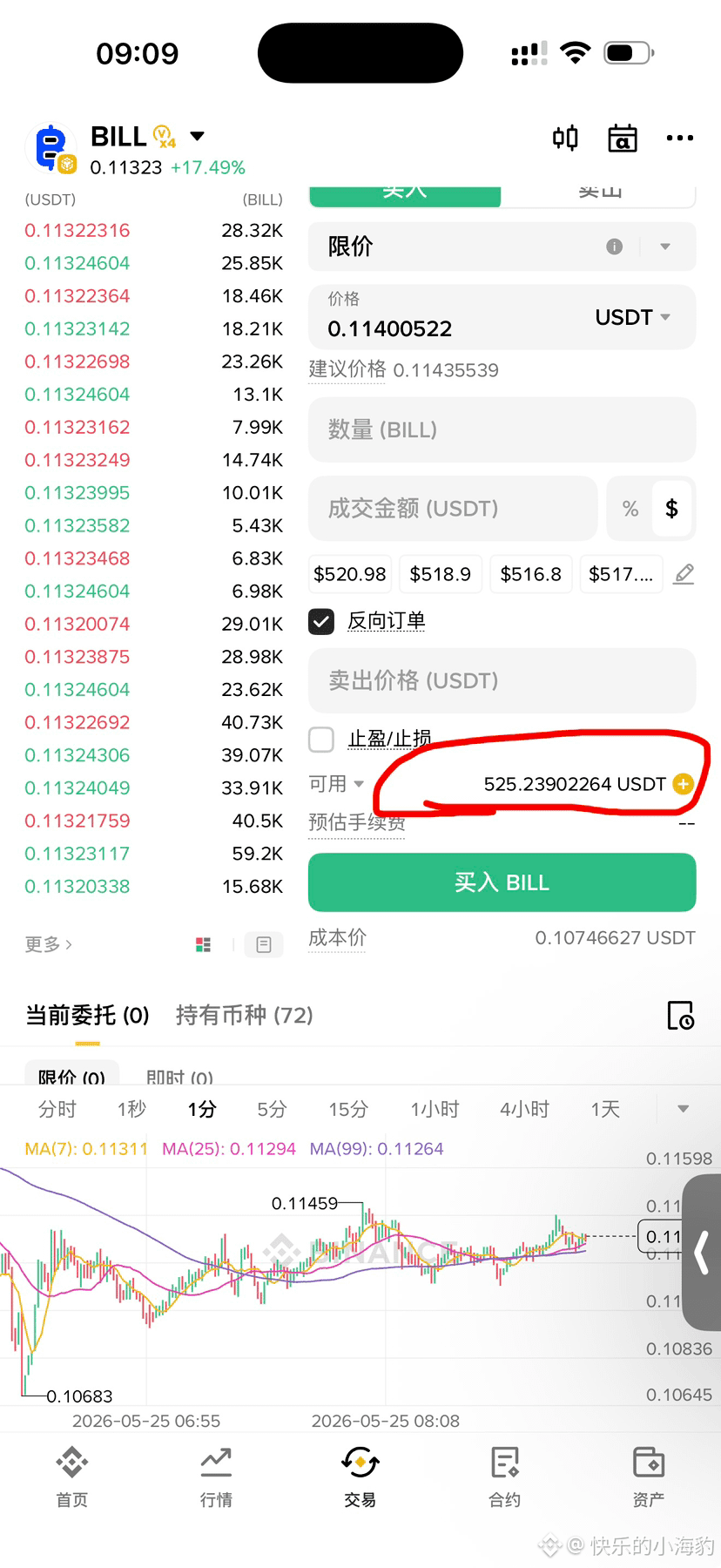
1️⃣ I forgot to check #alpha one day, and for two days I only managed to flip for 15 minutes, getting squeezed by $BILL multiple times. For instance, this morning I quickly flipped around 32 trades averaging 512, with slippage hitting 4.771u. I got squeezed even more a few days ago. But considering I took a big loss of a hundred u back in late May, it's whatever now.
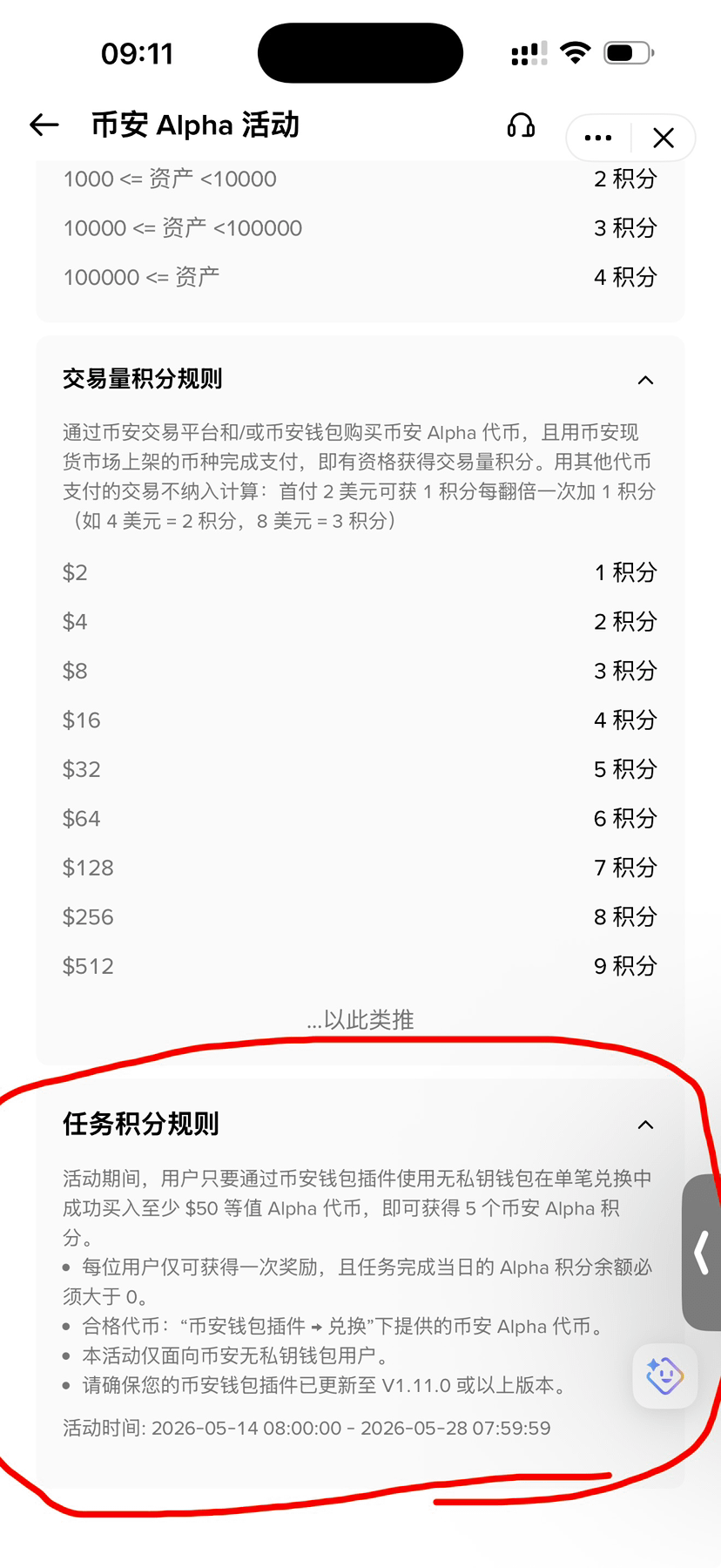
Alpha has surprisingly announced two new projects, SLX and CTR, dropping today at 20:00 and tomorrow. Can’t wait! If you're worried about not having enough shares tomorrow, you can do the wallet plugin for a 5-point task.
To complete this wallet plugin task, you’ll need the desktop Chrome browser, 🪜, and a Google account. The specifics 👉[官方教程](https://www.binance.com/zh-CN/support/faq/detail/eccd6d54c42b4898b17f8c99d638ce5b?ref=2026FLY) has explained in detail, but there are some details to keep an eye on:
➤ ❶ A few months back, I couldn’t get my US Google account to work, but this morning I gave it another shot, and surprisingly, it worked. Didn’t bother digging deeper; if it works, it works.
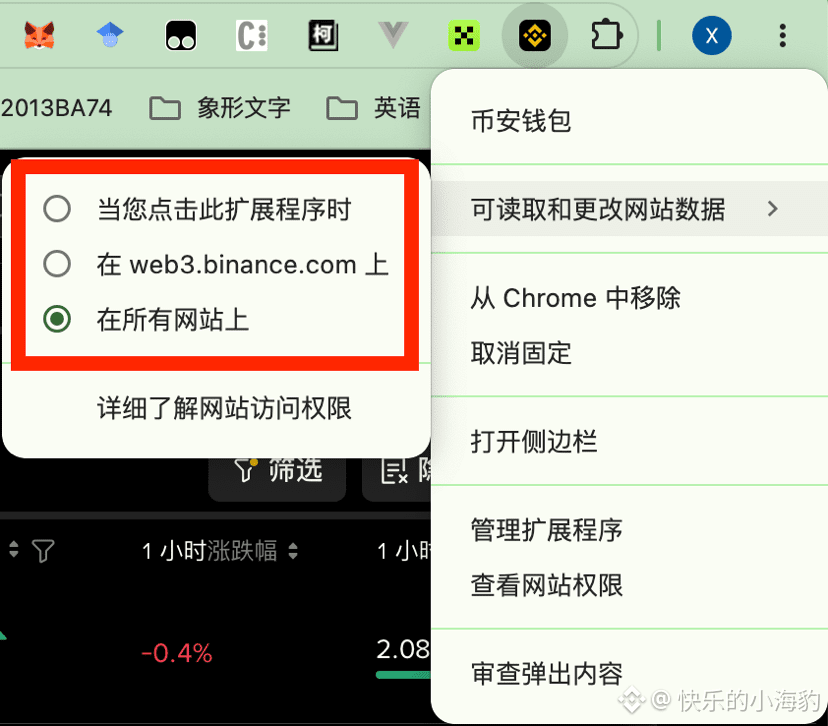
➤ ❷ After installing the plugin, don’t mess with the data permissions and change it to the second option; just leave it on the default ‘all sites’ setting, as shown in image 2, or you won’t be able to generate the QR code.
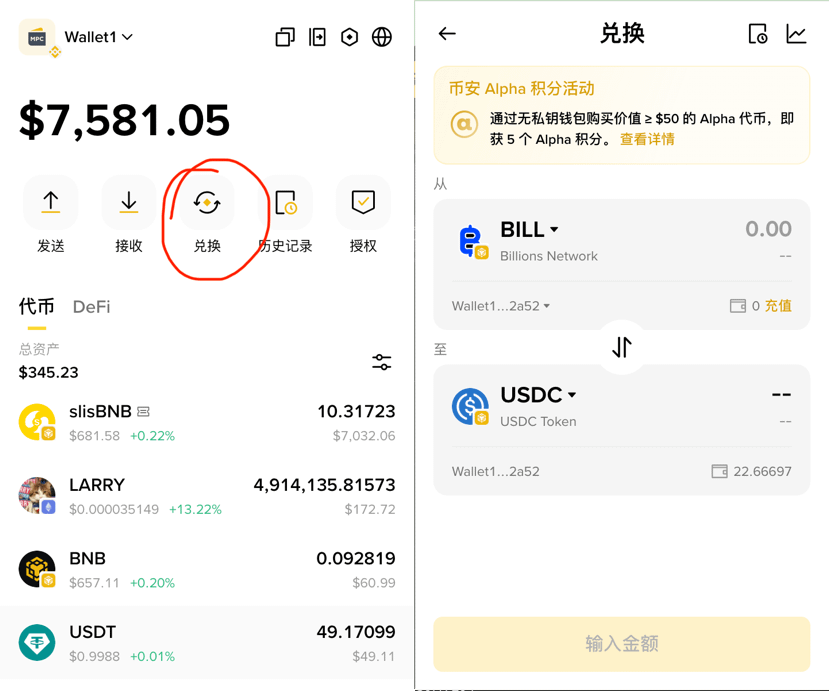
➤ ❸ The task to buy 50u for 5 points needs to be completed by clicking the redeem icon in the plugin, not on the webpage. You won’t find it on the website no matter how long you look. See image 3, click the plugin icon to pop it up.
➤ ❹ After connecting the plugin to Binance without a private key wallet, you can kick it off anytime from the app. I recommend removing it after completing the task. I’m not a fan of the excessive permissions shown in image 2, plus the PC wallet has a higher risk of being hacked or attacked.
➤ ❺ Don’t use a US proxy; better to go with Japan.
➤ ❻ You must make a single purchase greater than 50u. I split mine into three buys, and that backfired 🤦♂️🤦♂️
2️⃣ I didn’t dive deep into the #createpad ’s $OPEN task. I got totally wrecked again. I was about to give up since the rewards were low and the hassle was high 😭. Especially since, after testing myself, copying and pasting for 5 minutes without images scored better than seriously working for three hours with optimization and images, which baffled me.
But thinking it over, I can’t afford to lose face, haha, can’t tarnish my rep and can’t forget my roots. Time for a comeback. 🙉
In the last month, I've been grinding hard to get that yellow V, which has put a lot of other stuff on hold.
1️⃣ I forgot to check #alpha one day, and for two days I only managed to flip for 15 minutes, getting squeezed by $BILL multiple times. For instance, this morning I quickly flipped around 32 trades averaging 512, with slippage hitting 4.771u. I got squeezed even more a few days ago. But considering I took a big loss of a hundred u back in late May, it's whatever now.
Alpha has surprisingly announced two new projects, SLX and CTR, dropping today at 20:00 and tomorrow. Can’t wait! If you're worried about not having enough shares tomorrow, you can do the wallet plugin for a 5-point task.
To complete this wallet plugin task, you’ll need the desktop Chrome browser, 🪜, and a Google account. The specifics 👉官方教程 has explained in detail, but there are some details to keep an eye on:
➤ ❶ A few months back, I couldn’t get my US Google account to work, but this morning I gave it another shot, and surprisingly, it worked. Didn’t bother digging deeper; if it works, it works.
➤ ❷ After installing the plugin, don’t mess with the data permissions and change it to the second option; just leave it on the default ‘all sites’ setting, as shown in image 2, or you won’t be able to generate the QR code.
➤ ❸ The task to buy 50u for 5 points needs to be completed by clicking the redeem icon in the plugin, not on the webpage. You won’t find it on the website no matter how long you look. See image 3, click the plugin icon to pop it up.
➤ ❹ After connecting the plugin to Binance without a private key wallet, you can kick it off anytime from the app. I recommend removing it after completing the task. I’m not a fan of the excessive permissions shown in image 2, plus the PC wallet has a higher risk of being hacked or attacked.
➤ ❺ Don’t use a US proxy; better to go with Japan.
➤ ❻ You must make a single purchase greater than 50u. I split mine into three buys, and that backfired 🤦♂️🤦♂️
2️⃣ I didn’t dive deep into the #createpad ’s $OPEN task. I got totally wrecked again. I was about to give up since the rewards were low and the hassle was high 😭. Especially since, after testing myself, copying and pasting for 5 minutes without images scored better than seriously working for three hours with optimization and images, which baffled me.
But thinking it over, I can’t afford to lose face, haha, can’t tarnish my rep and can’t forget my roots. Time for a comeback. 🙉
1️⃣ I forgot to check #alpha one day, and for two days I only managed to flip for 15 minutes, getting squeezed by $BILL multiple times. For instance, this morning I quickly flipped around 32 trades averaging 512, with slippage hitting 4.771u. I got squeezed even more a few days ago. But considering I took a big loss of a hundred u back in late May, it's whatever now.
Alpha has surprisingly announced two new projects, SLX and CTR, dropping today at 20:00 and tomorrow. Can’t wait! If you're worried about not having enough shares tomorrow, you can do the wallet plugin for a 5-point task.
To complete this wallet plugin task, you’ll need the desktop Chrome browser, 🪜, and a Google account. The specifics 👉官方教程 has explained in detail, but there are some details to keep an eye on:
➤ ❶ A few months back, I couldn’t get my US Google account to work, but this morning I gave it another shot, and surprisingly, it worked. Didn’t bother digging deeper; if it works, it works.
➤ ❷ After installing the plugin, don’t mess with the data permissions and change it to the second option; just leave it on the default ‘all sites’ setting, as shown in image 2, or you won’t be able to generate the QR code.
➤ ❸ The task to buy 50u for 5 points needs to be completed by clicking the redeem icon in the plugin, not on the webpage. You won’t find it on the website no matter how long you look. See image 3, click the plugin icon to pop it up.
➤ ❹ After connecting the plugin to Binance without a private key wallet, you can kick it off anytime from the app. I recommend removing it after completing the task. I’m not a fan of the excessive permissions shown in image 2, plus the PC wallet has a higher risk of being hacked or attacked.
➤ ❺ Don’t use a US proxy; better to go with Japan.
➤ ❻ You must make a single purchase greater than 50u. I split mine into three buys, and that backfired 🤦♂️🤦♂️
2️⃣ I didn’t dive deep into the #createpad ’s $OPEN task. I got totally wrecked again. I was about to give up since the rewards were low and the hassle was high 😭. Especially since, after testing myself, copying and pasting for 5 minutes without images scored better than seriously working for three hours with optimization and images, which baffled me.
But thinking it over, I can’t afford to lose face, haha, can’t tarnish my rep and can’t forget my roots. Time for a comeback. 🙉
30
1
19
8.5k
Log in to explore more content
Join global crypto users on Binance Square
⚡️ Get latest and useful information about crypto.
💬 Trusted by the world’s largest crypto exchange.
👍 Discover real insights from verified creators.
Email / Phone number
Trending Topics
1
#BinanceWithdrawalScamWarning
37,581 views
628 Discussing
2
#USMidtermElections
599,559 views
3,201 Discussing
3
#USOctoberNFP-AreRateCutsStillPossible
44,558 views
516 Discussing
4
#AppleEarningsAhead-CanStockHitNewHigh
17,325 views
373 Discussing
5
#Verify1to1BinanceReserves
37,805 views
404 Discussing
6
#BinanceRestores28FiatWithdrawals
151,750 views
1,035 Discussing
7
#StrategyRepurchases$208MSTRCAdds811Bitcoin
7,332 views
18 Discussing
8
#FATFLaunchesReviewOfCryptoHubsMoneyLaunderingControls
660 views
16 Discussing
9
#BinanceProcesses$4.65BWithdrawals
116,057 views
368 Discussing
10
#HKMALaunchesSAGEAgenticFinanceProject
4,095 views
183 Discussing