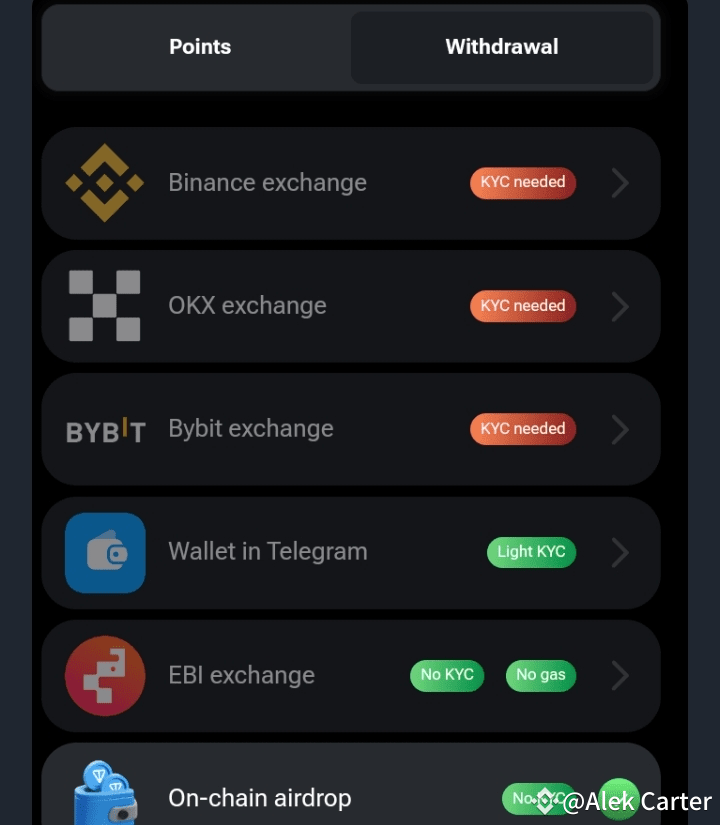

Ready to withdraw your $HMSTR? Follow this detailed guide to make sure you’re moving your funds safely and securely from Hamster Kombat to Binance, OKX, ByBit, or Tonkeeper! 🚀
🛑 Important Note: I DO NOT recommend withdrawing to TG Wallet or EBI Exchange! Stick to the reliable options below, with Binance being my top priority. ✅
Before You Begin: KYC Verification
Ensure that your KYC verification is complete on your chosen exchange. You won’t be able to withdraw without this step! If you haven’t done KYC yet, go complete it before continuing with this guide. Once that’s done, you’re ready to roll! ✅
Binance Withdrawal Process
Let’s start with Binance, one of the safest platforms for crypto withdrawals.
Open Binance: Log into your Binance account.
Go to Wallets: Tap the Wallets tab in the bottom right corner.
Select Deposit: Choose the Deposit option.
Search for $HMSTR: Type "HMSTR" into the search bar and select $HMSTR from the list.
Choose Network: Select Toncoin as the network.
Copy Address & Memo: Copy the Deposit Address and Memo/Tag provided.
Enter in Hamster Kombat: Go back to your Hamster Kombat wallet, and paste both the Address and Memo/Tag where required.
DONE! Your $HMSTR tokens will be on their way to your Binance account
OKX & ByBit Withdrawal Process
Similar to Binance, but with a few differences. Here’s what you need to do:
Get Your UID: For both OKX and ByBit, make sure you have your UID ready.
Open Wallet on OKX/ByBit: Navigate to the Wallet section.
Search for HMSTR: Locate $HMSTR by searching within your wallet’s deposit options.
Select Network: Choose Toncoin for the withdrawal network.
Copy Deposit Address & Memo: Copy both the Deposit Address and Memo/Tag/Comment.
Paste in Hamster Kombat: Enter this information into the Hamster Kombat withdrawal section and confirm.
⚠️ Key Reminders:
Always double-check the network and address before proceeding to avoid any mistakes.
Avoid TG Wallet and EBI Exchange for now due to reported issues. Stick with Binance, OKX, or ByBit for a smoother experience.
Be patient, as withdrawals can take some time to reflect, depending on network congestion.
🛡️ Safety Tip: If you're new to withdrawing crypto, consider starting with a small test amount before doing a full transfer to ensure the process is smooth.
You're All Set! Follow these steps and enjoy your smooth withdrawal experience! Let me know if you need further assistance, and always be vigilant with your transactions!
#BinanceLaunchpoolHMSTR #BinanceLaunchpoolCATI #FTXSolanaRedemption #hamsterkombat24 #HamsterKombat