

Kri
6.5k Posts

Kri
 Square Verified+
Report
Block User
Top Crypto Content Creator Since 2014 Year! For Partnership X: Sh_Mach

Top Voices

Level 1 Creator
7 Following
143.6K+ Followers
139.0K+ Liked
2 Badges
Posts
Portfolio
All
Quotes
Videos
·
--
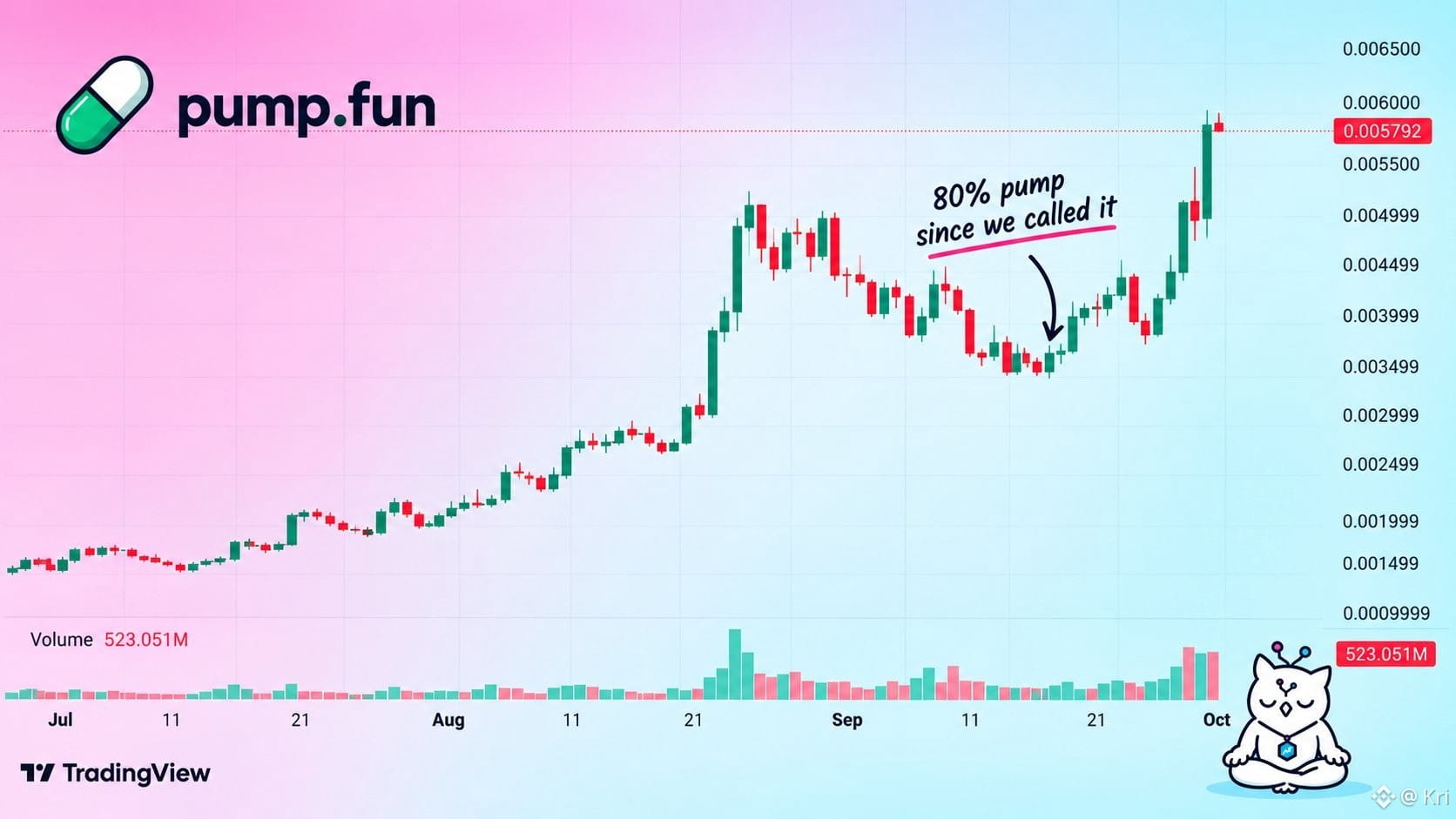
$PUMP fun has:
> pumped 80% since our last call at the dip
> pumped 2x since we called it before that
Not bad for a billion dollar project.
BUT
Its not going to stop here - the first TP for me would be $0.01, nothing before that 🤞
{future}(PUMPUSDT)
$PUMP fun has:
> pumped 80% since our last call at the dip
> pumped 2x since we called it before that
Not bad for a billion dollar project.
BUT
Its not going to stop here - the first TP for me would be $0.01, nothing before that 🤞
> pumped 80% since our last call at the dip
> pumped 2x since we called it before that
Not bad for a billion dollar project.
BUT
Its not going to stop here - the first TP for me would be $0.01, nothing before that 🤞
1
1.8k
·
--
Verified
🚨 NEWS: Strategy has purchased another 950 BTC for $75.7M, bringing its total Bitcoin holdings to 846,000 BTC.
The company is now just 1,363 BTC short of its June record, continuing its aggressive Bitcoin accumulation strategy. ₿
#StrategyStriveAdd2305BitcoinThisWeek
🚨 NEWS: Strategy has purchased another 950 BTC for $75.7M, bringing its total Bitcoin holdings to 846,000 BTC.
The company is now just 1,363 BTC short of its June record, continuing its aggressive Bitcoin accumulation strategy. ₿
#StrategyStriveAdd2305BitcoinThisWeek
The company is now just 1,363 BTC short of its June record, continuing its aggressive Bitcoin accumulation strategy. ₿
#StrategyStriveAdd2305BitcoinThisWeek
1
5
1.3k
·
--
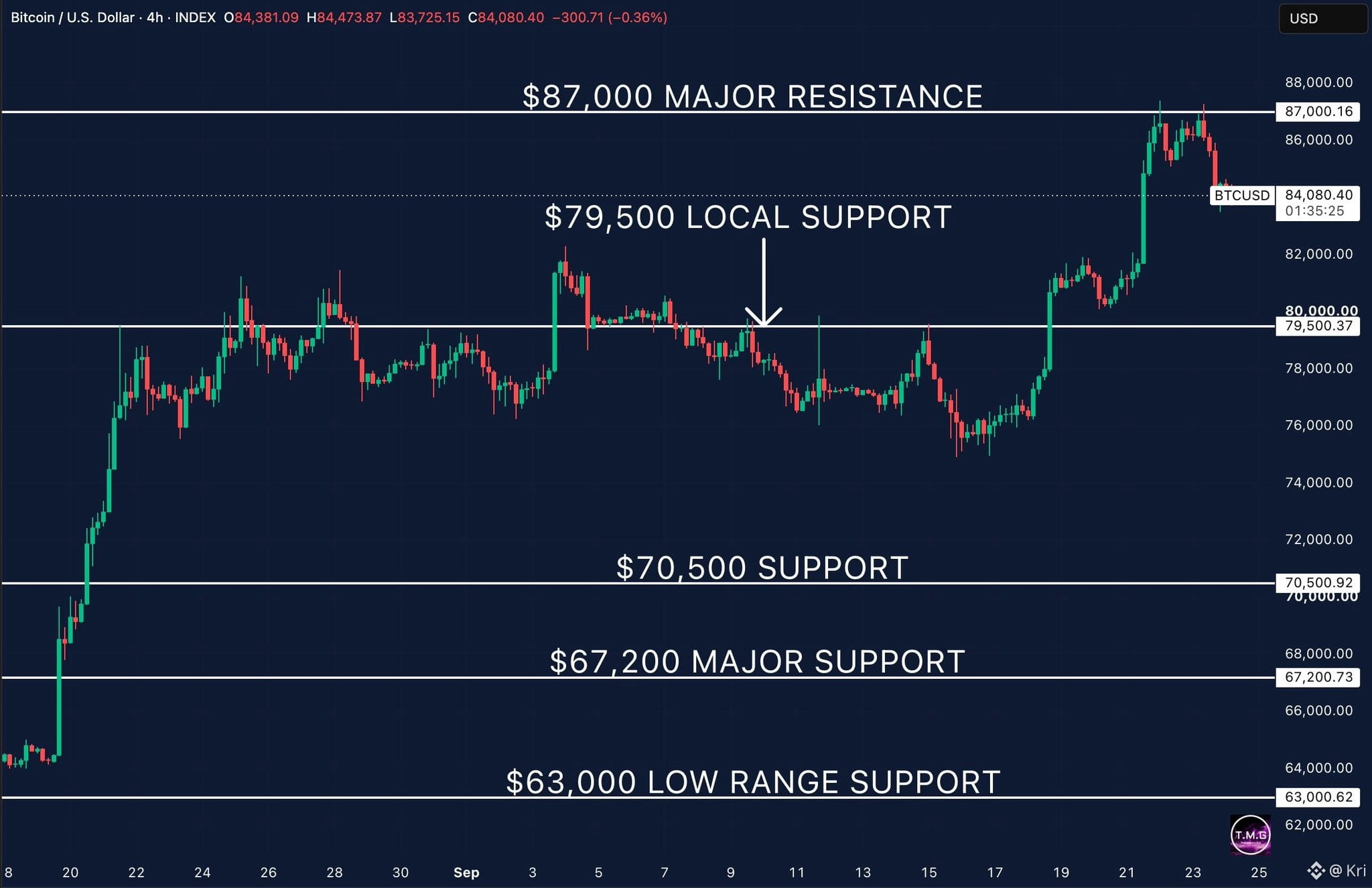
Bitcoin rejected $87K again and is now testing the $84K area.
The move from $75K to $87K was strong, so I’m not reading this pullback as a trend reversal just yet.
$84K is the immediate level I’m watching.
If BTC holds here and reclaims $85K-$86K, another test of $87K comes into play.
A clean break above $87K would put the next leg higher on the radar.
But if $84K fails, I’d be watching $82K first, with $79.5K remaining the bigger structural level.
For me, the key question is simple:
Can Bitcoin turn $84K into support, or does this pullback get deeper?
$BTC #BTC
{future}(BTCUSDT)
Bitcoin rejected $87K again and is now testing the $84K area.
The move from $75K to $87K was strong, so I’m not reading this pullback as a trend reversal just yet.
$84K is the immediate level I’m watching.
If BTC holds here and reclaims $85K-$86K, another test of $87K comes into play.
A clean break above $87K would put the next leg higher on the radar.
But if $84K fails, I’d be watching $82K first, with $79.5K remaining the bigger structural level.
For me, the key question is simple:
Can Bitcoin turn $84K into support, or does this pullback get deeper?
$BTC #BTC
The move from $75K to $87K was strong, so I’m not reading this pullback as a trend reversal just yet.
$84K is the immediate level I’m watching.
If BTC holds here and reclaims $85K-$86K, another test of $87K comes into play.
A clean break above $87K would put the next leg higher on the radar.
But if $84K fails, I’d be watching $82K first, with $79.5K remaining the bigger structural level.
For me, the key question is simple:
Can Bitcoin turn $84K into support, or does this pullback get deeper?
$BTC #BTC
2
696
·
--
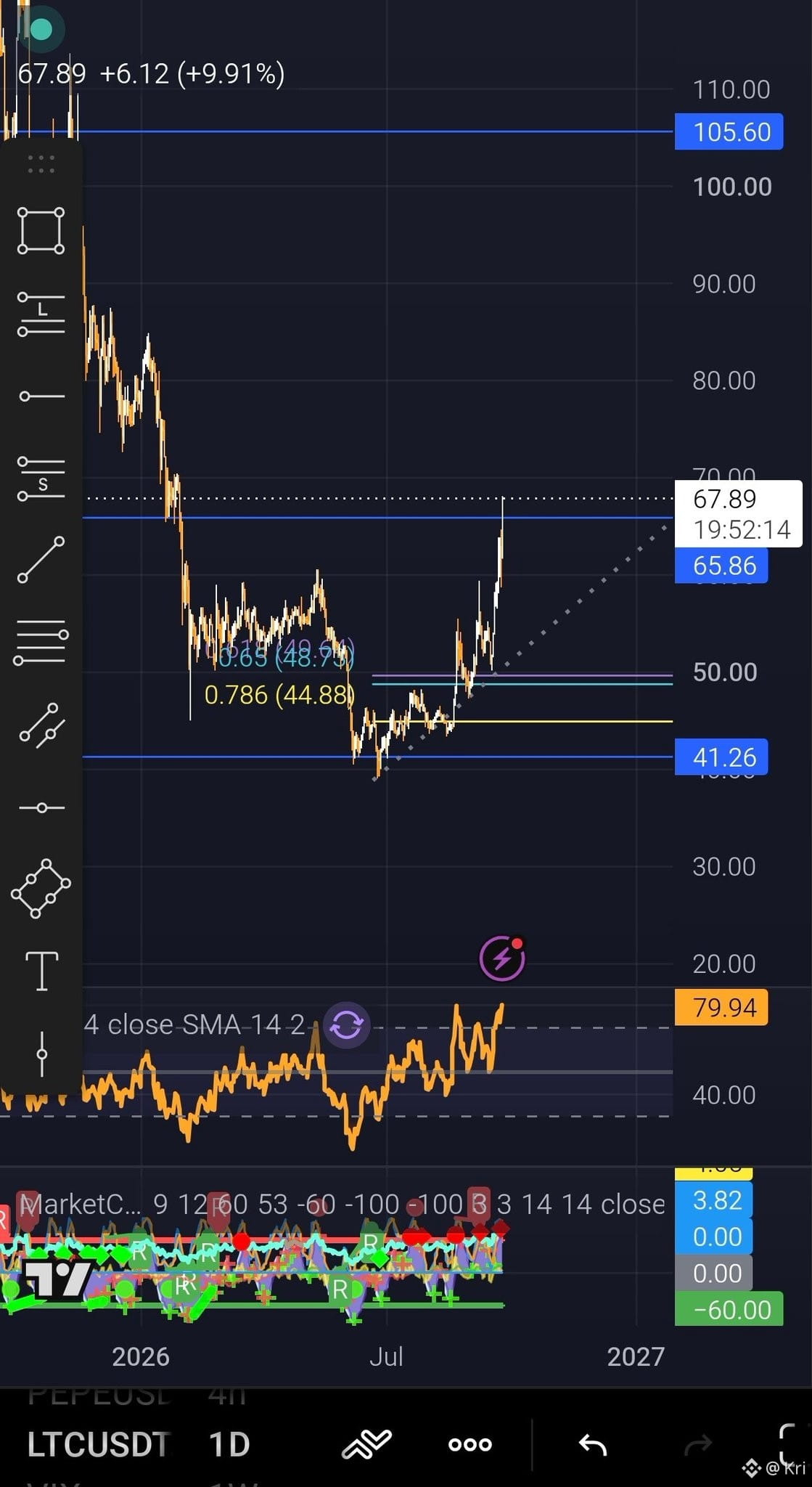
$LTC looking strong today while other alts take a breather
The important part for me: $65.8 got reclaimed
Hold above it and $105.6 comes into focus
If price rejects and drops back below $65.8
Im watching the $48.7–$44.8 Fib area
A bullish 4H divergence there would get my attention
RSI near 80 = momentum is strong, but also means dont be surprised by some cooling off 😅
#LTC #Altcoins #crypto
$LTC looking strong today while other alts take a breather
The important part for me: $65.8 got reclaimed
Hold above it and $105.6 comes into focus
If price rejects and drops back below $65.8
Im watching the $48.7–$44.8 Fib area
A bullish 4H divergence there would get my attention
RSI near 80 = momentum is strong, but also means dont be surprised by some cooling off 😅
#LTC #Altcoins #crypto
The important part for me: $65.8 got reclaimed
Hold above it and $105.6 comes into focus
If price rejects and drops back below $65.8
Im watching the $48.7–$44.8 Fib area
A bullish 4H divergence there would get my attention
RSI near 80 = momentum is strong, but also means dont be surprised by some cooling off 😅
#LTC #Altcoins #crypto
2
1.4k
·
--
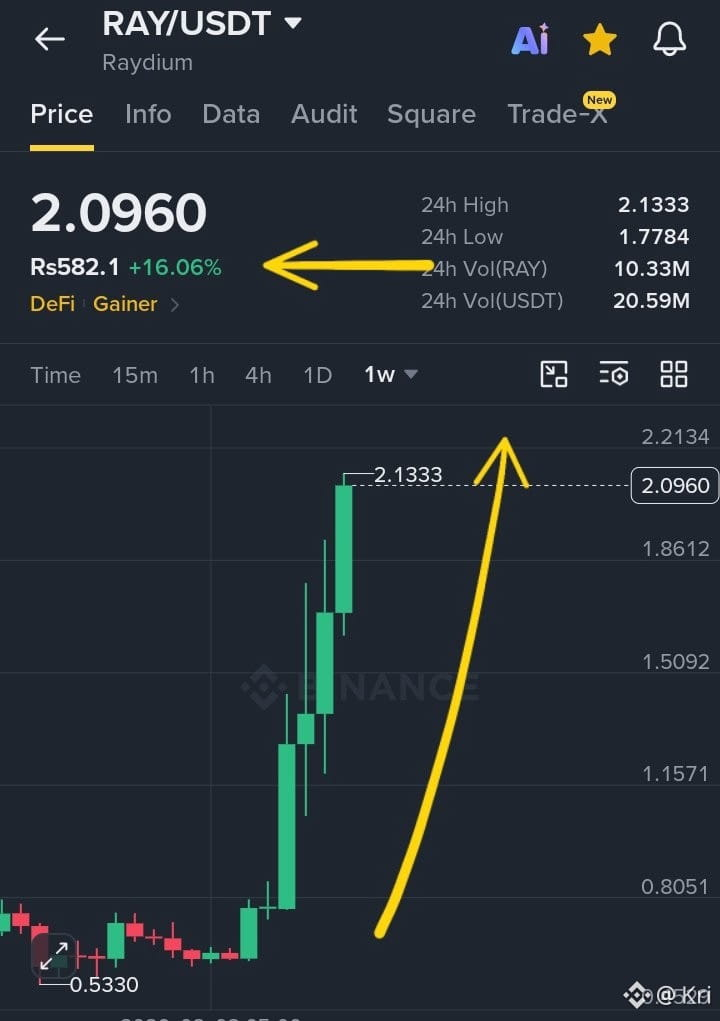
$RAY Pumping Hard 🚀
Now 16% + UP ✅
Hit $2.1 as well
Hope You Guys Making the Profit
{spot}(RAYUSDT)
$RAY Pumping Hard 🚀
Now 16% + UP ✅
Hit $2.1 as well
Hope You Guys Making the Profit
Now 16% + UP ✅
Hit $2.1 as well
Hope You Guys Making the Profit
1
893
·
--
‼️BREAKING:
🇨🇳 CHINA reportedly plans to lift its restrictions on cryptocurrencies by the end of 2026.
Just imagine what could happen when MILLIONS of Chinese investors re-enter the crypto market during the biggest bull run in history! 🚀
THIS COULD BE HUGE! 🔥
‼️BREAKING:
🇨🇳 CHINA reportedly plans to lift its restrictions on cryptocurrencies by the end of 2026.
Just imagine what could happen when MILLIONS of Chinese investors re-enter the crypto market during the biggest bull run in history! 🚀
THIS COULD BE HUGE! 🔥
🇨🇳 CHINA reportedly plans to lift its restrictions on cryptocurrencies by the end of 2026.
Just imagine what could happen when MILLIONS of Chinese investors re-enter the crypto market during the biggest bull run in history! 🚀
THIS COULD BE HUGE! 🔥
1
24
5.2k
·
--
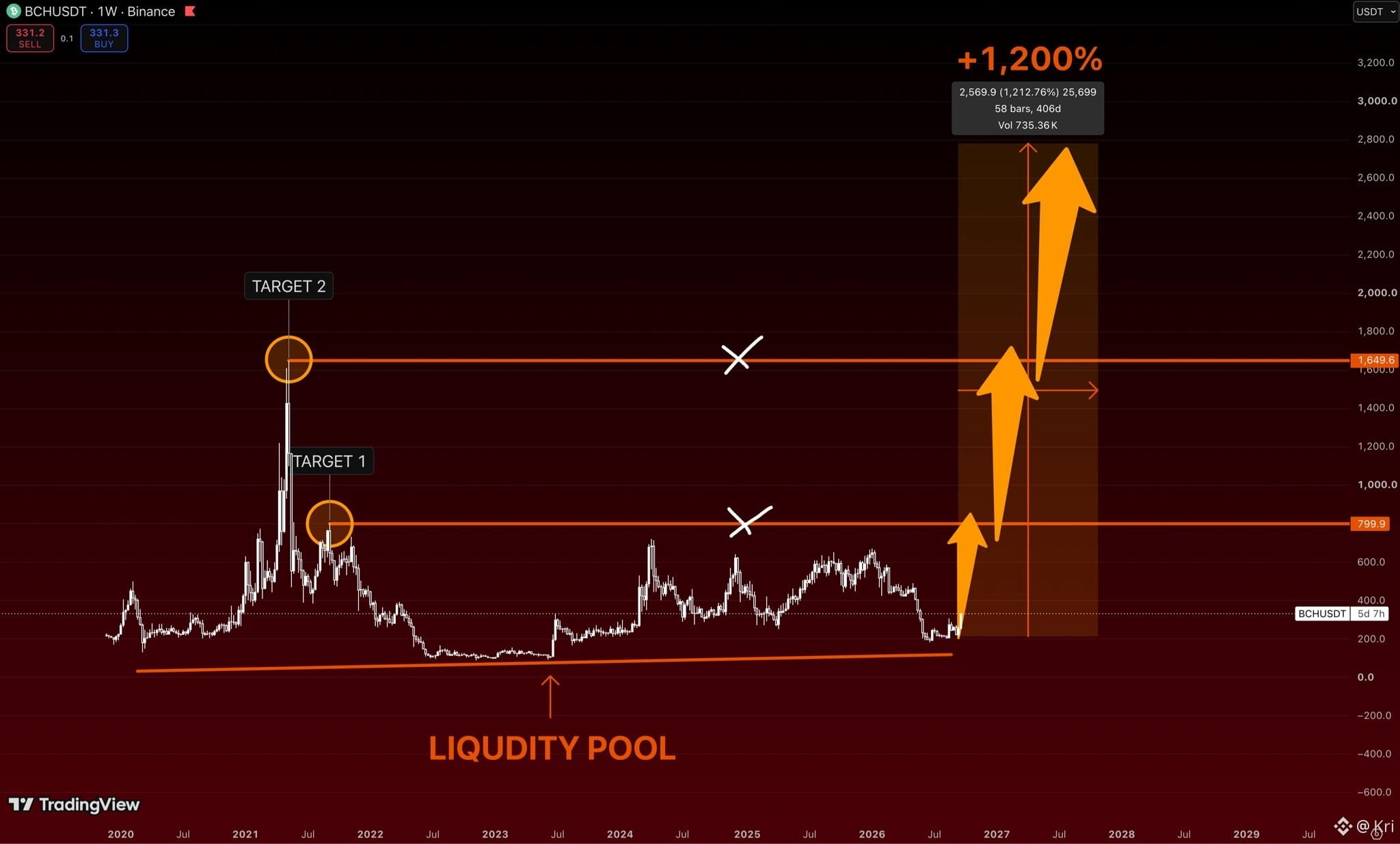
$BCH is one of those charts people ignore until it starts moving vertically.
Right now it’s around $330 and sitting close to the same macro liquidity area
that has repeatedly acted as the floor.
But above us, the roadmap is pretty clean:
$800 → $1,650 → $3,000+
That final move would be roughly +1,200% from the zone marked on the chart.
The funny part?
If $BCH reaches $800, everyone will suddenly start talking about it again.
I’d rather pay attention before that happens.
$BCH #BCHUSD
{future}(BCHUSDT)
$BCH is one of those charts people ignore until it starts moving vertically.
Right now it’s around $330 and sitting close to the same macro liquidity area
that has repeatedly acted as the floor.
But above us, the roadmap is pretty clean:
$800 → $1,650 → $3,000+
That final move would be roughly +1,200% from the zone marked on the chart.
The funny part?
If $BCH reaches $800, everyone will suddenly start talking about it again.
I’d rather pay attention before that happens.
$BCH #BCHUSD
Right now it’s around $330 and sitting close to the same macro liquidity area
that has repeatedly acted as the floor.
But above us, the roadmap is pretty clean:
$800 → $1,650 → $3,000+
That final move would be roughly +1,200% from the zone marked on the chart.
The funny part?
If $BCH reaches $800, everyone will suddenly start talking about it again.
I’d rather pay attention before that happens.
$BCH #BCHUSD
2
3
478
·
--
Verified
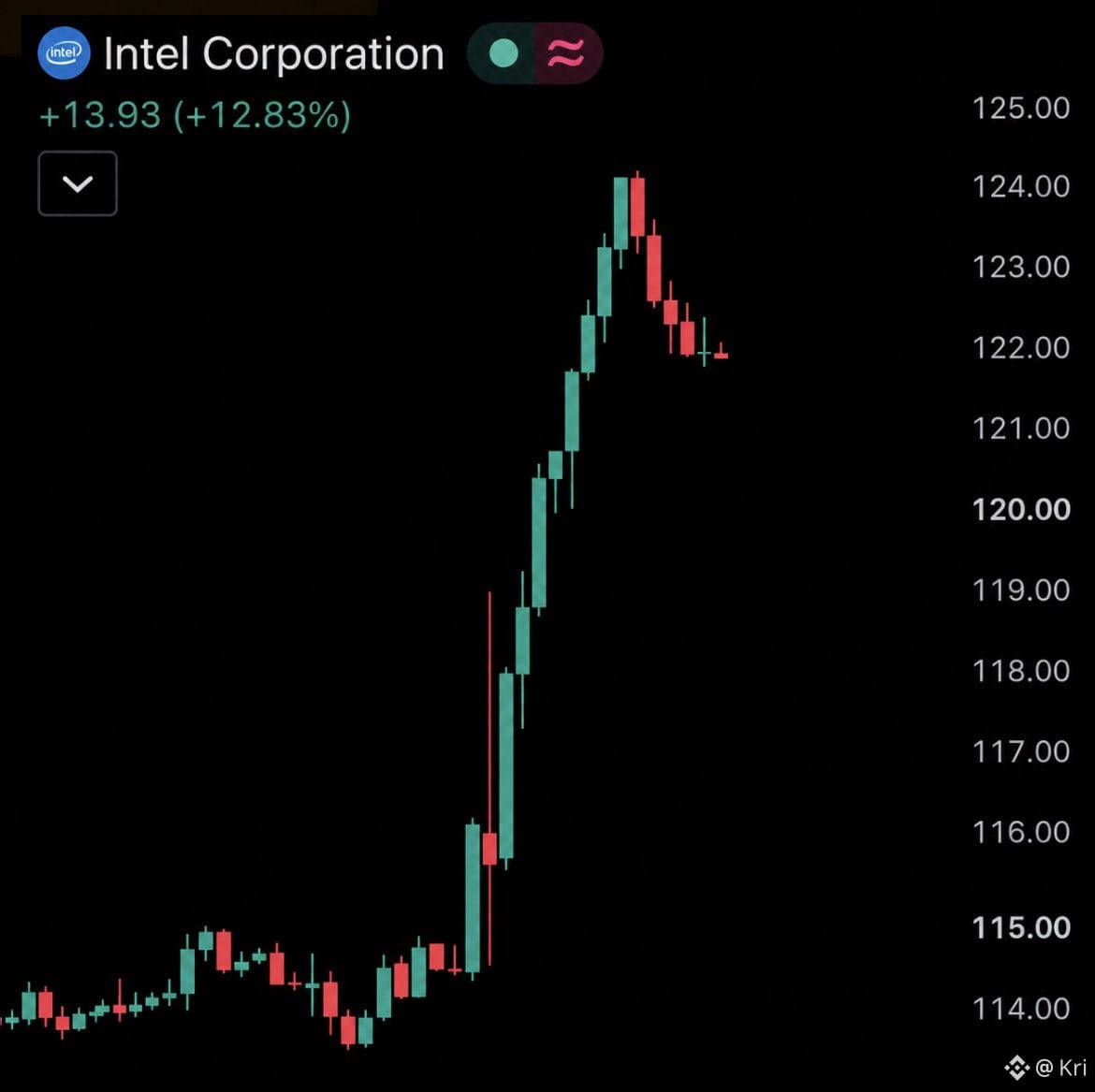
BREAKING: Intel $INTC surges 14%, surpassing $650 billion in market cap.
• Meta’s new Muse AI agent is fueling expectations that AI agents will drive significantly more demand for CPUs.
• Intel says CPU demand is already so strong it can currently fulfill only around half of customer orders.
• Falling oil prices and Treasury yields are easing inflation and interest-rate pressure, supporting tech stocks.
#AIStocksWhatNext
BREAKING: Intel $INTC surges 14%, surpassing $650 billion in market cap.
• Meta’s new Muse AI agent is fueling expectations that AI agents will drive significantly more demand for CPUs.
• Intel says CPU demand is already so strong it can currently fulfill only around half of customer orders.
• Falling oil prices and Treasury yields are easing inflation and interest-rate pressure, supporting tech stocks.
#AIStocksWhatNext
• Meta’s new Muse AI agent is fueling expectations that AI agents will drive significantly more demand for CPUs.
• Intel says CPU demand is already so strong it can currently fulfill only around half of customer orders.
• Falling oil prices and Treasury yields are easing inflation and interest-rate pressure, supporting tech stocks.
#AIStocksWhatNext
8
3.4k
·
--
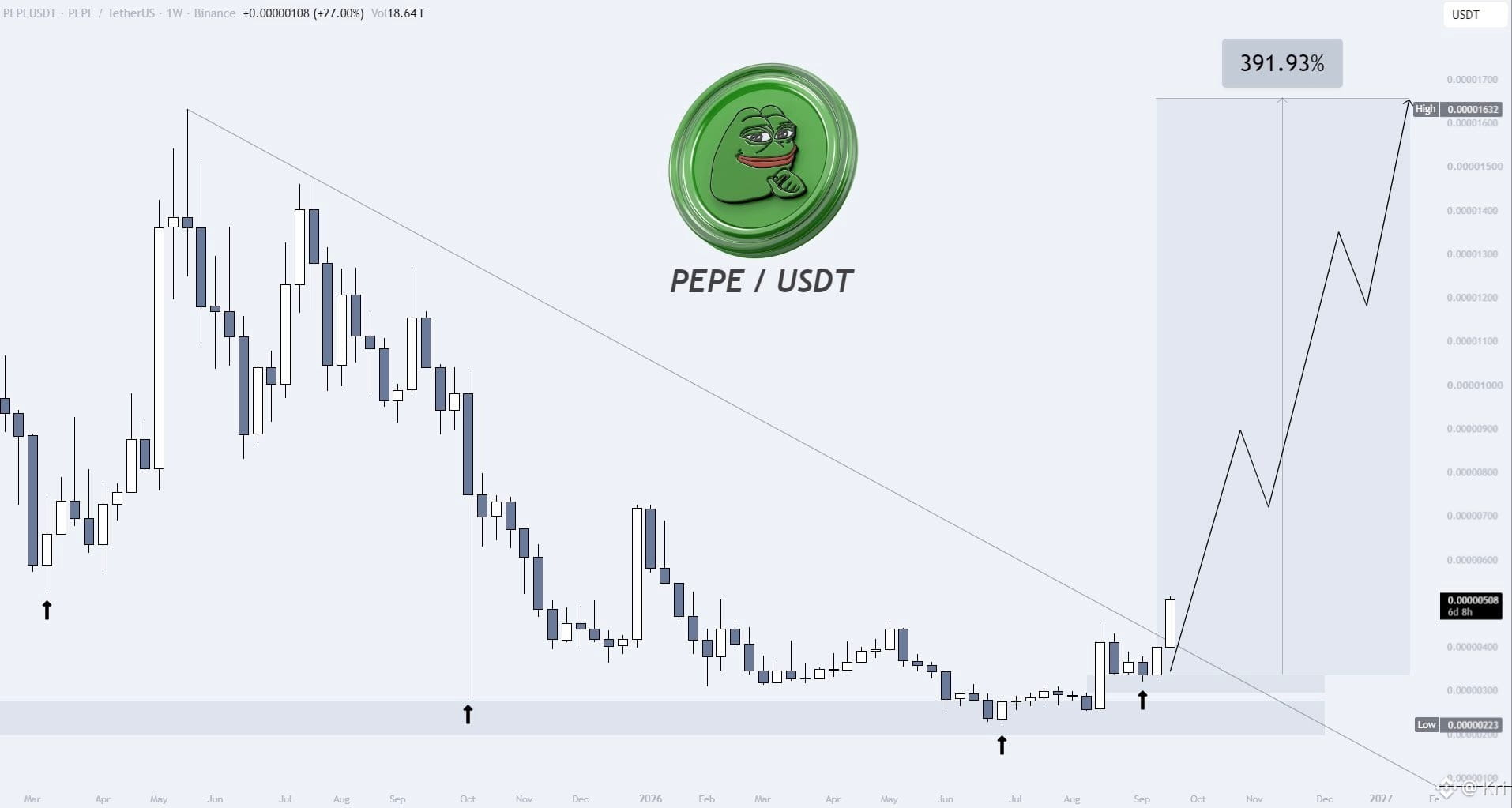
$PEPE - The path to +390% is open🚀
After filling the imbalance, the price broke an important level and shifted the structure, so I expect the growth to continue towards 0.00001632$.
The pure growth since the moment of publication has reached +60% so far, so we continue working without risks and move the stop-loss to breakeven!
#pepe⚡
{alpha}()
$PEPE - The path to +390% is open🚀
After filling the imbalance, the price broke an important level and shifted the structure, so I expect the growth to continue towards 0.00001632$.
The pure growth since the moment of publication has reached +60% so far, so we continue working without risks and move the stop-loss to breakeven!
#pepe⚡
After filling the imbalance, the price broke an important level and shifted the structure, so I expect the growth to continue towards 0.00001632$.
The pure growth since the moment of publication has reached +60% so far, so we continue working without risks and move the stop-loss to breakeven!
#pepe⚡
3
405
·
--
Partly True
Article
MalaSwap, Building an Intelligent Utility Ecosystem on ArcMalachite ($MALA) began with a simple but powerful idea: turn the technology associated with Arc’s consensus infrastructure into a recognizable community-driven identity.
The community discovered the name Malachite within Arc’s technical foundation and gave it a face, a story and an onchain presence. What started as a meme inspired by the technology behind Arc is now evolving into a broader utility ecosystem powered by $MALA.
Malachite is an independent community project and is not officially affiliated with Arc or its developers.
From a Meme to Real Utility
$MALA was created as more than a token built around a compelling narrative. It serves as the native utility currency of MalaSwap, an all-in-one platform being developed to make trading, automation, token creation and digital asset ownership more accessible across multiple blockchains.
This relationship gives the ecosystem two connected layers:
- Malachite provides the community, identity and native token.
- MalaSwap provides the technology, products and long-term utility.
Together, they are building an ecosystem in which $MALA can be used across several interconnected services.
Introducing MalaSwap
MalaSwap is an AI-powered, multichain platform designed to bring essential Web3 tools into one unified experience.
Rather than requiring users to move between separate applications for swaps, bridges, token launches, NFTs and automated trading, MalaSwap is bringing these services together under one platform.
Its expanding infrastructure includes multichain swaps, integrated bridging and support for more than 40 blockchain networks, allowing users to access assets and opportunities beyond a single ecosystem.
Intelligent Multichain Swaps
MalaSwap enables users to exchange tokens across supported networks through an integrated swapping interface.
With multichain connectivity and built-in bridging, users can move between different blockchain ecosystems more efficiently without relying on several disconnected platforms.
The goal is to create a smoother trading experience in which users can access multiple chains from one place while $MALA remains at the centre of the MalaSwap economy.
Agentic AI Trading
One of MalaSwap’s most ambitious developments is its agentic AI portal.
Unlike a conventional chatbot that only provides information, MalaSwap’s AI agents are being designed to understand instructions, monitor onchain conditions and carry out specific tasks for users.
A user could eventually instruct an agent to:
- Monitor a token until it reaches a selected market-cap target.
- Execute a swap when predetermined conditions are met.
- Launch a token at a specific date and time.
- Analyse market activity and identify potential risks.
- Assist with NFT creation and marketplace operations.
The MalaSwap AI workforce consists of five specialised agents:
- Sentinel — security and risk monitoring.
- Kairox — automated trading and execution.
- Velora — market intelligence and analysis.
- Nexari — token creation and launch management.
- Mintara — NFT minting and marketplace operations.
Each agent has a defined role within the ecosystem, creating an intelligent platform where users can delegate complex onchain activities using straightforward instructions.
$MALA is intended to serve as the primary currency for accessing and acquiring these AI-powered services.
Token Launchpad
The MalaSwap launchpad is being developed to help creators launch tokens through a more accessible and guided process.
With the integration of Nexari, users will eventually be able to provide launch instructions while the AI agent assists with the creation and deployment process.
This feature is designed to reduce technical barriers for builders and communities seeking to launch new projects across supported networks.
NFT Marketplace
MalaSwap is also developing an NFT marketplace where users can mint, buy and sell digital assets.
Mintara, the ecosystem’s dedicated NFT agent, is designed to support NFT creation and marketplace-related activities. This will connect creators, collectors and communities through a dedicated marketplace integrated into the wider MalaSwap platform.
Staking and Liquidity
Planned staking and liquidity features will give $MALA holders additional ways to participate in the ecosystem.
These tools are designed to support platform liquidity, encourage long-term participation and deepen the relationship between the token and MalaSwap’s growing suite of products.
A Deflationary Ecosystem Model
The growth of MalaSwap is directly connected to the value structure of $MALA.
Under the ecosystem’s planned model, 80% of the revenue generated through its agentic AI services will be used to buy back and burn $MALA. Tokens purchased through this process will be permanently removed from circulation.
This mechanism is designed to create recurring demand for $MALA while gradually reducing its available supply as platform usage increases.
The model connects product adoption with token utility: as more users access MalaSwap’s services, the ecosystem can generate more activity around $MALA.
Building Beyond the Meme
Malachite may have started with a meme, but its direction is increasingly focused on products, utility and long-term ecosystem growth.
MalaSwap is bringing together:
- Multichain token swaps
- Integrated cross-chain bridges
- More than 40 supported blockchain networks
- Agentic AI trading and automation
- Market intelligence and risk monitoring
- Token creation and launch management
- NFT minting and marketplace services
- Staking and liquidity tools
- $MALA-powered access to AI agents
- A buyback-and-burn model connected to platform revenue
The vision is to create an intelligent Web3 platform where users can trade, build, automate and explore multiple blockchain ecosystems through one connected experience.
Malachite gave the movement its identity. MalaSwap is giving it utility.
The meme inside Arc’s machine is now building an ecosystem of its own.
Company Information
Company: Mala Technologies LLC
Chief Executive Officer: Joel Ashton Rowe
Email: contact@malachitearc.com
MalaSwap: https://malaswap.com
Malachite: https://malachitearc.com
Malachite X: https://x.com/MalachiteonARC
MalaSwap X: https://x.com/MalaSwap
$MALA Contract on Arc:
0x4f7dc89dc44ad08c20d9680d2ee9cfad69bfda55
MalaSwap, Building an Intelligent Utility Ecosystem on Arc
Malachite ($MALA) began with a simple but powerful idea: turn the technology associated with Arc’s consensus infrastructure into a recognizable community-driven identity.
The community discovered the name Malachite within Arc’s technical foundation and gave it a face, a story and an onchain presence. What started as a meme inspired by the technology behind Arc is now evolving into a broader utility ecosystem powered by $MALA.
Malachite is an independent community project and is not officially affiliated with Arc or its developers.
From a Meme to Real Utility
$MALA was created as more than a token built around a compelling narrative. It serves as the native utility currency of MalaSwap, an all-in-one platform being developed to make trading, automation, token creation and digital asset ownership more accessible across multiple blockchains.
This relationship gives the ecosystem two connected layers:
- Malachite provides the community, identity and native token.
- MalaSwap provides the technology, products and long-term utility.
Together, they are building an ecosystem in which $MALA can be used across several interconnected services.
Introducing MalaSwap
MalaSwap is an AI-powered, multichain platform designed to bring essential Web3 tools into one unified experience.
Rather than requiring users to move between separate applications for swaps, bridges, token launches, NFTs and automated trading, MalaSwap is bringing these services together under one platform.
Its expanding infrastructure includes multichain swaps, integrated bridging and support for more than 40 blockchain networks, allowing users to access assets and opportunities beyond a single ecosystem.
Intelligent Multichain Swaps
MalaSwap enables users to exchange tokens across supported networks through an integrated swapping interface.
With multichain connectivity and built-in bridging, users can move between different blockchain ecosystems more efficiently without relying on several disconnected platforms.
The goal is to create a smoother trading experience in which users can access multiple chains from one place while $MALA remains at the centre of the MalaSwap economy.
Agentic AI Trading
One of MalaSwap’s most ambitious developments is its agentic AI portal.
Unlike a conventional chatbot that only provides information, MalaSwap’s AI agents are being designed to understand instructions, monitor onchain conditions and carry out specific tasks for users.
A user could eventually instruct an agent to:
- Monitor a token until it reaches a selected market-cap target.
- Execute a swap when predetermined conditions are met.
- Launch a token at a specific date and time.
- Analyse market activity and identify potential risks.
- Assist with NFT creation and marketplace operations.
The MalaSwap AI workforce consists of five specialised agents:
- Sentinel — security and risk monitoring.
- Kairox — automated trading and execution.
- Velora — market intelligence and analysis.
- Nexari — token creation and launch management.
- Mintara — NFT minting and marketplace operations.
Each agent has a defined role within the ecosystem, creating an intelligent platform where users can delegate complex onchain activities using straightforward instructions.
$MALA is intended to serve as the primary currency for accessing and acquiring these AI-powered services.
Token Launchpad
The MalaSwap launchpad is being developed to help creators launch tokens through a more accessible and guided process.
With the integration of Nexari, users will eventually be able to provide launch instructions while the AI agent assists with the creation and deployment process.
This feature is designed to reduce technical barriers for builders and communities seeking to launch new projects across supported networks.
NFT Marketplace
MalaSwap is also developing an NFT marketplace where users can mint, buy and sell digital assets.
Mintara, the ecosystem’s dedicated NFT agent, is designed to support NFT creation and marketplace-related activities. This will connect creators, collectors and communities through a dedicated marketplace integrated into the wider MalaSwap platform.
Staking and Liquidity
Planned staking and liquidity features will give $MALA holders additional ways to participate in the ecosystem.
These tools are designed to support platform liquidity, encourage long-term participation and deepen the relationship between the token and MalaSwap’s growing suite of products.
A Deflationary Ecosystem Model
The growth of MalaSwap is directly connected to the value structure of $MALA.
Under the ecosystem’s planned model, 80% of the revenue generated through its agentic AI services will be used to buy back and burn $MALA. Tokens purchased through this process will be permanently removed from circulation.
This mechanism is designed to create recurring demand for $MALA while gradually reducing its available supply as platform usage increases.
The model connects product adoption with token utility: as more users access MalaSwap’s services, the ecosystem can generate more activity around $MALA.
Building Beyond the Meme
Malachite may have started with a meme, but its direction is increasingly focused on products, utility and long-term ecosystem growth.
MalaSwap is bringing together:
- Multichain token swaps
- Integrated cross-chain bridges
- More than 40 supported blockchain networks
- Agentic AI trading and automation
- Market intelligence and risk monitoring
- Token creation and launch management
- NFT minting and marketplace services
- Staking and liquidity tools
- $MALA-powered access to AI agents
- A buyback-and-burn model connected to platform revenue
The vision is to create an intelligent Web3 platform where users can trade, build, automate and explore multiple blockchain ecosystems through one connected experience.
Malachite gave the movement its identity. MalaSwap is giving it utility.
The meme inside Arc’s machine is now building an ecosystem of its own.
Company Information
Company: Mala Technologies LLC
Chief Executive Officer: Joel Ashton Rowe
Email: contact@malachitearc.com
MalaSwap: https://malaswap.com
Malachite: https://malachitearc.com
Malachite X: https://x.com/MalachiteonARC
MalaSwap X: https://x.com/MalaSwap
$MALA Contract on Arc:
0x4f7dc89dc44ad08c20d9680d2ee9cfad69bfda55
The community discovered the name Malachite within Arc’s technical foundation and gave it a face, a story and an onchain presence. What started as a meme inspired by the technology behind Arc is now evolving into a broader utility ecosystem powered by $MALA.
Malachite is an independent community project and is not officially affiliated with Arc or its developers.
From a Meme to Real Utility
$MALA was created as more than a token built around a compelling narrative. It serves as the native utility currency of MalaSwap, an all-in-one platform being developed to make trading, automation, token creation and digital asset ownership more accessible across multiple blockchains.
This relationship gives the ecosystem two connected layers:
- Malachite provides the community, identity and native token.
- MalaSwap provides the technology, products and long-term utility.
Together, they are building an ecosystem in which $MALA can be used across several interconnected services.
Introducing MalaSwap
MalaSwap is an AI-powered, multichain platform designed to bring essential Web3 tools into one unified experience.
Rather than requiring users to move between separate applications for swaps, bridges, token launches, NFTs and automated trading, MalaSwap is bringing these services together under one platform.
Its expanding infrastructure includes multichain swaps, integrated bridging and support for more than 40 blockchain networks, allowing users to access assets and opportunities beyond a single ecosystem.
Intelligent Multichain Swaps
MalaSwap enables users to exchange tokens across supported networks through an integrated swapping interface.
With multichain connectivity and built-in bridging, users can move between different blockchain ecosystems more efficiently without relying on several disconnected platforms.
The goal is to create a smoother trading experience in which users can access multiple chains from one place while $MALA remains at the centre of the MalaSwap economy.
Agentic AI Trading
One of MalaSwap’s most ambitious developments is its agentic AI portal.
Unlike a conventional chatbot that only provides information, MalaSwap’s AI agents are being designed to understand instructions, monitor onchain conditions and carry out specific tasks for users.
A user could eventually instruct an agent to:
- Monitor a token until it reaches a selected market-cap target.
- Execute a swap when predetermined conditions are met.
- Launch a token at a specific date and time.
- Analyse market activity and identify potential risks.
- Assist with NFT creation and marketplace operations.
The MalaSwap AI workforce consists of five specialised agents:
- Sentinel — security and risk monitoring.
- Kairox — automated trading and execution.
- Velora — market intelligence and analysis.
- Nexari — token creation and launch management.
- Mintara — NFT minting and marketplace operations.
Each agent has a defined role within the ecosystem, creating an intelligent platform where users can delegate complex onchain activities using straightforward instructions.
$MALA is intended to serve as the primary currency for accessing and acquiring these AI-powered services.
Token Launchpad
The MalaSwap launchpad is being developed to help creators launch tokens through a more accessible and guided process.
With the integration of Nexari, users will eventually be able to provide launch instructions while the AI agent assists with the creation and deployment process.
This feature is designed to reduce technical barriers for builders and communities seeking to launch new projects across supported networks.
NFT Marketplace
MalaSwap is also developing an NFT marketplace where users can mint, buy and sell digital assets.
Mintara, the ecosystem’s dedicated NFT agent, is designed to support NFT creation and marketplace-related activities. This will connect creators, collectors and communities through a dedicated marketplace integrated into the wider MalaSwap platform.
Staking and Liquidity
Planned staking and liquidity features will give $MALA holders additional ways to participate in the ecosystem.
These tools are designed to support platform liquidity, encourage long-term participation and deepen the relationship between the token and MalaSwap’s growing suite of products.
A Deflationary Ecosystem Model
The growth of MalaSwap is directly connected to the value structure of $MALA.
Under the ecosystem’s planned model, 80% of the revenue generated through its agentic AI services will be used to buy back and burn $MALA. Tokens purchased through this process will be permanently removed from circulation.
This mechanism is designed to create recurring demand for $MALA while gradually reducing its available supply as platform usage increases.
The model connects product adoption with token utility: as more users access MalaSwap’s services, the ecosystem can generate more activity around $MALA.
Building Beyond the Meme
Malachite may have started with a meme, but its direction is increasingly focused on products, utility and long-term ecosystem growth.
MalaSwap is bringing together:
- Multichain token swaps
- Integrated cross-chain bridges
- More than 40 supported blockchain networks
- Agentic AI trading and automation
- Market intelligence and risk monitoring
- Token creation and launch management
- NFT minting and marketplace services
- Staking and liquidity tools
- $MALA-powered access to AI agents
- A buyback-and-burn model connected to platform revenue
The vision is to create an intelligent Web3 platform where users can trade, build, automate and explore multiple blockchain ecosystems through one connected experience.
Malachite gave the movement its identity. MalaSwap is giving it utility.
The meme inside Arc’s machine is now building an ecosystem of its own.
Company Information
Company: Mala Technologies LLC
Chief Executive Officer: Joel Ashton Rowe
Email: contact@malachitearc.com
MalaSwap: https://malaswap.com
Malachite: https://malachitearc.com
Malachite X: https://x.com/MalachiteonARC
MalaSwap X: https://x.com/MalaSwap
$MALA Contract on Arc:
0x4f7dc89dc44ad08c20d9680d2ee9cfad69bfda55
5
1
14
2.9k
·
--
Bullish
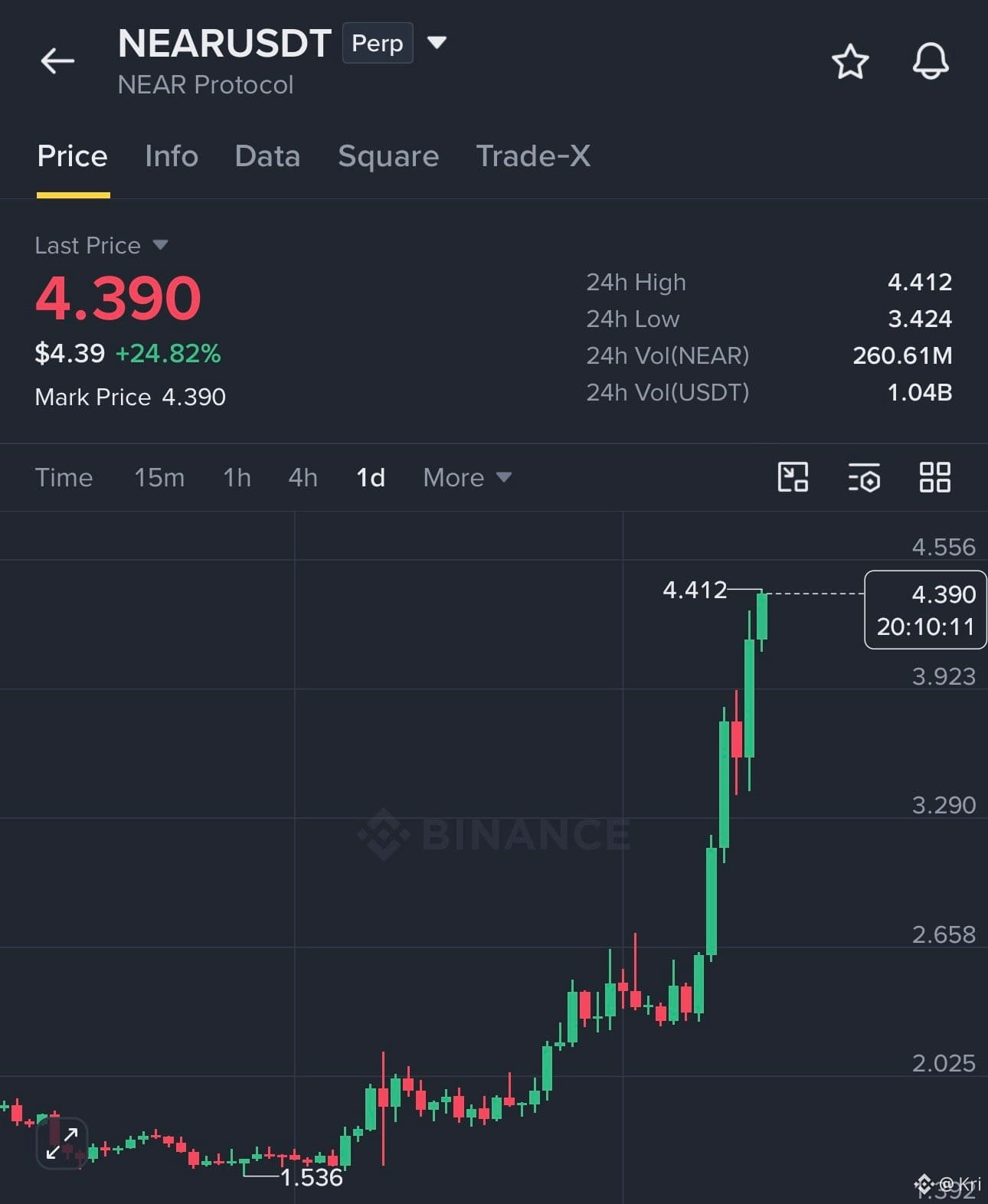
$NEAR had a crazy run 👀🔥
$1.39 —-> $4.40
That’s more than a 3.1X move from the lower range — around 217% upside. ✅
It has cooled off and is now trading around $2.60, but the overall run is still impressive.
Let’s see if $NEAR can build another strong leg from here 📈🚀
#Near
{future}(NEARUSDT)
$NEAR had a crazy run 👀🔥
$1.39 —-> $4.40
That’s more than a 3.1X move from the lower range — around 217% upside. ✅
It has cooled off and is now trading around $2.60, but the overall run is still impressive.
Let’s see if $NEAR can build another strong leg from here 📈🚀
#Near
$1.39 —-> $4.40
That’s more than a 3.1X move from the lower range — around 217% upside. ✅
It has cooled off and is now trading around $2.60, but the overall run is still impressive.
Let’s see if $NEAR can build another strong leg from here 📈🚀
#Near
2
555
·
--
XRP is down 25% from its August high. Fact.
What the price does not show:
#Reserves : exchange balances at a 7-year low, near 1.7 billion XRP.
#RLUSD: 88% of all RLUSD liquidity on the XRP Ledger.
#XRPL : a published roadmap to quantum-safe cryptography, targeted for 2028. This is a key safety measure for all of us.
These facts tell you what the next decade is being built for.
Wave 2 is doing its job. So patience is always the key.
Wave 3 does not ask for permission.
#XRPExchangeReservesHitSevenYearLow
XRP is down 25% from its August high. Fact.
What the price does not show:
#Reserves : exchange balances at a 7-year low, near 1.7 billion XRP.
#RLUSD: 88% of all RLUSD liquidity on the XRP Ledger.
#XRPL : a published roadmap to quantum-safe cryptography, targeted for 2028. This is a key safety measure for all of us.
These facts tell you what the next decade is being built for.
Wave 2 is doing its job. So patience is always the key.
Wave 3 does not ask for permission.
#XRPExchangeReservesHitSevenYearLow
What the price does not show:
#Reserves : exchange balances at a 7-year low, near 1.7 billion XRP.
#RLUSD: 88% of all RLUSD liquidity on the XRP Ledger.
#XRPL : a published roadmap to quantum-safe cryptography, targeted for 2028. This is a key safety measure for all of us.
These facts tell you what the next decade is being built for.
Wave 2 is doing its job. So patience is always the key.
Wave 3 does not ask for permission.
#XRPExchangeReservesHitSevenYearLow
3
773
·
--
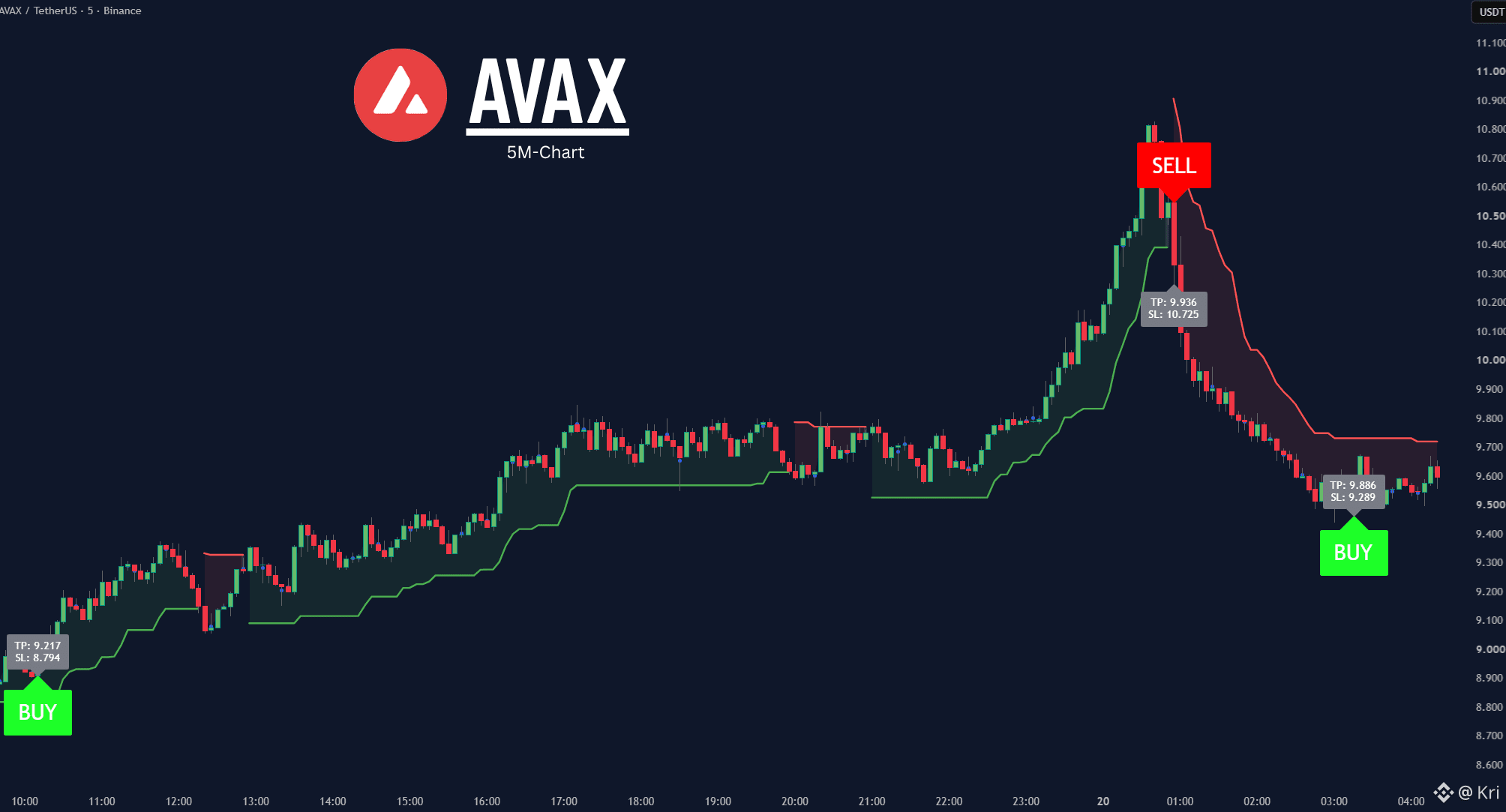
$AVAX bulls are calling for $450 @grok. Is this setup strong enough for a major breakout, and what’s the truth behind the GTA 6 connection?
{future}(AVAXUSDT)
$AVAX bulls are calling for $450 @grok. Is this setup strong enough for a major breakout, and what’s the truth behind the GTA 6 connection?
1
36
24.5k
·
--
🚨 BOOOOOOOOOOOOMB 💥🇺🇸 CLARITY ACT UPDATE: Final XRP & Crypto CLARITY Act text reportedly delayed until tomorrow morning. 👀⏳ Final formatting is underway… THE WAIT CONTINUES. 🍿🚀 #XRP
🚨 BOOOOOOOOOOOOMB 💥🇺🇸 CLARITY ACT UPDATE: Final XRP & Crypto CLARITY Act text reportedly delayed until tomorrow morning. 👀⏳ Final formatting is underway… THE WAIT CONTINUES. 🍿🚀 #XRP
470
·
--
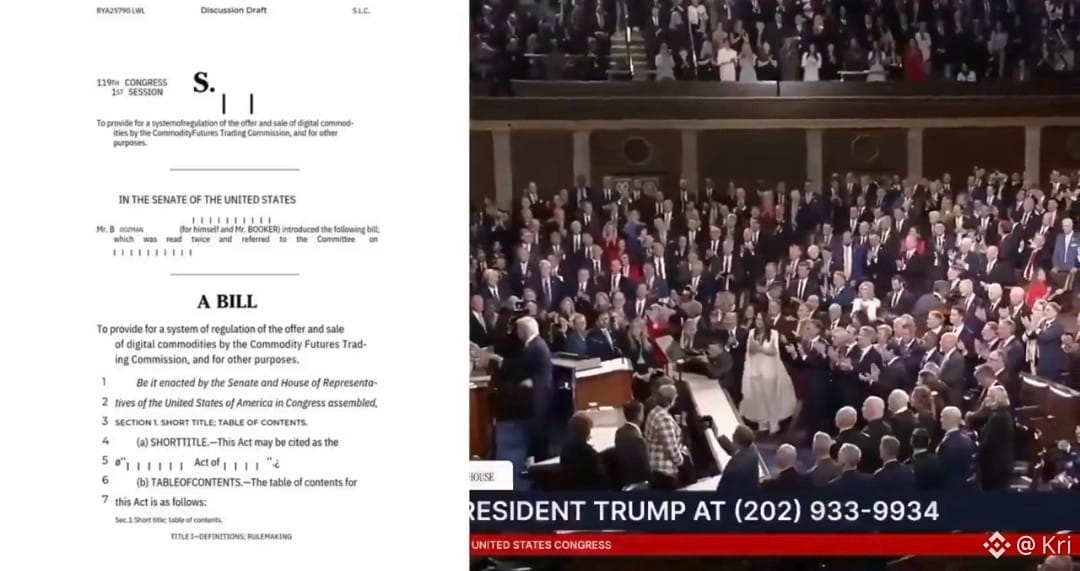
💥HUGE! 🇺🇸 The SEC Chair Paul Atkins has just announced that the United States of America will get CLEAR RULES for the crypto market with or without the CLARITY ACT.
AMERICA WILL BE THE CRYPTO CAPITAL OF THE WORLD!🔥
#SECReceivesAmendedInjectiveETFFiling $BTC
{future}(BTCUSDT)
💥HUGE! 🇺🇸 The SEC Chair Paul Atkins has just announced that the United States of America will get CLEAR RULES for the crypto market with or without the CLARITY ACT.
AMERICA WILL BE THE CRYPTO CAPITAL OF THE WORLD!🔥
#SECReceivesAmendedInjectiveETFFiling $BTC
AMERICA WILL BE THE CRYPTO CAPITAL OF THE WORLD!🔥
#SECReceivesAmendedInjectiveETFFiling $BTC
1
477
·
--
Partly True
#US10YearTreasuryYieldNears5%
markets are taking notice.
The US 10 Year Treasury yield is nearing 4.84%, close to its highest level since 2023.
#US10YearTreasuryYieldNears5%
markets are taking notice.
The US 10 Year Treasury yield is nearing 4.84%, close to its highest level since 2023.
markets are taking notice.
The US 10 Year Treasury yield is nearing 4.84%, close to its highest level since 2023.

1
1
998
·
--

Article
NIU MENG (牛梦) Surges Over 33x on Launch Day, Market Cap Nears $2 MillionNIU MENG (牛梦), the "Bull Dream" memecoin, climbed more than 33x within its first day on BSC, pushing market cap toward $2 million.
[Location] — NIU MENG (牛梦), a memecoin launched on BNB Smart Chain under the tagline "Bull Dream," today announced it has surged more than 33x within its first day of trading, with market capitalization climbing from roughly $57,180 at launch to an all-time high near $1.92 million.
A Launch-Day Breakout
NIU MENG went live on September 10, 2026, opening at a price of $0.00005718 before climbing to an all-time high of $0.001929 in less than 24 hours, a gain of more than 3,270%. The rapid move places NIU MENG among the more notable launch-day performers on BNB Smart Chain this month, with trading activity concentrated almost entirely within the token's first day on the market.
Bull Dream, Realized
The project's branding leans directly into its trajectory. NIU MENG, which translates from Chinese as "Bull Dream," pairs its name with the slogan "The bull run was never a dream. Wake it up." The team frames the token's early performance as a validation of that message rather than a coincidence.
"The bull run was never a dream. We're just here to wake it up," the NIU MENG team said in a statement addressing the token's early momentum. The project has positioned the phrase as its core identity across its website and social channels, betting that the sentiment resonates with traders looking for the next fast-moving BSC token.
Early Momentum, Early Days
With NIU MENG only one day removed from launch, the project's current market cap sits well above its starting point but still off its all-time high, leaving room for continued volatility in either direction, a dynamic common to newly launched memecoins during their first days of trading. The team has not detailed a formal roadmap beyond its initial launch push, though its public channels suggest an emphasis on building visibility and holder count in the near term.
Trading data and live price charts for NIU MENG are available on DexScreener, and the project maintains an active presence on X (formerly Twitter), where it has been posting updates tied to its price action and community growth since launch.
Part of a Broader Trend
NIU MENG's debut arrives amid continued speculative interest in newly launched tokens on BNB Smart Chain, where traders regularly seek out early-stage memecoins in search of outsized, short-term gains. The chain's low transaction costs and fast settlement times have made it a common launchpad for this category of token, and projects that pair a clear branding hook with rapid early price action, as NIU MENG has, tend to draw disproportionate attention in the hours immediately following launch. Whether that attention translates into sustained trading volume beyond the initial pump remains an open question the project will face in the coming days.
Join NIU MENG
Be part of the NIU MENG community and follow the project as it builds on its launch-day momentum. Explore NIU MENG's official website at https://niumengbsc.com/. Stay connected with the community on X at https://x.com/NiumengBSC, and track live price action on DexScreener.
About NIU MENG
NIU MENG (牛梦), meaning "Bull Dream," is a memecoin launched on BNB Smart Chain in September 2026, built around the idea that a sustained bull run is achievable rather than aspirational. The project debuted with rapid early price action and is focused on growing its trading community in the days following launch.
Contract Address: 0x33d2E1eeB4D399591C11ac9AD64863fa11678304
Website | Twitter | DexScreener
NIU MENG (牛梦)
[Contact Person]
[Business Email]
https://niumengbsc.com/
Disclaimer:
The information provided in this press release is not a solicitation for investment, nor is it intended as investment advice, financial advice, or trading advice. Investing involves risk, including the potential loss of capital. It is strongly recommended that you practice due diligence, including consultation with a professional financial advisor, before investing in or trading cryptocurrency and securities. You are solely responsible for your investment decisions and assume all associated risks. Neither the media platform nor the publisher shall be held responsible for any fraudulent activities, misrepresentations, or financial losses arising from the content of this press release.
NIU MENG (牛梦) Surges Over 33x on Launch Day, Market Cap Nears $2 Million
NIU MENG (牛梦), the "Bull Dream" memecoin, climbed more than 33x within its first day on BSC, pushing market cap toward $2 million.
[Location] — NIU MENG (牛梦), a memecoin launched on BNB Smart Chain under the tagline "Bull Dream," today announced it has surged more than 33x within its first day of trading, with market capitalization climbing from roughly $57,180 at launch to an all-time high near $1.92 million.
A Launch-Day Breakout
NIU MENG went live on September 10, 2026, opening at a price of $0.00005718 before climbing to an all-time high of $0.001929 in less than 24 hours, a gain of more than 3,270%. The rapid move places NIU MENG among the more notable launch-day performers on BNB Smart Chain this month, with trading activity concentrated almost entirely within the token's first day on the market.
Bull Dream, Realized
The project's branding leans directly into its trajectory. NIU MENG, which translates from Chinese as "Bull Dream," pairs its name with the slogan "The bull run was never a dream. Wake it up." The team frames the token's early performance as a validation of that message rather than a coincidence.
"The bull run was never a dream. We're just here to wake it up," the NIU MENG team said in a statement addressing the token's early momentum. The project has positioned the phrase as its core identity across its website and social channels, betting that the sentiment resonates with traders looking for the next fast-moving BSC token.
Early Momentum, Early Days
With NIU MENG only one day removed from launch, the project's current market cap sits well above its starting point but still off its all-time high, leaving room for continued volatility in either direction, a dynamic common to newly launched memecoins during their first days of trading. The team has not detailed a formal roadmap beyond its initial launch push, though its public channels suggest an emphasis on building visibility and holder count in the near term.
Trading data and live price charts for NIU MENG are available on DexScreener, and the project maintains an active presence on X (formerly Twitter), where it has been posting updates tied to its price action and community growth since launch.
Part of a Broader Trend
NIU MENG's debut arrives amid continued speculative interest in newly launched tokens on BNB Smart Chain, where traders regularly seek out early-stage memecoins in search of outsized, short-term gains. The chain's low transaction costs and fast settlement times have made it a common launchpad for this category of token, and projects that pair a clear branding hook with rapid early price action, as NIU MENG has, tend to draw disproportionate attention in the hours immediately following launch. Whether that attention translates into sustained trading volume beyond the initial pump remains an open question the project will face in the coming days.
Join NIU MENG
Be part of the NIU MENG community and follow the project as it builds on its launch-day momentum. Explore NIU MENG's official website at https://niumengbsc.com/. Stay connected with the community on X at https://x.com/NiumengBSC, and track live price action on DexScreener.
About NIU MENG
NIU MENG (牛梦), meaning "Bull Dream," is a memecoin launched on BNB Smart Chain in September 2026, built around the idea that a sustained bull run is achievable rather than aspirational. The project debuted with rapid early price action and is focused on growing its trading community in the days following launch.
Contract Address: 0x33d2E1eeB4D399591C11ac9AD64863fa11678304
Website | Twitter | DexScreener
NIU MENG (牛梦)
[Contact Person]
[Business Email]
https://niumengbsc.com/
Disclaimer:
The information provided in this press release is not a solicitation for investment, nor is it intended as investment advice, financial advice, or trading advice. Investing involves risk, including the potential loss of capital. It is strongly recommended that you practice due diligence, including consultation with a professional financial advisor, before investing in or trading cryptocurrency and securities. You are solely responsible for your investment decisions and assume all associated risks. Neither the media platform nor the publisher shall be held responsible for any fraudulent activities, misrepresentations, or financial losses arising from the content of this press release.
[Location] — NIU MENG (牛梦), a memecoin launched on BNB Smart Chain under the tagline "Bull Dream," today announced it has surged more than 33x within its first day of trading, with market capitalization climbing from roughly $57,180 at launch to an all-time high near $1.92 million.
A Launch-Day Breakout
NIU MENG went live on September 10, 2026, opening at a price of $0.00005718 before climbing to an all-time high of $0.001929 in less than 24 hours, a gain of more than 3,270%. The rapid move places NIU MENG among the more notable launch-day performers on BNB Smart Chain this month, with trading activity concentrated almost entirely within the token's first day on the market.
Bull Dream, Realized
The project's branding leans directly into its trajectory. NIU MENG, which translates from Chinese as "Bull Dream," pairs its name with the slogan "The bull run was never a dream. Wake it up." The team frames the token's early performance as a validation of that message rather than a coincidence.
"The bull run was never a dream. We're just here to wake it up," the NIU MENG team said in a statement addressing the token's early momentum. The project has positioned the phrase as its core identity across its website and social channels, betting that the sentiment resonates with traders looking for the next fast-moving BSC token.
Early Momentum, Early Days
With NIU MENG only one day removed from launch, the project's current market cap sits well above its starting point but still off its all-time high, leaving room for continued volatility in either direction, a dynamic common to newly launched memecoins during their first days of trading. The team has not detailed a formal roadmap beyond its initial launch push, though its public channels suggest an emphasis on building visibility and holder count in the near term.
Trading data and live price charts for NIU MENG are available on DexScreener, and the project maintains an active presence on X (formerly Twitter), where it has been posting updates tied to its price action and community growth since launch.
Part of a Broader Trend
NIU MENG's debut arrives amid continued speculative interest in newly launched tokens on BNB Smart Chain, where traders regularly seek out early-stage memecoins in search of outsized, short-term gains. The chain's low transaction costs and fast settlement times have made it a common launchpad for this category of token, and projects that pair a clear branding hook with rapid early price action, as NIU MENG has, tend to draw disproportionate attention in the hours immediately following launch. Whether that attention translates into sustained trading volume beyond the initial pump remains an open question the project will face in the coming days.
Join NIU MENG
Be part of the NIU MENG community and follow the project as it builds on its launch-day momentum. Explore NIU MENG's official website at https://niumengbsc.com/. Stay connected with the community on X at https://x.com/NiumengBSC, and track live price action on DexScreener.
About NIU MENG
NIU MENG (牛梦), meaning "Bull Dream," is a memecoin launched on BNB Smart Chain in September 2026, built around the idea that a sustained bull run is achievable rather than aspirational. The project debuted with rapid early price action and is focused on growing its trading community in the days following launch.
Contract Address: 0x33d2E1eeB4D399591C11ac9AD64863fa11678304
Website | Twitter | DexScreener
NIU MENG (牛梦)
[Contact Person]
[Business Email]
https://niumengbsc.com/
Disclaimer:
The information provided in this press release is not a solicitation for investment, nor is it intended as investment advice, financial advice, or trading advice. Investing involves risk, including the potential loss of capital. It is strongly recommended that you practice due diligence, including consultation with a professional financial advisor, before investing in or trading cryptocurrency and securities. You are solely responsible for your investment decisions and assume all associated risks. Neither the media platform nor the publisher shall be held responsible for any fraudulent activities, misrepresentations, or financial losses arising from the content of this press release.
1
2
592
·
--
🚨 CLARITY ACT ON A KNIFE-EDGE 🇺🇸⚠️
✅ Sept. 15: Senate cloture vote
✅ Sept. 17: House leaves D.C.
That could leave lawmakers with just 48 HOURS to push the CLARITY Act toward final passage. ⏳🔥
#CryptoSectorsFallSecondDay
🚨 CLARITY ACT ON A KNIFE-EDGE 🇺🇸⚠️
✅ Sept. 15: Senate cloture vote
✅ Sept. 17: House leaves D.C.
That could leave lawmakers with just 48 HOURS to push the CLARITY Act toward final passage. ⏳🔥
#CryptoSectorsFallSecondDay
✅ Sept. 15: Senate cloture vote
✅ Sept. 17: House leaves D.C.
That could leave lawmakers with just 48 HOURS to push the CLARITY Act toward final passage. ⏳🔥
#CryptoSectorsFallSecondDay

1
21
9.7k
·
--
Article
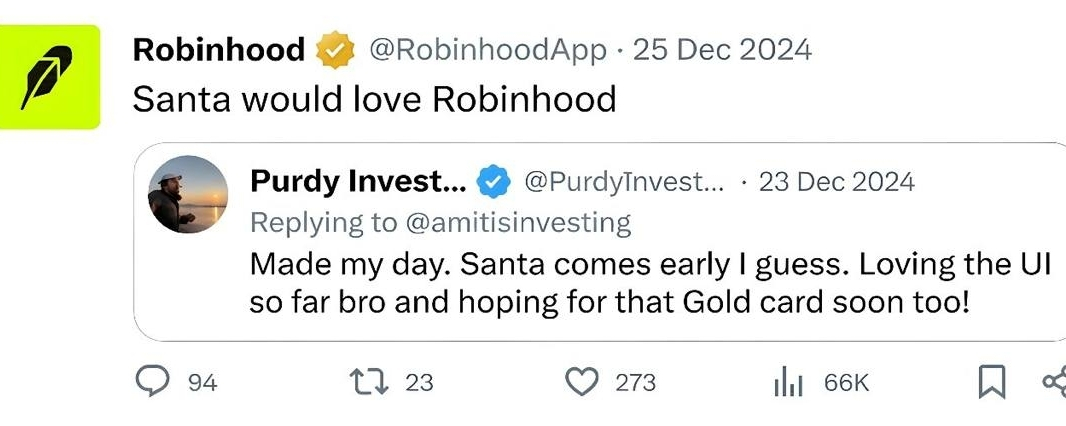
SantaHood Expands Beyond Memecoin Roots With Santro Exchange and $SANTACOIN UtilitySantaHood, an early Santa-themed project on Robinhood Chain, is expanding its ecosystem with the launch of Santro Exchange, bringing new utility to its native $SANTACOIN token as the project looks beyond the traditional Christmas memecoin narrative.
SantaHood is taking its Santa-themed crypto experiment beyond memecoin territory with the introduction of Santro Exchange, a trading platform designed to become a central part of the project's growing ecosystem.
Launched in July 2026 on Robinhood Chain, SantaHood entered the market months ahead of the traditional Christmas season. While the project initially attracted attention through its Santa narrative, its team has increasingly focused on building products around its native token, $SANTACOIN.
The official $SANTACOIN contract address on Robinhood Chain is:
0x38bb87cf3e7344a82be7cd671c191f015b97eee6
The strategy is designed to address one of the biggest challenges facing seasonal memecoins: maintaining relevance after the narrative that initially drove attention begins to fade.
Rather than relying exclusively on Christmas speculation, SantaHood is attempting to build an ecosystem where $SANTACOIN has utility throughout the year.
Santro Exchange Becomes the Centerpiece of SantaHood's Utility Push
The biggest development in that strategy is Santro Exchange, which the project is positioning as a centralized trading platform built around the Robinhood Chain ecosystem.
Santro Exchange is scheduled for public launch on September 9, 2026.
The platform is designed with both centralized and decentralized trading components, giving users access to different trading experiences within the broader Santro ecosystem.
More importantly, SantaHood has decided against introducing a separate token for the exchange.
Instead, $SANTACOIN will remain the native and governance token of the ecosystem, connecting SantaHood and Santro Exchange under a single-token structure.
For holders, this means the launch of Santro Exchange is not intended to dilute the existing ecosystem through another token issuance.
The team describes its strategy simply as:
“One ecosystem, one token.”
Exchange Fees to Support $SANTACOIN Buybacks and Burns
One of the most notable elements of Santro Exchange is its planned fee structure.
According to the project, platform fees generated by Santro Exchange will be used to purchase $SANTACOIN from the open market, with purchased tokens subsequently burned.
This creates a direct economic connection between exchange activity and the SantaHood token.
Under the model, increased trading activity could generate additional platform fees, which would translate into market buybacks and further reductions in token supply.
The mechanism can be summarized as:
Trading Activity → Platform Fees → $SANTACOIN Buybacks → Token Burns
The ultimate impact of the mechanism will depend on Santro Exchange attracting sustained users and trading volume after launch.
However, the model represents SantaHood's attempt to move $SANTACOIN beyond purely speculative demand by connecting the token to revenue-generating infrastructure.
SantaHood Has Already Made Token Burns Part of Its Strategy
The exchange mechanism builds on a strategy SantaHood has already been pursuing.
$SANTACOIN launched with a maximum supply of 1 billion tokens.
Since launch, the project says it has conducted multiple market buybacks and permanently removed tokens from circulation through burns.
According to figures provided by the SantaHood team, approximately 15% of the original supply has been burned through its various initiatives.
The project has also introduced a daily buyback-and-burn mechanism, with the goal of continuously reducing supply over time.
Santro Exchange is expected to add another component to this strategy by tying future buybacks to economic activity generated by the platform itself.
$SANTACOIN Utility Expands
SantaHood's broader roadmap places $SANTACOIN at the center of several ecosystem functions.
Beyond its role within Santro Exchange, the token is being positioned for governance, staking and additional holder utilities.
The project is also developing NFT-related functionality intended to provide further benefits within the ecosystem.
By keeping these utilities connected to one asset, SantaHood is attempting to avoid the fragmented token structure seen in some crypto ecosystems where individual products launch their own tokens.
The approach means future SantaHood products could potentially expand the utility of $SANTACOIN rather than compete against it.
Building Before the Christmas Narrative Peaks
Timing has played an important role in SantaHood's strategy.
Rather than launching at the height of the Christmas memecoin season, the project entered Robinhood Chain months earlier and began establishing its ecosystem before December.
That gives SantaHood an opportunity to position itself before seasonal attention around Santa-themed assets potentially increases.
But the team appears equally focused on what happens after Christmas.
Santro Exchange is central to that plan.
Instead of Christmas being the entire reason for the project's existence, SantaHood is treating the seasonal narrative as a potential gateway into a broader ecosystem.
If successful, users initially attracted by the Santa narrative could subsequently interact with Santro Exchange, staking, governance and other products connected to $SANTACOIN.
An Early Bet on Robinhood Chain
SantaHood's expansion also represents a bet on the development of Robinhood Chain.
Emerging blockchain networks often create opportunities for early applications to establish their brands before ecosystems become crowded.
SantaHood is attempting to secure that position by building both a recognizable token brand and trading infrastructure during Robinhood Chain's early development.
Santro Exchange represents the project's largest step in that direction so far.
As with any newly launched crypto platform, however, its longer-term impact will depend on adoption, liquidity, trading activity and the team's ability to execute its roadmap.
For SantaHood, the objective is clear: transform a recognizable meme narrative into an ecosystem with products capable of operating independently of seasonal hype.
From Memecoin to Ecosystem
The launch of Santro Exchange marks an important transition for SantaHood.
The project started with Santa as its identity, but its development strategy now revolves around building utility around $SANTACOIN.
With Santro Exchange, staking, governance, NFT functionality and a fee-funded buyback-and-burn mechanism forming part of the ecosystem, SantaHood is attempting to demonstrate that a memecoin can use its narrative to attract a community while simultaneously developing products around that community.
Whether that strategy succeeds will ultimately depend on adoption.
But as the Christmas season approaches, SantaHood is entering it with something many seasonal tokens do not have: an ecosystem being built beyond the meme.
Readers interested in following the project's development can find SantaHood through its official website and social channels, while Santro Exchange maintains separate channels for exchange-related developments.
SantaHood Official Information
Project: SantaHood
Ticker: $SANTACOIN
Network: Robinhood Chain
Maximum Supply: 1,000,000,000 SANTACOIN
Ecosystem Platform: Santro Exchange
Official Contract Address (CA):
"0x38bb87cf3e7344a82be7cd671c191f015b97eee6"
SantaHood Website: https://Santahood.com
SantaHood X: https://x.com/SantaHoodCoin
SantaHood Telegram: https://t.me/Santahood
Santro Exchange: https://SantroExchange.com
Santro Exchange X: https://x.com/SantroExchange
Santro Exchange Telegram: https://t.me/SantroExchange
Readers should independently verify the contract address through SantaHood's official channels and conduct their own research before interacting with cryptocurrency assets.
SantaHood Expands Beyond Memecoin Roots With Santro Exchange and $SANTACOIN Utility
SantaHood, an early Santa-themed project on Robinhood Chain, is expanding its ecosystem with the launch of Santro Exchange, bringing new utility to its native $SANTACOIN token as the project looks beyond the traditional Christmas memecoin narrative.
SantaHood is taking its Santa-themed crypto experiment beyond memecoin territory with the introduction of Santro Exchange, a trading platform designed to become a central part of the project's growing ecosystem.
Launched in July 2026 on Robinhood Chain, SantaHood entered the market months ahead of the traditional Christmas season. While the project initially attracted attention through its Santa narrative, its team has increasingly focused on building products around its native token, $SANTACOIN.
The official $SANTACOIN contract address on Robinhood Chain is:
0x38bb87cf3e7344a82be7cd671c191f015b97eee6
The strategy is designed to address one of the biggest challenges facing seasonal memecoins: maintaining relevance after the narrative that initially drove attention begins to fade.
Rather than relying exclusively on Christmas speculation, SantaHood is attempting to build an ecosystem where $SANTACOIN has utility throughout the year.
Santro Exchange Becomes the Centerpiece of SantaHood's Utility Push
The biggest development in that strategy is Santro Exchange, which the project is positioning as a centralized trading platform built around the Robinhood Chain ecosystem.
Santro Exchange is scheduled for public launch on September 9, 2026.
The platform is designed with both centralized and decentralized trading components, giving users access to different trading experiences within the broader Santro ecosystem.
More importantly, SantaHood has decided against introducing a separate token for the exchange.
Instead, $SANTACOIN will remain the native and governance token of the ecosystem, connecting SantaHood and Santro Exchange under a single-token structure.
For holders, this means the launch of Santro Exchange is not intended to dilute the existing ecosystem through another token issuance.
The team describes its strategy simply as:
“One ecosystem, one token.”
Exchange Fees to Support $SANTACOIN Buybacks and Burns
One of the most notable elements of Santro Exchange is its planned fee structure.
According to the project, platform fees generated by Santro Exchange will be used to purchase $SANTACOIN from the open market, with purchased tokens subsequently burned.
This creates a direct economic connection between exchange activity and the SantaHood token.
Under the model, increased trading activity could generate additional platform fees, which would translate into market buybacks and further reductions in token supply.
The mechanism can be summarized as:
Trading Activity → Platform Fees → $SANTACOIN Buybacks → Token Burns
The ultimate impact of the mechanism will depend on Santro Exchange attracting sustained users and trading volume after launch.
However, the model represents SantaHood's attempt to move $SANTACOIN beyond purely speculative demand by connecting the token to revenue-generating infrastructure.
SantaHood Has Already Made Token Burns Part of Its Strategy
The exchange mechanism builds on a strategy SantaHood has already been pursuing.
$SANTACOIN launched with a maximum supply of 1 billion tokens.
Since launch, the project says it has conducted multiple market buybacks and permanently removed tokens from circulation through burns.
According to figures provided by the SantaHood team, approximately 15% of the original supply has been burned through its various initiatives.
The project has also introduced a daily buyback-and-burn mechanism, with the goal of continuously reducing supply over time.
Santro Exchange is expected to add another component to this strategy by tying future buybacks to economic activity generated by the platform itself.
$SANTACOIN Utility Expands
SantaHood's broader roadmap places $SANTACOIN at the center of several ecosystem functions.
Beyond its role within Santro Exchange, the token is being positioned for governance, staking and additional holder utilities.
The project is also developing NFT-related functionality intended to provide further benefits within the ecosystem.
By keeping these utilities connected to one asset, SantaHood is attempting to avoid the fragmented token structure seen in some crypto ecosystems where individual products launch their own tokens.
The approach means future SantaHood products could potentially expand the utility of $SANTACOIN rather than compete against it.
Building Before the Christmas Narrative Peaks
Timing has played an important role in SantaHood's strategy.
Rather than launching at the height of the Christmas memecoin season, the project entered Robinhood Chain months earlier and began establishing its ecosystem before December.
That gives SantaHood an opportunity to position itself before seasonal attention around Santa-themed assets potentially increases.
But the team appears equally focused on what happens after Christmas.
Santro Exchange is central to that plan.
Instead of Christmas being the entire reason for the project's existence, SantaHood is treating the seasonal narrative as a potential gateway into a broader ecosystem.
If successful, users initially attracted by the Santa narrative could subsequently interact with Santro Exchange, staking, governance and other products connected to $SANTACOIN.
An Early Bet on Robinhood Chain
SantaHood's expansion also represents a bet on the development of Robinhood Chain.
Emerging blockchain networks often create opportunities for early applications to establish their brands before ecosystems become crowded.
SantaHood is attempting to secure that position by building both a recognizable token brand and trading infrastructure during Robinhood Chain's early development.
Santro Exchange represents the project's largest step in that direction so far.
As with any newly launched crypto platform, however, its longer-term impact will depend on adoption, liquidity, trading activity and the team's ability to execute its roadmap.
For SantaHood, the objective is clear: transform a recognizable meme narrative into an ecosystem with products capable of operating independently of seasonal hype.
From Memecoin to Ecosystem
The launch of Santro Exchange marks an important transition for SantaHood.
The project started with Santa as its identity, but its development strategy now revolves around building utility around $SANTACOIN.
With Santro Exchange, staking, governance, NFT functionality and a fee-funded buyback-and-burn mechanism forming part of the ecosystem, SantaHood is attempting to demonstrate that a memecoin can use its narrative to attract a community while simultaneously developing products around that community.
Whether that strategy succeeds will ultimately depend on adoption.
But as the Christmas season approaches, SantaHood is entering it with something many seasonal tokens do not have: an ecosystem being built beyond the meme.
Readers interested in following the project's development can find SantaHood through its official website and social channels, while Santro Exchange maintains separate channels for exchange-related developments.
SantaHood Official Information
Project: SantaHood
Ticker: $SANTACOIN
Network: Robinhood Chain
Maximum Supply: 1,000,000,000 SANTACOIN
Ecosystem Platform: Santro Exchange
Official Contract Address (CA):
"0x38bb87cf3e7344a82be7cd671c191f015b97eee6"
SantaHood Website: https://Santahood.com
SantaHood X: https://x.com/SantaHoodCoin
SantaHood Telegram: https://t.me/Santahood
Santro Exchange: https://SantroExchange.com
Santro Exchange X: https://x.com/SantroExchange
Santro Exchange Telegram: https://t.me/SantroExchange
Readers should independently verify the contract address through SantaHood's official channels and conduct their own research before interacting with cryptocurrency assets.
SantaHood is taking its Santa-themed crypto experiment beyond memecoin territory with the introduction of Santro Exchange, a trading platform designed to become a central part of the project's growing ecosystem.
Launched in July 2026 on Robinhood Chain, SantaHood entered the market months ahead of the traditional Christmas season. While the project initially attracted attention through its Santa narrative, its team has increasingly focused on building products around its native token, $SANTACOIN.
The official $SANTACOIN contract address on Robinhood Chain is:
0x38bb87cf3e7344a82be7cd671c191f015b97eee6
The strategy is designed to address one of the biggest challenges facing seasonal memecoins: maintaining relevance after the narrative that initially drove attention begins to fade.
Rather than relying exclusively on Christmas speculation, SantaHood is attempting to build an ecosystem where $SANTACOIN has utility throughout the year.
Santro Exchange Becomes the Centerpiece of SantaHood's Utility Push
The biggest development in that strategy is Santro Exchange, which the project is positioning as a centralized trading platform built around the Robinhood Chain ecosystem.
Santro Exchange is scheduled for public launch on September 9, 2026.
The platform is designed with both centralized and decentralized trading components, giving users access to different trading experiences within the broader Santro ecosystem.
More importantly, SantaHood has decided against introducing a separate token for the exchange.
Instead, $SANTACOIN will remain the native and governance token of the ecosystem, connecting SantaHood and Santro Exchange under a single-token structure.
For holders, this means the launch of Santro Exchange is not intended to dilute the existing ecosystem through another token issuance.
The team describes its strategy simply as:
“One ecosystem, one token.”
Exchange Fees to Support $SANTACOIN Buybacks and Burns
One of the most notable elements of Santro Exchange is its planned fee structure.
According to the project, platform fees generated by Santro Exchange will be used to purchase $SANTACOIN from the open market, with purchased tokens subsequently burned.
This creates a direct economic connection between exchange activity and the SantaHood token.
Under the model, increased trading activity could generate additional platform fees, which would translate into market buybacks and further reductions in token supply.
The mechanism can be summarized as:
Trading Activity → Platform Fees → $SANTACOIN Buybacks → Token Burns
The ultimate impact of the mechanism will depend on Santro Exchange attracting sustained users and trading volume after launch.
However, the model represents SantaHood's attempt to move $SANTACOIN beyond purely speculative demand by connecting the token to revenue-generating infrastructure.
SantaHood Has Already Made Token Burns Part of Its Strategy
The exchange mechanism builds on a strategy SantaHood has already been pursuing.
$SANTACOIN launched with a maximum supply of 1 billion tokens.
Since launch, the project says it has conducted multiple market buybacks and permanently removed tokens from circulation through burns.
According to figures provided by the SantaHood team, approximately 15% of the original supply has been burned through its various initiatives.
The project has also introduced a daily buyback-and-burn mechanism, with the goal of continuously reducing supply over time.
Santro Exchange is expected to add another component to this strategy by tying future buybacks to economic activity generated by the platform itself.
$SANTACOIN Utility Expands
SantaHood's broader roadmap places $SANTACOIN at the center of several ecosystem functions.
Beyond its role within Santro Exchange, the token is being positioned for governance, staking and additional holder utilities.
The project is also developing NFT-related functionality intended to provide further benefits within the ecosystem.
By keeping these utilities connected to one asset, SantaHood is attempting to avoid the fragmented token structure seen in some crypto ecosystems where individual products launch their own tokens.
The approach means future SantaHood products could potentially expand the utility of $SANTACOIN rather than compete against it.
Building Before the Christmas Narrative Peaks
Timing has played an important role in SantaHood's strategy.
Rather than launching at the height of the Christmas memecoin season, the project entered Robinhood Chain months earlier and began establishing its ecosystem before December.
That gives SantaHood an opportunity to position itself before seasonal attention around Santa-themed assets potentially increases.
But the team appears equally focused on what happens after Christmas.
Santro Exchange is central to that plan.
Instead of Christmas being the entire reason for the project's existence, SantaHood is treating the seasonal narrative as a potential gateway into a broader ecosystem.
If successful, users initially attracted by the Santa narrative could subsequently interact with Santro Exchange, staking, governance and other products connected to $SANTACOIN.
An Early Bet on Robinhood Chain
SantaHood's expansion also represents a bet on the development of Robinhood Chain.
Emerging blockchain networks often create opportunities for early applications to establish their brands before ecosystems become crowded.
SantaHood is attempting to secure that position by building both a recognizable token brand and trading infrastructure during Robinhood Chain's early development.
Santro Exchange represents the project's largest step in that direction so far.
As with any newly launched crypto platform, however, its longer-term impact will depend on adoption, liquidity, trading activity and the team's ability to execute its roadmap.
For SantaHood, the objective is clear: transform a recognizable meme narrative into an ecosystem with products capable of operating independently of seasonal hype.
From Memecoin to Ecosystem
The launch of Santro Exchange marks an important transition for SantaHood.
The project started with Santa as its identity, but its development strategy now revolves around building utility around $SANTACOIN.
With Santro Exchange, staking, governance, NFT functionality and a fee-funded buyback-and-burn mechanism forming part of the ecosystem, SantaHood is attempting to demonstrate that a memecoin can use its narrative to attract a community while simultaneously developing products around that community.
Whether that strategy succeeds will ultimately depend on adoption.
But as the Christmas season approaches, SantaHood is entering it with something many seasonal tokens do not have: an ecosystem being built beyond the meme.
Readers interested in following the project's development can find SantaHood through its official website and social channels, while Santro Exchange maintains separate channels for exchange-related developments.
SantaHood Official Information
Project: SantaHood
Ticker: $SANTACOIN
Network: Robinhood Chain
Maximum Supply: 1,000,000,000 SANTACOIN
Ecosystem Platform: Santro Exchange
Official Contract Address (CA):
"0x38bb87cf3e7344a82be7cd671c191f015b97eee6"
SantaHood Website: https://Santahood.com
SantaHood X: https://x.com/SantaHoodCoin
SantaHood Telegram: https://t.me/Santahood
Santro Exchange: https://SantroExchange.com
Santro Exchange X: https://x.com/SantroExchange
Santro Exchange Telegram: https://t.me/SantroExchange
Readers should independently verify the contract address through SantaHood's official channels and conduct their own research before interacting with cryptocurrency assets.
1
2
492
·
--
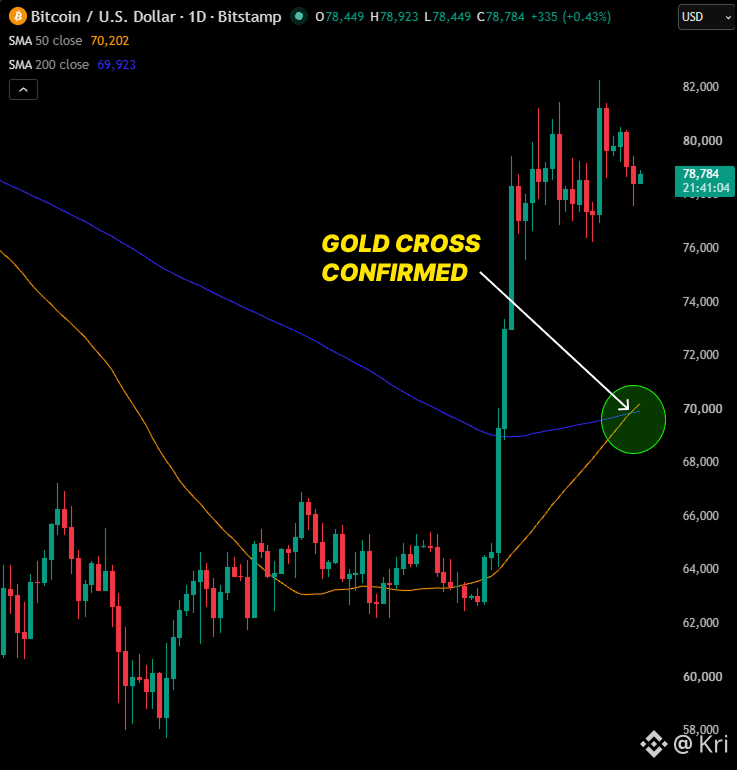
🚨BULLISH: Bitcoin's golden cross has officially confirmed for the first time since November 2025.
Its 50-day average has crossed above the 200-day after spending nearly 280 days below this signal.
The last three completed golden crosses sent Bitcoin up 50%, 45% and 60%.
This time it's backed by $3.8 BILLION in ETF inflows over the last three weeks, the strongest stretch of 2026.
$BTC
{future}(BTCUSDT)
🚨BULLISH: Bitcoin's golden cross has officially confirmed for the first time since November 2025.
Its 50-day average has crossed above the 200-day after spending nearly 280 days below this signal.
The last three completed golden crosses sent Bitcoin up 50%, 45% and 60%.
This time it's backed by $3.8 BILLION in ETF inflows over the last three weeks, the strongest stretch of 2026.
$BTC
Its 50-day average has crossed above the 200-day after spending nearly 280 days below this signal.
The last three completed golden crosses sent Bitcoin up 50%, 45% and 60%.
This time it's backed by $3.8 BILLION in ETF inflows over the last three weeks, the strongest stretch of 2026.
$BTC
1
533
Log in to explore more content
Join global crypto users on Binance Square
⚡️ Get latest and useful information about crypto.
💬 Trusted by the world’s largest crypto exchange.
👍 Discover real insights from verified creators.
Email / Phone number
Trending Topics
BitcoinParesGainsAfterRallyTo$86.5K
0 views
20 Discussing
$BTC sitting right on the knife edge at $86k. Bulls stacked 1,436 BTC defending that level, bears loaded 1,008 BTC as a wall at $86.5k. This is pure liquidation fuel—whoever loses this fight is getting absolutely nuked.
Short-term scalp territory. If bulls punch through $86.5k with volume, we're probably running to $88k fast. If bears hold and push down, $84k is the next stop and longs get flushed.
Watch the tape closely. One side's about to get destroyed, and the move will be violent either way.
AI Market Brief
·3 Likes
·2.7k views
CerebrasSinksNearly20%OnReportNvidiaToPowerOpenAI
742 views
45 Discussing
SECProposesCryptoCustodyRules
16,236 views
193 Discussing