

Carefully! Lots of text.
Binance accepts fiat and cryptocurrency inputs from external wallets and bank accounts. The input method will depend on the currency you want to enter.
Be sure to double-check the blockchain address and correct the MEMO or ID if necessary. If the blockchain network is congested, you may experience delays. In this case, you will just need to wait for the transaction to be confirmed, but if this does not happen after a while, contact Binance support.
Depending on the method used, it may take up to several days for fiat funds to be credited. If you experience a long delay, please check to see if your deposit has been suspended before contacting support.
Introduction
Before trading cryptocurrency on Binance, you need to deposit fiat or cryptocurrency into your account. There are several ways to do this. Some of them can take quite a long time, so patience is required. Follow the instructions below to ensure the safety (SAFU) of your funds.
How to deposit cryptocurrency on Binance
In this example, we will be entering BNB from Trust Wallet.
1. Login to your Binance account. Hover over [Wallet] and select [Fiat & Spot].

2. Press [Enter].

3. Open the [Cryptocurrencies] tab.

4. Select the cryptocurrency to enter.
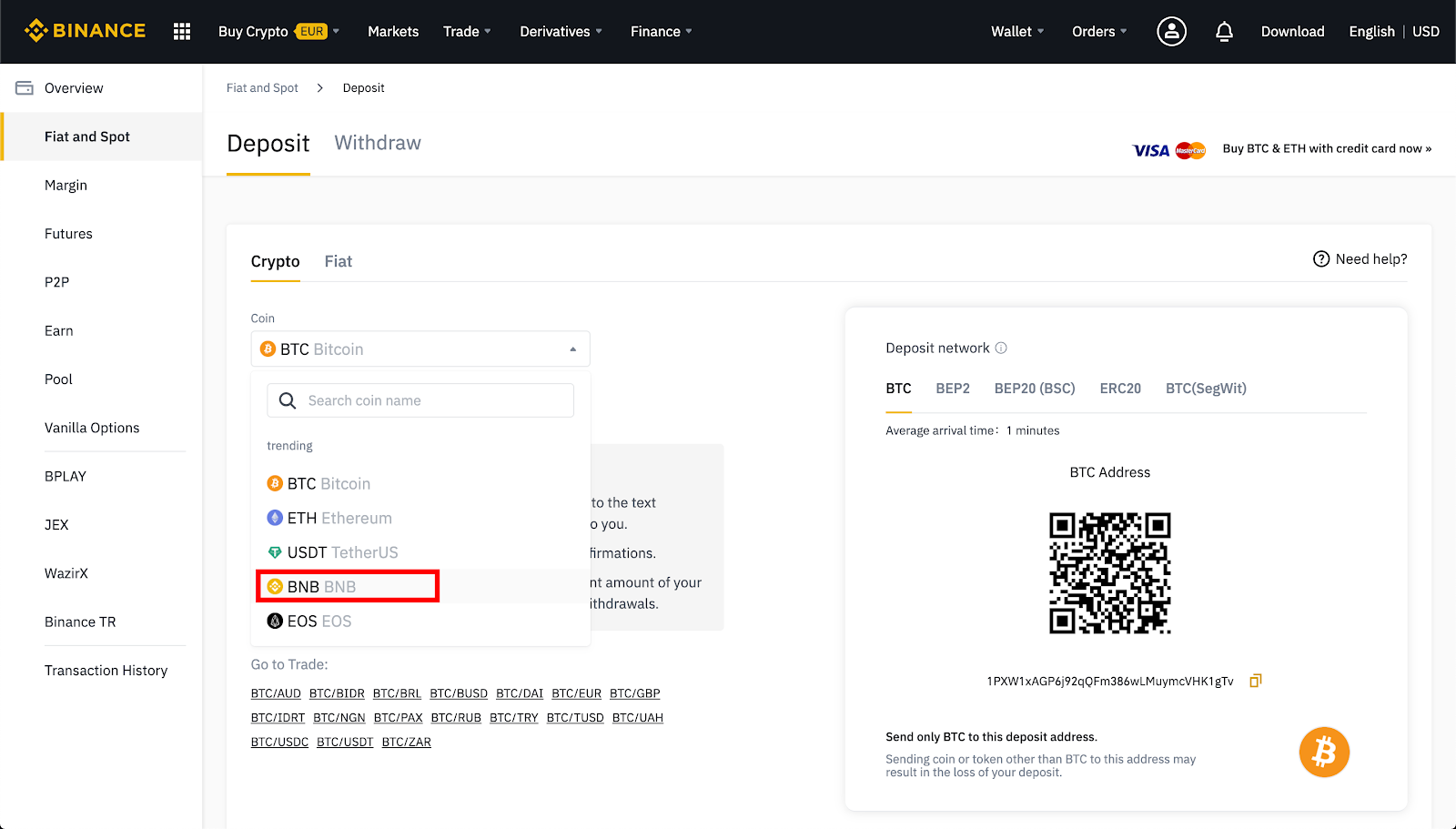
5. If your cryptocurrency is issued on several networks, select the one from which you want to withdraw funds.
For example, BNB is issued on Binance Chain as a BEP-2 token, on Binance Smart Chain (BSC) as a BEP-20 token, and on Ethereum as an ERC-20 token. So, if you have BEP-2 tokens in the wallet you are sending from, select the BEP-2 address. You need to be careful here: if you enter the wrong address, you could lose your crypto assets.
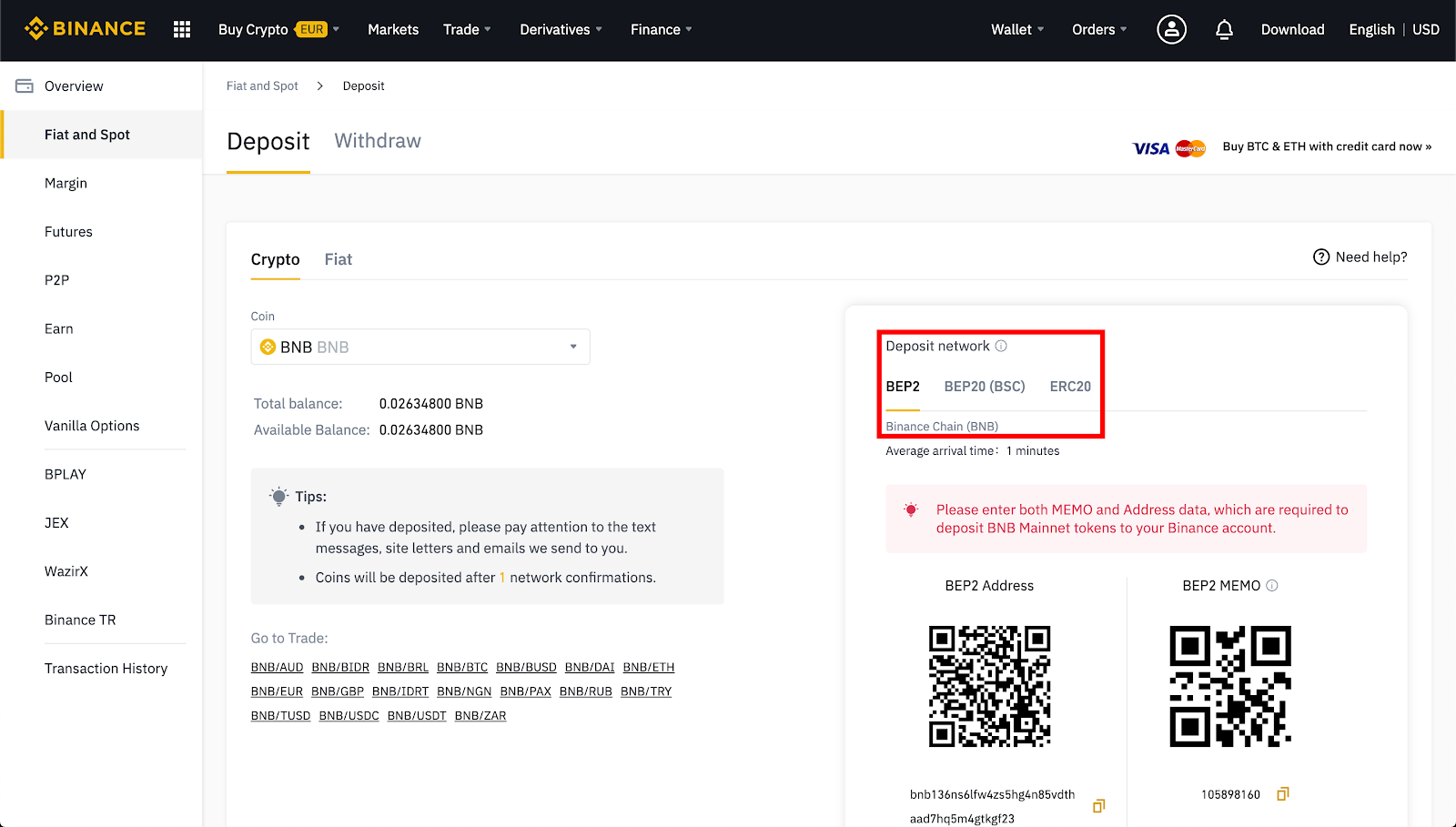
6. Introducing BNB requires both an input address and a MEMO. You need to copy and paste them into the appropriate fields of the wallet from which you are sending funds.
Why do you need MEMO? The BNB deposit address is identical for all Binance users. A tag or MEMO is a unique identifier for each account that allows funds to be credited to it.
7. Select BNB in the Trust Wallet app.

8. Click "Submit".

9. In this field you need to insert the input address and MEMO from the funds input page on Binance. You can also use your phone's camera to scan the QR code.
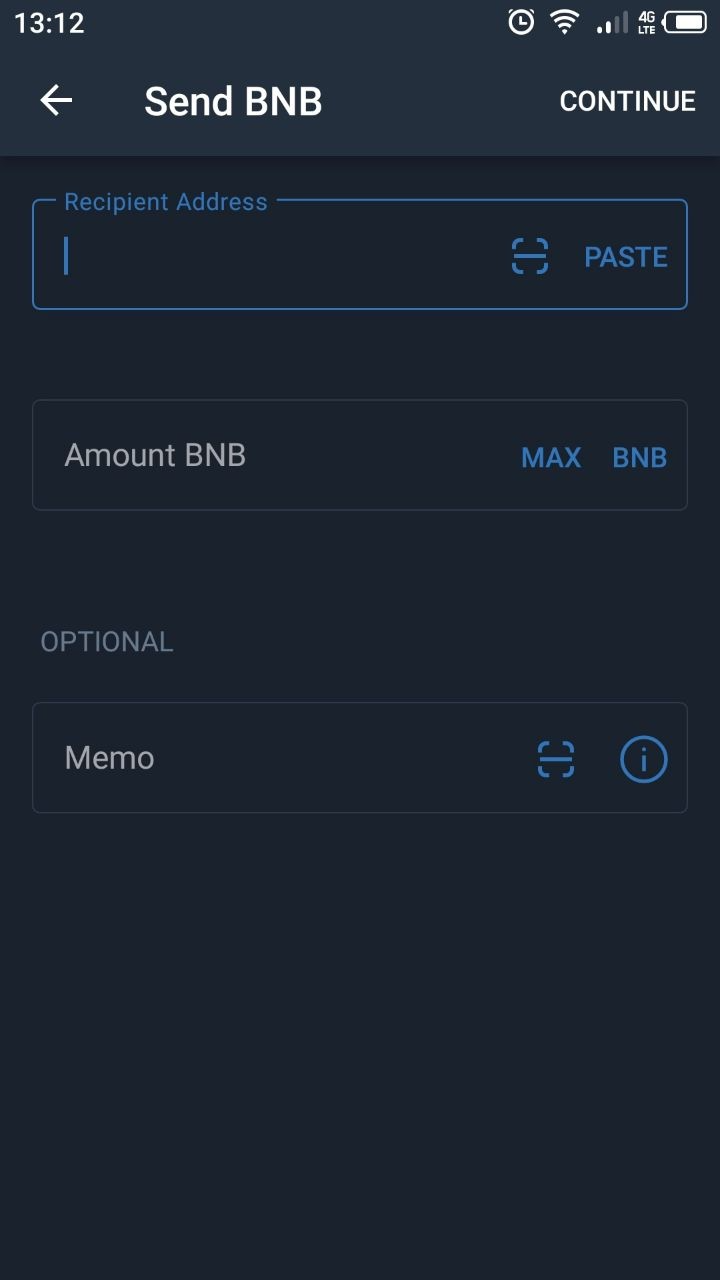
10. Confirm the transaction. After sending funds from your Trust Wallet, you can view the status of the transaction using the blockchain explorer by searching for the transaction ID. We recommend the official Binance Chain explorer.
11. You can check your deposits in your transaction history on Binance.
How to Buy Cryptocurrency Using Fiat Currency on Binance
You can purchase cryptocurrency on Binance using over 60 fiat currencies and a variety of payment methods. A similar process will be required for other cryptocurrencies, including Bitcoin (BTC) or Ether (ETH).
1. Login to your Binance account. Hover over [Wallet] and select [Fiat & Spot].
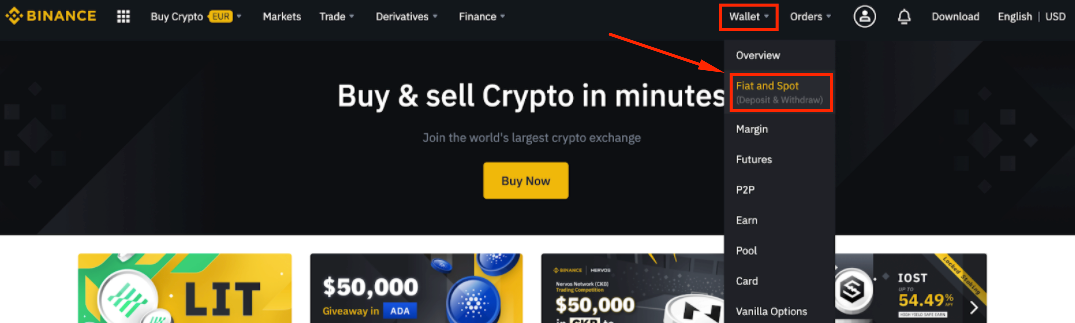
2. Press [Enter].
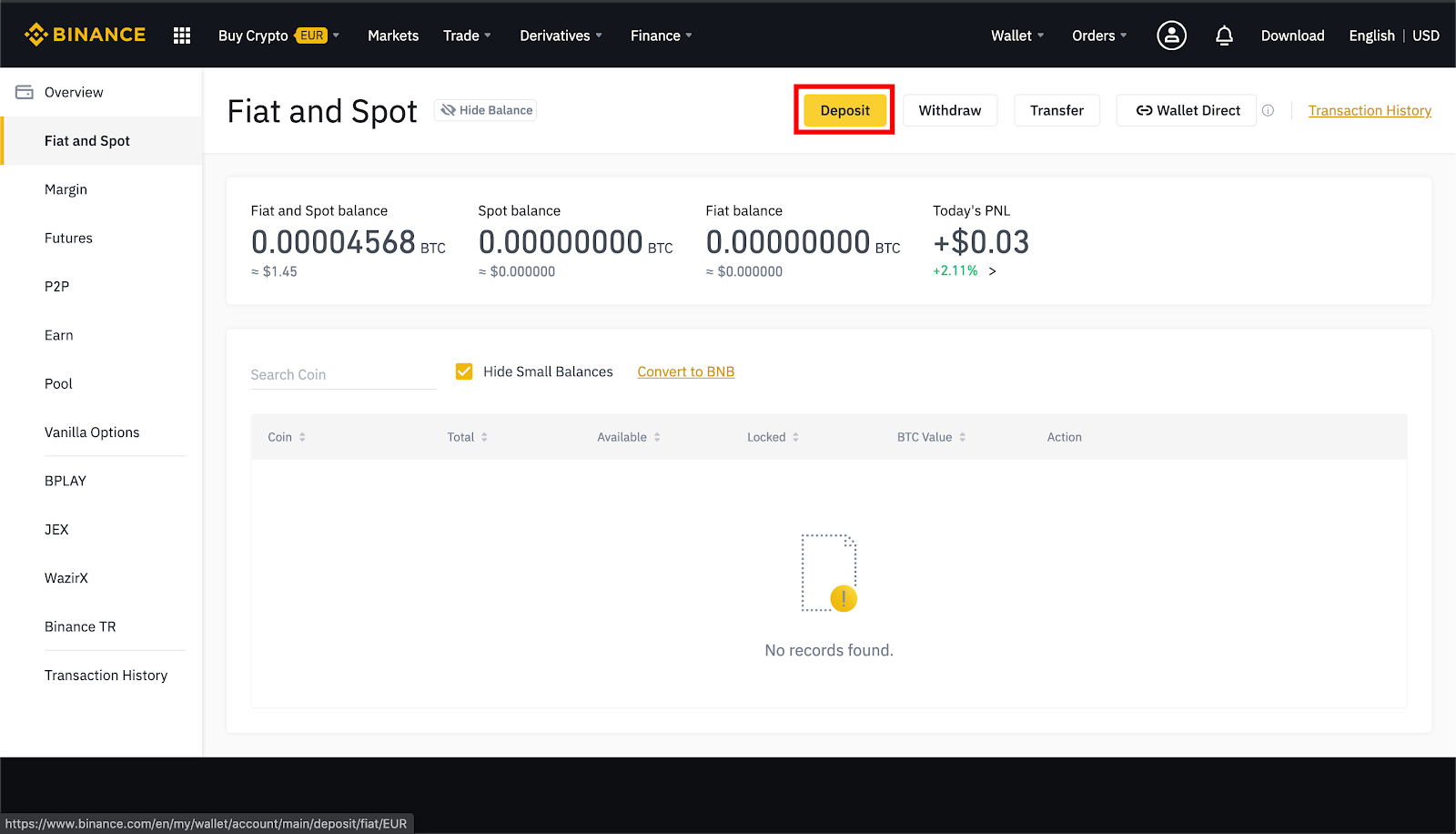
3. Select the [Fiat] tab.

4. If you have not passed identity verification, please confirm your details first. Click [Confirm Now] and follow the instructions.
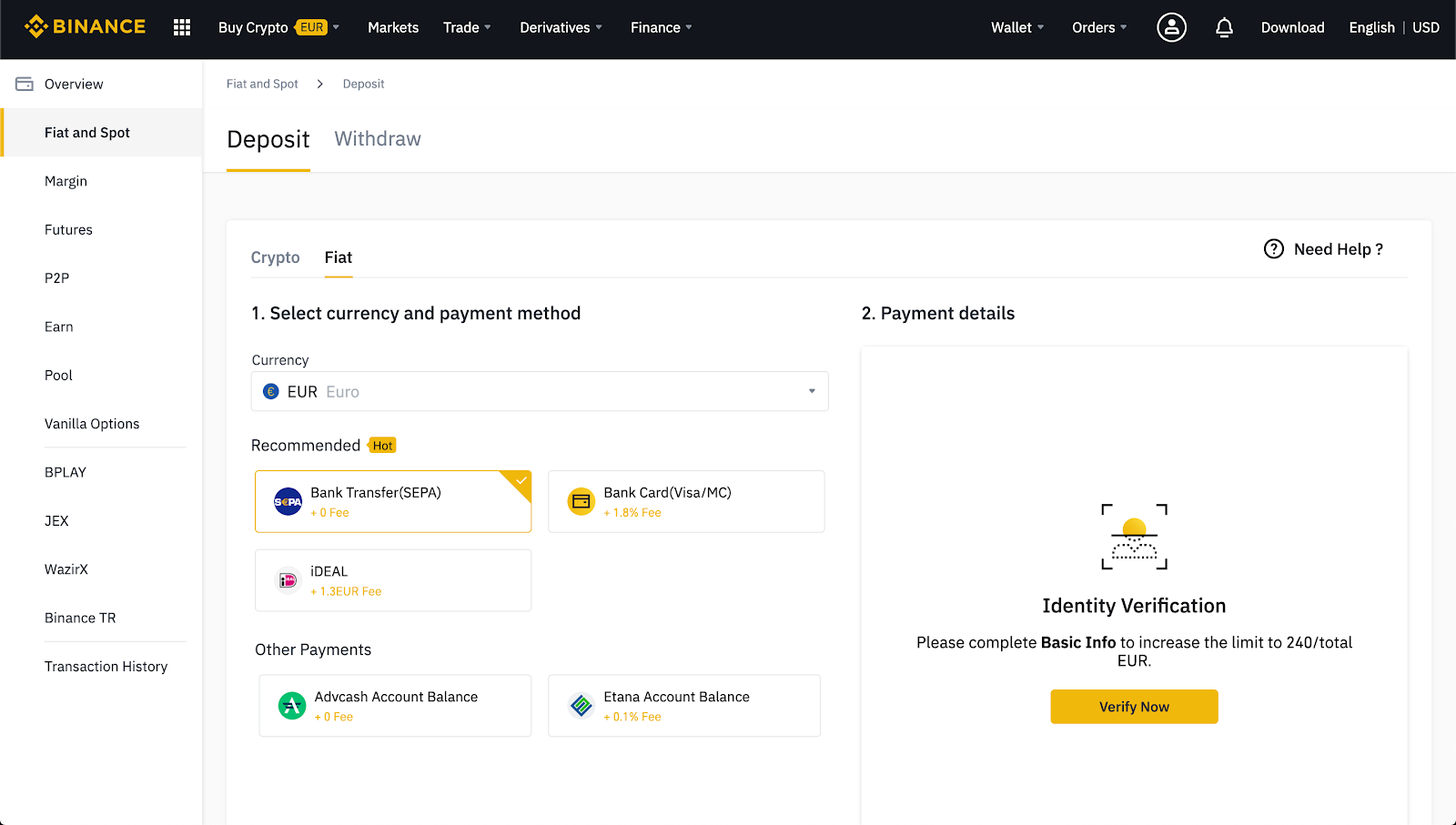
4. Select the fiat currency you want to buy and payment method. Binance supports credit/debit cards, bank transfers, or your fiat balance.

6. Enter the required information and follow the instructions.

7. Don't forget to double-check your details before sending the payment.
Does Binance have a fee for depositing cryptocurrency?
There are no fees for depositing cryptocurrency on Binance. However, you will need to pay a transaction fee for sending cryptocurrency from your wallet. If you are transferring your funds from an exchange, you may have to pay a withdrawal fee.
Maximum and minimum input amount with and without KYC
For users who have not completed the KYC (Know Your Customer) procedure on their account, deposits and withdrawals will be significantly limited. These restrictions vary by country, so it's best to log in and go to your profile page to find out all the details in advance. The more verification levels you complete, the lower your restrictions on deposits and withdrawals will be.

How long does it take to deposit funds on Binance?
Once your cryptocurrency deposit receives enough confirmations, it will immediately appear in your Binance Spot Wallet. However, heavy network traffic and network congestion may cause delays. In this case, you can use the TxID (transaction ID) to check the status of the transaction using a blockchain browser, such as BscScan for Binance Smart Chain or EtherScan for Ethereum.
Entering fiat currency will also depend on the method you use to send money, and can take several hours or even days. More detailed information can be found on the fiat deposit page by selecting the appropriate deposit method.
Why can't I deposit funds on Binance?
There are two main reasons why you are unable to enter crypto or fiat on Binance. Binance may suspend fiat or cryptocurrency inputs during updates or maintenance. If you tried to deposit funds in fiat that is no longer supported, Binance will refund your money (most likely within seven business days).
Most often, problems with cryptocurrency deposits arise due to user errors. The Binance deposit page will display your payment details. Make sure you copy them exactly to your wallet or payment system page.
From time to time, Binance suspends deposits. To stay informed, check your email regularly and read Binance news. Be sure to make sure you have copied and pasted the wallet address from Binance correctly and selected the correct blockchain network. To successfully enter cryptocurrency, you may also need to add a tag, MEMO, or payment ID.
What should I do if my input did not arrive in my Binance account?
If you entered fiat but Binance did not credit it to your account, please contact Binance support. Please note that it may take several days for your fiat currency to be credited.
If you entered cryptocurrency to the correct address without a MEMO, tag or payment ID, then you can always use the self-service form to get your funds back. To do this, you will need basic information about your transaction, including TxID, amount and sender address. But this is only possible if the blockchain has confirmed your transaction.
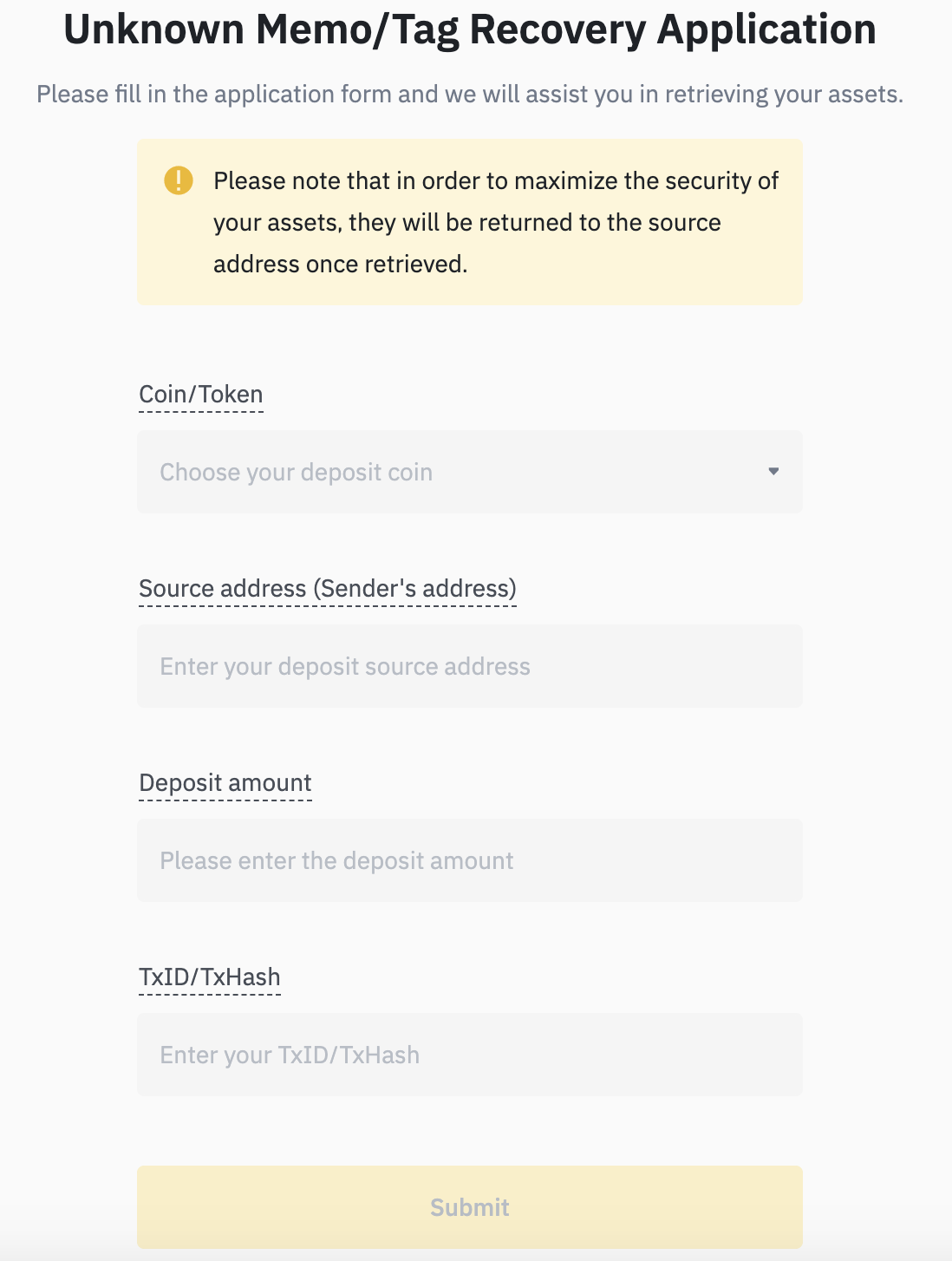
If your transaction is not confirmed, then the issue may be due to network congestion. In this case, you will have to wait for confirmation. Different blockchains require different numbers of confirmations. As mentioned, you can use TxID to view the status of a transaction using the blockchain explorer.
How to check if the deposit was successful
If your cryptocurrency input has enough successful confirmations, it will appear in your Binance Spot Wallet immediately. You can check this by going to [Wallet], then to [Overview] and to the [Transaction History] tab.

Fiat deposits will appear there as soon as they arrive in your Binance account. They can also be found in the [Fiat and Spot] section of the website.

Summary
It may take some time to deposit fiat or cryptocurrency into your Binance account. Binance always strives to process customer transactions as quickly as possible, but sometimes delays cannot be avoided. If your transaction takes too long to be confirmed, please contact Binance support.