

Summary
The process of withdrawing your funds on Binance depends on which cryptocurrency or local currency you wish to convert. Some digital currencies can be withdrawn and transferred to different blockchains, so be sure to choose the correct method.
The time it takes to complete the withdrawal process varies depending on the method you use. To make cryptocurrency withdrawals, each blockchain requires a certain number of confirmations before they appear in your wallet. You can check the status of the transaction you made by using the relevant blockchain explorer.
From time to time, Binance may suspend withdrawals due to technical updates, in which case you will be notified by Binance. If the withdrawal process takes a long time after checking all possible reasons, you can contact Binance Customer Support.
the introduction
If you want to transfer funds outside of your Binance account, you will need to make a withdrawal. The method varies depending on the blockchain, digital currency, or approved local currency you wish to withdraw. Overall, the process is very easy, but make sure to perform each step carefully in order to avoid accidentally losing your money.
How to withdraw cryptocurrencies from Binance (Binance)
In this example, you're withdrawing BNB and transferring it to your Trust wallet and following the process step by step.
1. Log in to your Binance account. Once logged in, move your mouse to [Wallet], then click on [Approved Local Currency Wallet and Instant Wallet].

2. Click [Withdrawal].

3. Click on the [Cryptocurrencies] tab, then select the cryptocurrency you wish to withdraw.
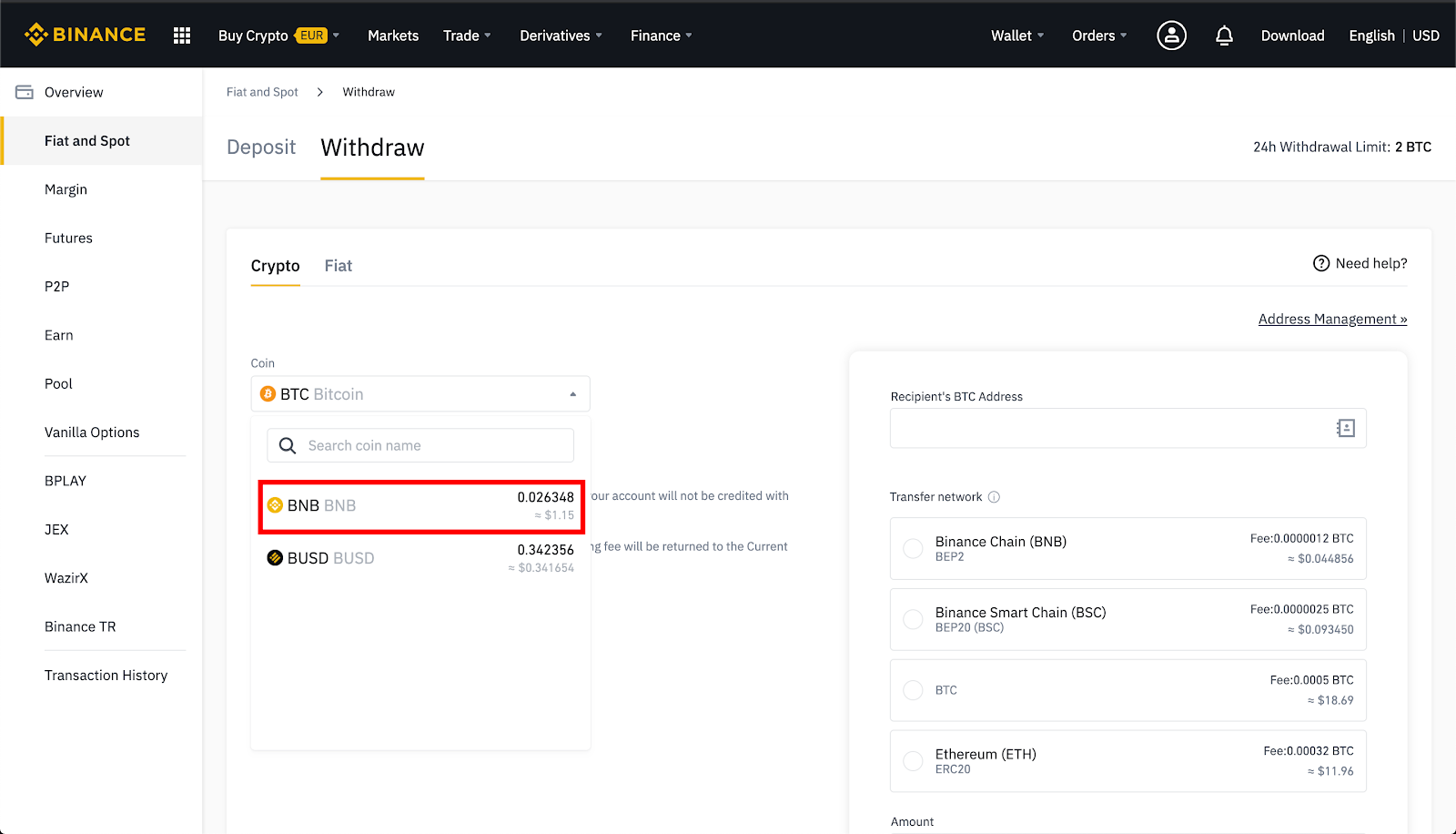
4. If the digital currency is issued on more than one network, select the network on which you wish to make the withdrawal.
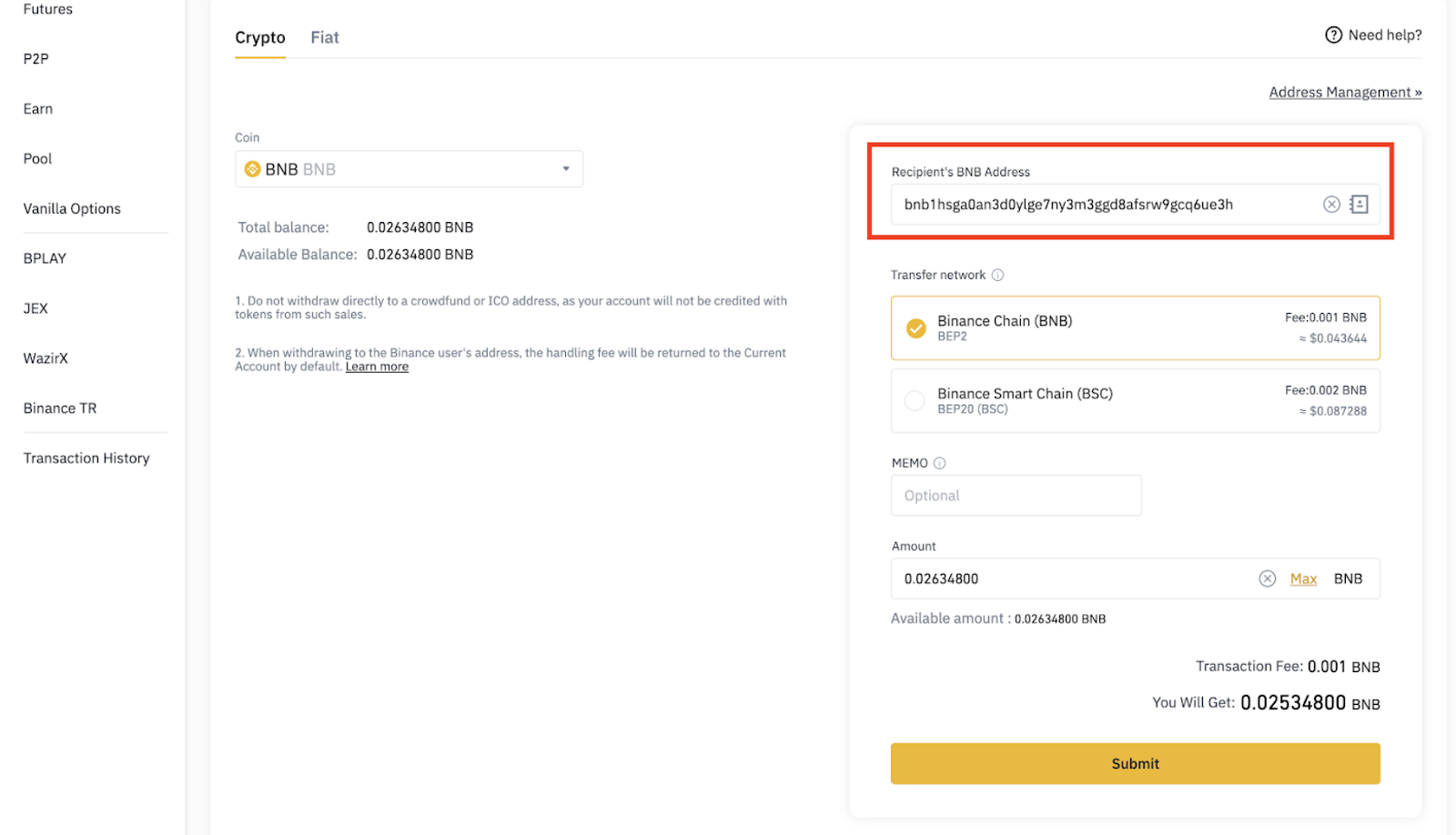
For example, BNB is issued on the Binance Chain as a BEP-2 token, while on the Binance Smart Chain it appears as a BEP-20 token. If you want to withdraw to a BEP-2 wallet address, select the BEP-2 option. But be careful while performing this step; If you make a withdrawal to the wrong address, you may lose your digital currency assets.

5. Click on BNB coin in Trust wallet.

6. Click [Receive].

7. Copy your BNB address.

8. Paste the address into [BNB Recipient Address] on the withdrawal page on the Binance website. If you see that the steps went well, click [Submit].
9. Click [Send Code], then enter the six-digit code you received via email.
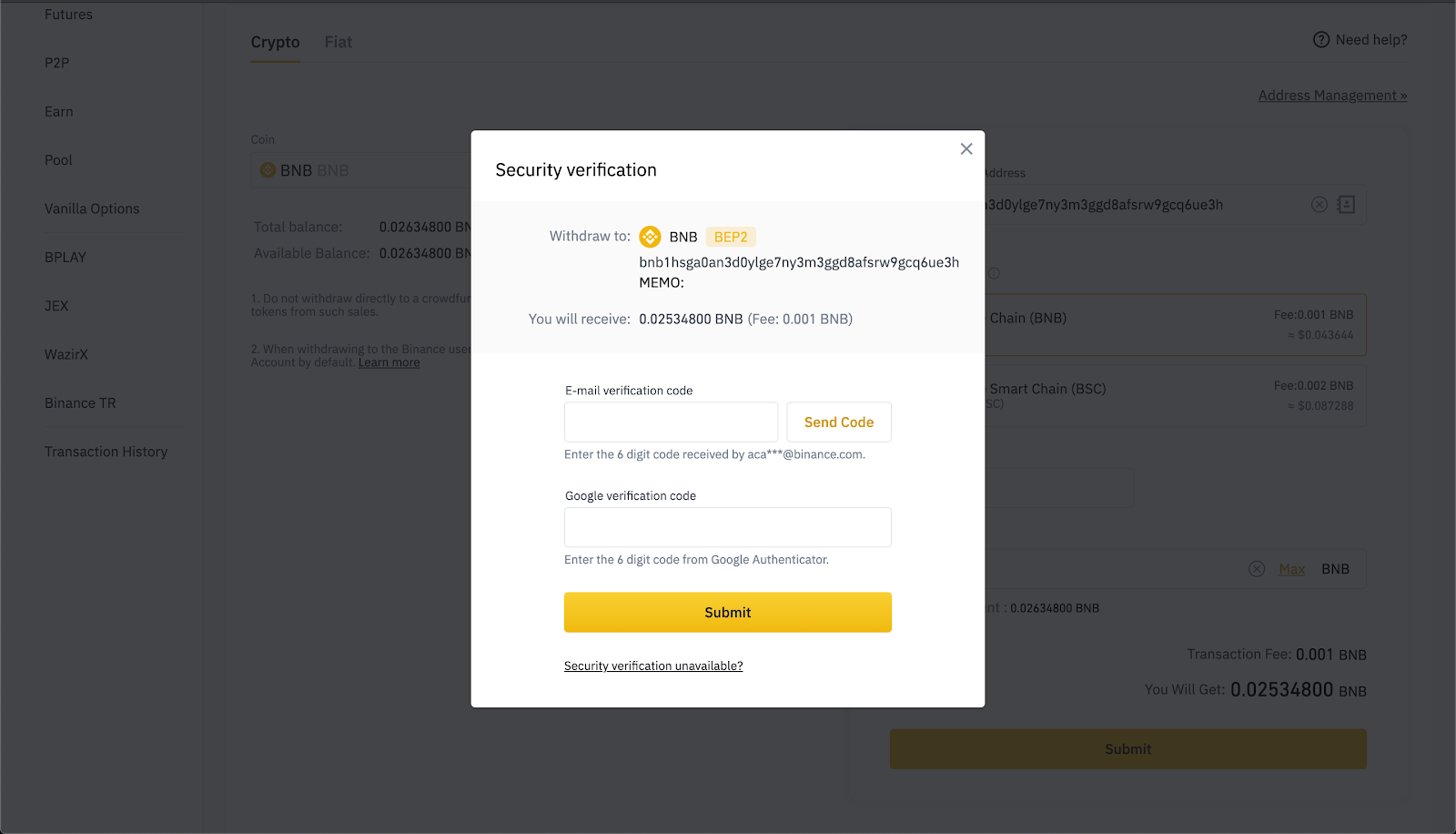
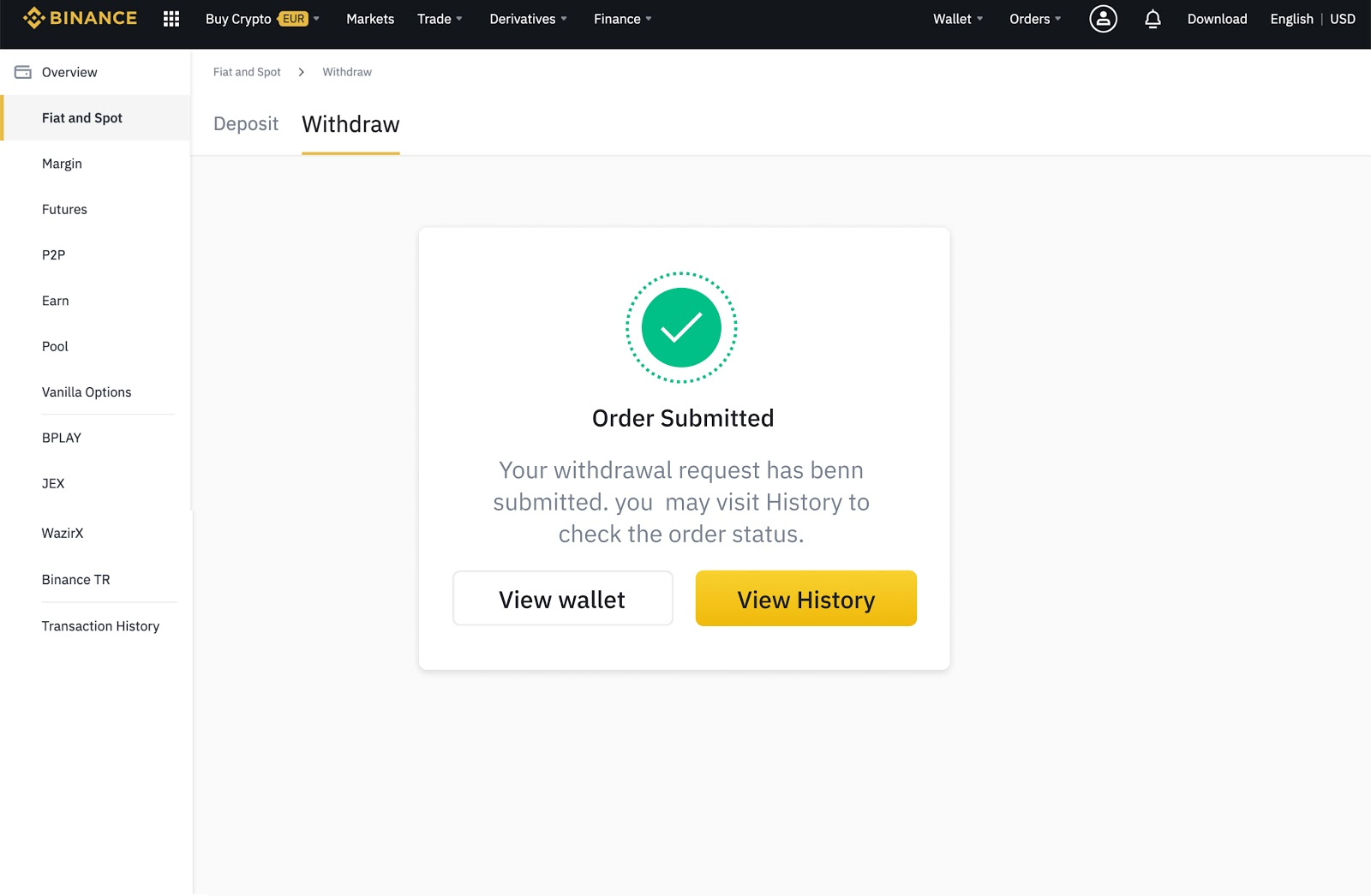
10. Enter your two-factor authentication code. If you have successfully completed these steps, click [Submit]. You will then be able to view the ongoing withdrawals in your transaction history.
How to withdraw local currencies supported by Binance (Binance)
Binance supports more than 60 supported local currencies and offers different payment methods.
1. Log in to your Binance account. Once logged in, move your mouse to [Wallet], then click on [Approved Local Currency Wallet and Instant Wallet].

2. Click [Withdrawal].

3. Click on the [Supported Local Currency] tab.

4. Select the approved local currency you wish to withdraw and the payment method. Payment method options depend on the currency and region of your choice.
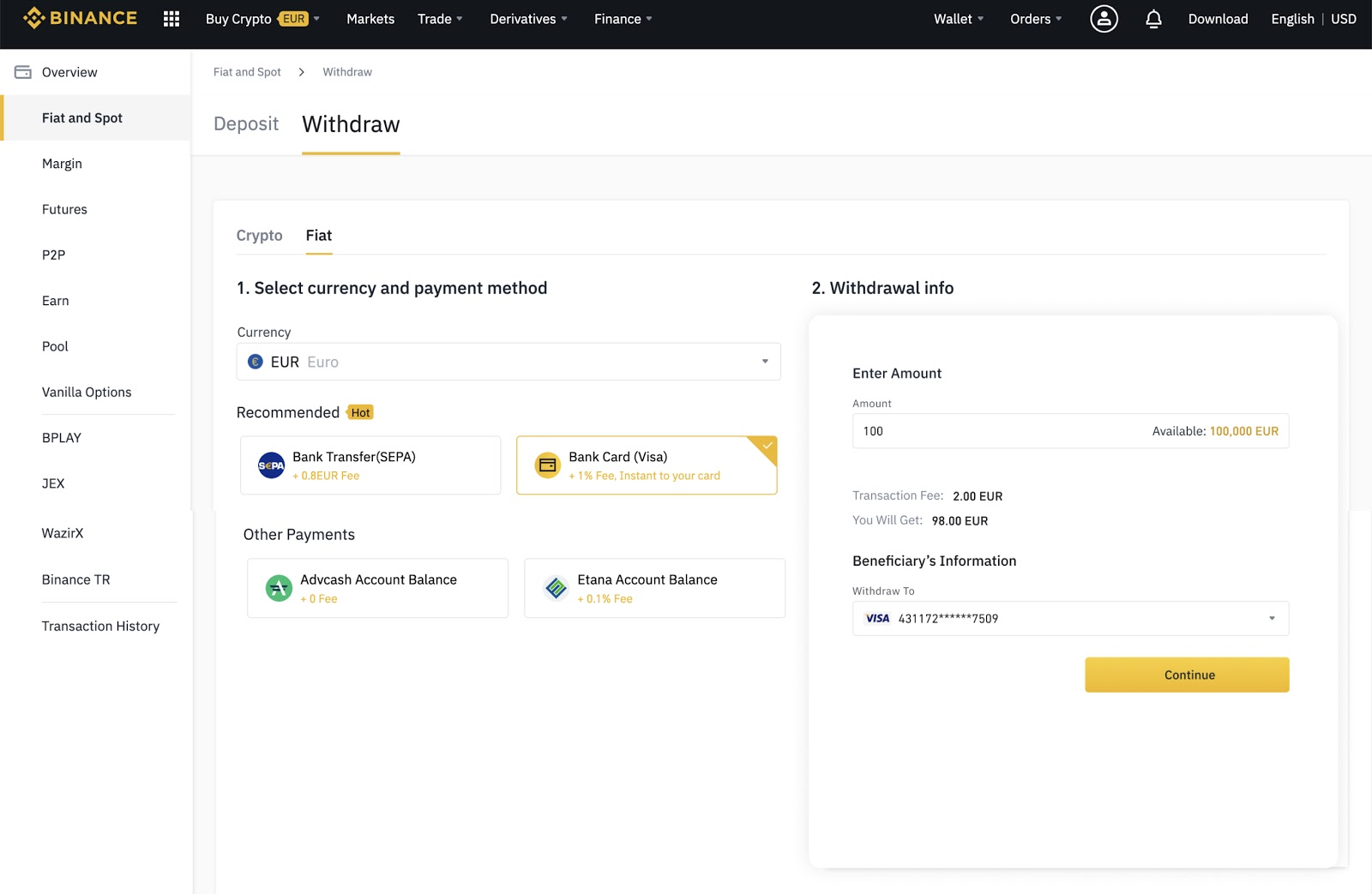
5. Enter the required details, then follow the instructions.

6. Then enter the verification code to confirm the withdrawal.

What are the fees for withdrawing cryptocurrencies?
Cryptocurrency withdrawals from your Binance account are charged a fee to cover network transaction costs. For example, transferring BNB or Ethereum requires Binance to send the cryptocurrency to another cryptocurrency wallet on the blockchain.
In other words, any transaction on the Binance Smart Chain, Binance Chain, or Ethereum network requires an on-chain transfer fee paid by the user to the miners. Binance transfers the cost of this transaction fee to the user for payment.
Each blockchain applies its own fees, so fees for withdrawing your cryptocurrencies will vary from one currency to another. The fees are not fixed and change according to network activities. The best and most accurate way to check withdrawal fees is to view them yourself on the withdrawal page.
What is the minimum withdrawal on Binance?
Each digital currency has a minimum withdrawal limit. You will not be able to withdraw an amount less than the amount specified on the withdrawal page. You will find a list of all minimums and withdrawal fees in the Deposit and Withdrawal Fees on our website.
How long does it take to withdraw on Binance?
Binance processes your withdrawal as soon as you request it, but each blockchain takes a certain amount of time to confirm your transaction. For example, Bitcoin may take between ten and 30 minutes for a withdrawal to be confirmed. Withdrawals on Binance Smart Chain often only take a few minutes, while Ethereum takes relatively longer. The more activities on the network, the longer it takes to complete the process.
Why is my Binance withdrawal delayed?
The execution of your transaction may be delayed because the blockchain is waiting for the transaction to be confirmed or the network is congested. As we explained previously, some blockchains require network confirmations more than others. During periods when the network is busy with activity, transactions may take longer than expected.
Why can't I withdraw from Binance?
There are a few possible reasons why you may not be able to make withdrawals on Binance. First, if you recently changed your password or recently disabled SMS/Google Authentication, Binance will suspend withdrawals for 24 hours. If you perform a full SMS/Google Authentication reset, Binance will suspend withdrawals for 48 hours.
If Binance detects any abnormal activity on your account, the withdrawal function will also be temporarily suspended. This disabling is intended to protect your account and funds. In addition, from time to time Binance makes system updates that require withdrawals to be suspended until the updates are completed.
What action do I take if I do not receive my withdrawal amount on Binance?
If you have confirmed that the blockchain network is not congested, and yet you have not received your withdrawal amount, please contact the Binance technical support team for further assistance. If you are trying to withdraw an amount in the approved local currency and transfer it to your bank account, this process may take a few days.

Concluding thoughts
Withdrawing cryptocurrencies from Binance is easy and often occurs without any problems. If you want to withdraw an approved local currency or convert digital currencies, all the necessary information appears on the withdrawal page. If you encounter a problem, please check your email, Binance may have suspended withdrawals. You can also check the blockchain explorer to check network congestion. In general, you need to be patient in this case, as more often than not, all problems are temporary. But if you still experience the problem, ask for help from the Binance technical support team.