

criptoseguro
9,763 views
30 Discussing
Hot
Latest



Binance News
·
--
Binance Deposits Are No Longer Affected; Pledges to Cover Losses Related to the Incident
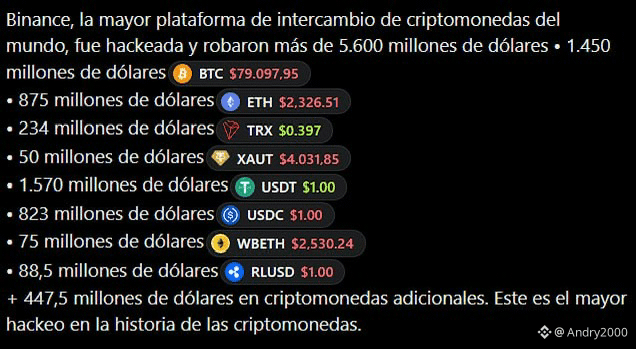
Binance is actively resolving a potential security issue and has committed to bearing all losses resulting from it, and user funds are safe. In the latest service update, deposits remain unaffected and continue to operate as normal, while withdrawals remain paused as the team completes a security revamp of the withdrawal service and its related addresses. Binance expects to resume within 48 hours and will share further details as they become available. The incident stems from multiple factors, and its initial investigation suggests that a compromised DevOps engineer's laptop may have been the entry point, potentially enabling an attacker to access a service container and submit unauthorized withdrawal transactions. Its security team is tracing the full attack path through the compromised computer, and a comprehensive report with the root cause will follow. Critically, Binance has found no evidence that wallet private keys were leaked. Binance is working around the clock with law enforcement, issuers, blockchain intelligence firms, and industry partners to trace and freeze affected assets, with ecosystem partners across the industry responding and helping to quickly freeze affected assets. The estimated total impact is around $6.3 billion, and the current verified total frozen on-chain is around $3 billion — a figure that may continue to increase as tracing efforts progress. Binance is aware of differing public figures regarding amounts frozen, including references to $1.8 billion, and confirms that the ~$3 billion figure is the current verified total.Binance will cover all losses using funds from its SAFU fund and company resources. A full post-mortem and an updated Proof of Reserves will be published once remediation is complete. Please rely only on official Binance channels for updates.

Log in to explore more content