


After you register on Binance, you should hurry up to do KYC, which is real-name identity authentication, just like you need to do real-name identity authentication immediately after opening an account in a bank. The purpose is to improve the security of the account, and the most direct effect is to prevent it from being stolen. If you fail to do KYC in time, you will encounter restrictions in the recharge, withdrawal, and trading process. The higher the KYC level, the higher the account permissions you will get, so you should do KYC as early as possible and try to achieve the highest KYC level possible.
Now I will teach you how to perform KYC identity authentication:
1. Log in to your Binance account and click [User Center] - [Identity Authentication].

Or click [Pass Verification] or [Go to Verification] on the homepage.

3. Here you can see the corresponding certification levels: Standard Certification, Advanced Certification and Enterprise Certification. The limits vary by country or region. Click the button next to [Primary Country/Region of Residence] to select your country or region of residence.
Then, click [Start Now] to authenticate your personal account.

4. Select your nationality and enter your identification and supplementary information as instructed. Please ensure that all the information you enter is consistent with your ID. Once confirmed, you will not be able to change it.


5. Click [Continue] and select the document type and the country or region that issued your document.

6. Click [Continue] to take the ID photo.
Note: If you are prompted that your camera cannot be accessed, we will not be able to verify your identity. Please go to your browser settings and allow camera access.

According to the prompts, place the front and back of the ID photo in front of the camera and click [Take Photo] to take the photo. When taking the photo, the above information should be displayed clearly and completely. When finished, click [Continue].


7. After uploading successfully, click [Continue].

8. After that, the system will ask you to complete the liveness detection. Select [Current Device] or [Mobile Phone].

9. Center your face in the frame and follow the on-screen instructions. Note: Do not wear a hat, glasses or use filters, and ensure there is adequate lighting.


10. After completing the above process, please wait patiently. Binance will review your application in a timely manner. Once your application is approved, we will send you an email notification.
Please enter your basic personal information and complete the photo verification within 15 minutes. During this period, please do not refresh the browser.
You can attempt to verify your identity up to 10 times per day. If your application is rejected 10 times within 24 hours, please wait 24 hours before trying again.

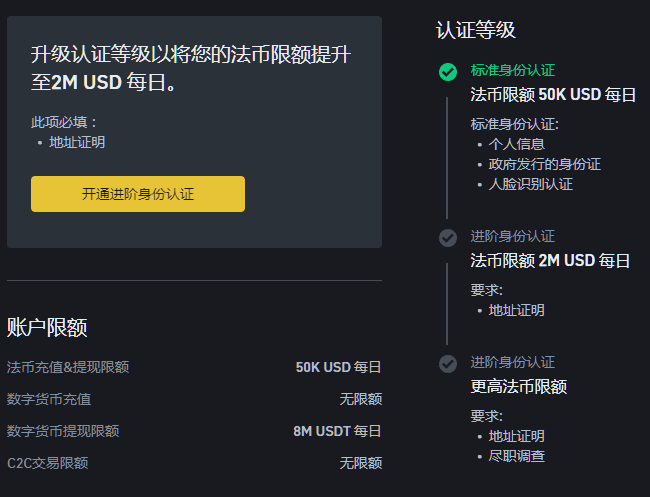
After the review is passed, you will obtain standard identity authentication. The rights and interests are shown in the figure below. The daily withdrawal limit is 50,000 U, which is enough for most people. If you have a large amount of funds and this limit is not enough, you can click to open advanced identity authentication and do a more advanced identity authentication.
Okay, that’s it for you all. I hope this helps you all. If you have any questions, please leave a comment in the comment section. I will do my best to answer you.