
#binancetipshere
binancetipshere
479 views
6 Discussing
Hot
Latest

·
--
How to Read the BTC/USDC Spot Screen: A Simple Guide for Beginners**
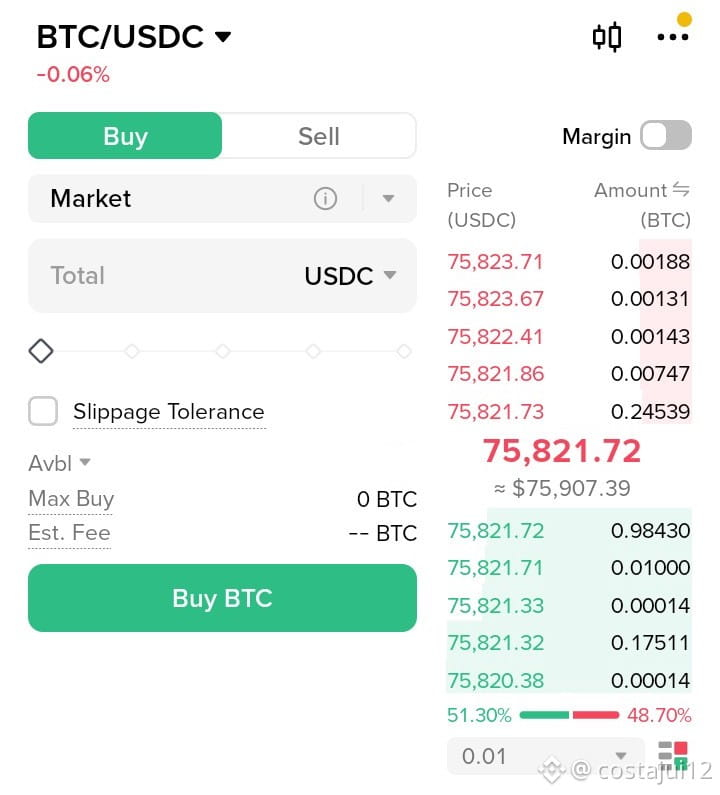
$BTC is trading around **$75,900** (about -0.06% on the day). The order book is almost evenly split: **51.30% buy vs 48.70% sell**. That means neither side has one-sided control right now.
Here are 5 things every beginner should understand on the spot trading screen:
1️⃣ **Order book:** Sellers wait in the red section, buyers in the green. The big number in the middle is the latest price.
2️⃣ **Market vs Limit:**
- Market: buy right now at the current price
- Limit: buy only when the price reaches the level you set
3️⃣ **Slippage Tolerance:** On a Market order, the price can move suddenly, so you may buy slightly away from the price you expected. This option sets your limit for that.
4️⃣ **Minimum order size:** Binance sets a minimum value for every order. If your balance is below it, Max Buy shows 0. This is the most common problem with small balances.
5️⃣ **Fees:** Every trade has a fee. On very small amounts, the fee takes a bigger share.
📢 The "Important Notice" banner on the screen mentions removal of some spot trading pairs. Check the Announcements page to see if the coins you trade are affected.
🧠 My advice: practice with small amounts first, learn Limit orders, and don't jump into big trades because of hype.
Do you use Market orders more, or Limit? Tell us in the comments 👇
⚠️ Not financial advice. DYOR.
#BinanceSquare #SpotTrading #CryptoForBeginners #Bitcoin #BinanceTipsHere
$BTC
{future}(BTCUSDT)
$USDC
{future}(USDCUSDT)
How to Read the BTC/USDC Spot Screen: A Simple Guide for Beginners**
$BTC is trading around **$75,900** (about -0.06% on the day). The order book is almost evenly split: **51.30% buy vs 48.70% sell**. That means neither side has one-sided control right now.
Here are 5 things every beginner should understand on the spot trading screen:
1️⃣ **Order book:** Sellers wait in the red section, buyers in the green. The big number in the middle is the latest price.
2️⃣ **Market vs Limit:**
- Market: buy right now at the current price
- Limit: buy only when the price reaches the level you set
3️⃣ **Slippage Tolerance:** On a Market order, the price can move suddenly, so you may buy slightly away from the price you expected. This option sets your limit for that.
4️⃣ **Minimum order size:** Binance sets a minimum value for every order. If your balance is below it, Max Buy shows 0. This is the most common problem with small balances.
5️⃣ **Fees:** Every trade has a fee. On very small amounts, the fee takes a bigger share.
📢 The "Important Notice" banner on the screen mentions removal of some spot trading pairs. Check the Announcements page to see if the coins you trade are affected.
🧠 My advice: practice with small amounts first, learn Limit orders, and don't jump into big trades because of hype.
Do you use Market orders more, or Limit? Tell us in the comments 👇
⚠️ Not financial advice. DYOR.
#BinanceSquare #SpotTrading #CryptoForBeginners #Bitcoin #BinanceTipsHere
$BTC
$USDC
$BTC is trading around **$75,900** (about -0.06% on the day). The order book is almost evenly split: **51.30% buy vs 48.70% sell**. That means neither side has one-sided control right now.
Here are 5 things every beginner should understand on the spot trading screen:
1️⃣ **Order book:** Sellers wait in the red section, buyers in the green. The big number in the middle is the latest price.
2️⃣ **Market vs Limit:**
- Market: buy right now at the current price
- Limit: buy only when the price reaches the level you set
3️⃣ **Slippage Tolerance:** On a Market order, the price can move suddenly, so you may buy slightly away from the price you expected. This option sets your limit for that.
4️⃣ **Minimum order size:** Binance sets a minimum value for every order. If your balance is below it, Max Buy shows 0. This is the most common problem with small balances.
5️⃣ **Fees:** Every trade has a fee. On very small amounts, the fee takes a bigger share.
📢 The "Important Notice" banner on the screen mentions removal of some spot trading pairs. Check the Announcements page to see if the coins you trade are affected.
🧠 My advice: practice with small amounts first, learn Limit orders, and don't jump into big trades because of hype.
Do you use Market orders more, or Limit? Tell us in the comments 👇
⚠️ Not financial advice. DYOR.
#BinanceSquare #SpotTrading #CryptoForBeginners #Bitcoin #BinanceTipsHere
$BTC
$USDC
Piaary Adil:
Thx $SUI
7
5
645

$TAO Trade🤑
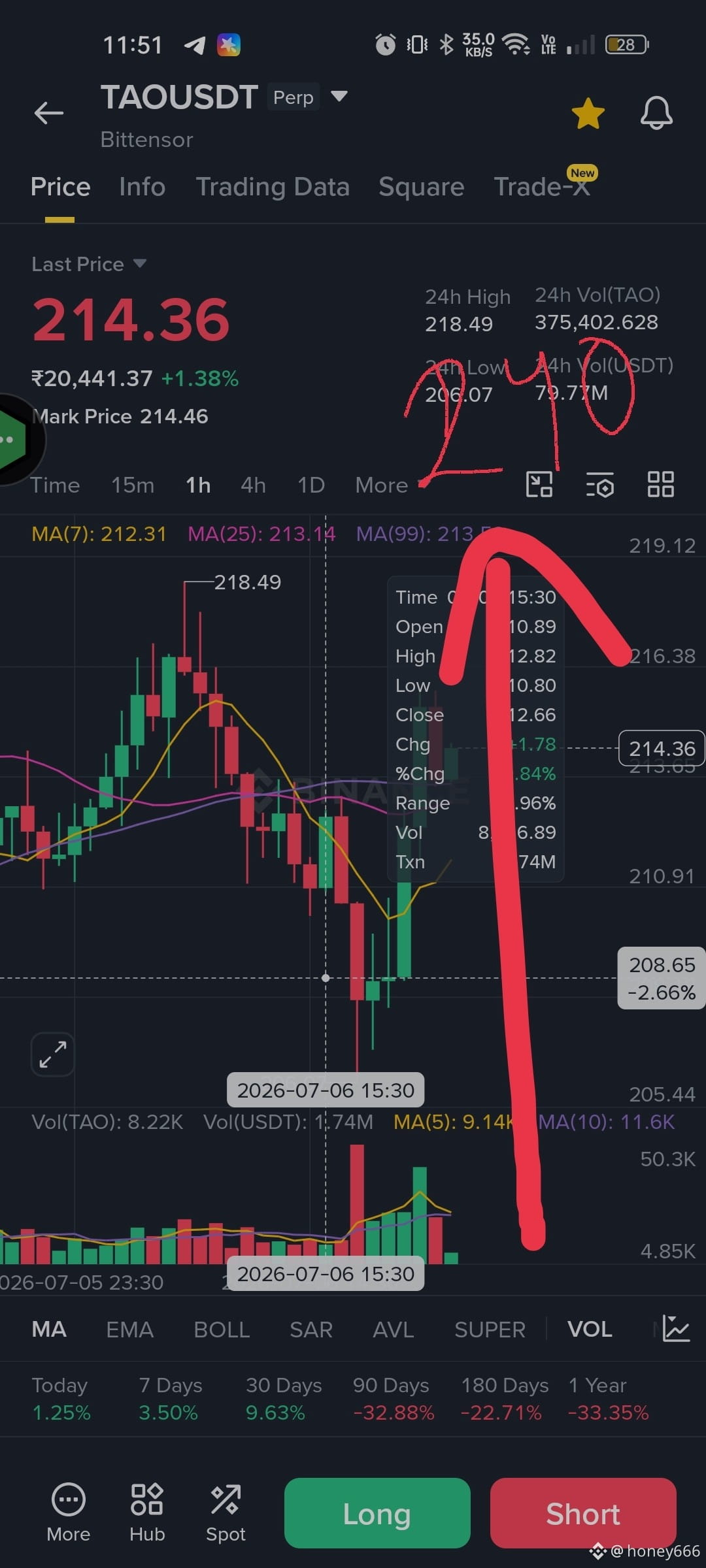
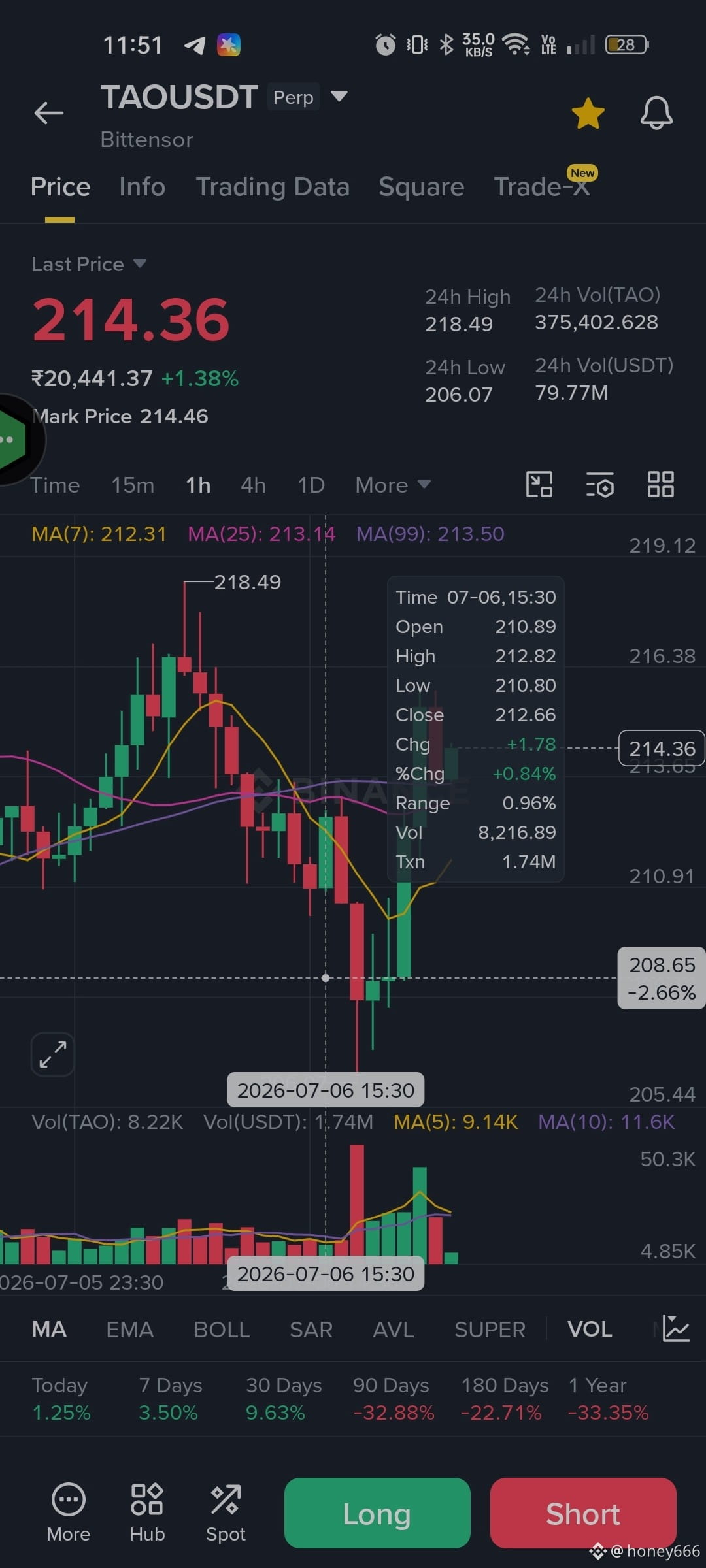
currently at $217 it will rise upto 230to240
Buy -217 -220 lev 20-30x SL-210
TP1-225
TP2-230
TP3-240
HURRY up bags good amount of profit 🤑🤑🤑
BUY and TRADE 👉$TAO
{spot}(TAOUSDT)
#BinanceTipsHere #ProfitBooking
$TAO Trade🤑
currently at $217 it will rise upto 230to240
Buy -217 -220 lev 20-30x SL-210
TP1-225
TP2-230
TP3-240
HURRY up bags good amount of profit 🤑🤑🤑
BUY and TRADE 👉$TAO
#BinanceTipsHere #ProfitBooking
currently at $217 it will rise upto 230to240
Buy -217 -220 lev 20-30x SL-210
TP1-225
TP2-230
TP3-240
HURRY up bags good amount of profit 🤑🤑🤑
BUY and TRADE 👉$TAO
#BinanceTipsHere #ProfitBooking
177
Log in to explore more content
Join global crypto users on Binance Square
⚡️ Get latest and useful information about crypto.
💬 Trusted by the world’s largest crypto exchange.
👍 Discover real insights from verified creators.
Email / Phone number
Trending Topics
1
#CPITestsDecemberRateOutlook
733,970 views
3,540 Discussing
2
#NvidiaInvestigatesAfterHuang’sAffairApology
291,881 views
2,281 Discussing
3
#AnthropicRejectsIPODelayValuationinQuestion
78,363 views
735 Discussing
4
#US-IranTalksFuelStrongStockMarketRebound
20,371 views
237 Discussing
5
#BitcoinFiveWeeklyLosses
315,923 views
2,594 Discussing
6
#AIChipSlumpNasdaq
179,170 views
1,571 Discussing
7
#BitcoinSpotETFsPost$201MNetOutflowForThirdStraightDay
259 views
4 Discussing
8
#CryptoLiquidationsReach$1.16BIn24Hours
31,741 views
63 Discussing
9
#TetherFreezes5EthereumAddressesHoldingAbout24.35MUSDT
147 views
3 Discussing
10
#StrategyBuys1037BTCLastWeek
10,028 views
117 Discussing