Beginner Lesson 51: Want to close a position? Don’t accidentally open one in the opposite direction
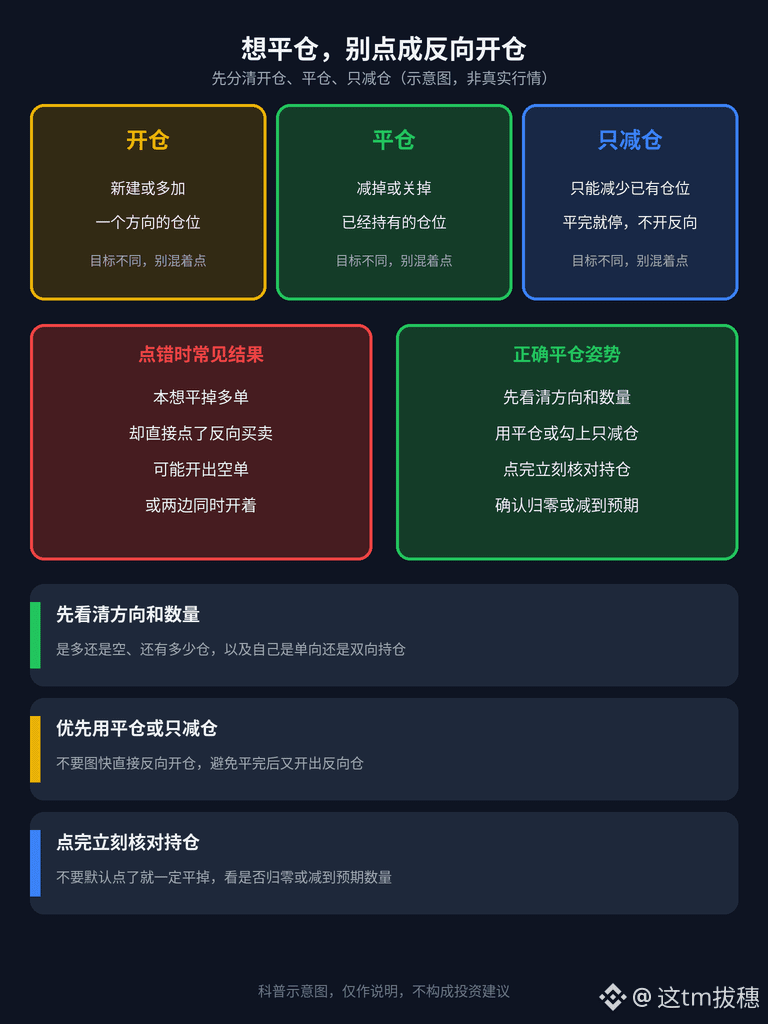
Many beginners know how to close a position, but rush and hit the wrong button. When the market suddenly moves in the opposite direction, their first instinct is to immediately tap Buy or Sell. They may end up closing the old position and then opening one in the opposite direction—or leaving positions open on both sides. Before they’ve dealt with the loss, they’ve already doubled their risk. Closing a position reduces an existing position; opening a position creates a new one in a particular direction. These are two different actions, so don’t treat them as interchangeable buttons.
1. First, understand the difference between opening, closing, and reduce-only
1) Open position: Create a new position or add to a position in one direction;
2) Close position: Reduce or fully close a position you already hold, with the goal of reducing it or bringing it to zero;
3) Reduce-only: This order can only reduce an existing position. Once it’s closed, it stops—it won’t open a position in the opposite direction. If you’re unsure, use Close Position or enable Reduce-Only. The exact buttons depend on the current version of the app.
For example, in Binance spot market data at around 14:02 on November 23 (Taipei time), $BTC was up approximately 4.53% over 24 hours, and $ETH was up approximately 4.26%. The broader market was rebounding. At the same time, the popular coin $ACE (Fusionist) was down approximately 12.83% over 24 hours, with a trading volume of about 17.99 million USDT. Its high for the day was approximately 0.0900, its low approximately 0.0567, and its latest price approximately 0.0734. It had a wide price range between its high and low that day. During a rapid drop like this, if you’re holding a long position and panic and try to “sell,” without confirming whether you’re closing or opening a position, the most common outcome is that you don’t fully close the old position before opening one in the opposite direction. The faster prices move, the more important it is to check your positions before taking action.
Quick question before we continue: Before closing a position, do you usually check whether you’re currently long or short and how much you’re holding? If you do, comment 1; if you often just tap directly, comment 2.
2. How to close a position cleanly in practice
First, check your positions list: the direction, quantity, and whether you’re using one-way or hedge mode. In one-way mode, if your sell quantity exceeds your long position, it may turn into a short position. In hedge mode, placing another order in the opposite direction may leave positions open on both sides. So if you want to exit a position, use Close Position or Reduce-Only rather than opening an opposite position just to save time. When volatility clearly increases, first write down the closing price you can accept. Don’t repeatedly place market orders when you’re not sure of the quantity. After placing an order, immediately check whether the position has actually been reduced to zero or to the amount you expected. Don’t assume that tapping the button means the position has definitely been closed.
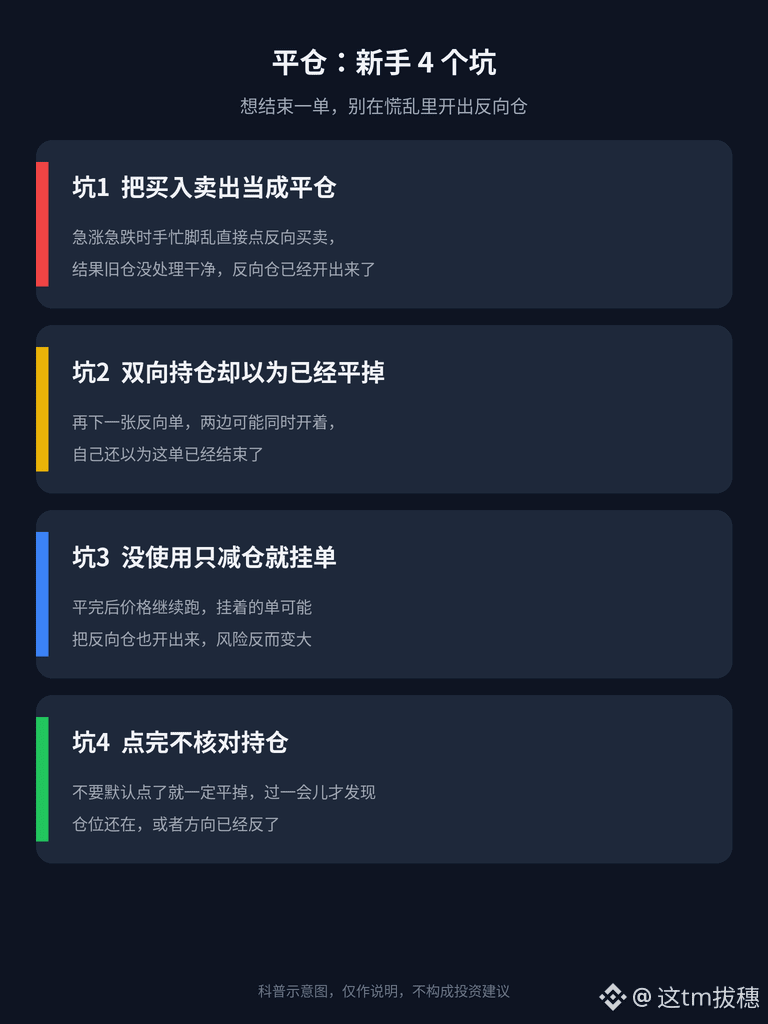
3. Common beginner pitfalls
1) Panicking during sharp rises or falls and mistaking Buy or Sell for Close Position, resulting in a position opening in the opposite direction;
2) Leaving positions open on both sides in hedge mode while thinking the position has already been closed;
3) Not using Reduce-Only, so after closing a position, a resting order opens a position in the opposite direction when the price keeps moving;
4) Not checking the position after placing an order, only to discover later that it’s still open or has flipped direction.
In short: Closing a position reduces it; opening a position creates a new direction. If you want to exit a position, use Close Position or Reduce-Only, then immediately check your positions. The sharper the rise or fall, the more important it is not to panic and open a position in the opposite direction.
A specific question: Next time you’re preparing to close a position, would you choose A) use Close Position or Reduce-Only, then check that the position is at zero, or B) place an order in the opposite direction directly to save time? Just reply with A or B in the comments.
The content above is for educational purposes only and does not constitute investment advice. Crypto assets are highly volatile, and futures trading carries even greater risks. Only participate with money you can afford to lose.
#新手入门 #技术分析 #币安广场