


A wealthy individual had 1,155 bitcoins stolen by hackers. Sixty-eight million US dollars could be lost forever due to a single small mistake. The hackers observed the victim's wallet and noticed he frequently made large transfers to one address. So, the hackers created a wallet address with a similar first digit, sent a small amount to the victim. The victim mistakenly believed the hacker's wallet was his own secondary wallet and transferred 68 million US dollars to it. In one go, the money was gone.
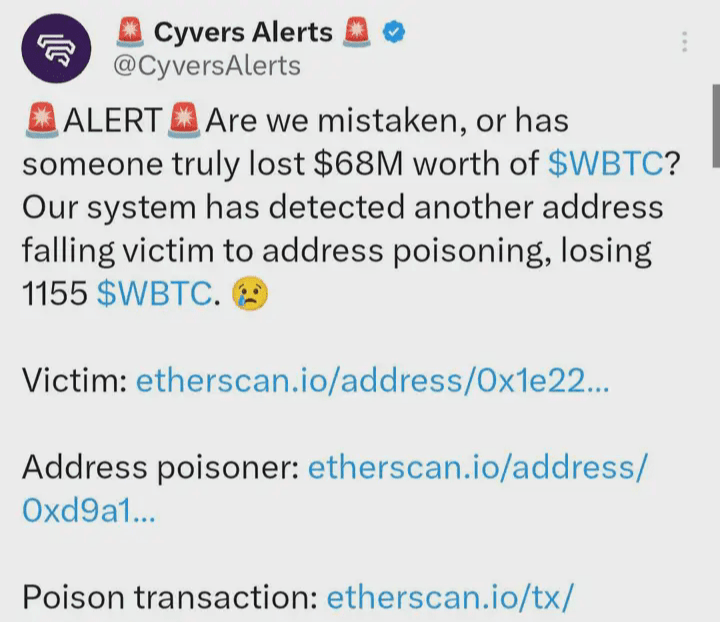

This tells us that in the cryptocurrency world, everyone is the primary responsible party for their own asset security. In the dark forest world of blockchain, remember these two fundamental security principles first:
Zero trust. Simply put, it means to be skeptical, and always be skeptical.
Continuous verification. You must believe that you have the ability to verify what you doubt, and make this ability a habit.
A Beginner's Guide to Blockchain Dark Forest Self-Help
One picture
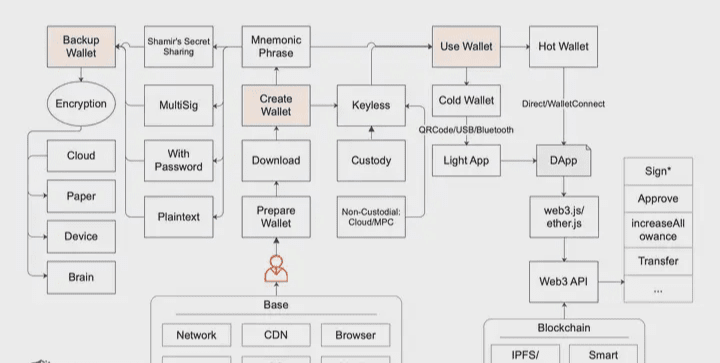
Before reading the following text in detail, you can quickly skim through this diagram. The process includes three main parts: creating a wallet, backing up your wallet, and using your wallet.
We will analyze each key point involved in these three processes.
Create a wallet
The most crucial element of a wallet is its private key (or mnemonic phrase).
Your private key is your identity. If you lose or steal your private key, that identity is no longer yours. There are many wallet applications, and quite a few are well-known. I don't intend to, and can't, introduce them all. However, this manual will mention some specific wallets. Please note that those mentioned are those I have a basic level of trust in. But I cannot guarantee against security issues you might encounter during use, or that the target wallet might have security risks that I didn't anticipate (I won't go into detail about this later; please keep the two security principles mentioned in the introduction in mind).
Wallets can be categorized by application, including PC wallets, browser extension wallets, mobile wallets, hardware wallets, and web wallets. They can also be classified as cold wallets or hot wallets based on their internet connectivity. When entering this world, the first thing to consider is the purpose of the wallet you will own. This purpose determines which wallet you will use, and it also determines how you will treat that wallet.
No matter which wallet you choose, at least one thing is certain: after navigating this world for a while, you can't possibly have only one wallet.
Therefore, we need to remember another safety principle: isolation, or don't put all your eggs in one basket. Generally speaking, the more frequently you use a wallet, the greater the risk of problems. Always remember: when facing something new, prepare a separate wallet and use a small amount of money to try it out for a while. Unless you are as experienced as I am and have a thorough understanding of many things. But, even the most careful person can get their feet wet.
Download
This seemingly simple point is actually not so simple, for the following reasons:
Many people (really many people) couldn't find the correct official website or app store, so they installed fake wallets.
Many people don't know how to check if downloaded applications have been tampered with.
Thus, his mission failed before it even began. He was already broke before he even entered this world.
Regarding point 1 above, there are techniques for finding the correct official website, such as:
Google (beware of the ads in the search results; they are highly unreliable).
Industry-renowned indexes, such as CoinMarketCap
Ask more people you trust.
Okay, you can combine all the information above for reference and mutual corroboration. Ultimately, there is only one truth :) Congratulations, you have found the correct official website.
Next, you'll need to download and install the application. If it's a PC wallet, download it from the official website via the provided download link and install it yourself. However, before installation, it's recommended to verify whether it has been tampered with. While this doesn't prevent the source from being completely tampered with (e.g., malicious actions by the official team, internal hacking, or the website being compromised and having related information replaced), it can prevent situations like partial tampering of the source or man-in-the-middle attacks.
Verifying whether a file has been tampered with is essentially a file consistency check. There are two common methods:
One method is hash verification, such as MD5 and SHA256. MD5 is sufficient in most cases, but there is a very small risk of hash collision. Therefore, the industry generally chooses SHA256, which is sufficient and secure.
Another method is GPG signature verification, which is also quite popular. I strongly recommend mastering GPG tools, commands, and methods. Although it may be a bit challenging for beginners, believe me, you will enjoy it once you get the hang of it.
That being said, there aren't many projects in the industry that do this, so it's truly rare and precious to encounter one. For example, the Bitcoin wallet Sparrow Wallet's "Verifying the Release" on its download page is incredibly helpful, providing clear guides for both methods mentioned, which you can directly refer to and learn from.
This page mentions two GPG tools:
GPG Suite runs on macOS.
Gpg4win runs on Windows.
If you look closely, you'll notice that both GPG tool download pages actually provide instructions on consistency verification using two methods. However, unfortunately, they don't offer step-by-step guidance on how to verify it. I guess they assume you're smart enough to have already covered the necessary knowledge :)
If it's a browser extension wallet, like the world-renowned MetaMask, the only thing you can really pay attention to is the number of users and the ratings on the target extension's download page. For example, MetaMask on the Chrome Web Store has over ten million users and more than two thousand user ratings, although the final ratings aren't very high. Some might say, "Can't this be artificially inflated?" Well, yes, I believe it can be, but the sheer volume of such manipulation would be utterly illogical.
For mobile wallets, the identification method is similar to that of extended wallets. However, it's important to note that the iPhone App Store is region-specific. So, if you download a wallet using a Chinese App Store account, there's only one suggestion: don't use it! Switch to a US App Store account instead. Additionally, downloading from the correct official website will guide you to the correct download location (such as globally renowned Trust Wallet; ensure the official website is secure, as a hacked website carries significant security risks).
For hardware wallets, simply put, you should purchase them directly from the official website, rather than from online stores. After receiving the wallet, be wary of any tampering, as some modifications to the hardware packaging are quite sophisticated and may not be easily detected. In this case, it's recommended that you create a wallet from scratch at least three times consecutively before use, recording the generated mnemonic phrase and associated wallet address to ensure they are unique.
If it's a web-based wallet, I strongly advise against using online wallets unless absolutely necessary. If you must, make sure it's an official one and use it quickly; don't develop any emotional attachment to it.
Mnemonic Phrase
Generally, after creating a wallet, the key information we deal with directly is the mnemonic phrase (not the private key), since mnemonic phrases are easy for humans to remember. Mnemonic phrases follow standard conventions (such as BIP39), which impose requirements. For example, they are typically 12 English words, but can also be other numbers (multiples of 3), though no more than 24 words. Otherwise, they would be too complex to remember, and fewer than 12 words would compromise security. 12, 15, 18, 21, and 24 words are all acceptable. However, industry practice generally favors 12 words, which provides sufficient security. Some extremely secure wallets, like Ledger hardware wallets, use 24 words as standard. Besides English words, other languages such as Chinese, Japanese, and Korean can also be used. However, not just any words are acceptable; there is a fixed list of 2048 words.
When creating a wallet, the mnemonic phrase is a highly sensitive issue. Be mindful of situations where no one is around, cameras are present, or anything else that could allow for eavesdropping. Also, ensure the mnemonic phrase is sufficiently random. Generally, well-known wallets generate sufficiently random mnemonic phrases, but isn't this just a precaution? You really can't be sure if the wallet you receive has any hidden issues. Don't think it's a hassle; once you develop these security habits, trust me, you'll be much happier. Finally, in some scenarios, you can even consider creating a wallet offline, especially if you plan to use it as a cold wallet. Being offline is practically a brute-force approach.
Keyless, as the name suggests, means without a private key. Here we divide keyless into two main scenarios (note that this distinction is not the industry-standard one, but only for my own explanation):
Custodial refers to a custodial arrangement. For example, centralized exchanges and wallets only require users to register an account; users do not possess private keys, and security relies entirely on these centralized platforms.
Non-Custodial, or unmanaged method, means the user has sole control over what is similar to a private key, but not the actual private key (or mnemonic phrase). For example, when relying on a well-known cloud platform for hosting, authentication, and authorization, the well-known cloud platform becomes the weakest link in the chain. It also utilizes secure multi-party computation (MPC) to ensure there are no single points of failure, while also leveraging a well-known cloud platform to optimize the user experience.
For me, I've used several keyless methods. Centralized platforms with strong financial backing and a good reputation offer a good user experience, and as long as the theft isn't due to my own fault (like account privileges being stolen), these platforms will cover the losses. As for keyless solutions based on MPC, I think they have great potential and should be widely adopted as soon as possible. I've used some good ones, such as ZenGo, Fireblocks, and Saferron. Their advantages are obvious; I'll briefly mention a few:
MPC algorithm engineering practices are becoming increasingly mature on these well-known blockchains, and can be carried out only on private keys.
A single approach can solve the problem of huge differences in multi-signature schemes across different blockchains, making them universally applicable to users. This is what we often call: universal multi-signature.
It can ensure that the real private key never appears, and resolves single point of failure risk through multi-party computation.
Combining with a well-known cloud (or, as some have suggested, Web2) makes MPC not only more secure but also provides a smoother experience.
The advantages are obvious, but there are also some disadvantages, which I will briefly mention:
While meeting industry-recognized standards and being open source, the maturity in this area is still far from sufficient, and everyone still needs to work hard.
Many people say they mainly use Ethereum (or blockchains based on EVM), so a multi-signature solution using smart contracts like Gnosis Safe is sufficient.
Whichever method you choose, as long as you feel it's safe, controllable, and comfortable to use, it's a good method; opinions vary.
Okay, that covers the security precautions for creating a wallet for now. We'll cover some general security issues later, so don't worry about that :)
Backup Wallet
Many capable people have fallen into this trap, including myself. I'm used to it, and I'm willing to accept getting my shoes wet. Fortunately, it wasn't a large asset wallet, and ultimately, my friends at SlowMist helped me crack and resolve the issue. That's the impressive part; I hadn't backed up my data properly, I made the mistake, but I had the resources to help me fix it. However, I did break out in a cold sweat, which is only natural. You probably don't like that feeling either, so let's focus on learning how to securely back up our wallets.
Mnemonic phrase/private key type
When we talk about backing up a wallet, we're essentially backing up the mnemonic phrase (or private key; for simplicity, we'll generally only refer to the mnemonic phrase from now on). The mnemonic phrases we obtain can be mainly categorized into several types:
plain text
Password
Multiple signatures
Shamir's Secret Sharing, abbreviated as SSS
Let me briefly explain these types.
Plain text is easy to understand: once you get those 12 English words, the assets inside are yours. At this point, you could consider creating a special "random order pattern," or even replacing certain words with others. This would be troublesome for bad actors, but if you forget this "pattern," then it's your turn to have a headache. Don't think it's impossible for you to have a headache; believe me, after a year, two years, five years, memory really does become distorted. A few years ago, when I was working with the Ledger hardware wallet, I made a mistake. The mnemonic phrase had 24 words, and when I copied it down for backup, I scrambled the order. Years later, I forgot the sorting pattern and couldn't remember if I had replaced any words. As mentioned before, my problem was later solved; a specialized cracking program found the correct mnemonic phrase order and corrected a few words.
Password-enabled mnemonic phrases are permissible according to standards. The mnemonic phrase itself remains the same, but adding a password creates a different seed key. This seed key is used to derive a series of private keys, public keys, and corresponding addresses. Therefore, you must not only back up your mnemonic phrase but also remember the password. Incidentally, besides the accompanying mnemonic phrase, there are also relevant standards for private keys (such as BIP38) and, as commonly seen in Ethereum systems, keystore files.
Multisignature can be understood as requiring multiple signatures for authorization before the use of target funds. Multisignature is flexible, allowing for the setting of approval strategies. For example, if three people have keys (mnemonic phrases or private keys), at least two signatures are required for the target funds to be used. Each blockchain has its own multisignature solution. The Bitcoin ecosystem is easy to understand, as well-known Bitcoin wallets natively support multisignature. However, the Ethereum ecosystem primarily implements multisignature through smart contracts, such as Gnosis Safe. In addition to these common multisignature solutions, another increasingly popular approach is MPC (Secure Multi-Party Computation). While similar to traditional multisignature in experience, its underlying principle is quite different. MPC enables universal multisignature, eliminating the need for different multisignature methods across different blockchains.
SSS, or Shamir Secret Sharing Scheme, divides a seed into multiple shards (each shard typically contains 20 words). When recovering a wallet, a specified number of shards are required for recovery.
Using multi-signature or SSS (Security Service) solutions can provide peace of mind by avoiding single points of failure, but it also complicates management and often involves multiple people. Convenience and security are always at odds; it depends on your individual circumstances. However, never be lazy when it comes to rules and principles.
Encryption
Encryption is a very, very broad concept. Whether it's symmetric, asymmetric, or any other advanced encryption, as long as it's encrypted, a good encryption is one that you or your disaster recovery team can easily decrypt years later, while others cannot.
According to the "zero trust" security principle, when backing up our wallets, we must assume at every step that there is a possibility of intrusion, even in physical environments like safes. Don't forget, in this world, no one is completely trustworthy except yourself; in fact, sometimes even you yourself are not trustworthy, for example, memories may fade or become confused. But I won't assume the world is so terrifying, otherwise I'll ultimately mess things up.
Disaster recovery must be a top priority when backing up data. The main purpose of disaster recovery is to avoid single points of failure. What if you are gone, or what if the environment where your backup target is located is gone? Therefore, important data must have a disaster recovery team; important data must have multiple backups.
So, I won't go into the details of choosing a disaster recovery provider; it's up to you who you trust. I'll focus on multiple backups. Let's first look at some basic types of backup locations:
Cloud
Paper
Device
Brain
Many people are terrified of cloud backups, as if hackers are truly elusive and unpredictable. In reality, the battle between offense and defense is always a battle of costs—whoever invests more, whether in personnel or money. Personally, I tend to trust cloud services provided by companies like Google, Apple, and Microsoft because I know the strength of their security teams and the scale of their security investments. However, besides combating external hacking, I'm also very concerned about internal security risk control capabilities and the strength of privacy data protection measures. The companies I trust have generally mitigated these security risks quite well. But nothing is absolute. If I choose these cloud providers to back up my very important data (like my wallet), I will definitely encrypt it at least once more.
Okay, you've got GPG covered :) Now that you've encrypted your wallet (mnemonic phrase or private key) using GPG in a secure offline environment, you can directly upload the encrypted files to these cloud services. Just keep them safe, no problem. But I need to remind you, don't lose your GPG private key, and don't forget your private key password...
At this point, you might not have even gotten used to the security hassles. You've finally gotten the hang of GPG, and now you still need to back up your GPG private key and password. Actually, once you've reached this stage and are familiar with it, backing up this stuff isn't that difficult. I won't elaborate on this; I'll leave it to you to learn through practice.
If you want to take a shortcut, there's another option to consider, though it will compromise security somewhat. I can't quantify the exact compromise, but sometimes I do want to be lazy, so I'll use a well-known tool like 1Password. The new version of 1Password supports directly saving wallet-related information such as mnemonic phrases, passwords, and wallet addresses, which is convenient for users. Other similar tools (like Bitwarden) also work, but they aren't as user-friendly.
Many hardware wallets come with several high-quality paper cards where you can write your mnemonic phrase (in plain text, SSS, etc.). Besides paper, there are also steel cards (fireproof, water-resistant, and corrosion-resistant, though I haven't verified this). After writing down your mnemonic phrase, it will be verified. Once it's confirmed to be working correctly, put it in a safe place, such as a safe. Personally, I quite like paper; if kept in a good environment, paper's lifespan far exceeds that of electronic devices.
Devices, in this context, refer to various devices, with electronic devices being a common choice. Computers, iPads, iPhones, external hard drives, USB flash drives, etc., can all be used for backups, depending on personal preference. For secure data transfer between devices, I feel more secure using peer-to-peer methods like AirDrop and USB, which are less prone to man-in-the-middle attacks. However, my natural concern about electronic devices is their potential for failure after many years, so I maintain a habit of checking them at least once a year. For recurring practices (such as encryption), refer to the explanations in Cloud Point.
Brain-based memorization is exhilarating and stimulating. Everyone has their own "memory palace," which isn't mysterious; it can be trained, and practice makes perfect, deepening memory. There are indeed many things that are better memorized mentally. Whether or not to rely solely on brain memorization is up to you. However, be aware of two risks: first, time can cause memories to fade or become confused; second, unexpected events might occur. I won't elaborate further on this; please explore it on your own.
Now you've backed everything up. Don't overdo the encryption, otherwise it'll be a "mutual destruction" situation years later, because you might not even be able to decrypt it yourself. According to the security principle of "continuous verification," regardless of the encryption or backup methods, you must verify them regularly. The frequency depends on your memory; sometimes you might forget. Verification doesn't necessarily mean completely decrypting everything. As long as the entire process is correct, partial verification is acceptable. Finally, you also need to pay attention to the confidentiality and security of the verification process.
Alright, take a deep breath. Actually, getting started is the hardest part. Now that you've prepared everything above, let's truly enter this dark forest :)
Welcome to follow Rongrong! You can watch live trading sessions, learn and exchange ideas, and gain a clear understanding of market direction and strategies. Knowing the market's style in advance allows you to better manage it!

