


What Is the Image Optimizer?
The Image Optimizer is a new feature inside WhoTweets, the Social Mining platform developed by DAO Labs. It analyzes uploaded images, scores them across several quality categories, and provides recommendations that can help creators improve visibility, engagement, and discoverability on social media.
Why I Tested the WhoTweets Image Optimizer
As someone interested in #SocialMining and content creation, I wanted to see how effectively the Image Optimizer could evaluate an image before publication. For this experiment, I uploaded a cartoon-style slot-machine mascot holding a bottle and a flower. The image was colorful, unique, and already prepared for sharing on X, making it a good candidate for testing the optimizer's capabilities.
My goal was not only to obtain a score but also to understand how AI systems interpret visual content and what improvements could potentially increase engagement.
Image Optimizer Scores and Results
After uploading the image, the Image Optimizer analyzed it and generated several performance metrics.
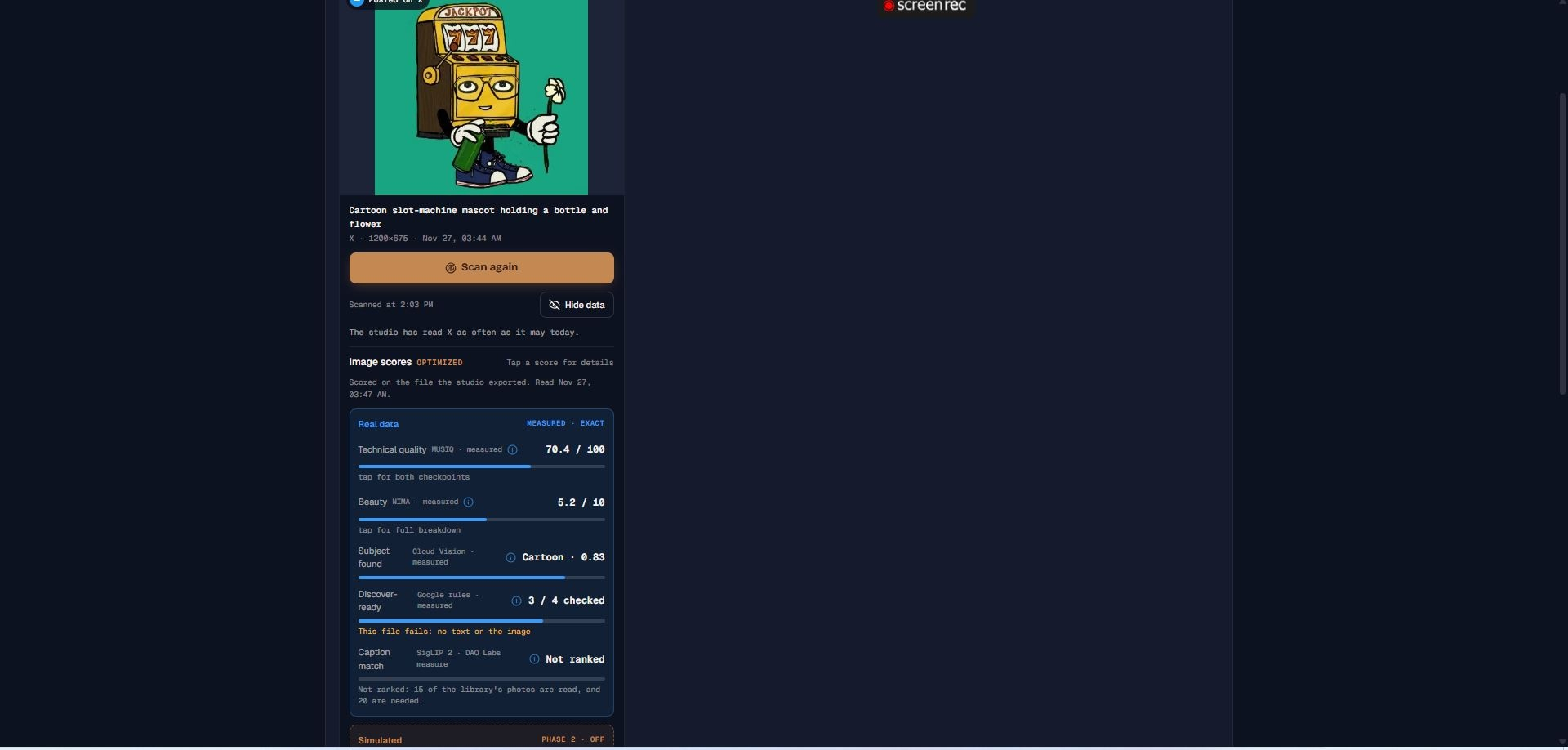
Technical Quality
The image received a technical quality score of:
70.4/100
This score suggested that the image met acceptable quality standards but still had room for improvement. The optimizer highlighted potential enhancements related to image sharpness and detail retention.
Beauty Score
The image earned a beauty score of:
5.2/10
While the image successfully communicated its subject, the aesthetics score indicated that certain visual elements could be refined to make the image more appealing to viewers.
Subject Recognition
One of the strengths of the scan was its ability to recognize the primary object.
Detected Subject: Cartoon
Confidence Score: 0.83
The successful identification demonstrated that the image contained a clear and recognizable focal subject.
Discover-Ready Check
The optimizer reported:
3 out of 4 checks completed
Although most requirements were passed, one discoverability checkpoint was not satisfied.
The scan specifically noted:
This file fails: no text on the image.
This feedback was interesting because it showed that discoverability is being measured from the perspective of search engines and AI systems, not only human viewers.
How the Image Optimizer Helped Me Improve the Image
One of the most useful sections of the report was the improvement recommendations.
Better Visual Storytelling
The optimizer suggested creating a more defined moment around the subject.
Examples included:
Showing a stronger action scene
Highlighting the main object more clearly
Introducing additional visual context
Improving lighting and focus
These recommendations are valuable because users scrolling through a crowded feed usually decide within seconds whether an image deserves attention.
Improving Sharpness and Detail
The second recommendation focused on image quality.
The platform advised using the full-size original image rather than enlarging a cropped version. This would preserve clarity and reduce quality degradation.
For content creators participating in Social Mining campaigns, maintaining image quality is important because blurry or low-resolution visuals may reduce engagement potential.
Alt Text and SEO Information Used
The Image Optimizer generated a descriptive caption for the uploaded image:
"Cartoon slot-machine mascot holding a bottle and flower."
This description functions as useful alt text because it accurately identifies the image subject while providing contextual keywords.
Proper alt text matters for three reasons:
Accessibility for users who rely on screen readers.
Better understanding by search engines.
Improved interpretation by AI systems that evaluate online content.
As more AI-powered tools analyze social media posts, descriptive metadata becomes increasingly valuable.
How My Post Performed on X
The most interesting part of the experience was seeing how the image performed after being posted.
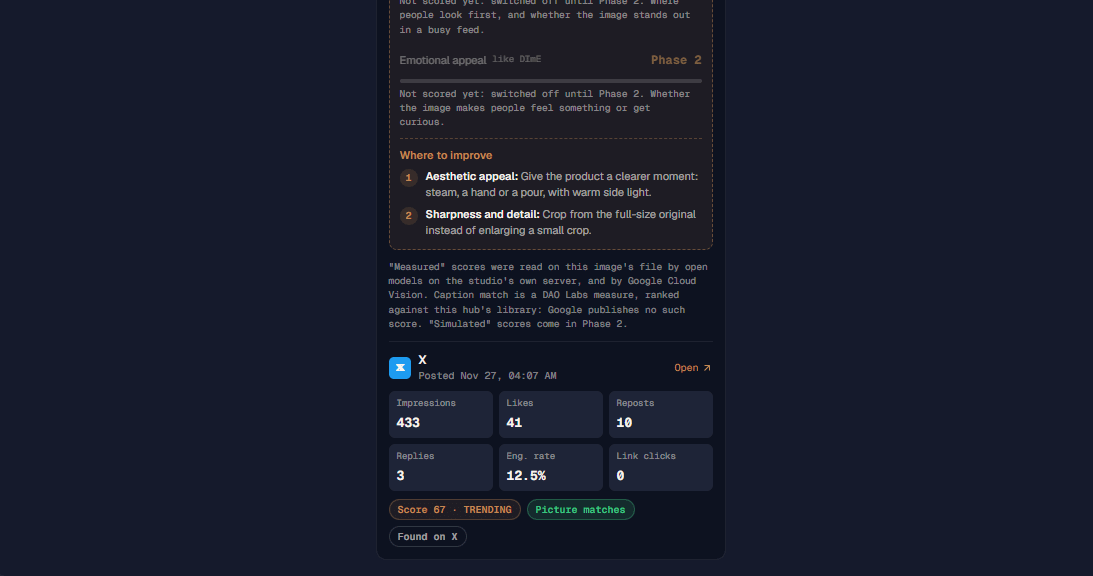
According to the scan results, the image was successfully matched with my X post and generated the following metrics:
Performance Statistics
Impressions: 433
Likes: 41
Reposts: 10
Replies: 3
Total Engagements: 96
Engagement Rate: 12.5%
Link Clicks: 0
The system also assigned:
Image Score: 66
Status: Trending
Picture Match: Found on X
For a single image post, a 9.6% engagement rate is encouraging. The combination of likes, reposts, and replies suggests that the image was capable of attracting attention and generating interaction.
Why the Image Optimizer Matters for Social Mining
One reason I found this tool valuable is that it transforms image optimization from guesswork into measurable analysis.
Many Social Miners create content without understanding how AI systems evaluate images. The Image Optimizer bridges that gap by showing:
Technical quality scores
Aesthetic evaluations
Subject recognition accuracy
Discoverability checks
Real-world social performance
This feedback loop can help creators improve future posts and potentially increase reach across Social Mining campaigns.
Since WhoTweets is built around rewarding quality participation and engagement, having access to image analytics provides creators with actionable insights before and after publishing content.
Final Verdict
My experience with the WhoTweets Image Optimizer was positive overall. The tool successfully analyzed my image, identified key strengths and weaknesses, and linked the content to measurable performance data from X.
What impressed me most was the combination of image scoring and social performance tracking. Rather than simply assigning a score, the platform explained why certain areas needed improvement and showed how the image performed in a real-world environment.
The biggest opportunity for future development would be providing even more detailed improvement suggestions and a deeper explanation of how discoverability scores are calculated.
Overall, the Image Optimizer is a promising addition to the WhoTweets ecosystem. For Social Miners looking to improve content quality, understand AI-driven image evaluation, and maximize engagement, this feature provides practical and data-driven guidance.
Sources
WhoTweets: https://whotweets .com
DAO Labs: https://dao-labs .com
DAO Labs V2 Docs: https://team-dao-labs.gitbook .i/dao-labs-v2-docs
DAO Labs Blog: https://www.dao-labs .com/blog/all