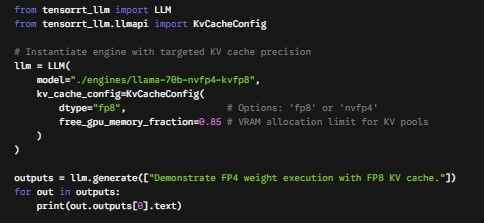
Configuring FP8 or NVFP4 Key-Value (KV) cache quantization alongside NVFP4 model weights requires calibrating activation dynamic ranges during offline post-training quantization (PTQ) and enabling specific runtime plugins/flags during engine compilation or server execution.
Phase 1: Calibration & Checkpoint Export (NVIDIA ModelOpt)
Before building the engine, offline calibration using modelopt (NVIDIA Model Optimizer) is required to capture scaling parameters for weights and KV-cache layer matrices.
1. Quantization Config Script (quantize.py)
To export an NVFP4 weight model paired with either FP8 or NVFP4 KV cache, calibrate the attention key/value tensors against a calibration dataset (e.g., CNN-DailyMail or WikiText).
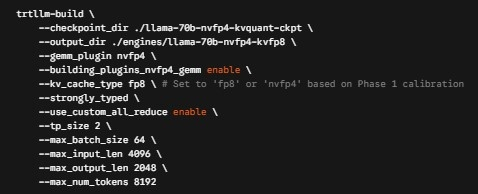
Phase 2: Engine Compilation via trtllm-build CLI
To compile the calibrated checkpoint into a runtime .engine, pass explicit build flags that register the FP4 weight matrix plugins and allocate the target KV cache data type.
CLI Command Execution
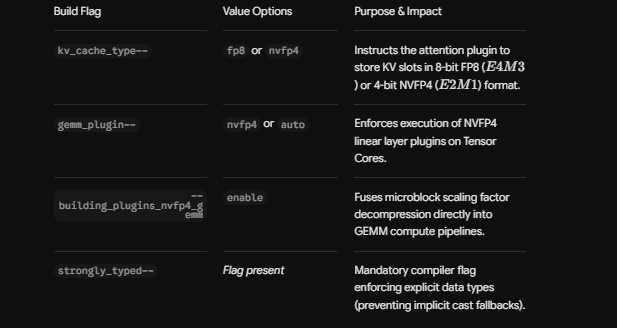
Mandatory Build Flags Reference
Phase 3: High-Level Python API Execution (LLM class)
When launching serving pipelines via the high-level TensorRT-LLM API, configure the KvCacheConfig programmatically: