

Say you have 1,700 manat sitting in m10 and want USDT on Binance by tonight. Since the m10 integration went live, you do not need a stranger on P2P for that. You send the manat from the m10 app straight into an AZN balance on Binance, buy crypto against it, and later send manat back the same way.
👉 Create your Binance account with code GETREWARD
Below are three real-life scenarios with the numbers worked out: a first deposit, a conversion to USDT and a cash-out, followed by the monthly cap, a cost comparison with P2P, the legal position and fixes for the usual problems. Fees and limits quoted here are the terms m10 and Binance announced in October 2025. Check the confirmation screen in both apps before every transfer, because the figure shown there is the one that applies.
Who can use the m10 route?
The service is built for Azerbaijani citizens, and both sides of it need a verified identity. Before the first transfer, make sure every item below is ready:
A verified Binance account: Identity verification must be complete, or the AZN option will not appear under Deposit.
A verified m10 account: Binance's own help page says to create the m10 account and finish its ID check first.
Both apps on one phone: When you start a deposit in the Binance app, it hands you over to the m10 app to confirm. If m10 is missing, you are sent to the app store instead.
Two-factor authentication on Binance: Withdrawals ask for it, and it protects the account if your phone number is ever hijacked.
The same name everywhere: The m10 account and the Binance account should belong to the same person. A mismatch is the fastest way to a stuck or returned transfer.
The flow is close to a bank-transfer deposit in other currencies. If you want to compare, our step-by-step AED bank transfer guide shows how the same Deposit screen works for dirhams.
Scenario one, moving 1,700 manat into Binance
On the app the deposit takes about a minute once both accounts are verified.
Open Binance and go to Wallets, then Deposit.
Choose AZN as the currency and m10 as the method, then tap Continue.
Type the amount, here 1,700, and tap Continue again.
The m10 app opens. Read the amount and the fee line, then confirm inside m10.
Go back to Binance. The manat should show as an AZN balance in your wallet.
On the website the path is Deposit, then Bank Deposit in the side panel. The site cannot open m10 for you, so it shows a code to scan with your phone and the rest happens in the m10 app.
Now the cost. The announced deposit fee is 1%. On 1,700 manat that is 17 manat. If the fee comes off the amount you send, 1,683 manat land on Binance; if m10 adds it on top, 1,717 leave your m10 balance and the full 1,700 arrive. The confirmation screen in m10 tells you which of the two applies to your transfer, so read it before you tap confirm.
The Deposit and Withdraw buttons both sit on the wallet overview:

Scenario two, turning the manat into USDT
An AZN balance on its own does nothing. You need to swap it into a coin before you can trade Spot, send crypto out or use any other product.
Buy crypto with AZN: In the app, tap Add Funds, choose Buy crypto with AZN, enter the manat amount and the coin, and pick your AZN wallet as the funding source. Confirm before the quote timer runs out, or tap Refresh for a new price.
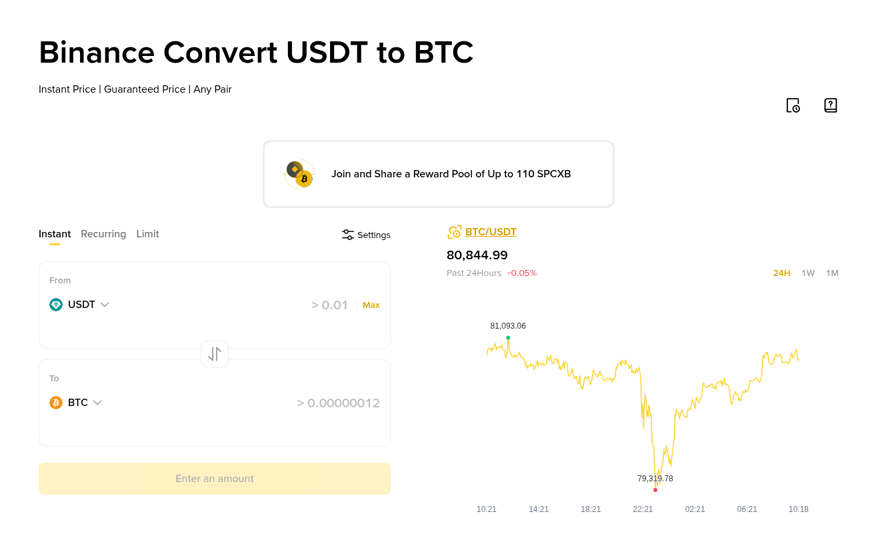
Convert: The Convert screen does the same job with a From box and a To box. Put AZN in From, USDT in To, and the amount you will receive appears before you confirm.
The manat has been held close to 1.70 per US dollar by the Central Bank for years, so it is easy to sanity-check a quote. With 1,683 manat, the reference figure is 1,683 ÷ 1.70 = 990 USDT. A quote of 984 USDT means about 0.6% of spread is built into the price. A quote of 960 means about 3%, and you should wait or try a smaller amount.
The coins land in your Spot wallet, so you can place an order straight away. The Convert screen looks like this:
Scenario three, cashing out 500 USDT back to m10
Going the other way is two moves: sell the coin for manat, then withdraw the manat.
Convert or sell 500 USDT to AZN. At the 1.70 reference that is about 850 manat, less whatever spread the quote carries.
Open Withdraw, choose AZN and m10, and enter your m10 account details.
Enter the amount, confirm with your two-factor code and wait for the manat to reach m10.
The announced withdrawal fee is 1.5%. On 850 manat that is 12.75 manat, which leaves about 837.25.
Put the three scenarios together and you can see the real cost of a full round trip. Leaving aside spread, 1,700 manat in becomes 1,683, and if you converted all of it to USDT and straight back, the 1.5% exit would leave roughly 1,657.75 manat. That is about 2.5% gone to fees before any price move. The route makes sense for money you plan to keep in crypto for a while, not for quick in-and-out moves.
How does the monthly deposit cap work in practice?
During the sandbox phase the deposit limit was set at the equivalent of 20,000 US dollars per month, resetting on the first day of each month. At about 1.70 that is roughly 34,000 manat. Withdrawals were announced without a monthly limit.
A quick example. You deposit 20,000 manat on 10 March and another 10,000 on 20 March. About 4,000 manat of room is left until 1 April. A transfer of 6,000 on 28 March would be refused or cut, so either split it across the month boundary or move the rest through P2P.
The cap counts what you deposit, not what you hold. Converting manat to USDT does not give you room back.
When is P2P the cheaper choice?
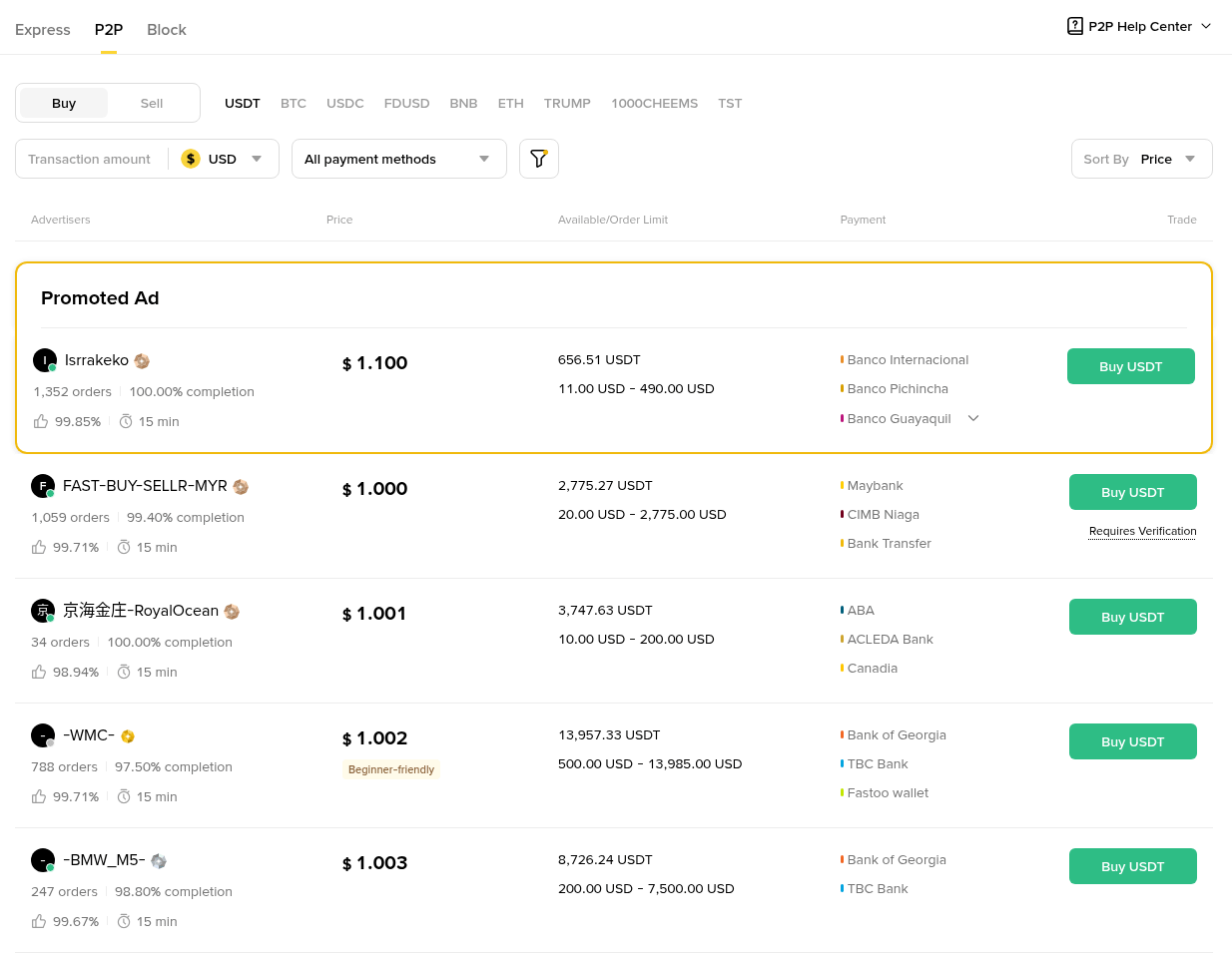
P2P is the fallback when the cap is used up or the m10 route is down. Many Azerbaijani advertisers accept m10 and Kapital Bank transfers. Independent testing published in 2026 put USDT/AZN prices on Binance P2P typically 1 to 2% above the official 1.70 rate.
Compare the two for a 1,000 manat purchase, with figures used only to show the method:
m10 deposit plus Convert: 1% fee leaves 990 manat; at a 0.5% spread you get about 579 USDT.
P2P at 1.5% above 1.70: The ad price is about 1.7255, so 1,000 manat buys about 579.5 USDT, with no Binance fee on the buyer side.
Close to a tie. The difference comes from other things: the m10 route has no counterparty and no escrow timer, while P2P has no monthly cap and can be cheaper on a quiet day. For larger amounts, run the numbers with that day's prices rather than trusting a rule of thumb. Before your first P2P order, read our guide to trading on P2P safely with local bank methods. The P2P market lists each ad with its price, limits and accepted methods:
Is this route official in Azerbaijan?
The m10 integration was tested inside the Central Bank of Azerbaijan's regulatory sandbox. The sandbox registry lists the testing period as 15 November 2024 to 3 April 2026, and the Central Bank said in August 2025 that the first phase was successful and extended it for six more months. m10 itself is a licensed Azerbaijani financial institution.
That is not the same as a crypto licence for the exchange. Azerbaijan has no licensing regime for crypto platforms yet. The virtual asset rules the Central Bank signed in 2023 only take effect once a law on service providers is adopted, and that law is still being drafted.
Three practical points follow:
Crypto is not money in Azerbaijan: The manat is the only legal tender, so you cannot use crypto to settle purchases inside the country.
Taxes are your job: The Tax Code has listed virtual assets as intangible assets since February 2025, which brings gains into the tax system. How that applies to your own trades is a question for a local tax adviser. This is not tax or financial advice.
Terms can change: A sandbox product can be extended, reshaped or closed. Before a large transfer, check that AZN and m10 still show under Deposit and that the fee line matches what you expect.
What to do if a transfer goes wrong
AZN is missing under Deposit: Finish identity verification on Binance and check that your account is registered as Azerbaijani. Update the app; the option can be absent from old versions.
Binance does not open m10: Install m10 on the same phone and log in there first, then start the deposit again from Binance.
The deposit left m10 but is not on Binance: Wait a few minutes and check the deposit history in Binance. If it is still missing, contact Binance support from inside the app with the time and amount, and keep the m10 receipt.
The transfer was refused: The usual reasons are the monthly cap, an unverified m10 account or a name mismatch. Check them in that order.
The withdrawal is pending: Confirm that the m10 account details you typed belong to you and that your two-factor step went through.
Someone offers to help on Telegram: Ignore it. Real support never asks for your password, codes or a transfer to a third account.
For every transfer, save the m10 receipt and the Binance history entry together. When the tax question comes, those two records show what you sent, what arrived and the rate you converted at.
A short plan for your first week
Day one, verify both accounts and turn on two-factor. Day two, send a small test deposit of 50 manat and convert it to see the real spread. After that, move the main amount, keep an eye on the monthly cap, and withdraw a small amount once so you know the exit works before you need it.
New to Binance? You can check the current Binance bonus campaign to see which welcome tasks apply to eligible new users right now.
Sign-up code: GETREWARD
FAQ
Can foreigners living in Baku use the m10 route?
The service was announced for Azerbaijani citizens. Residents with another nationality should expect to use P2P instead.
Does the AZN balance count toward the monthly cap when I convert it?
No. The cap applies to deposits from m10. Converting or holding manat on Binance does not use it up.
Can I deposit from a bank card instead of m10?
Card options depend on your account and region and can carry their own fees. Check the Deposit screen for what is offered to you.
Is there a minimum deposit?
The announcements did not name one. The m10 confirmation screen shows any minimum before you send.
Disclosure: this article includes a Binance sign-up link with the code GETREWARD. Crypto prices can fall. This is not financial or tax advice.