


The Binance promo code for India that works on a new account is 20LESSFEES. Put it in at registration and your Spot and Futures trading fees drop by a flat 20% for good, while eligible users can still go after the welcome bonus of up to $19,800 on top.
👉 Sign up on Binance with a lower fee rate
Most questions about promo codes from Indian sign-ups are not about what the code does. They are about why it seemed to fail: the box wasn't there, the +91 number was refused, a Google sign-up skipped a screen, or a Telegram post promised 100 free USDT. This page is built as a fault finder. Each problem comes with the likely cause and the fix, and the rupee and dollar sums show what the discount is worth once it is in place.
Why use this code at all?
Cheaper trades: Your tier's Spot and Futures fee rate cut by a flat 20%, starting with the very first fill.
Fees are not deductible in India: Under the VDA rules only the cost of acquisition comes off a gain, so every rupee of fee you avoid stays avoided.
No conditions: No deposit size, trading target or waiting period before the discount starts.
Welcome tasks unchanged: Anyone eligible for the new-user campaign sees identical tiers and rewards whichever code they typed.
How do you enter the code when signing up from India?
Open the sign-up link above. Arriving that way fills the code in for you.
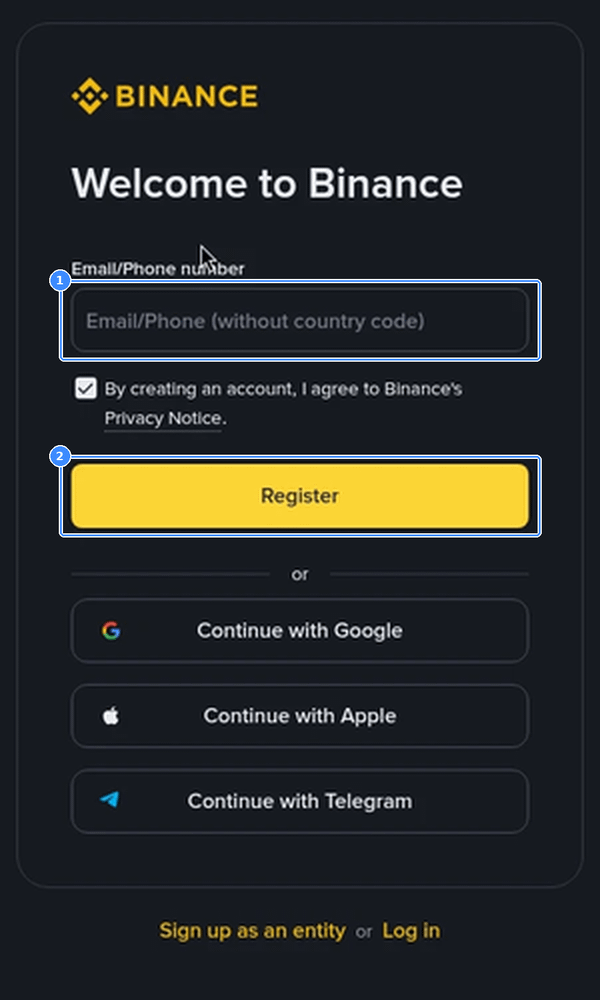
Type your email, or your 10-digit mobile number with India (+91) picked as the country. Leave out the +91 and any leading 0 in the box itself.
Look below the email or phone field for the code line. Expand it if it is folded and check it shows 20LESSFEES with no extra space.
Tap Register and enter the one-time digits sent by SMS or email.
Create a password, then finish identity verification. Indian accounts are asked for PAN details along with an ID document and a selfie.
Code to type if the box is empty: 20LESSFEES
Why is there no code box on the screen?
This is the most common report, and it rarely means the code is gone.
Folded line: On the web form and in the app the code field is often collapsed into a small text line under the email box. Tap it to open the field.
Pre-filled and hidden: When you arrive through a sign-up link, the code may already be attached and shown only as a short note. Expanding the line lets you confirm it.
Old app version: An outdated app can render the form differently. Update it, or register on binance.com in a mobile browser and log in to the app afterwards.
What doesn't work is finishing registration and hoping to find the field later. Once the account exists, there is nowhere left to put a code.
Why does the +91 number keep getting refused?
Almost always a formatting issue. The phone box asks for the number without the country code, so "+91 98xxxxxxxx" or "098xxxxxxxx" can be rejected while the bare ten digits go through, as long as India is selected in the country list next to it.
If the SMS still doesn't arrive, wait for the resend timer instead of tapping again and again, check that DND settings on your SIM aren't blocking service messages, or switch to email sign-up and add the phone later in Security settings. Switching sign-up method does not affect the code, provided you check the code line before tapping Register.
What if a Google or Apple signup skipped the code?
Social sign-ups move fast. After you pick Google, Apple or Telegram, Binance shows one more screen to create the account, and that screen is where the code line sits. People who tap straight through end up with a code-free account.
If that already happened and you haven't deposited or traded, there is no setting to fix it after the fact. Contacting support is the only route to ask, and there is no promise of an answer either way. Do not open a second account to get around it, because duplicate accounts break the terms and can cost you both.
I already have an account, so now what?
Then the code can't be added. Codes attach only during registration of a brand-new account, so an existing one keeps its current fee rate. What you can still do on an old account is check whether covering fees with BNB, or reaching a higher VIP tier, lowers your rate. Those are separate from any code.
Is a Telegram code worth free USDT real?
A real sign-up code is a few letters typed into one field on binance.com or the official app. It never asks for anything else. Walk away from any "promo code" that wants you to:
Share an OTP or password: No genuine code ever needs your login details or a one-time password.
Send crypto first: A message asking for a deposit to an address to "activate" a reward is a scam pattern.
Use a lookalike site: Check the address bar reads binance.com before typing anything. Binance Verify on the official site checks whether a link, account or handle is genuine.
Act within minutes: A countdown in a WhatsApp group is pressure, not a promotion.
So is a real code safe? Yes, in the sense that it carries no access. Nobody reads your balance, orders or login through it. Account safety still depends on your password, 2FA and the devices you sign in on.
Why can't I deposit rupees directly?
Most Indian users bring rupees in through Binance P2P, buying USDT from a seller and sending the money by UPI or IMPS from their own bank account. Two points matter for the code. P2P itself carries no trading fee for the buyer, so the 20% has nothing to act on there. And the USDT lands in the Funding wallet, so you move it to Spot before placing an order that uses the discount.
The details of a first rupee purchase, from picking an advertiser to what to do when a release is late, are in this step-by-step guide to buying USDT with UPI on Binance P2P.
How much does the 20% save once it works?
New accounts start on the Regular User tier. Spot is 0.100% for maker and taker, which falls to 0.080% with the code. For the rupee figures the examples use a round, made-up rate of ₹95 per USDT. Check the live P2P price before you do your own sums.
One $1,000 Spot buy: $1.00 in fees without the code, $0.80 with it. That is 20 cents, about ₹19.
A ₹50,000 starter amount: At ₹95 that is about 526 USDT. Spend 500 USDT on BTC with a market order and the fee drops from 0.50 to 0.40 USDT.
Forty $1,000 trades a month: $40,000 of volume costs $40 in fees normally and $32 with the code. $8 a month is around ₹760, or roughly ₹9,100 across twelve months if nothing changes.
Light buyers will barely notice the saving. Someone placing a trade or two most days will, and with fees not deductible against VDA gains, it is money that otherwise just leaves.
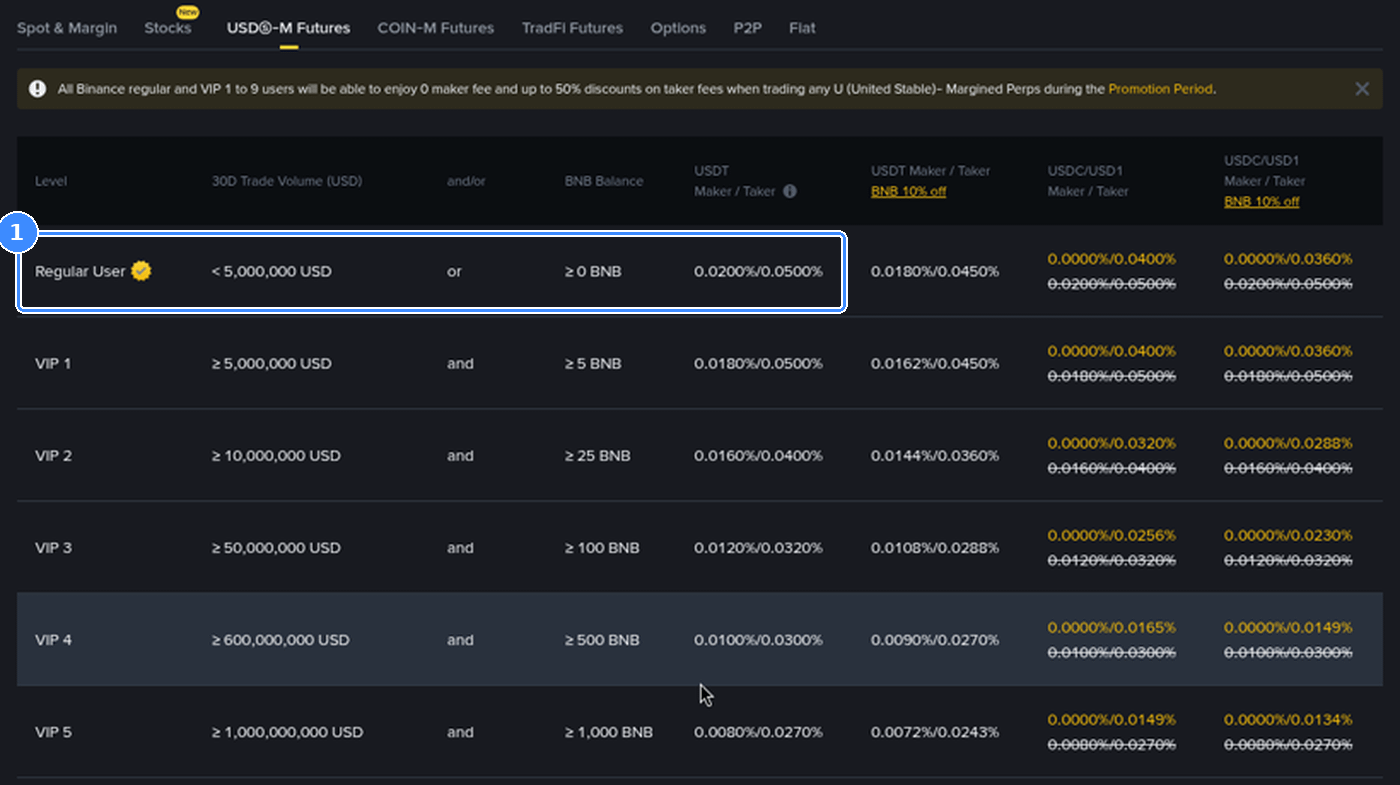
On Futures the fee is worked out from the whole position size, so the collateral amount is irrelevant to it. On the USDⓈ-M table a Regular User is charged 0.0200% as maker and 0.0500% as taker. With the code those become 0.0160% and 0.0400%.
Opening at 5x: $200 of margin at 5x is a $1,000 position. A market order costs $0.50 normally, $0.40 with the code.
Closing with a limit order: The maker rate on $1,000 is $0.20, or $0.16 with the code. Round trip, $0.70 against $0.56.
Same margin at 20x: The position becomes $4,000 and every fee is four times larger. Higher multiples raise the fee bill much faster than any code can trim it.
Funding, the periodic amount swapped between long and short holders, is not a trading fee, so the 20% leaves them alone. If Futures is not switched on for your account, the Spot part of the discount still applies.
👉 One code covers both markets: 20LESSFEES
Why does the fee schedule still say 0.100%?
That page is public and lists standard rates for everyone. It never shows your personal discount. The place to look is your own trade history.
Move a small amount of USDT from Funding to Spot.
Place a 100 USDT market buy on any USDT pair.
Open Orders, then Trade History, and read the fee column for that fill.
For a Regular User the fill should carry roughly 0.08 USDT of fee where a code-free account sees 0.10. The fee on a buy is usually taken in the coin you receive, so it may read as a small BTC amount whose value works out to roughly that figure.
If you turned on BNB for fees, the starting rate is lower (0.075% on Spot for Regular User), and the line will look different again. Judge the result from one real fill rather than from tables.
Why hasn't the welcome bonus shown up?
The code and the welcome bonus are separate things. The discount is automatic. The bonus is a set of tasks, and nothing arrives until a task is done and checked.
Not enrolled: Some campaigns need you to join from the event page before deposits and trades count.
Wrong timing: Each tier has a deadline counted in days from sign-up or from joining. Trades placed after it don't count.
Net deposit too low: Moving funds in and straight out again lowers the net figure the task reads.
Not eligible: Eligibility depends on region, verification and account history, and it is the same with every code.
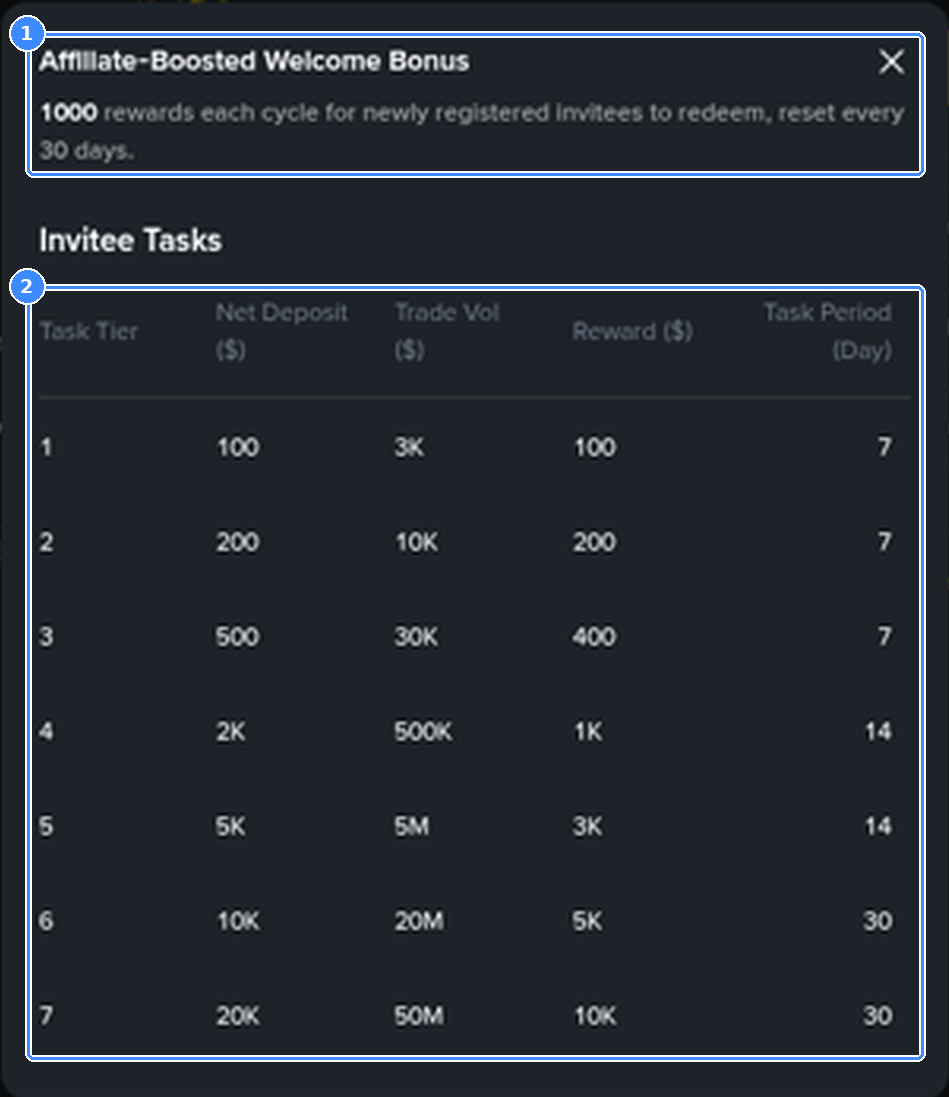
Read a table like this as costs first. In the capture above, the first row wants $100 kept in as net deposit and 3K of volume inside a week. On Spot with the code, $3,000 of volume costs $2.40 in fees instead of $3.00. That part is small. The bigger cost is market risk on every one of those trades, which can easily exceed both the fee and the reward. Choose a tier only if its volume matches what you planned to trade anyway.
How does the code sit with Indian tax?
It doesn't change it. Profit on a crypto transfer carries 30% tax and 4% cess on top, the 1% TDS rules run separately, and fees cannot be set against the gain. A lower fee means you keep a little more of each sale, not that the taxable figure changes.
Keep every trade record from the first week, including the fee column you checked earlier. For how sales, losses and TDS credits turn into numbers on a return, see these worked examples for the Indian VDA tax schedule.
Which edge cases make the saving look smaller?
Zero-fee pairs: A promotion that already removes the fee leaves the code with nothing to cut.
Tiny orders: On a 10 USDT trade the difference is under a cent and can vanish in rounding.
Convert: Its spread sits inside the rate you are offered, with no separate fee line the code could reduce.
VIP tiers: The 20% comes off your tier's rate. As the base rate falls, each order saves fewer cents.
A quick fault finder before you register
Code line: Expanded and reading 20LESSFEES before you tap Register.
Phone field: India selected, ten digits only.
Social sign-up: Stop on the extra screen and check the code there.
One account: No second account to retry a code.
Official channels: binance.com or the official app, never a code that asks for an OTP or a deposit.
First fill: A 100 USDT Spot order, then the fee column in Trade History.
Ready to open the account?
If you trade a few times a month, the code is a free setting that trims every order. If you trade most days, it becomes a real line in your yearly costs. Either way it takes ten seconds at sign-up and can't be added afterwards.
Register with 20LESSFEES, finish PAN and ID verification, and if you are eligible, look over the current welcome bonus tasks for new Binance users before you move rupees in, so you know which deadlines apply.
👉 Check that 20LESSFEES sits in the code field, then tap Register.
This is general information, not financial or tax advice. Coin prices can drop sharply, and Binance is free to alter fee levels, campaigns, task tiers or who qualifies whenever it likes. Ask a CA about your own tax position.
FAQ
Does the code work in the Binance app on an Indian phone?
Yes. The app has the same code line on the registration screen. Update the app first so the field shows up.
Does the code lower P2P or withdrawal costs?
No. It applies to Spot and Futures trading fees only. P2P buying has no trading fee, and withdrawals follow their own network fee table.
What happens to the code if my verification is rejected?
It stays on the account. Fix the rejected document and resubmit, and the discount applies once you can trade.
Can two family members use the same code?
Yes. Each person registers their own account in their own name and enters the code during sign-up.
Will a different code get me a bigger welcome bonus?
No. Welcome tiers and eligibility are the same whatever code is entered.
Disclosure: 20LESSFEES, used in the link near the top, belongs to me. All dollar, rupee and USDT amounts above are worked illustrations, not price quotes or predictions.