


People search for "Binance bank statement" for three different reasons. Some see a line on their bank statement after a deposit or a card buy and do not recognise the name. Some are in a P2P order where the other side says the money never arrived, and they need their bank statement as proof. Others have been asked by Binance to upload a bank statement for a source of funds check and keep getting it rejected. Each case has its own fix, so this guide goes problem by problem: what you see, why it happens, and what to do next.
👉 Open a Binance account with code GETREWARD
Which bank statement problem do you have?
Unknown name on your bank statement: You moved money to or from Binance and the line shows a company you have never heard of. See problem 1.
Money left the bank but Binance shows nothing: A bank transfer deposit that has not been credited. See problem 2.
Card buy shows a different amount: The bank charged more or less than the order you placed. See problem 3.
P2P order in dispute: You sent the money, the seller says it did not arrive, or the names do not match. See problems 4 and 5.
Your bank asks about P2P transfers: Incoming payments from strangers triggered a review. See problem 6.
Binance asked you for a bank statement: A source of funds or address check, or a document that keeps bouncing back. See problem 7.
Withdrawal to your bank came back: The bank returned a fiat withdrawal. See problem 8.
Menus and partner names differ by country, so check what your own app shows.
1. An unfamiliar company name after a deposit
What you see: You sent 500 EUR to fund your account, and your bank statement shows a transfer to a payment company or a bank you do not know, not to "Binance".
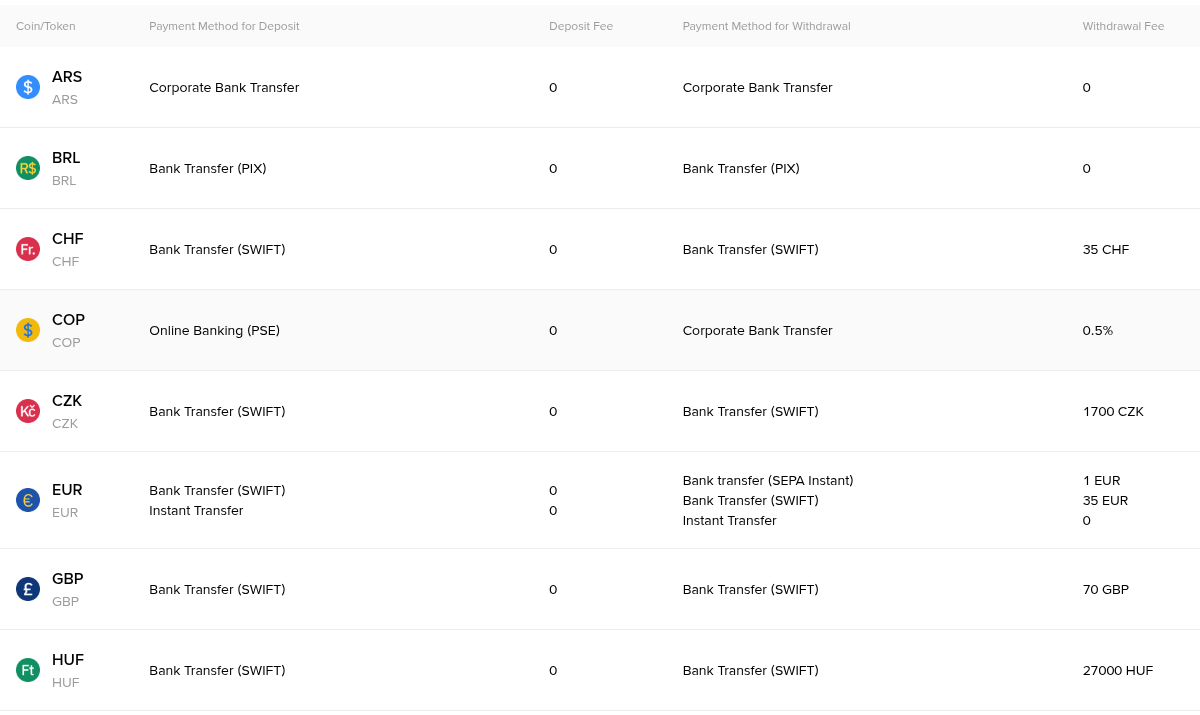
Why it happens: Binance does not hold a bank account in every currency itself. Fiat deposits and withdrawals go through local banking partners, and the account name on the deposit instructions is often the partner's name. Your bank prints whatever name is attached to the receiving account. Card buys can show a card processor's name in the same way.
What to do: Match the line, do not guess. Open the deposit history in your Binance account and look for a credit with the same amount and a date within a business day or two. Then compare three details.
Amount: 500.00 EUR on the bank side should match 500.00 EUR on the Binance side, minus any deposit fee shown in the fee table for your method.
Reference: If the deposit page gave you a reference code, it should appear in the bank line or in the transfer details.
Date: Bank dates are booking dates in your local time. Binance history is often shown in UTC, so a transfer at 00:30 on 3 March in UTC+8 can show as 16:30 on 2 March.
If all three line up, the unfamiliar name is just the partner. A debit you cannot match to anything is a different matter: call your bank first, then Binance support.
2. The money left your bank but Binance shows nothing
What you see: Your bank statement shows the transfer as completed, but the fiat balance on Binance is still zero after the normal processing time.
Why it happens: Usually one of these, and each can be checked against your statement.
Missing or wrong reference: The partner bank cannot match the money to your account without it, so the transfer sits unassigned.
Name mismatch: The money came from an account that is not in your name, for example a partner's or a company account. Third-party deposits are usually returned.
SWIFT deductions: An international transfer passes through intermediary banks that can take a fee on the way.
Cut-off times: A transfer sent on Friday evening may wait until Monday.
A worked example for the SWIFT case. You send 1,000 EUR by SWIFT. Your bank charges you 12 EUR for sending, which shows as a separate line on your statement. An intermediary bank keeps 15 EUR on the way. Binance receives 985 EUR and credits 985 EUR, because the deposit fee for that method is 0. Your statement shows −1,000 and −12, your Binance history shows +985. Nothing is lost, the 27 EUR went to the two banks.
What to do: Ask your bank for the transfer confirmation (for SWIFT, the MT103 or the bank's payment confirmation with the tracking reference). Open a support case on Binance with the date, the amount, the reference you used and that confirmation. If the money came from someone else's account, expect a return to that account rather than a credit, and send the next deposit from an account in your own name.
3. A card buy shows a different amount on your statement
What you see: You bought crypto with a card for an amount in one currency, and the bank statement shows a different number.
Why it happens: Two separate costs can sit between the order and the bank line. The first is the card fee shown on the order screen before you confirm. The second is your bank's own currency conversion if the card currency differs from the order currency.
A worked example. Your card is in EUR and you place a 200 USD order. Binance quotes the total in USD, fee included. Your bank converts 200 USD at its rate of 0.932, which gives 186.40 EUR, and adds a 1.5% foreign transaction fee of 2.80 EUR. The statement shows 189.20 EUR, sometimes as two lines. Binance never saw the 2.80 EUR; it is your bank's charge.
What to do: Choose the card's own currency where the option exists, or fund the account by bank transfer in your currency, which avoids the bank's conversion step.
4. The P2P seller says your money never arrived
What you see: You paid, marked the order as paid, and the seller does not release the crypto, or claims nothing came in.
Why it happens: The transfer may still be on its way, the seller may not have checked properly, or the seller may be trying to keep both the money and the crypto.
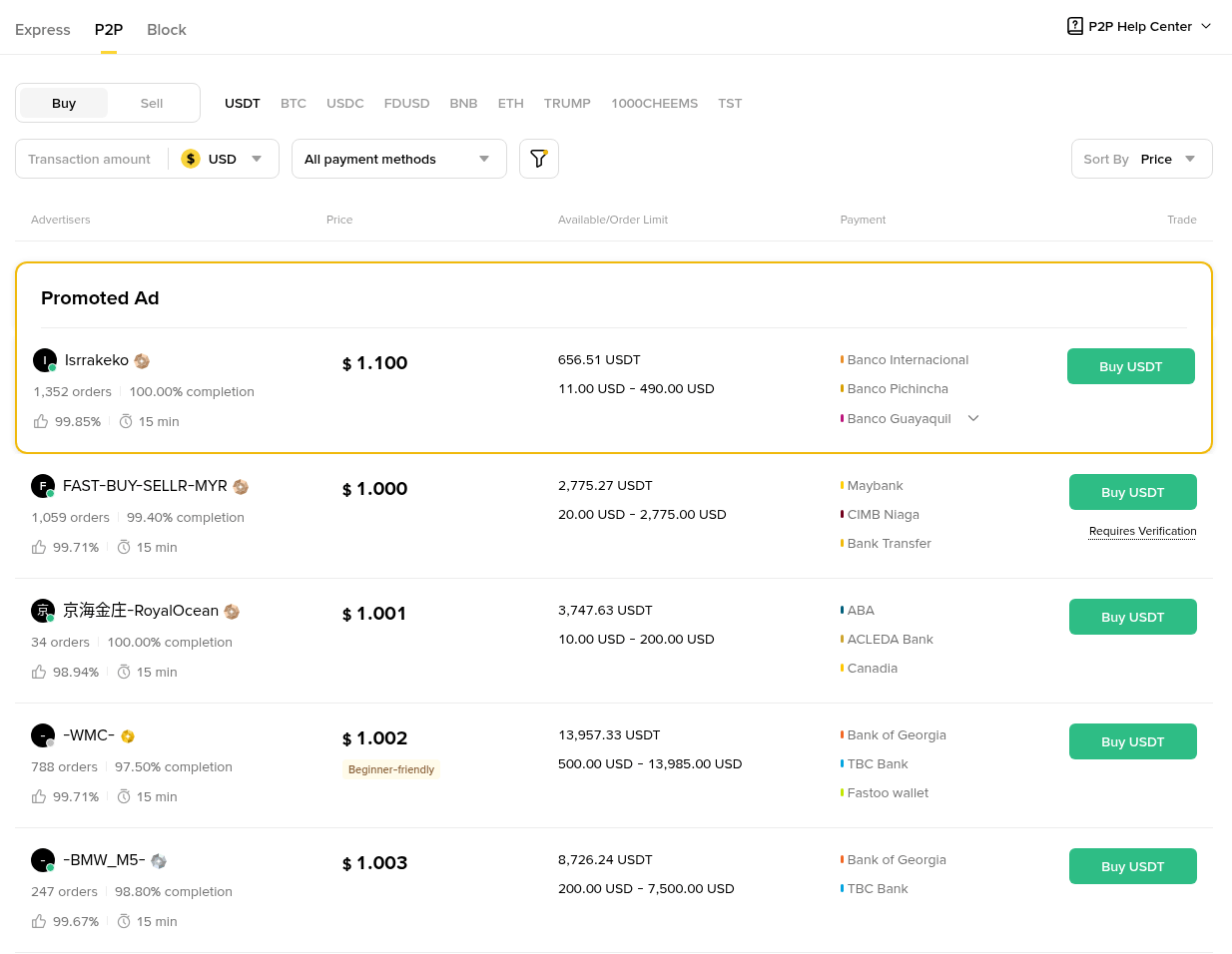
A worked example. You buy 300 USDT from an ad priced at 1.002 USD, so the order total is 300.60 USD. The order opens at 13:58 with a 15 minute window. You send exactly 300.60 USD from your own account to the account name shown in the order, and your bank shows it as completed at 14:05. You mark the order as paid at 14:06. At 14:30 the seller still has not released. That is the point to appeal, not to send a second payment.
What to do: Open an appeal from the order page and upload proof. The proof that works best is your bank statement or the bank's transfer receipt, showing:
Your full name as the sender: It must match the name on your verified Binance account.
The recipient's name and account: They must match the payment details shown in the order.
The exact amount: 300.60, not a rounded 300 or 301.
Date, time and status: Completed or executed, not "scheduled" or "pending".
A transaction ID: Most bank receipts have one, and support can ask the seller to search for it.
A PDF receipt from online banking beats a cropped phone screenshot with no names on it.
5. The names on the statement do not match
What you see: As a seller, the money arrived, but from a name that is not the buyer's verified name. As a buyer, the seller asks you to send the money to a different person or to write a note about crypto.
Why it happens: A payment from a third party is a classic setup for a chargeback or for laundering stolen funds through your account. If you release the crypto, the real owner of that bank account can later ask their bank to reverse the transfer, and you lose both sides.
What to do as a seller: Do not release. Open an appeal, explain that the sender name on your statement differs from the buyer's name, and return the money only to the account it came from, following support's instructions. As a buyer, pay only to the account shown in the order and only from your own account. Anyone asking to move the chat or payment outside the order gets cancelled and reported.
6. Your bank questions your P2P transfers
What you see: After a few P2P sales, your bank sends a message about unusual activity, limits your account, or asks where the incoming transfers come from.
Why it happens: Several payments from strangers in a short time can look like a mule account, and the bank sees only the incoming lines, not your orders.
What to do: Answer the bank with records that match its statement line by line. A simple table works well:
Line 1: +150.00 EUR from A. Novak on 4 March, matching P2P order ending 4471, sale of 160.4 USDT.
Line 2: +420.00 EUR from M. Rossi on 4 March, matching order ending 5108, sale of 449.2 USDT.
Line 3: +75.00 EUR from J. Smit on 6 March, matching order ending 6630, sale of 80.2 USDT.
Add your P2P order history export and the deposit history showing where the sold crypto came from. Writing "USDT" or "crypto" in the reference field of P2P transfers is something many sellers ask buyers not to do, so do not add notes the seller did not request. For the basics of choosing ads and payment methods, see this guide to buying and selling crypto safely on Binance P2P.
7. Binance keeps rejecting your bank statement
What you see: A request to upload a bank statement for a source of funds check, a higher limit or a proof of address, and the upload comes back as rejected.
Why it happens: The reviewer needs to read your name, the bank's name, a recent date and the relevant transactions in one document. Rejections usually come down to one of these:
Too old: For address checks, documents are often accepted only if issued within the last three months.
Cropped or partial: The page cuts off your name, the bank logo or the period.
Screenshot instead of a document: Easy to edit, so often refused.
Edited file: A PDF re-saved in an editor may fail an integrity check.
Name mismatch: A joint account or a married name that differs from your ID without any explanation.
What to do: Download the official PDF statement from online banking for the period asked, usually the last one to three months. Make sure the first page shows your name and address as they appear on your ID. If the request is about source of funds, choose the months that show the salary, sale or savings that funded your deposits. For example, 8,000 EUR deposited in March is explained by a statement showing a 3,200 EUR salary and a 6,000 EUR transfer from savings in February. If your name differs from your ID, add a short note and, where relevant, a marriage certificate or similar document.
Never send a statement or any document to someone who contacts you by private message or email claiming to be Binance support. Uploads go only through the verification or support pages inside your account.
8. A withdrawal to your bank was returned
What you see: You withdrew euros, your Binance history shows the withdrawal, but the money never shows on your bank statement, or it shows and then reverses.
Why it happens: The receiving bank rejected the payment. The main causes are an IBAN typo, an account that is closed or does not accept transfers of that type, and an account holder name that differs from your verified Binance name.
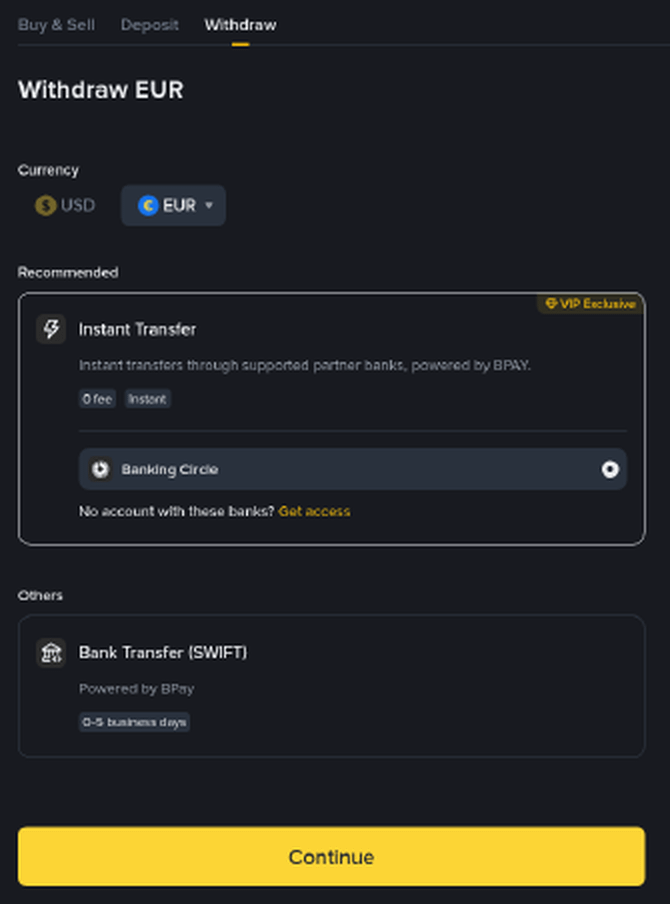
A worked example. You withdraw 1,200 EUR by SEPA Instant with a 1 EUR fee, so your bank should receive 1,199 EUR within minutes. If the account belongs to your partner, their bank can reject the incoming payment because the name check fails. The funds go back to Binance, which can take several business days, and the 1 EUR fee may not be refunded. On your bank statement there is no line at all, because the money never landed.
What to do: Check the IBAN and account name on the withdrawal record. If the funds have not come back after a week, open a support case with the withdrawal ID. Send a small test amount to any new bank account first. For deposits and withdrawals in euros, the steps and fixes are covered in detail in this guide to sending euros to Binance by SEPA bank transfer.
If you are new and opening an account with code GETREWARD, the Binance new user bonus page lists the welcome tasks for eligible users. Fund the account from a bank account in your own name from day one, and most of the problems above never come up.
FAQ
Does Binance show up by name on my bank statement?
Not always. Deposits and withdrawals often run through local banking partners, so the line can carry the partner's name. Match the amount, date and reference with your Binance deposit or withdrawal history.
Can a Binance statement replace a bank statement?
Usually not. A verification check or a bank asks for a document issued by your bank. The Binance export works alongside it, showing what happened to the money after it arrived.
Is a screenshot from my banking app enough for a P2P appeal?
It can be accepted, but a PDF receipt with both names, the amount, the time and a completed status is stronger.
How recent does a bank statement need to be for verification?
For proof of address, the usual limit is three months. For source of funds, upload the months that show the money arriving before your deposits, as asked in the request.
Should I hide crypto transfers from my bank?
No. Banks see the transfers anyway, and hiding them makes a review more likely. Keep tidy records instead.
Disclosure: the sign-up link in this article uses my code GETREWARD. The amounts above are simplified examples, not quotes or forecasts, and fees and partner names vary by country. This is general education, not financial advice.