


Binance does not charge a fee to deposit crypto. You only pay the network fee on the sending side, set by the blockchain or the platform you send from. Fiat deposits are different: the cost depends on the method and currency, and bank transfers are usually the cheapest route. Card payments typically cost the most, and the exact fee is shown before you confirm.
👉 New to Binance? Sign up on Binance with a bonus and 20% lower trading fees.
Does Binance charge a fee for crypto deposits?
No. Binance credits the full amount that arrives on-chain to your account.
Network fee: paid by the sender to the blockchain, not to Binance.
Exchange withdrawal fee: if you send from another exchange, that exchange charges its own withdrawal fee.
Network choice matters: networks such as BNB Smart Chain or Tron are usually much cheaper than Ethereum for stablecoins.
Always pick the same network on both sides. Sending on a network Binance doesn't support for that coin can mean lost funds.
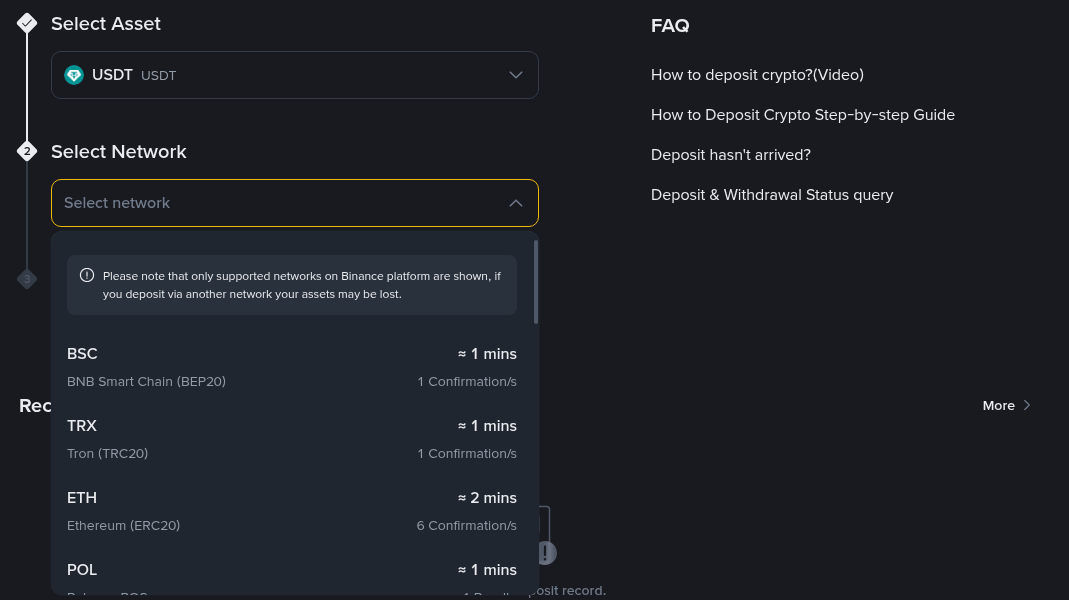
When you deposit USDT, Binance lists the supported networks with their typical arrival time. Choose the one your sending wallet supports.
How much do fiat deposits cost on Binance?
For bank transfers, usually nothing. As of October 2026 Binance lists a deposit fee of 0 for bank transfer methods such as SWIFT, PIX and Instant Transfer in many currencies, including EUR, GBP, CHF and BRL.
Bank transfer: no Binance deposit fee in most listed currencies, though your own bank may charge for sending.
Card purchase: fast, but a percentage fee applies.
P2P: no Binance fee for the buyer, but the price set by the seller may include a markup.
Withdrawals are where fiat fees show up, for example 1 EUR via SEPA Instant or 35 EUR via SWIFT. Binance shows the fee and the amount you'll receive before you confirm.
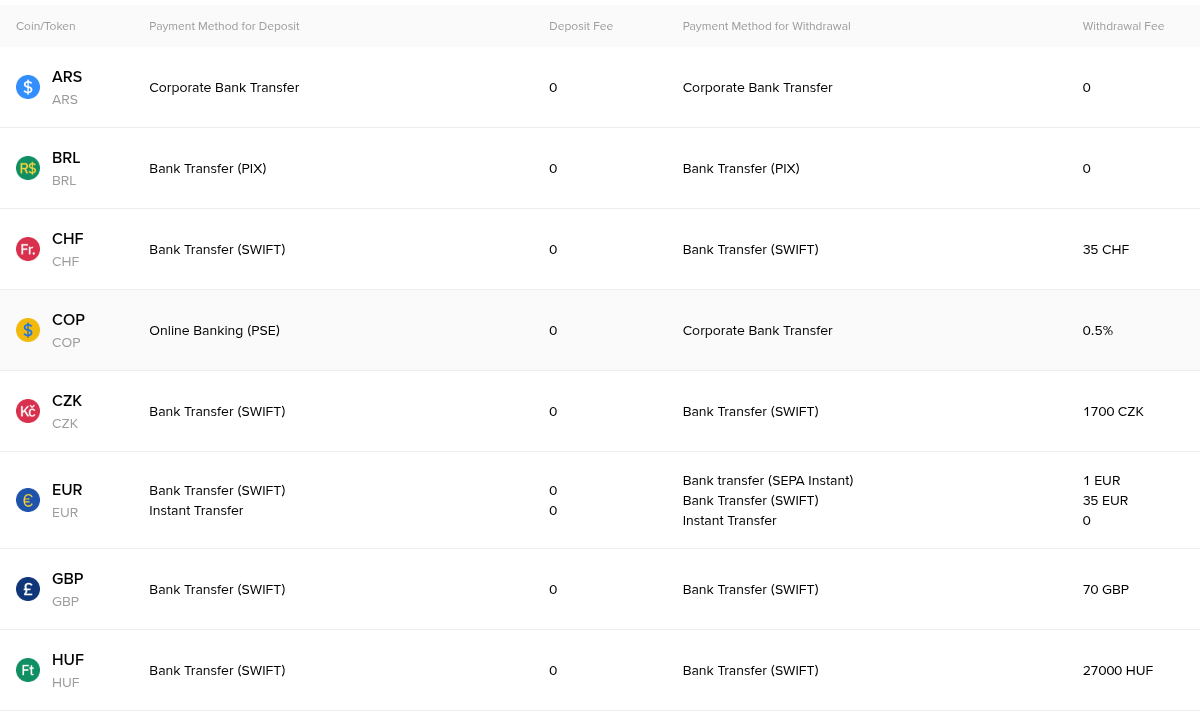
Binance's fiat fee table: bank transfer deposits show a 0 fee, while withdrawal fees depend on the currency and method.
How can you keep deposit costs low?
A few habits save more than any single trick.
Use a low-fee network and double-check the address and memo.
Send one larger deposit instead of many small ones.
Prefer bank transfer over card when speed doesn't matter.
Compare the P2P price with the market price before you buy.
What about trading fees after you deposit?
For most users, trading fees end up costing more than deposits, because you pay them on every buy and sell. The regular Spot fee is 0.1% for both maker and taker orders, and paying fees with BNB lowers it.
If you're opening a new account, you can also register with code 20LESSFEES to get 20% off Spot and Futures trading fees. The welcome bonus of up to $19,800 for eligible users is a separate, task-based extra.
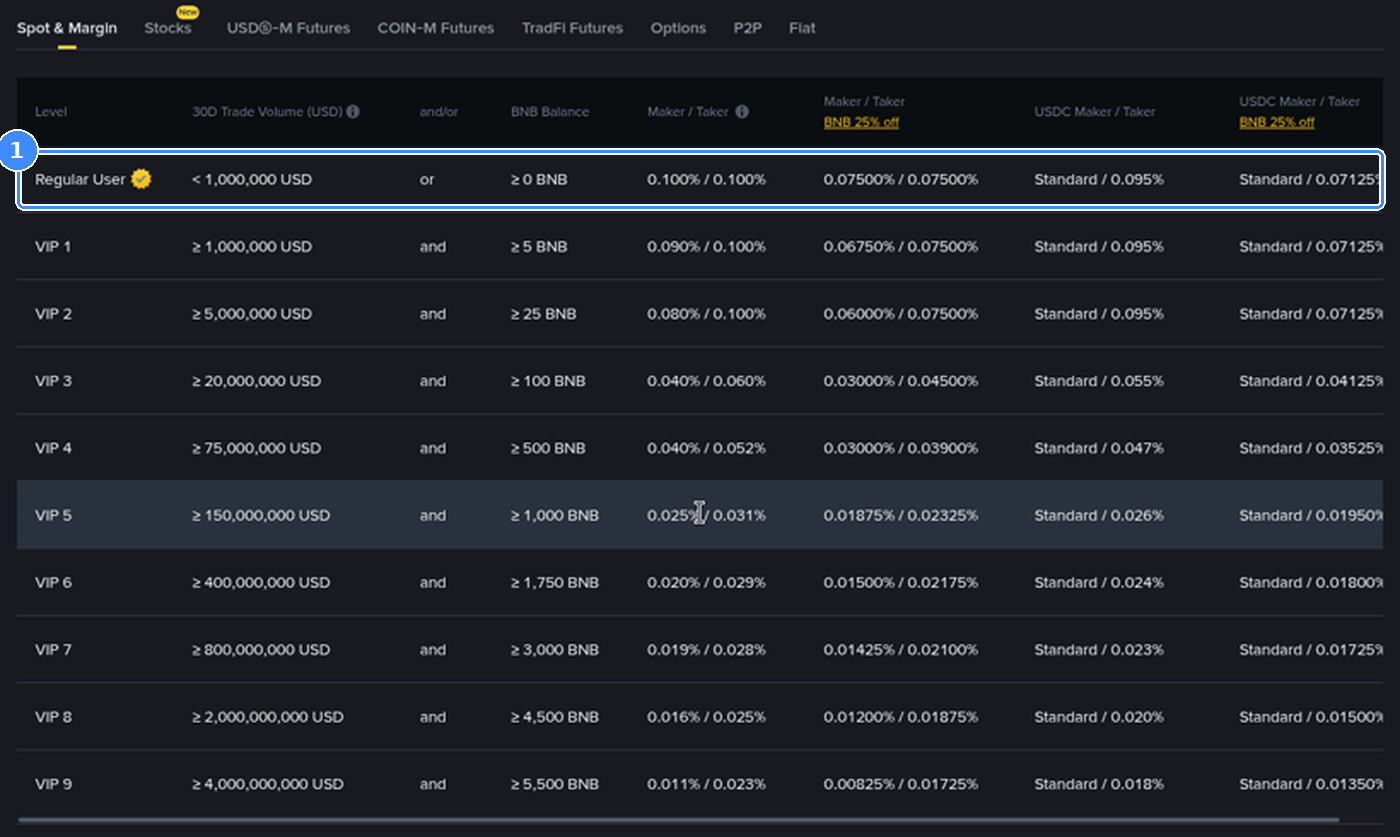
The Spot fee schedule starts at 0.1% maker and taker for regular users, with lower rates when you pay fees in BNB.
FAQ
Is depositing USDT on Binance free?
Yes, Binance charges nothing for the deposit. You only pay the network fee where you send it from.
Why did I receive less than I sent?
The sending platform deducted its withdrawal or network fee. Binance credits what arrives on-chain.
What is the cheapest way to deposit money to Binance?
A bank transfer in a supported currency, which carries no Binance deposit fee, or sending stablecoins on a low-fee network.
Are there fees to withdraw from Binance?
Yes. Crypto withdrawals carry a network fee that depends on the coin and network, and fiat withdrawals have a fee per currency and method. Binance shows it before you confirm.
Fund your account the cheap way
Ready to start? Create your Binance account here, deposit on a low-fee network and trade with lower fees from day one.
Disclosure: 20LESSFEES is my referral code. If you use it, I may earn a commission from Binance at no extra cost to you. This is not financial advice.