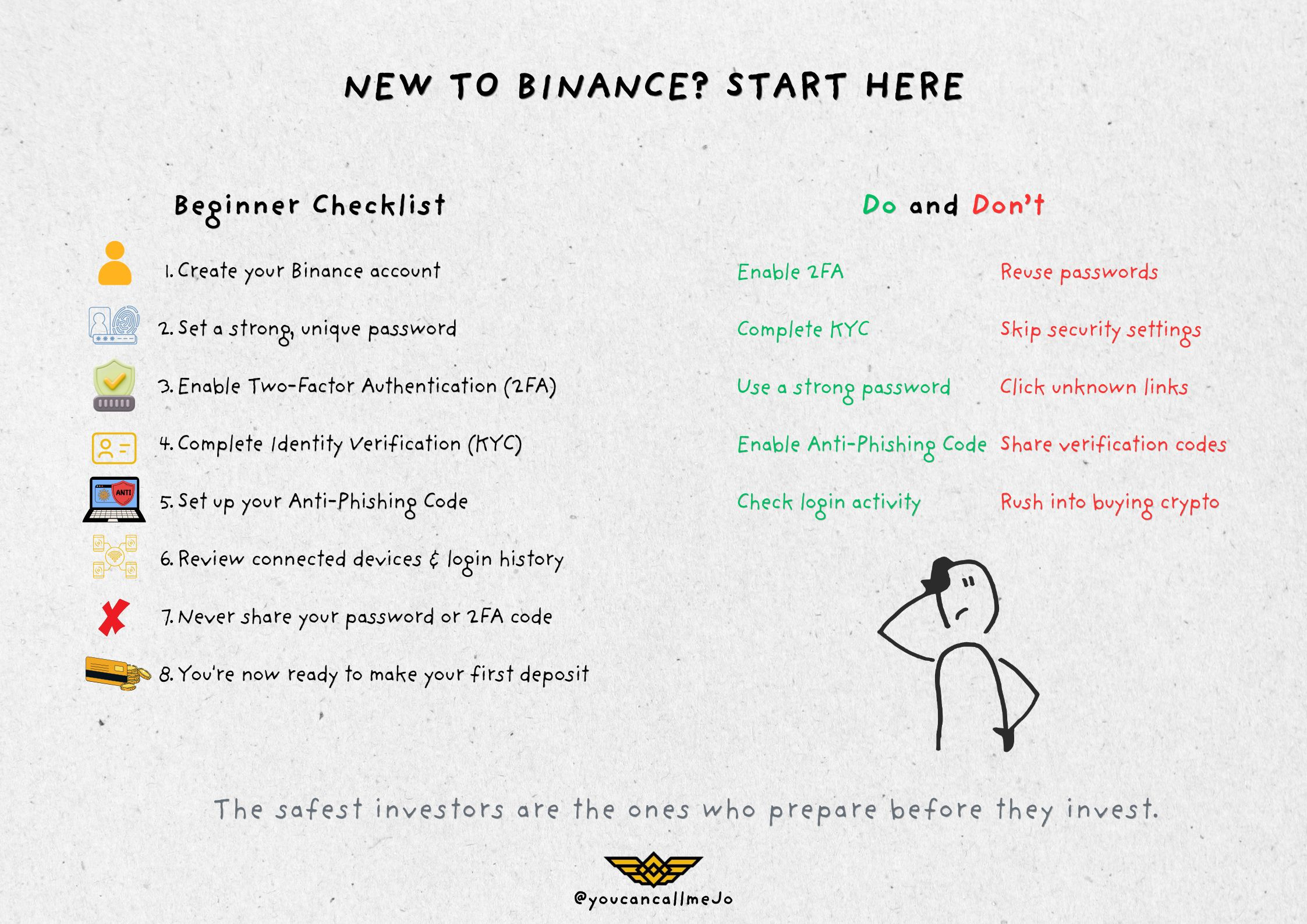

"Ich habe endlich Binance heruntergeladen... und was jetzt?"
Wenn du gerade zum ersten Mal ein Binance-Konto erstellt hast, schaust du wahrscheinlich auf deinen Bildschirm und denkst: "Hier ist ganz schön viel los."
Spot. Futures. Convert. Earn. P2P. Märkte. Wallets.
Wenn man komplett neu in Krypto ist, kann es sich anfühlen, als würde man in das Cockpit eines Flugzeugs steigen, ohne zu wissen, was die einzelnen Knöpfe machen.
Die gute Nachricht? Du musst nicht alles am ersten Tag verstehen.
Tatsächlich ist einer der größten Fehler, den Einsteiger machen, direkt mit dem Kauf von Kryptowährung zu starten, bevor sie ein paar einfache Schritte durchgehen, die sowohl ihr Konto als auch ihre Gelder schützen können. Stell dir deine Binance-Reise wie den Bau eines Hauses vor. Du würdest das Wohnzimmer nicht erst einrichten, bevor du das Fundament gelegt hast. Genau nach diesem Prinzip solltest du vorgehen. Bevor du deine erste Order oder Investition tätigst, sollte deine Priorität darin liegen, ein sicheres Konto einzurichten und die Grundlagen zu verstehen.
Lass uns ganz von vorn anfangen.
Schritt 1: Erstelle dein Binance-Konto
Die Erstellung eines Binance-Kontos dauert nur wenige Minuten, ist aber der erste Schritt, um Zugriff auf eines der größten Krypto-Ökosysteme der Welt zu erhalten. Du kannst dich mit deiner E-Mail-Adresse oder deiner Mobilnummer anmelden, ein starkes Passwort erstellen und erhältst sofort Zugang zur Plattform. In diesem Stadium existiert dein Konto zwar, ist aber noch nicht vollständig einsatzbereit. Viele Einsteiger denken, dass man mit dem Eröffnen eines Kontos bereit ist, mit dem Handel zu beginnen. In Wirklichkeit ist das nur die Startlinie. Bevor du Geld einzahlst, solltest du zuerst ein paar wichtige Schritte abschließen.
Schritt 2: Dein Passwort ist deine erste Verteidigungslinie
Wenn Menschen an Sicherheit denken, geht es meistens um Hacker. Erfahrene Nutzer denken an Prävention. Dein Passwort ist das Erste, was dein Konto schützt. Vermeide daher Geburtstage, Namen oder einfache Kombinationen, die leicht zu erraten sind. Ein starkes Passwort sollte einzigartig sein und eine Mischung aus Groß- und Kleinbuchstaben, Zahlen und Sonderzeichen enthalten. Noch wichtiger: Verwende niemals dasselbe Passwort auf verschiedenen Plattformen. Wenn eine andere Website einen Datenleck erleidet, können wiederverwendete Passwörter mehrere Konten gefährden – auch dein Binance-Konto. Ein paar zusätzliche Sekunden beim Erstellen eines starken Passworts können dich später vor viel größeren Problemen bewahren.
Schritt 3: Zwei-Faktor-Authentifizierung (2FA) aktivieren
Wenn es eine Sicherheitsfunktion gibt, die jeder Binance-Nutzer sofort aktivieren sollte, dann ist das die Zwei-Faktor-Authentifizierung (2FA). Stell sie dir vor wie das Hinzufügen eines zweiten Schlosses an deiner Haustür.
Selbst wenn jemand irgendwie dein Passwort herausfindet, kann er dennoch nicht auf dein Konto zugreifen, ohne den zweiten Verifizierungscode, der von deiner Authentifizierungs-App generiert wird oder über eine andere genehmigte Methode gesendet wird. Viele neue Nutzer sehen 2FA als optionale Funktion. Das ist es nicht. Es ist eine der einfachsten und effektivsten Methoden, um dein Konto zu schützen. Sicherheit ist nichts, worüber man nach einem Problem nachdenkt. Sie ist etwas, das du vorbereitest, bevor überhaupt etwas passiert.
Schritt 4: Identität verifizieren (KYC)
Sobald dein Konto abgesichert ist, ist der nächste Schritt die Fertigstellung der Identitätsverifizierung, auch bekannt als Know Your Customer (KYC). Für Einsteiger wirft dieser Schritt oft Fragen auf.
„Warum braucht Binance meinen Ausweis?“ Die Antwort ist einfach.
Die Identitätsprüfung hilft Binance, die Vorschriften einzuhalten, Betrug zu reduzieren, die Sicherheit der Plattform zu verbessern und eine sicherere Umgebung für alle Nutzer der Börse zu schaffen. Die Verifizierung schließt außerdem zusätzliche Funktionen und Services auf, die je nach Region möglicherweise nicht für nicht verifizierte Konten verfügbar sind. Der Ablauf ist unkompliziert. Du wirst in der Regel gebeten, ein amtliches Ausweisdokument bereitzustellen und eine kurze Gesichtserkennung zu absolvieren. In den meisten Fällen dauert der Prozess nur wenige Minuten. Auch wenn es wie ein zusätzlicher Schritt wirken mag, ist er wichtig – er hilft dabei, sowohl dich als auch die gesamte Binance-Community zu schützen.
Schritt 5: Überspringe nicht die Sicherheitsfunktionen, die in den Einstellungen versteckt sind
Eine Sache, die viele Einsteiger nicht wissen: Binance enthält mehrere integrierte Sicherheitswerkzeuge – zusätzlich zu Passwort und 2FA.
Du kannst zum Beispiel einen Anti-Phishing-Code erstellen – einen personalisierten Code, der in echten Binance-E-Mails angezeigt wird. Wenn eine E-Mail, die vorgibt, von Binance zu sein, deinen Code nicht enthält, ist das ein starkes Warnsignal dafür, dass es sich um einen Phishing-Versuch handeln könnte. Du kannst außerdem deine Login-Historie einsehen, verbundene Geräte verwalten und die Kontobewegungen direkt in deinen Sicherheitseinstellungen überwachen. Diese Funktionen wirken vielleicht nicht besonders spannend. Aber sie sind bei Weitem spannender als die Wiederherstellung eines kompromittierten Kontos.
Häufige Fehler von Einsteigern
Der Einstieg in deine Krypto-Reise macht Spaß – aber es ist auch der Zeitpunkt, an dem viele Nutzer vermeidbare Fehler machen. Manche zahlen Geld ein, bevor sie 2FA aktivieren. Andere ignorieren die Sicherheitseinstellungen, weil sie vorhaben, „das später zu machen“. Einige klicken sogar auf Links aus gefälschten E-Mails oder Social-Media-Konten, die so tun, als wären sie von Binance. Gute Gewohnheiten von Tag eins an aufzubauen ist viel einfacher, als später Fehler zu beheben. Das Ziel ist nicht, paranoid zu werden. Es geht einfach darum, vorbereitet zu sein.
Dein Binance-Konto ist bereit … Was kommt als Nächstes?
Herzlichen Glückwunsch!
Du hast jetzt etwas viel Wertvolleres als nur ein Binance-Konto: eine sichere Grundlage. Du verstehst, warum Sicherheit an erster Stelle steht, warum die Identitätsverifizierung wichtig ist – und warum ein paar zusätzliche Minuten heute deine Assets morgen schützen können. Aber ein Konto ohne Guthaben ist wie eine Geldbörse ohne Inhalt.
Was ist also der nächste Schritt?
In Teil 2 finanzieren wir dein Konto, schauen uns die verschiedenen Einzahlungsarten an, die auf Binance verfügbar sind, und nutzen eines der einfachsten Tools für Einsteiger – Binance Convert –, um deine allererste Kryptowährung zu kaufen, ohne die Komplexität des traditionellen Tradings.
Willkommen bei Krypto. Ihre Reise hat offiziell begonnen.
#learnwithbinance #Square #fypシ #Binance #NewAccountAlert