
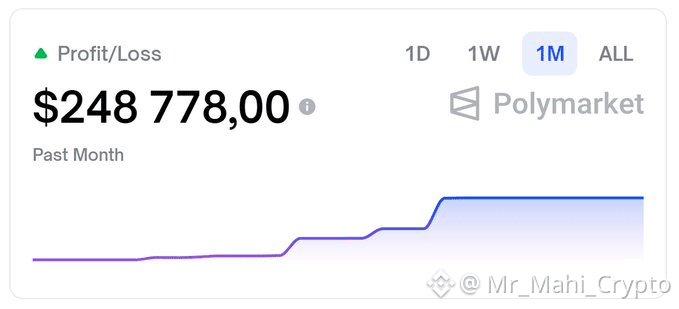
Someone in a Discord chat said he pulls in $200 a day - and it took him six years to reach that point. Asked whether Polymarket is basically gambling. Another person responded with a screenshot. $248,000 overnight. The chat went quiet.
The Setup (Secure Version)
From fresh Ubuntu VPS to hardened private AI server. Do it in this order.
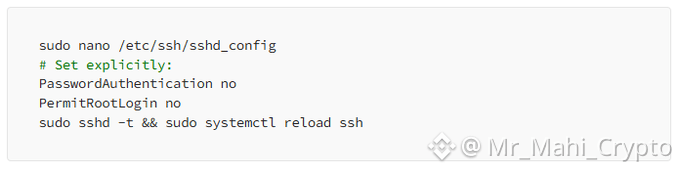
1) Lock Down SSH
→ Keys only, no passwords, no root login.
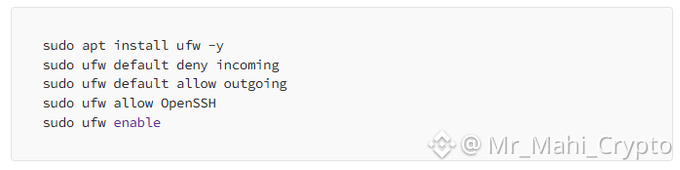
2) Default-Deny Firewall
→ Block everything incoming by default.
3) Brute-Force Protection
→ Auto-ban IPs after failed login attempts.

4) Install Tailscale
→ Your private VPN mesh network. This is what makes everything reachable only from your devices.

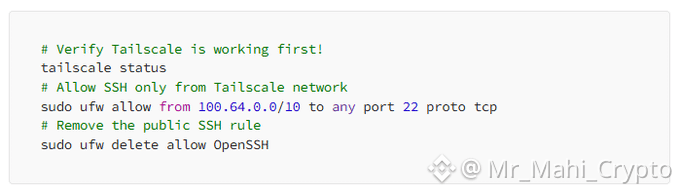
5) SSH Only via Tailscale
→ No more public SSH exposure.
6) Web Ports Private Too
→ ClawdBot gateway only accessible from your devices.

7) Install Node.js 22
→ ClawdBot requires version 22+. Ubuntu’s default is older.

8) Install ClawdBot

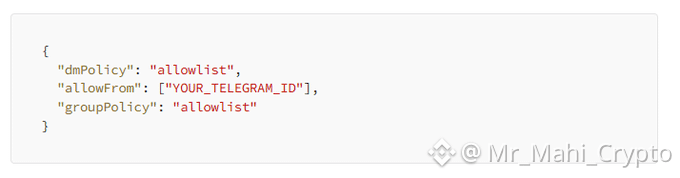
9) Lock ClawdBot to Owner Only
→ Only you can message the bot. Add this to your ClawdBot config: Never add ClawdBot to group chats. Every person in that chat can issue commands to your server through the bot.
10) Enable Sandbox Mode
→ Runs risky operations in a container instead of your actual system.
Check the security docs and enable isolation. If something goes wrong, the blast radius is contained.
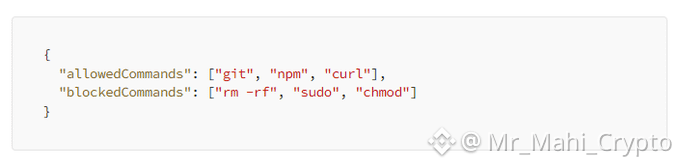
11) Whitelist Commands
→ Don’t let the agent run arbitrary commands. Explicitly list only what it needs: If the agent gets hijacked through prompt injection, it can only execute what you’ve whitelisted.
12) Scope API Tokens
→ When connecting GitHub, Gmail, Google Drive: do not use full-access tokens. Give minimum permissions. Read-only where possible. If something goes wrong, damage is limited to what that specific token could do.
13) Fix Credential Permissions
→ Don’t leave secrets world-readable.

14) Run Security Audit
→ Catches issues you missed. Don’t skip this. If this fails, do not deploy. Fix whatever it flags first.

Verify Everything
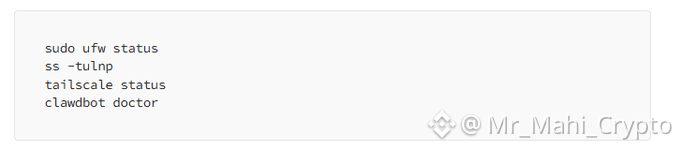
Result should be:
No public SSH
No public web ports
Server only reachable via Tailscale
Bot responds only to you
Create Telegram Bot
Open Telegram, search for
@BotFather
Send /newbot, follow prompts
Copy the token it gives you
Get your user ID from
@userinfobot
Enter both in clawdbot onboard --install-daemon
Approve Pairing
After setup, message your bot on Telegram. It won’t respond yet. Now it should respond.

A Note on Prompt Injection A member of the ClawdBot community ran an experiment. They sent an email from an unrelated address to an inbox ClawdBot could access. The message included concealed instructions. ClawdBot executed them and wiped every email. Including the contents of the trash.
This wasn’t hypothetical. It actually occurred.
Claude Opus 4.5 is explicitly recommended because Anthropic trained it to withstand prompt injection (internal tests show ~99% resistance). That’s useful, but it’s only one layer. Command allowlists, sandboxing, and narrowly scoped API tokens make up the rest.
Common Errors “no auth configured” - Run clawdbot onboard again and reconfigure authentication.
Bot not responding - Pairing was never approved. Run clawdbot pairing list telegram and approve it.
“node: command not found” - Node.js isn’t installed. Execute the NodeSource install command.
Gateway won’t start - Run clawdbot doctor to identify what’s failing. Trading. Data over opinions. Results over theories.