

Quick answer: On the Binance Spot market order form, the buy side asks for a Total in USDT and the sell side asks for an Amount in BTC. The Price field reads Market Price because you don't set it. The Slippage Tolerance box lets you set how far the fill may move, with a minimum of 0.1%. Binance referral code CODE2026 is the example in this guide. Updated: Nov 15, 2026.
A market order is the quickest way to buy or sell, but it hands the price to the order book. This guide explains the market order form on BTC/USDT, using screenshots taken on November 15, 2026, and shows how Slippage Tolerance puts a limit on that.
The Binance Market Order Form at a Glance
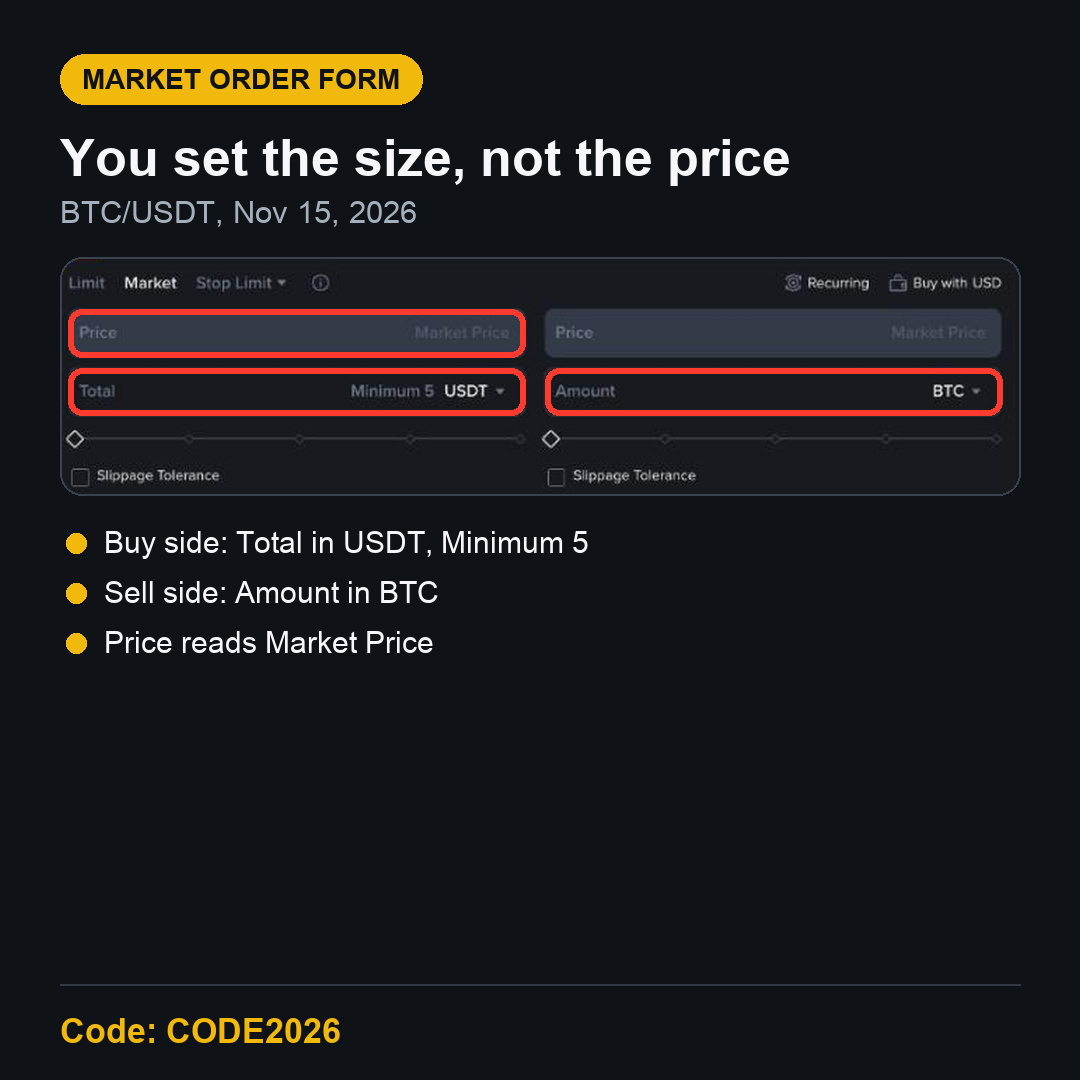
Open a Spot pair, then click Market at the top of the order form. The Price field turns grey and reads Market Price. Below it you will find one input field, the slider and the Slippage Tolerance box.
Total vs Amount on a Binance Market Order
Buy side: Total in USDT
On the buy side the form shows Total with Minimum 5 USDT. You say how much USDT to spend, and the order buys as much BTC as that gets at the prices in the book. This is handy when you have a set budget.
Sell side: Amount in BTC
On the sell side the form shows Amount in BTC. You say how much BTC to sell, and you receive whatever USDT the book pays for it. The small arrow next to the unit lets you switch what you enter.
Either way, you choose the size, not the price. The final price can differ slightly from the last price you saw, especially in a fast market or on a quiet pair.
What Slippage Tolerance Does on Binance
Tick the Slippage Tolerance box and a new Slippage field appears, with Minimum 0.1 %. Here you set how far from the current price you are willing to be filled.
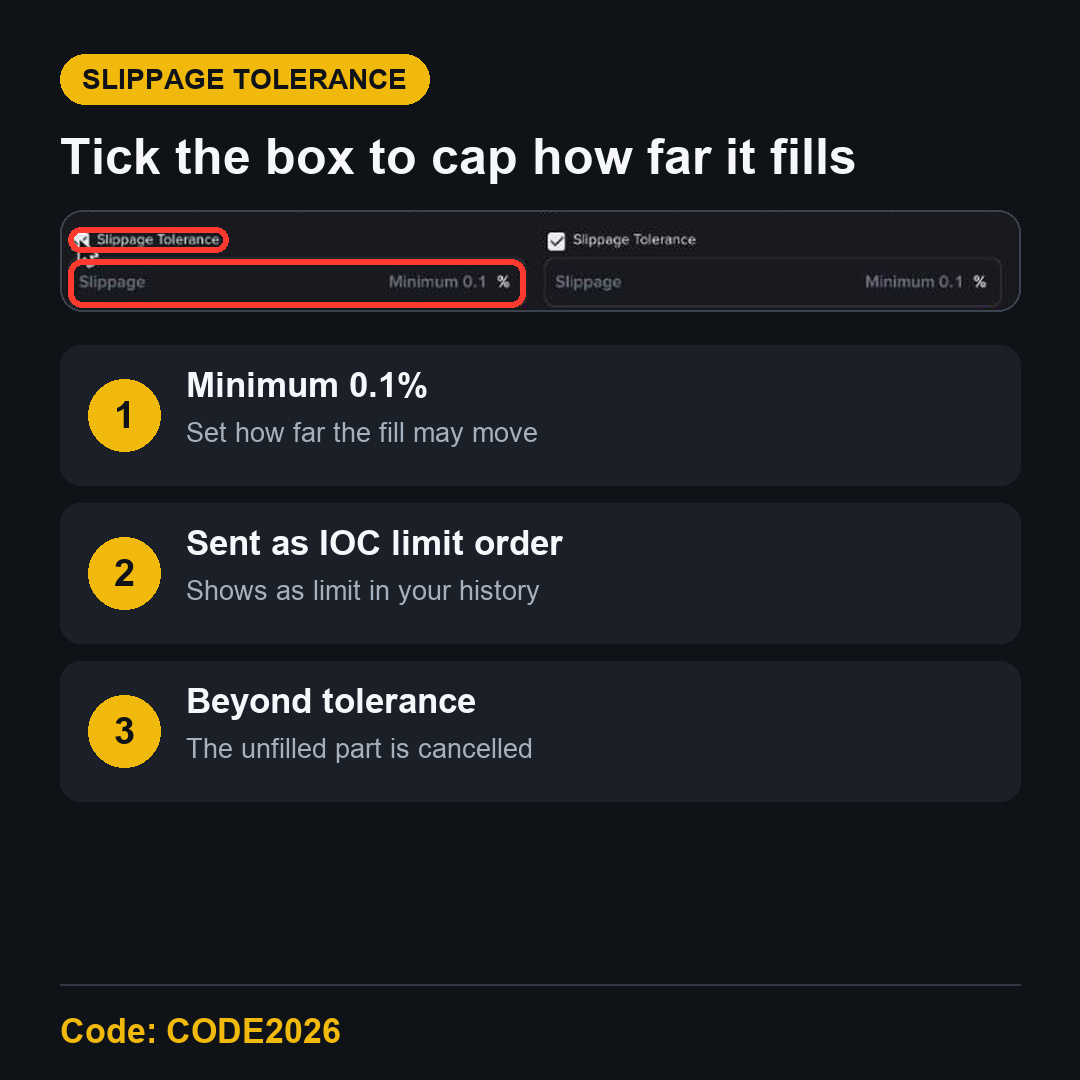
The tooltip on the box explains how it works. A market order with slippage is sent as a limit order with Time in Force set to IOC, Immediate or Cancel. After it fills, it shows in your order history as a limit order, not a market order.
If your order is bigger than the depth available within your tolerance, the part that can't fill inside it is cancelled. You get a partial fill instead of a fill at a much worse price.
A Simple Example
At 10:48 on November 15, 2026, BTC/USDT showed 63,941.67 USDT. With a 0.1% tolerance, a buy would only fill up to roughly 64,005 USDT. Anything the book couldn't fill below that would be cancelled, not bought higher.
On a busy pair like BTC/USDT, a small order rarely moves that far. On a pair with a thin book, the box can make a real difference.
Fees on Market Orders
A market order fills at once against the book, so it is a taker order. The Binance Spot fee page showed 0.100% maker and 0.100% taker for a Regular User on November 15, 2026, or 0.075% when paying fees with BNB. On a 50 USDT market buy, the fee at 0.100% is about 0.05 USDT.
CODE2026 shows up to 20% trade rebates on qualifying Spot trading fees. Since April 29, 2026, Spot referral commission is calculated on net fees, so the amount can be lower. A rebate doesn't cover the spread or slippage, which is one more reason to know the Slippage Tolerance box.
FAQ
Why can't I set a price on a Binance market order?
Because a market order takes the best prices in the book right now. If you want to choose the price, use a limit order.
Why does my market order show as a limit order?
If you ticked Slippage Tolerance, the order is sent as an IOC limit order, so it appears as a limit order in your history.
What is the minimum for a Binance market buy?
On BTC/USDT the Total field showed Minimum 5 USDT.
Start on Binance with Referral Code CODE2026
Now you know what the market order form asks for and how to cap slippage. To open an account, use the Binance referral code CODE2026 sign-up link. Open the CODE2026 sign-up page and check that it shows Code: CODE2026 at the top before you register.
Disclosure: CODE2026 is my referral code, and I may earn commission from qualifying activity. This is an independent guide, not an official Binance post. Benefits depend on Binance's terms, your region and your eligibility. Crypto trading carries risk. Not financial advice. DYOR.