
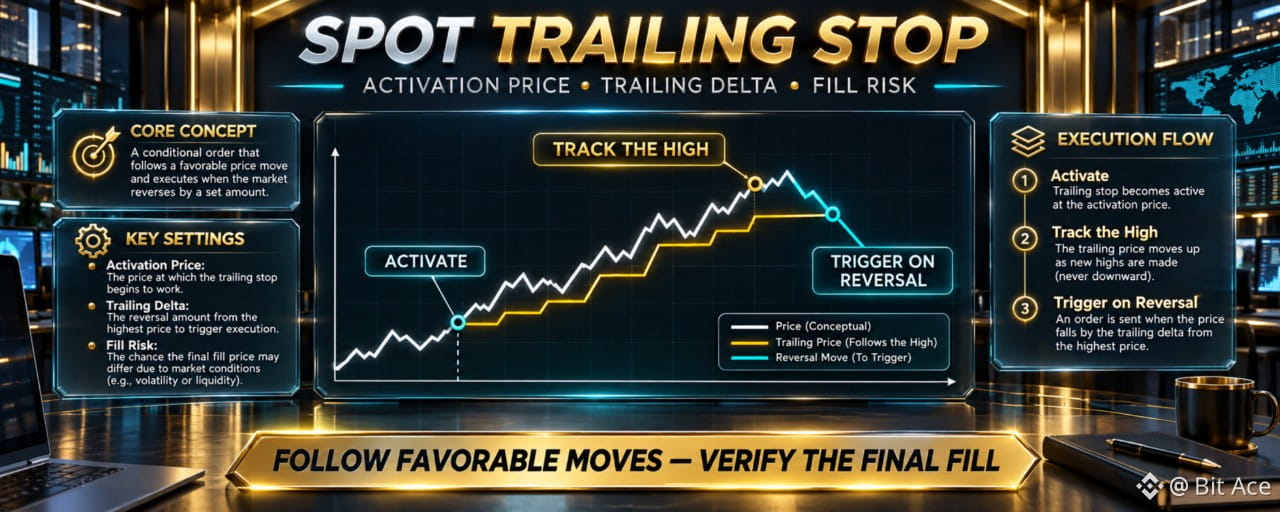

A Spot Trailing Stop follows a favorable price move and reacts only after the market reverses by the selected trailing delta. The activation price and trailing delta control when tracking starts and when the next order is submitted, but neither setting guarantees a complete fill.
How a Spot Trailing Stop follows price
For a sell Trailing Stop, the reference level can rise as the market reaches new highs after activation. It does not move back down when the market reverses. If the reversal reaches the selected trailing delta, Binance submits the configured Limit or Market order under the current Spot order rules.
A buy Trailing Stop works in the opposite direction: it can follow new lows and trigger after the market rebounds by the selected delta. Always confirm the trade side before entering the activation and execution settings.
Activation price starts the tracking condition
The activation price is the level the market must reach before the trailing logic becomes active. If no activation price is entered, Binance's current Spot guide states that tracking can begin from the market price when the order is placed.
Activation is not execution. An order can show that the trailing condition is active while still waiting for the required reversal. Review the status and timestamps in Open Orders instead of assuming that a trade was submitted.
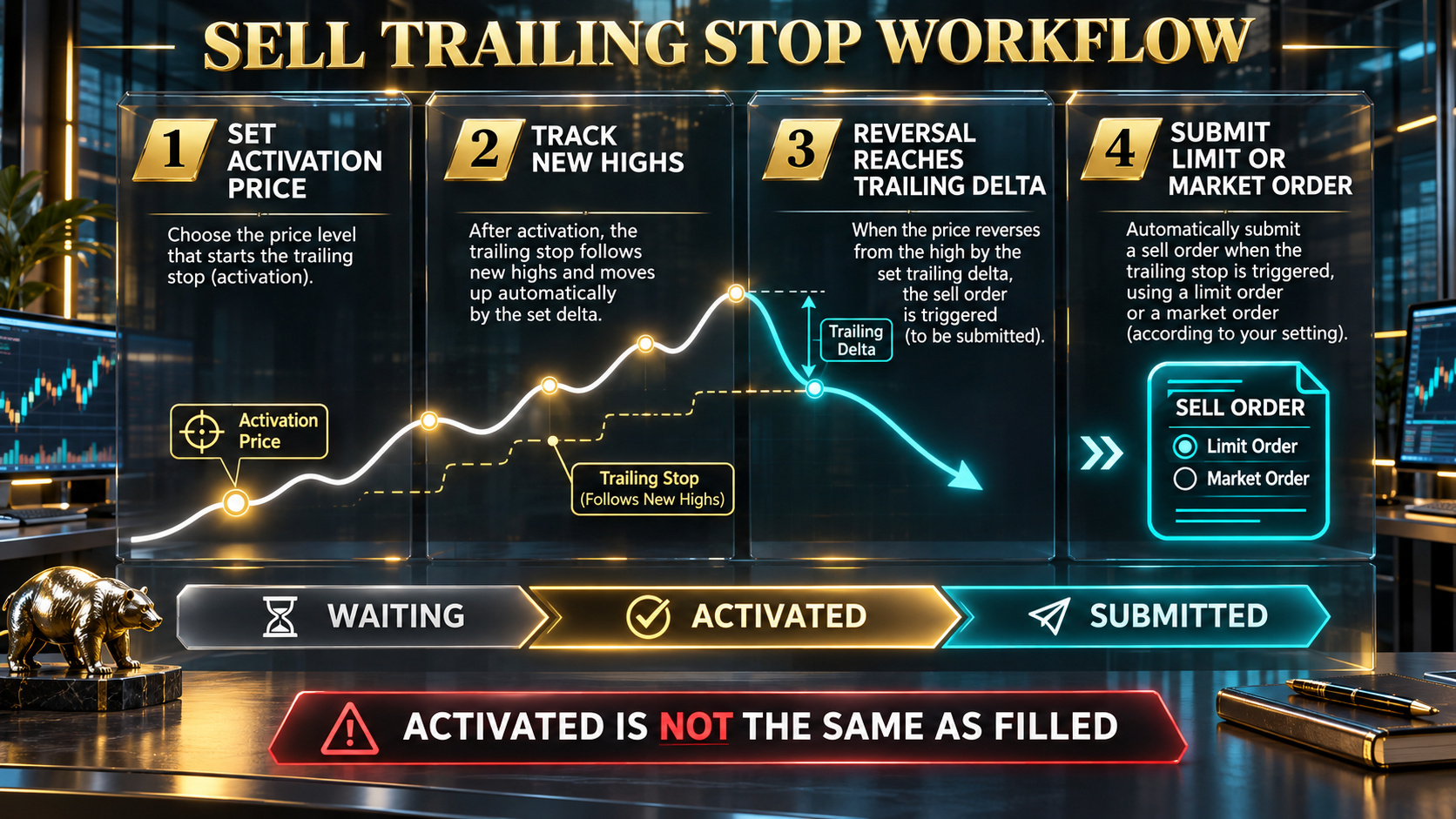
A sell Trailing Stop activates first, follows new highs, and submits the configured order only after the reversal reaches the trailing delta.
Trailing delta controls the permitted reversal
Spot uses the term trailing delta for the percentage movement in the opposite direction that triggers the next order. A smaller delta can react to ordinary market noise, while a larger delta allows more movement but can expose more of the favorable price move before the order triggers.
There is no universally optimal setting. Review volatility, market depth, order size, trading pair rules, risk tolerance, and the current range shown in the live order form.
Triggered does not always mean filled
When a Spot Trailing Stop submits a Limit order, normal limit-order matching still applies. The order may fill fully, fill partially, or remain unfilled if price moves away or liquidity is insufficient at the selected limit. If a Market order is selected, the final execution price can differ from the displayed price during fast or thin markets.
Check the executed quantity, average price, remaining amount, and order status after the trigger. Do not place a second order until you understand what the first one actually completed.
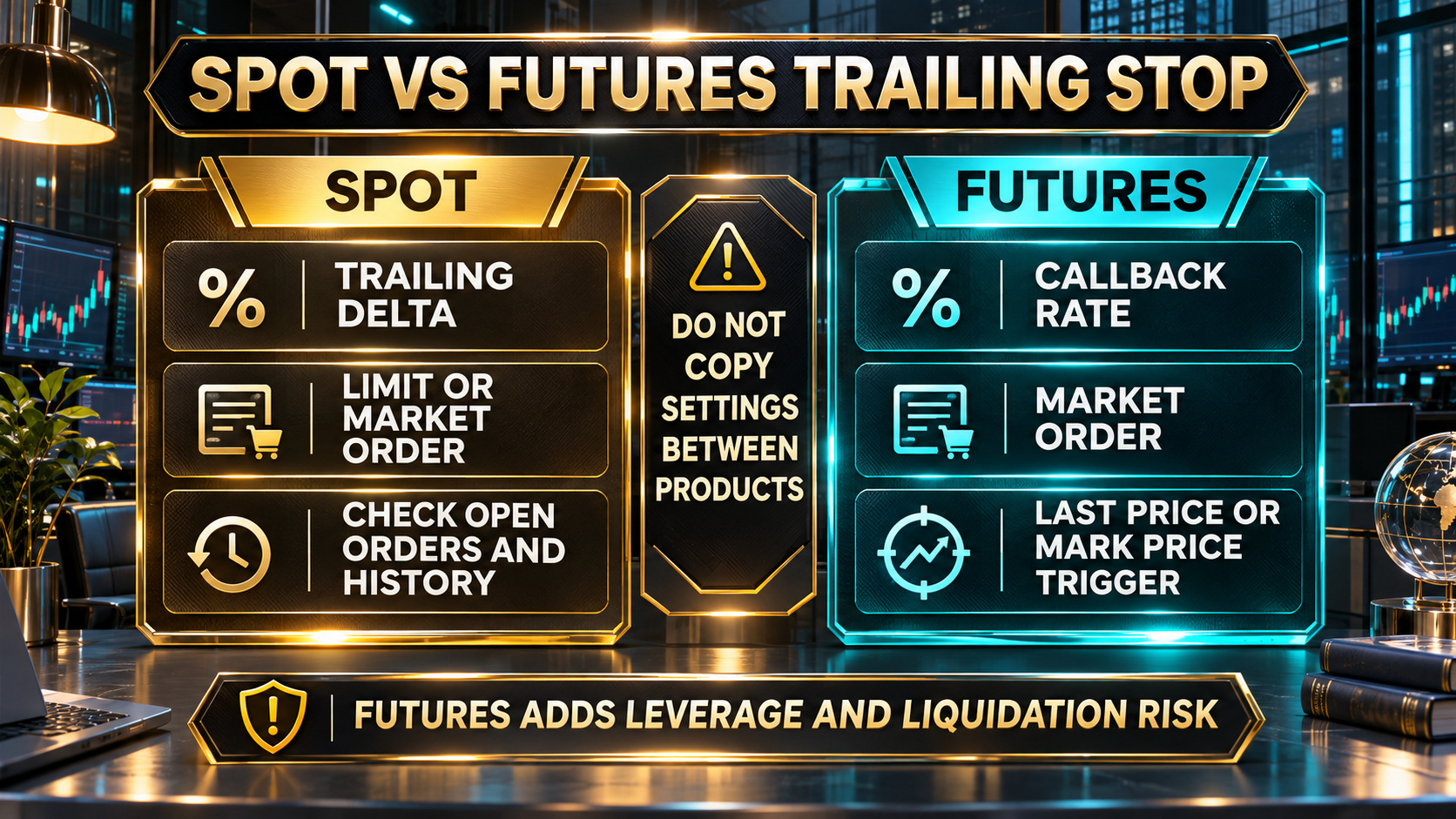
Spot uses trailing delta and can submit a Limit or Market order. Futures uses callback rate and separate trigger choices, so do not copy settings between products.
Do not mix Spot and Futures settings
Binance's current documentation distinguishes Spot trailing delta from Futures callback rate. Spot and Futures can also differ in execution type, trigger source, permitted ranges, collateral, and liquidation risk. Confirm the product name and live form before using any value from another interface.
This Article covers Spot mechanics. Futures positions involve leverage and liquidation risk that require separate review.
Frequently asked questions
Q1. Does the activation price close the trade?
No. It starts the trailing condition. The selected reversal must still reach the trailing delta before the configured order is submitted.
Q2. Does the trailing level move backward after the market reverses?
No. The trailing reference follows favorable movement and stops moving in the opposite direction.
Q3. Why can a triggered Trailing Stop Limit remain unfilled?
The trigger submits a limit order. If the market does not provide matching liquidity at the limit price under normal order-book rules, the order can remain open or partially filled.
Q4. Is trailing delta the same as Futures callback rate?
No. Binance uses trailing delta for Spot and callback rate for Futures. The applicable ranges and execution mechanics can differ.
Q5. Where can I check activation and submission times?
Use Open Orders or Order History in the official interface and review the order details, status, activation time, submission time, and executed quantity.
Official sources
Binance Support: How to Use Spot Trailing Stop Order?
Binance Support: Different Order Types in Spot Trading
Binance Support: What Is a Trailing Stop Order?
Related Binance guides
New to Binance? Review Binance sign up: website and app steps. For the referral field mentioned below, use Binance referral code: entry and Linked-status checks.
Check availability and terms before signing up
Order types, parameters, and product availability vary by jurisdiction, trading pair, account, and current interface. Use your genuine identity and actual residence, follow the rules that apply to you, and never bypass a restriction. If Binance is available where you live and you need a new account, confirm referral code UAUBG73C on the official registration form before submitting. No reward, discount, approval, trading result, or product access is guaranteed.
https://www.binance.com/join?ref=UAUBG73C
Affiliate disclosure: this Article includes a referral sign-up link.
#BinanceSpot #TrailingStop #RiskManagement #CryptoEducation