

To export your Binance trade history as a CSV, open Orders, then Spot Order, switch to the Trade History tab and press the export icon. That opens the Data Download Center, where you pick Spot Trade History, a time range, a time zone and the CSV format, then press Generate. The file appears in the export list and its link stays valid for 7 days. Every row is a single fill, with the fee written in whichever coin it was charged in.
👉 Sign up on Binance with a bonus (code GETREWARD)
Getting the file takes two minutes. Reading it correctly takes longer, because amounts can carry coin names glued to the numbers, one order can show up as four rows, and a fee may sit in a third coin you never traded. Below: the export, every column in turn, a worked example that turns three partial fills into a cost basis, and the spreadsheet traps that quietly corrupt numbers.
Where is the export button for Spot trade history?
On the website, click the profile icon, open Orders and pick Spot Order. Choose the Trade History tab, then the download icon at the top right. In the app, open Trade, scroll to the open orders area, tap the orders icon, choose Trade History and tap the download icon.
Picking the right tab matters more than it looks:
Order History: One line per order you placed, including cancelled ones and ones that never filled. Handy for checking what you asked for, weak as a tax record.
Trade History: One line per execution. An order that filled in three pieces gives three lines, each with its own price, size and fee. This is what tax software expects for spot trading.
The on-screen table only reaches back 6 months, as the note under it says. Anything older has to come through the export. If a tax tool imports zero rows from your file, the tab is the first thing to check.

The Trade History tab under Spot Order, with the date range, pair and side filters and the column headers. The small download icon at the top right opens the export.
The download icon leads to one form for every kind of record, so the first field matters.
Which settings matter in the Data Download Center?
Data Type: Spot, Trade History. Other entries in the same menu cover futures, deposits, Convert and more, each as a separate file.
Time Range: Presets from the last 24 hours to 6 months, or Customize for older dates. Binance's help page puts the limit at one year per generated statement, with data going back to 13 July 2017.
Time zone: A small selector at the top right of the range. It decides how every timestamp in the file is written, more on that below.
Format: PDF, Excel or CSV. The form itself warns that PDFs may fail above 10,000 records and Excel above 50,000, and points to CSV for raw data. Tax tools want CSV anyway.
Monthly quota: The line under Generate shows how many files you can still request this month. Older help pages mention 5 a month, while the screen on our test account showed a much larger allowance, so trust the number on your own screen.
With a long history, plan ranges before clicking. Someone trading since 2019 who wants everything up to the end of 2025 needs seven yearly files. Use whole years, 1 January 00:00 to 31 December 23:59 in one time zone, so neighbouring ranges meet with no gap and no overlap, and keep a short log of what you requested and when you downloaded it.
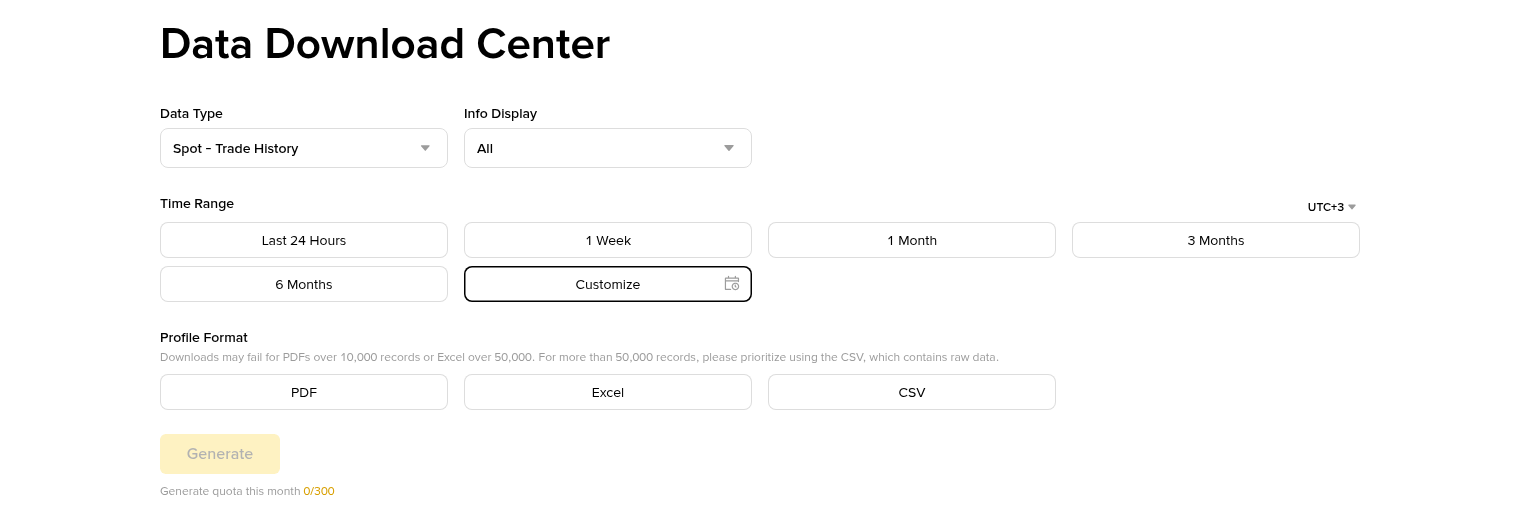
The Data Download Center with Spot Trade History selected, showing the time range presets or Customize, the time zone selector, PDF, Excel or CSV, and the monthly quota under Generate.
After pressing Generate there is nothing to watch. The next step happens in the list of finished exports.
Where does the finished file show up?
Under Export Details on the same page, with submission time, data type, date range, status and a download action. Binance emails you when it is ready. Large ranges can take from a few minutes to over an hour, so check the list before requesting the same range again.
Download within 7 days: After that the link expires and you generate the file again.
Rename it straight away: Something like spot-trades_2025_UTC.csv. The default name says little about the range or the time zone.
Leave the original untouched: Mark it read-only and work on a copy. One spreadsheet save can rewrite dates and decimals.
Back it up off the laptop: Questions about old trades can come years later.
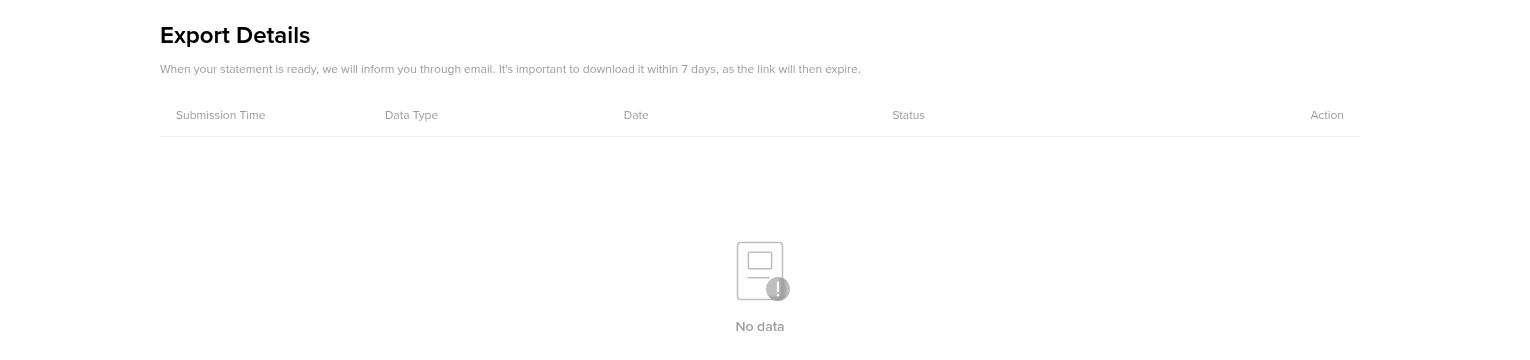
Export Details lists each requested file with its submission time, data type, range and status. Download links expire after 7 days.
With the file saved, open a copy and look at the header row. That is where most misreadings begin.
What does each column in the CSV mean?
Column names have changed over the years, so check your header first. The layout most import tools document has seven columns, and a typical row reads like this:
2026-03-15 00:03:12, ETHUSDT, BUY, 2400.00, 0.10000000ETH, 240.00000000USDT, 0.00010000ETH
Date(UTC): The second the fill executed, not the moment you placed the order. A limit order placed on Monday that fills on Wednesday carries Wednesday's time.
Pair: The market. ETHUSDT means ETH priced in USDT. The first coin is the base asset and the rest is the quote asset, and some versions write it with a slash, as the on-screen table does.
Side: BUY or SELL, always seen from the base asset. SELL on ETHBTC means ETH left your wallet and BTC came in, which most tax systems treat as disposing of ETH although no cash appeared.
Price: The fill price in the quote asset for one unit of the base asset.
Executed: How much of the base asset changed hands in this fill. The screen calls it Filled.
Amount: Price times Executed, in the quote asset. On a buy it is what you spent before the fee, on a sell what you got before the fee. The screen calls it Total.
Fee: The trading fee for this fill, with its coin. By default it comes out of whatever you received, the base coin on a buy and the quote coin on a sell. With BNB fee settlement switched on and BNB in the Spot wallet, it shows up in BNB instead.
Older files use Date(UTC), Market, Type, Price, Amount, Total, Fee and Fee Coin. Same data, different names: Market is the pair, Type is the side, Amount there means the base quantity, Total is the quote value. Newer screens also show Role, meaning maker or taker, and a value in USDT. A sheet built for one layout returns wrong numbers on another without a single error message.
Why do the times look several hours off?
Because the file and your phone may not agree on the zone. Binance's help page says trade history is shown in UTC+0, and the classic header says Date(UTC). The Data Download Center adds a time zone selector, and it does not always default to UTC.
For someone in UTC−5, a sale at 21:30 local time on 31 December is 02:30 on 1 January in UTC. Export calendar years in UTC and that sale lands in the following year's file. Pick the zone your tax year follows, write it into the file name, and use the same setting for every year, or the merged history will have hours missing or doubled at each boundary.
How do three partial fills become one cost basis?
A worked example with round numbers. You place a limit buy for 0.30 ETH at 2,400 USDT late in the evening. It fills in three pieces, and partway through your small BNB balance runs dry, so the fee coin changes between rows.
Row 1: 2026-03-14 23:58:41, ETHUSDT, BUY, 2400.00, 0.12000000ETH, 288.00000000USDT, 0.00036000BNB
Row 2: 2026-03-15 00:03:12, ETHUSDT, BUY, 2400.00, 0.10000000ETH, 240.00000000USDT, 0.00010000ETH
Row 3: 2026-03-15 00:07:55, ETHUSDT, BUY, 2400.00, 0.08000000ETH, 192.00000000USDT, 0.00008000ETH
The first row is dated 14 March, the other two 15 March. One order, two dates, only because midnight UTC fell in the middle of it.
The arithmetic, using the common approach where buying fees are added to cost:
Add up the spend: 288 + 240 + 192 = 720.00 USDT.
Work out what arrived: 0.30 ETH executed, minus 0.00018 ETH taken as fees in rows 2 and 3, leaves 0.29982 ETH.
Value the BNB fee: The file shows 0.00036 BNB but no BNB price. Look up BNB/USDT for 23:58 UTC on 14 March. At 600 USDT that fee is worth 0.216 USDT, against 0.288 USDT at the regular 0.1% rate, so the lower BNB rate checks out.
Total the cost: 720.00 + 0.216 = 720.216 USDT for 0.29982 ETH, roughly 2,402.16 USDT per ETH.
Convert to your currency: Tax is normally reported in local money, so each part is converted at the rate for its own date, two dates here.
The ETH fees in rows 2 and 3 need no separate value under this approach. You spent 720 USDT and received fewer coins, so the cost per coin already reflects them. The BNB fee is another matter. Those 0.00036 BNB left your wallet, and where spending crypto counts as a disposal, that line is a tiny BNB sale with its own gain or loss. Tax software handles it row by row, one more reason it needs your whole history rather than one year.
Months later you sell 0.10 ETH at 2,600 USDT. Amount is 260.00 USDT, a 0.1% fee of 0.26 USDT comes out of it, and 259.74 USDT arrives. At the average cost of 2,402.16, those 0.10 ETH cost 240.22 USDT, a gain of 19.52 USDT before currency conversion. First in, first out and other methods give different results when lots were bought at different prices, and your country may prescribe one. This walkthrough of Binance taxes in eight real scenarios runs a single sale through three methods side by side.
Why are some trades missing from the file?
Usually because they never touched the spot order book. Several common actions are recorded elsewhere:
Convert: Swaps on the Convert page have their own Convert history and export. They are often disposals, yet this file never shows them.
Small balance sweeps into BNB: These appear in the transaction history, not as spot fills.
Futures: Separate order pages and separate exports.
Deposits, withdrawals and rewards: Without them a sell can appear with no matching buy, because the coins arrived from outside.
Sub-accounts: Check each one, since their trades may not appear in the main account's file.
The fix is to pair this file with the broader transaction export, which lists every balance change across wallets. Our Binance statement guide from download to final check covers that export and how to test whether the totals reconcile. The trade file gives fill-level prices and fees, the transaction file shows where coins came from and where they went.
How do you merge several yearly files without double counting?
Match the headers: Rename older Market and Total columns to the current names before stacking.
Stack, then sort by date: Files often come newest first, so sort ascending once everything is in one sheet.
Build a duplicate key: The classic layout has no trade ID, so join date, pair, side, price and executed quantity into one text key and count repeats.
Look before deleting: A repeat inside one file can be two genuine fills of the same size in the same second. A repeat right on the boundary between two files is almost always an overlap.
Count rows: The merged sheet should hold the sum of all source rows minus the overlaps you removed.
Most tax tools prefer the original files uploaded one at a time, oldest first. Merge for your own checks and upload the originals.
How do you open the CSV in Excel or Google Sheets without breaking numbers?
Double-clicking the file is the quickest way to damage it. Spreadsheets guess the type of every cell, and timestamps, long decimals and coin suffixes trip those guesses.
Import instead of opening: In Excel use Data, From Text/CSV. In Google Sheets use File, Import. Both let you set the delimiter and column types before anything gets converted.
Match the decimal separator: The file uses a dot. In a locale that expects a decimal comma, 2400.00 can turn into 240000 or into text. Pick a locale with a decimal point for the import.
Keep the date as text at first: Automatic conversion can drop the seconds or swap day and month.
Split off the coin suffix: Where a cell holds 0.00036000BNB, in Google Sheets =VALUE(REGEXEXTRACT(E2,"^[0-9.]+")) returns the number and =REGEXREPLACE(E2,"^[0-9.]+","") returns the coin. Coins whose names start with a digit, such as 1INCH, confuse this split, so check those rows by hand.
Ignore 1E-05: A fee of 0.00001 BTC may display in scientific notation. The value is fine, apply a format with 8 decimals.
Never save over the original: Saving back to CSV writes the converted values, and the next import reads the damaged version.
What does a tax tool need from you besides this file?
Every year since your first deposit, not only the current one, because cost basis carries forward from old purchases. The transaction history and Convert exports, so swaps, deposits and rewards have a starting point. Withdrawals to your own wallets labelled as transfers. And a spot-check of three or four rows against the app: date, price and fee should match what Binance shows for that fill.
Rules differ widely on which cost method applies, whether crypto to crypto swaps count and how fee coins are handled. Everything above describes the data. How your own tax rules use it is a question for them or an adviser. This is not tax advice.
Setting up a fresh account? The sign-up code GETREWARD goes into the code field on the registration form, and the export works the same way on every account. Before the first deposit, have a look at the tasks in the current Binance welcome bonus too.
FAQ
Can I export several years of trade history in one file?
Binance's help page limits a generated statement to one year, so longer histories need several requests within your monthly quota.
Why is my exported CSV empty?
The usual causes are Order History selected instead of Trade History, a range with no fills, trades made in a sub-account, or activity that only went through Convert.
Is the time in the file my local time?
Only if you chose your zone in the time zone selector. The classic export and the help page use UTC+0, so read the header and the selector before filtering by date.
Does the file include a BNB price for fees charged in BNB?
No. It records the BNB amount only. Look up the BNB price at the fill time or let your tax software do it.
Can I export trade history from the app?
Yes. Open the orders screen from Trade, pick Trade History and tap the download icon. The help page says ranges within six months export at once, up to 10,000 data points each.
Disclosure: this article includes a Binance sign-up link with the code GETREWARD. Crypto prices move in both directions and trades can lose money. Nothing here is financial or tax advice.