

Binance caps every account at 50 active price alerts, with no more than 10 on a single trading pair, and each alert expires after 90 days. Few people ever reach that cap. The ones who come close usually end up muting the app.
A setup that stays useful looks like this. Keep a short watchlist of pairs you would really trade, give each one or two alerts tied to a written plan, use price-level alerts for entries and percent-change alerts for unusual moves. Alerts can be created from the pair page in the app and from the chart on the website.
👉 Open a Binance account with a sign-up bonus (code GETREWARD)
The guide moves in levels. It starts with the watchlist, goes through alert types and delivery settings, and finishes with an alert budget, an entry routine and a cheat sheet for people who already trade.
Why build the watchlist before the first alert?
An alert on a coin you would never buy is a distraction with a sound attached. The watchlist is the filter that decides which pairs deserve alerts at all.
On Binance the watchlist is called Favorites. Tap or click the star next to a pair, either in the Markets list or on the pair's own page, and it shows up in the Favorites tab. Tap the star again to drop it.
A few habits keep the list honest:
Cap it at 10 to 15 pairs: That is about as many charts as one person can check properly over a coffee. Past 20, most rows get scrolled past without a real look.
One quote currency: Mixing SOL/USDT and SOL/BTC in one list makes the 24h change column hard to compare. Pick one quote, usually USDT, and stay with it.
Holdings apart from ideas: Recent app and web versions let you split Favorites into groups. One group for coins you hold and one for setups you are waiting on makes the morning scan faster.
Monthly cleanup: Anything you haven't opened in 30 days comes off. If it starts moving later, the gainers and losers lists will show it to you anyway.
On most versions Spot and Futures keep separate favorite lists, so a pair starred on the Spot page may be missing on the Futures page. If you trade both, check both.
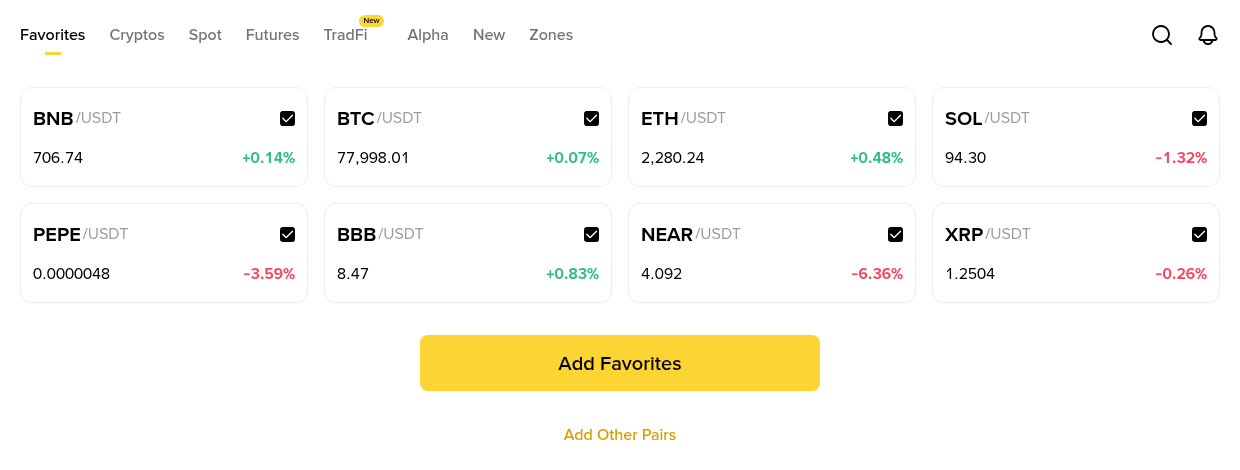
The Favorites tab on the website. Eight pairs on one screen, each with its price and 24h change, short enough to check in a single sitting.
Once the list is short, each pair left on it is worth an alert or two.
Which alert types can you choose from?
Binance offers three families of alerts. The website's Price Alert window lists them as Price reaches, Price rises above, Price drops to, Change is over, Change is under, 24H change is over and 24H change is down. The app uses slightly different wording on some versions, but the logic stays the same:
Price rises above: Fires when the price reaches a level above the current one. A coin at $1,000 with an alert at $1,080 is the typical case.
Price drops to: The mirror image. Same coin, alert at $950. Price reaches covers a level in either direction.
Change is over or under: A percentage move measured from the price at the moment you created the alert. A 5% drop alert set at $1,000 fires around $950.
24H change is over or down: Watches the rolling 24-hour change shown in the Markets list, so its reference point keeps moving.
Each alert also gets a frequency. Depending on the version, the choices read roughly as once only, once a day, or every time the condition is met. That one setting decides more about noise than the alert type does, as the budget section further down shows.
How do you set your first price alert?
In the app, the alert tools live in Binance Pro mode. If your app opens in Lite, switch to Pro from the profile menu first.
Open the pair: Tap Markets, search for the pair, for example BNB/USDT, and open it.
Tap the alert icon: On recent versions it is a bell at the bottom left of the pair page.
Pick the type and value: Choose Price drops to and type the level, or pick a percent type and type the percentage.
Pick the frequency and confirm: Start with once only, then tap Create Alert. Add Alert on the same screen creates the next one.
On the website, open the pair's chart and right-click it to choose Create Alert, or reach Price Alert through the chart settings. The window asks for the coin pair, alert type, price and an optional note of up to 30 characters, then Create. Active alerts are drawn as horizontal lines on the chart, which makes it easy to see a week later whether a level still makes sense.
The Binance desktop app has its own Alerts icon at the top right. There you pick the market, pair, condition, alert time and sound, and you can attach a note to each alert.
Use that note whenever you get one. "Retest of breakout, buy plan ready" tells you what to do when the alert fires. A bare number tells you nothing.
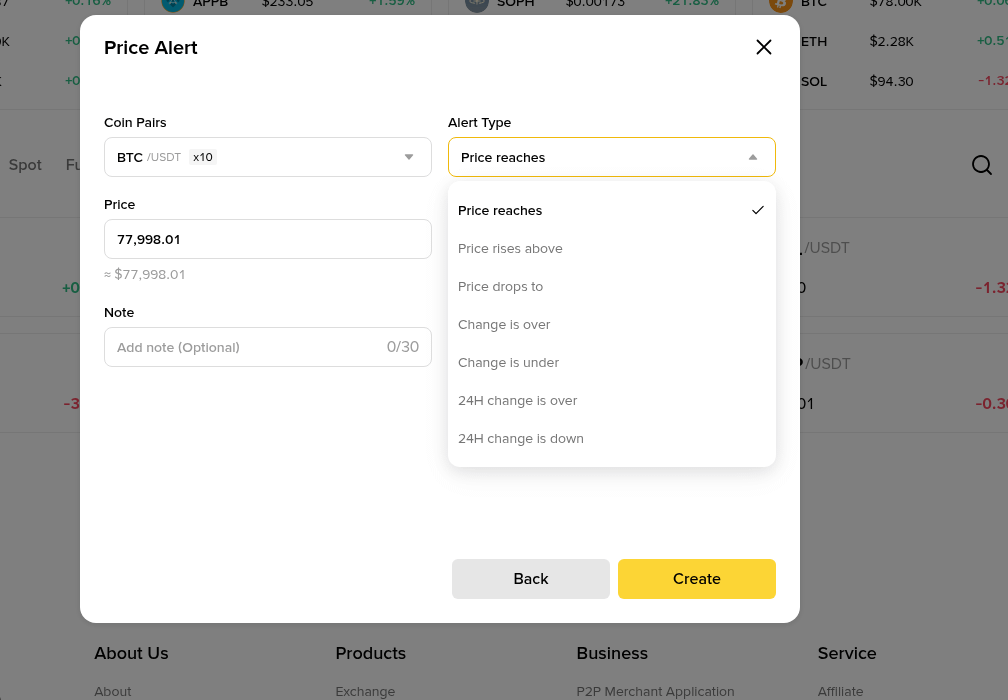
The website Price Alert window: coin pair, alert type from Price reaches to 24H change is down, target price and an optional note, then Create.
The level typed into that box matters more than the coin. The next two sections deal with where to put it and how many alerts to keep.
Price level or percent change, which one fits your plan?
Use a price level when you already know the number that changes your decision. Use a percent alert when you have no level yet but want to hear about an unusual move.
Say a coin trades at $1,060 and your plan is to buy a pullback to $1,000. A Price drops to alert at exactly $1,000 fires as the price touches your entry, which leaves no time to look at anything. Setting it at $1,010, about 1% higher, gives you a few minutes to check the chart and place a limit order calmly.
Now say you already hold that coin and only want to know if it falls hard. A Change is under alert of 7% created at $1,060 fires near $986.
A 24H change is down alert of 7% behaves differently. If the coin ran up to $1,120 yesterday and slides to $1,045 today, the 24-hour figure shows about -6.7% even though the price is close to where you set things up. The reference is yesterday, not your plan.
A workable rule: price levels for plans, Change alerts for surprises on coins you hold, 24H change alerts for coins you are only watching.
How many alerts can you keep before they turn into noise?
Binance allows 50, but the useful number sits far lower. Here is a budget for a 12-pair watchlist:
Coins you hold, 4 pairs: One level that would make you rethink the position and one percent alert for sharp moves. That makes 8 alerts.
Coins you are waiting on, 5 pairs: One entry alert each, so 5 alerts.
The rest, 3 pairs: None. They stay on the list for context.
That is 13 alerts, about a quarter of the cap, and on an ordinary day one or two of them fire.
Frequency is where it falls apart. An every-time alert parked at a round number like $1,000 can fire again and again while the price chops around that level. Ten of those on a choppy day can produce well over 50 pushes.
After a week of that, most people swipe notifications away without reading them, and the one alert that mattered goes with the rest. A quick test helps: if more than five alerts fire in a day and you act on none of them, delete half.
Where do you manage alerts and notification settings?
A pair with alerts shows the list of its active ones on the alert screen, where each can be edited or deleted. On the website, the Price Alert window sorts them into Spot, Futures, Options and Alpha tabs with a Create Alert button on top, and the lines on the chart do the same job at a glance.
Delivery depends on switches that are easy to forget:
Phone permission: Notifications for the Binance app must be allowed in the phone's own settings. Aggressive battery savers on some phones can hold them back too.
In-app preference: Under Account Center, Settings, Notification Preference, the Price Alert toggle in the app push group needs to be on.
Automated price alerts: Binance also sends its own movement alerts on popular coins. If they crowd your screen, Messages, Settings, Price Alert has an Automated Price Alert toggle you can switch off.
After changing any of these, create a test alert a fraction above the current price. If it arrives within a minute or two, the chain works. Then delete it.
Binance's notification help says outright that it can't promise on-time delivery, for example on a congested network. Treat alerts as a convenience, not as protection.
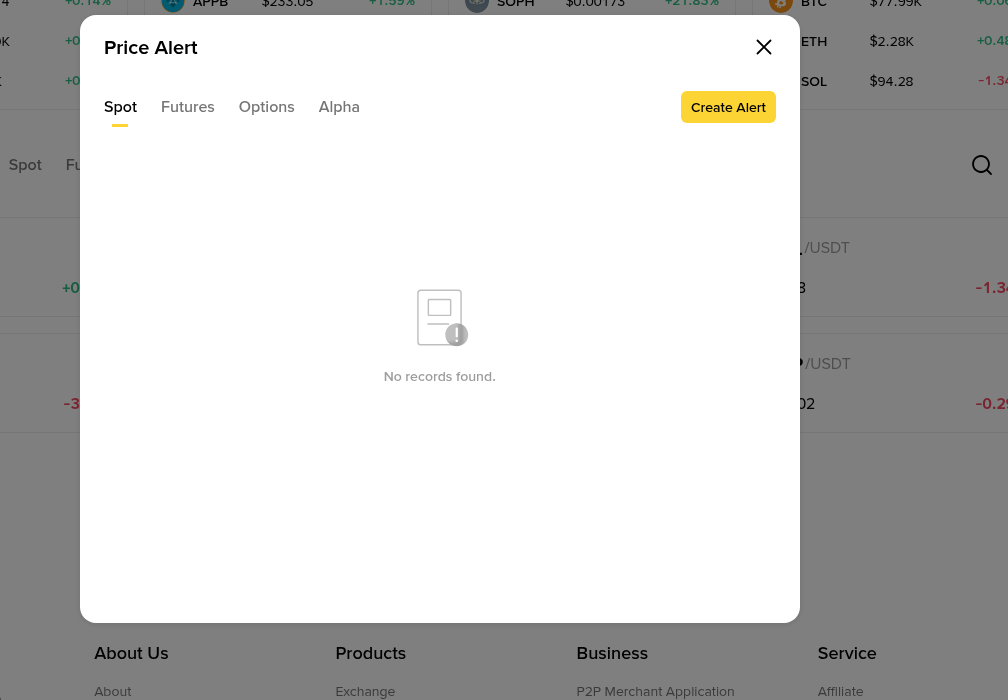
The Price Alert manager on the website, split into Spot, Futures, Options and Alpha tabs. This list is empty until your first alert; active ones show up here to edit or delete.
Tapping an alert opens that pair's trading page. Handy, and also where a lot of impulsive trades begin. The routine below puts a pause into that gap.
How do alerts fit into an entry routine?
This is the advanced level, where alerts become one part of a written plan rather than reminders.
Write the plan before the alert: Entry $1,000, size $200, exit if the price falls to $960. If you can't fill in all three, it is too early for an alert.
Set the entry alert 1% early: Price drops to $1,010, frequency once only.
When it fires, check two things: Is this a slow pullback or a sudden wick, and has anything changed since you wrote the plan? If news broke and the price is falling fast, skip it.
Place a limit order, not a market order: A limit at $1,000 waits for your price. If it never fills, the plan never triggered, and that is fine. This guide to limit orders that won't fill walks through the usual reasons.
Swap the entry alert for an exit order: Once filled, delete the entry alert so it can't fire again, and protect the position with a real order.
Why isn't an alert 2% below entry a stop loss?
Plenty of new traders buy at $1,000, set a Price drops to alert at $980 and call that risk control. It isn't. An alert tells you something. It doesn't sell anything.
If the price drops through $980 at 3 a.m. while your phone sits on silent, nothing happens. By morning the coin might trade at $930. On a $200 position the planned 2% loss was $4, and the real one is $14, or 7%.
A stop-limit or OCO order would have acted at the level whether you were awake or not. This Binance stop loss walkthrough covers the order types from basic to trailing.
Alerts still have a job next to the stop. One placed a little above the stop level warns you that the trade is getting close to its exit, so you can review it instead of reading about the fill afterwards.
Which mistakes keep catching people?
Alerts sitting on round numbers: Levels like $1,000 attract choppy trading. Setting yours slightly before them gives cleaner signals.
Every-time frequency by default: Keep it for rare levels you want to hear about repeatedly. For entries, once only does the job.
Forgetting the 90-day expiry: An alert created on 2 November lapses around 31 January. Long-range levels need a calendar reminder to set them again.
Old alerts after the plan changed: An entry alert for a setup you dropped still fires, and it can pull you into a trade you already ruled out.
Reading a fired alert as a signal: It only reports that a price was touched. Whether that is a reason to trade is still your call.
Hitting 10 alerts on one pair: If a single pair needs that many, the plan for it is probably too vague.
What goes on a cheat sheet you can keep?
Watchlist size: 10 to 15 pairs, one quote currency, cleaned monthly.
Held coins: 2 alerts each, one price level and one percent move.
Coins on the waiting list: 1 alert each, about 1% before the planned entry.
Total: 10 to 20 alerts, well under the cap of 50.
Frequency: Once only for entries, once a day for slow trends, every time for rare levels only.
Noise test: More than 5 pushes a day with no action means it is time to cut.
Safety: Alerts inform, orders execute. Every open position gets a real exit order.
Opening a new account to try this? The sign-up code GETREWARD goes into the code field on the registration form, and the alert and watchlist tools work the same on every account. Before the first deposit, the current Binance welcome bonus tasks are worth a look too.
FAQ
Can you set price alerts on the Binance website?
Yes. Right-click the chart and choose Create Alert, or open Price Alert from the chart settings. Active alerts show as lines on the chart.
Why didn't my alert fire?
The usual reasons are an alert past its 90-day validity, notifications blocked on the phone, the Price Alert toggle switched off, or a once-only alert that already fired. A poor connection can also delay delivery.
Does a price alert place a trade?
No. It only sends a notification. To buy or sell automatically at a level, use a limit, stop-limit or OCO order.
Do Favorites and alerts depend on each other?
No. You can set an alert on a pair that isn't in Favorites, and starring a pair creates no alert. Keeping the two in line is a habit, not a setting.
What is the difference between Change and 24H change alerts?
Change is measured from the price when you created the alert. 24H change follows the rolling 24-hour figure, so its reference moves all the time.
Disclosure: this article includes a Binance sign-up link with the code GETREWARD. Crypto prices move in both directions and trades can lose money. Nothing here is financial advice.