Binance Square

withdrawcrypto

600 مشاهدات
4 يقومون بالنقاش
Ahmed299300
·
--
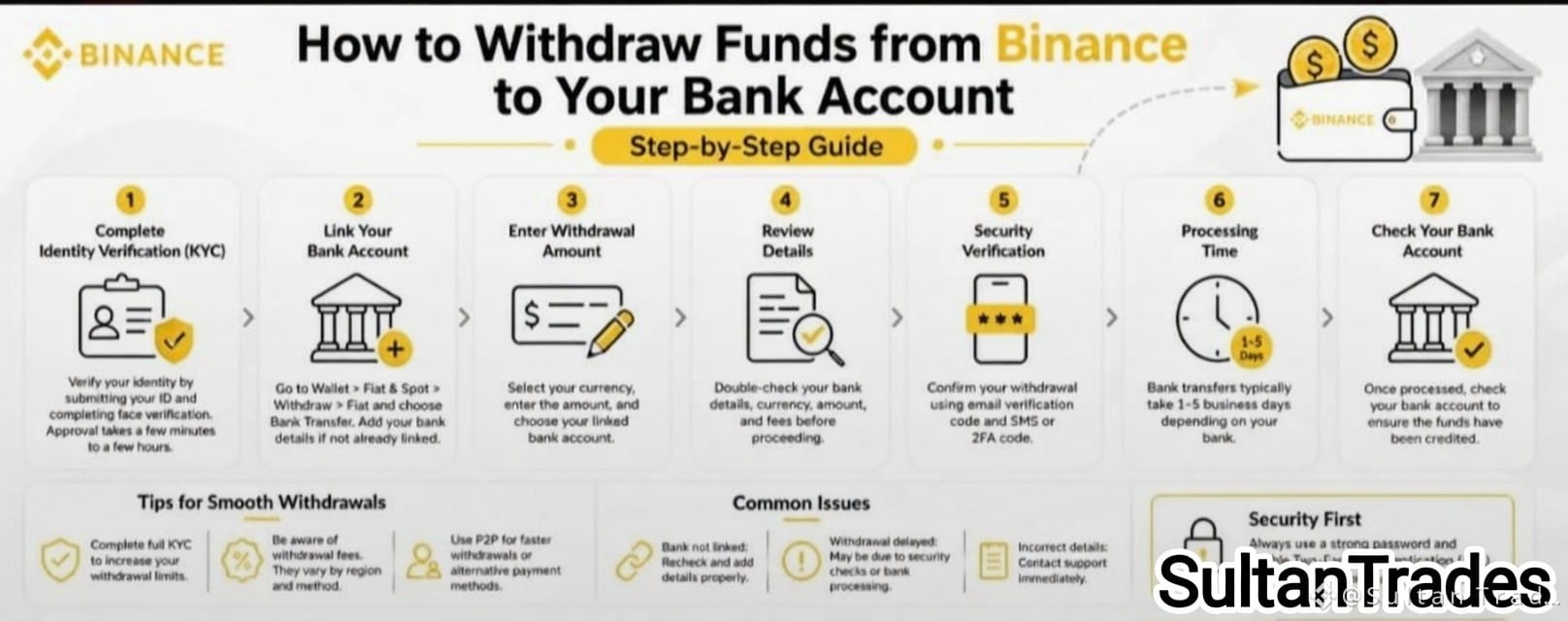
كيفية سحب الأموال من Binance إلى حسابك المصرفي: دليل خطوة بخطوة (2025)#Withdrawing تحويل أرباحك من العملات المشفرة إلى حسابك المصرفي هو خطوة حاسمة لأي شخص يستخدم Binance—أكبر بورصة للعملات المشفرة في العالم. سواء كنت تأخذ الأرباح أو تقوم فقط بتحويل الأموال، إليك طريقة مبسطة وآمنة للحصول على أموالك من Binance إلى مصرفك. ✅ الخطوة 1: استكمال التحقق من الهوية (KYC) قبل بدء سحب الأموال النقدية، يجب عليك إكمال التحقق من الهوية (اعرف عميلك). إليك كيفية القيام بذلك: قم بتسجيل الدخول إلى حسابك في Binance اذهب إلى الملف الشخصي > التعريف قم بتحميل هويتك الصادرة عن الحكومة (جواز السفر، الهوية الوطنية، أو رخصة القيادة)

كيفية سحب الأموال من Binance إلى حسابك المصرفي: دليل خطوة بخطوة (2025)

#Withdrawing تحويل أرباحك من العملات المشفرة إلى حسابك المصرفي هو خطوة حاسمة لأي شخص يستخدم Binance—أكبر بورصة للعملات المشفرة في العالم. سواء كنت تأخذ الأرباح أو تقوم فقط بتحويل الأموال، إليك طريقة مبسطة وآمنة للحصول على أموالك من Binance إلى مصرفك.

✅ الخطوة 1: استكمال التحقق من الهوية (KYC)

قبل بدء سحب الأموال النقدية، يجب عليك إكمال التحقق من الهوية (اعرف عميلك).

إليك كيفية القيام بذلك:

قم بتسجيل الدخول إلى حسابك في Binance
اذهب إلى الملف الشخصي > التعريف
قم بتحميل هويتك الصادرة عن الحكومة (جواز السفر، الهوية الوطنية، أو رخصة القيادة)
عرض الترجمة
How to Withdraw USDT from Binance to Your Bank Account Withdrawing USDT (Tether) from Binance to your bank account is simple and secure. Here’s how you can do it: 🔹 Step 1: Log in to Binance Open the Binance App or go to the Binance website. Sign in with your verified account. Make sure your account is KYC-verified to enable fiat withdrawals. 🔹 Step 2: Go to Wallet Tap on Wallets → Select Funding or Spot Wallet. Find USDT (Tether) in your list of assets. Tap Withdraw. 🔹 Step 3: Select “Sell to Fiat” or “Withdraw to Bank” There are two main ways to cash out USDT: 1. P2P (Peer-to-Peer) Trading – Sell USDT directly to verified buyers and receive money in your local bank account. Choose P2P Trading under “Trade.” Select Sell USDT. Pick a buyer offering your preferred payment method (Bank Transfer, Easypaisa, Payoneer, etc., depending on your region). Enter the amount and confirm. Once the buyer transfers money to your account, confirm receipt and release USDT. 2. Direct Bank Withdrawal (if supported in your country) Select Withdraw Fiat. Choose Currency (e.g., USD, EUR, GBP, PKR, etc.). Enter your bank details and the amount to withdraw. Confirm the transaction → Funds are usually credited within minutes to 3 business days, depending on bank processing. 🔹 Step 4: Confirm & Complete Double-check your details (bank account name must match your Binance account name). Confirm withdrawal. Wait for the transaction to complete — you’ll get a notification once the funds arrive. ✅ Tips for Smooth Withdrawal Always enable 2FA for security. Use only your own verified bank account. Watch out for transaction fees (P2P may have better rates). Check your country’s supported payment methods in Binance before withdrawing. 💡 With these steps, you can easily convert your USDT into cash and withdraw it to your bank account safely. #Binance #USDT #CryptoToFiat #WithdrawCrypto
How to Withdraw USDT from Binance to Your Bank Account

Withdrawing USDT (Tether) from Binance to your bank account is simple and secure. Here’s how you can do it:

🔹 Step 1: Log in to Binance

Open the Binance App or go to the Binance website.

Sign in with your verified account.

Make sure your account is KYC-verified to enable fiat withdrawals.

🔹 Step 2: Go to Wallet

Tap on Wallets → Select Funding or Spot Wallet.

Find USDT (Tether) in your list of assets.

Tap Withdraw.

🔹 Step 3: Select “Sell to Fiat” or “Withdraw to Bank”

There are two main ways to cash out USDT:

1. P2P (Peer-to-Peer) Trading – Sell USDT directly to verified buyers and receive money in your local bank account.

Choose P2P Trading under “Trade.”

Select Sell USDT.

Pick a buyer offering your preferred payment method (Bank Transfer, Easypaisa, Payoneer, etc., depending on your region).

Enter the amount and confirm.

Once the buyer transfers money to your account, confirm receipt and release USDT.

2. Direct Bank Withdrawal (if supported in your country)

Select Withdraw Fiat.

Choose Currency (e.g., USD, EUR, GBP, PKR, etc.).

Enter your bank details and the amount to withdraw.

Confirm the transaction → Funds are usually credited within minutes to 3 business days, depending on bank processing.

🔹 Step 4: Confirm & Complete

Double-check your details (bank account name must match your Binance account name).

Confirm withdrawal.

Wait for the transaction to complete — you’ll get a notification once the funds arrive.

✅ Tips for Smooth Withdrawal

Always enable 2FA for security.

Use only your own verified bank account.

Watch out for transaction fees (P2P may have better rates).

Check your country’s supported payment methods in Binance before withdrawing.

💡 With these steps, you can easily convert your USDT into cash and withdraw it to your bank account safely.

#Binance #USDT #CryptoToFiat #WithdrawCrypto
سجّل الدخول لاستكشاف المزيد من المُحتوى
استكشف أحدث أخبار العملات الرقمية
⚡️ كُن جزءًا من أحدث النقاشات في مجال العملات الرقمية
💬 تفاعل مع صنّاع المُحتوى المُفضّلين لديك
👍 استمتع بالمحتوى الذي يثير اهتمامك
البريد الإلكتروني / رقم الهاتف